What are Bit Fields?
Imagine you need to store a switch variable that can only be on (1) or off (0). Using a full int (typically 4 bytes, 32 bits) would waste 31 bits of space. Bit fields (also known as “bit segments”) were created to solve this waste.
They allow you to partition the binary bits within a byte into multiple regions (fields) of different lengths, each with a field name, and you can manipulate them by name just like regular struct members. This way, multiple logically independent data can be compactly stored in one or several bytes, greatly saving storage space.
In many high-level languages and application scenarios, the “idea” of bit fields has been inherited in another form,bit fields have retreated to the background. However, for learners, understanding bit fields is still very valuable.
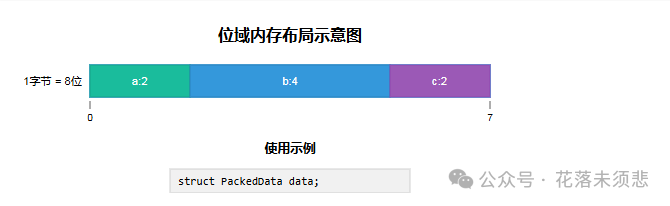
How to Define Bit Fields?
The definition of a bit field is very similar to that of a struct:
struct BitFieldStruct { TypeSpecifier fieldName : fieldLength; // ... more fields};For example:
struct PackedData { unsigned int a : 2; // a occupies 2 bits, can represent 0-3 unsigned int b : 4; // b occupies 4 bits, can represent 0-15 unsigned int c : 1; // c occupies 1 bit, can represent 0 or 1};The above PackedData structure theoretically occupies only 2+4+1 = 7 bits in total, which is less than one byte.
Understanding Bit Field Storage Rules (Core)
The core of bit fields lies in how the compiler packs these bits into memory. It mainly follows the following rules:
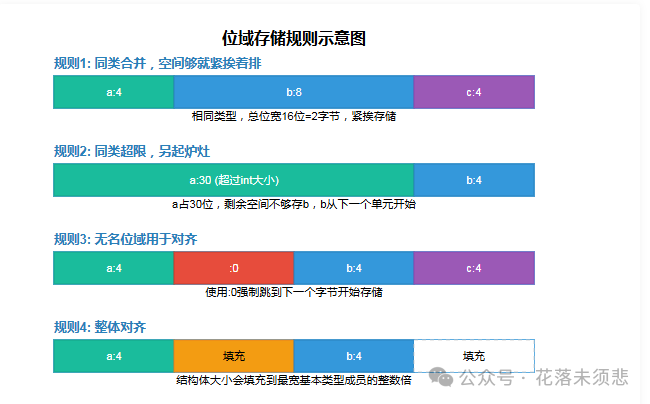
1. Merge Similar Types, Store Adjacent if Space Allows
If adjacent bit field members are of the same type and their bit widths do not exceed the size of that type, they will be stored adjacently in the same unit.
struct example1 { unsigned int a : 3; unsigned int b : 5;};2. Exceeding Similar Types, Start a New Unit
If the sum of the bit widths of adjacent similar bit field members exceeds the sizeof size of the type, the subsequent members will start storing from the next memory unit.
Example:<span><span>a</span></span> occupies 30 bits, and the remaining space (2 bits) is insufficient to store<span><span>b</span></span>‘s 5 bits, so<span><span>b</span></span> will start from the next<span><span>unsigned int</span></span>.
struct example2 { unsigned int a : 30; // first unsigned int unsigned int b : 5; // needs a new storage unit};3. Anonymous Bit Fields: Manual Padding and Alignment
-
<span><span>unsigned :0</span></span>: a special usage that indicates filling all remaining bits with 0, and the next bit field must start from the next memory unit. -
<span><span>unsigned :4</span></span>: defines an anonymous bit field that occupies 4 bits, which are not used, serving as padding and spacing.
Example:<span><span>a</span></span> occupies 4 bits, then using<span><span>:0</span></span> forces the storage of<span><span>b</span></span><code><span><span> to start from the next byte.</span></span>
struct example3 { unsigned a : 4; unsigned : 0; // force jump to the next byte unsigned b : 4; // starts storing from the second byte};4. Different Types, Compiler’s Discretion (Caution!)
If adjacent bit field members are of different types, different compilers may handle them differently. This is the main reason for the poor portability of bit fields, and it is advisable to avoid using them in projects.
How to Use Bit Fields?
The usage of bit fields is exactly the same as that of struct members:
#include <stdio.h>int main() { struct bs { unsigned a : 1; unsigned b : 3; unsigned c : 4; } bit = {1, 5, 12}; printf("Initial values: %d, %d, %d\n", bit.a, bit.b, bit.c); struct bs *pbit = &bit pbit->a = 0; pbit->b &= 2; pbit->c |= 3; printf("After modification: %d, %d, %d\n", pbit->a, pbit->b, pbit->c); return 0;}Important Notes:
-
Assignment Range: When assigning values to bit field members, do not exceed the range that their bit width can represent, otherwise truncation will occur. For example, assigning2 (binary
<span><span>10</span></span>) to<span><span>a:1</span></span>will actually yield a value of<span><span>0</span></span><span><span>.</span></span> -
Portability: Due to the implementation differences mentioned in rules 3 and 4, bit fields should beused with caution in projects that require cross-platform compatibility.
Summary:

The key to mastering bit fields lies in deeply understanding their memory layout packing rules. Although they may not be a daily tool in modern application development, they are an essential skill for efficient memory management in low-level and embedded systems programming.
——————————————————————————————
Writing is not easy; if you find this useful, please consider clicking 【Follow】 and 【Recommend】. Your likes are my motivation to keep writing, thank you!