Introduction
This article discusses how to implement HTTP requests in Python and extract valid information from HTML. The ultimate goal is to extract domain names line by line from the <span>domains.txt</span> file, query each one, and output the domain along with its corresponding weights from Baidu PC, Baidu Mobile, and Google.
Requests Module
The Python requests library is used to send HTTP requests to websites and retrieve response results. Before using this module, it needs to be imported:
import requestsOnce imported, the module can be used to send HTTP requests. Here are a few methods of the requests module:
-
<span>get(url, params, args)</span>sends a GET request, where url is the request URL, params are query parameters, and args are other parameters such as cookies, headers, verify, etc. -
<span>post(url, data, json, args)</span>sends a POST request, where the data parameter is a dictionary, list of tuples, bytes, or file object to be sent to the specified URL, and the json parameter is a JSON object to be sent to the specified URL. -
<span>request(method, url, args)</span>sends a request with the specified method to the specified URL. The method parameter is used to specify the request method.
All methods return a response object, which contains specific response information such as common status codes, response headers, and response content. Common object properties and methods include:
-
<span>status_code</span>retrieves the response status code. -
<span>headers</span>retrieves the response headers. -
<span>content</span>or<span>text</span>retrieves the response content. -
<span>close()</span>closes the connection to the server.
With this basic knowledge, we can try sending an HTTP request to Aizhan. First, we will use BurpSuite to capture the request packet. It was found that a GET request is used, with the query parameter <span>runoob.com</span> directly concatenated in the path.
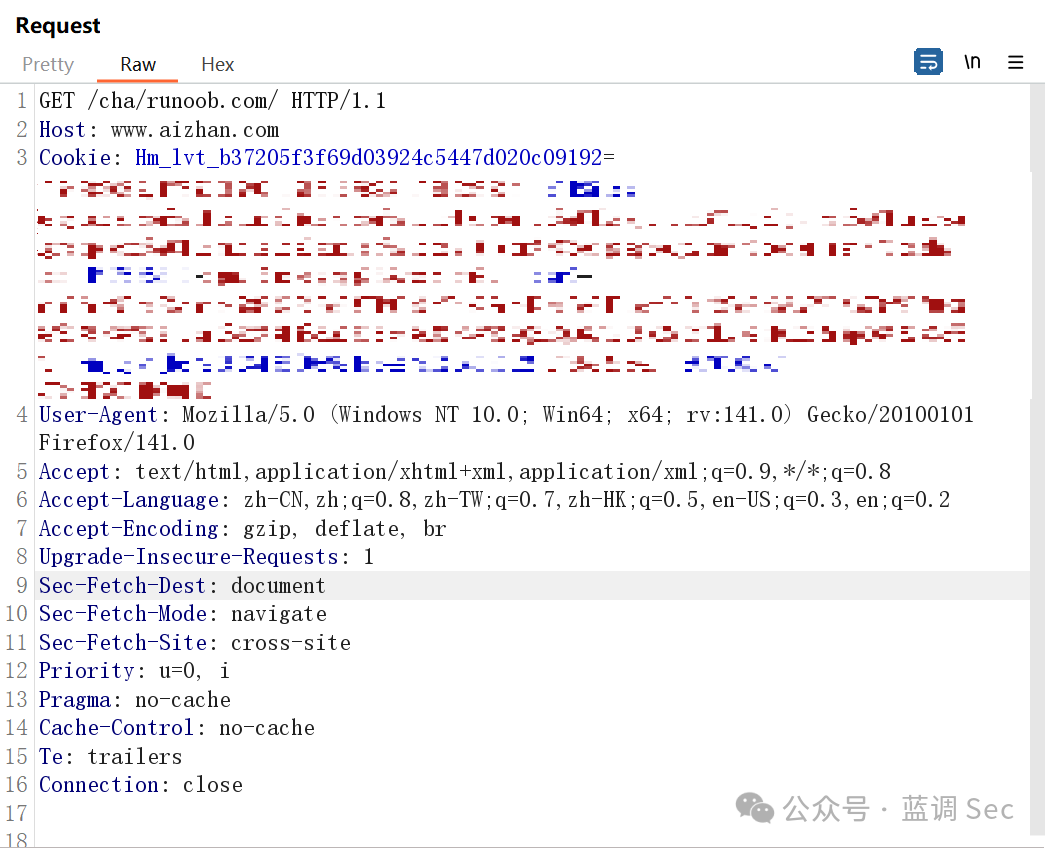 Therefore, our request program is written as:
def aizhan_get(domain):    # Set request URL and UA    url = 'https://www.aizhan.com/cha/runoob.com/'    headers = {'User-Agent': 'Mozilla/5.0 (Windows NT 10.0; Win64; x64; rv:141.0) Gecko/20100101 Firefox/141.0'}
    response = requests.get(url, headers=headers)  # Send GET request    response.raise_for_status()  # Raise HTTPError if status code is not 200
    print(response.text)  # Get request body    response.close()  # Close connection
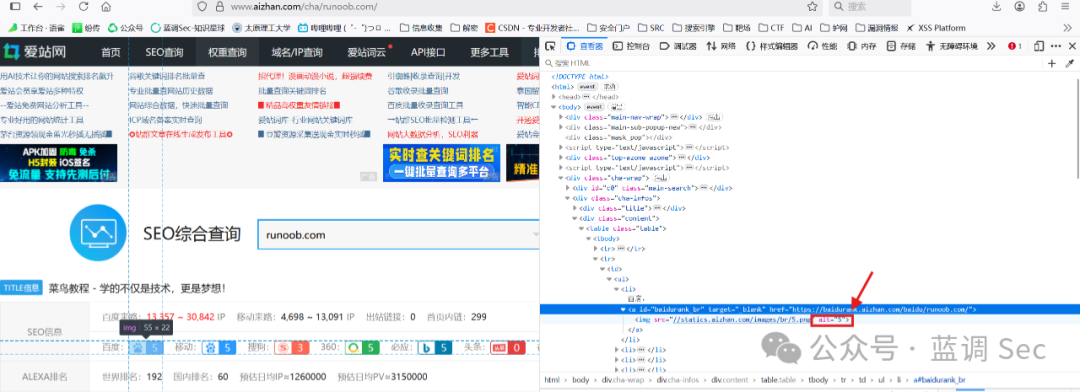
It is essential to specify the UA header for the request; otherwise, the website may identify it as a crawler and not return any data. Calling this function will allow us to successfully send an HTTP request to Aizhan and obtain the response body (HTML page). After obtaining the response body, we need to extract the weight information. Use the browser’s F12 to open developer mode, select the viewer, and find the corresponding position of the weight information in the source code. The position for Baidu weight is:
<span>cha-wrap -> cha-infos -> content -> table -> <tbody> second <tr> -> <td> -> <ul> first <li> -> <a> -> <img> attribute alt</span>
BeautifulSoup
After obtaining the HTML page, the crawler needs to parse the content and extract data, and BeautifulSoup is a Python library for extracting data from web pages, particularly suitable for parsing HTML and XML files. To use BeautifulSoup, you need to install beautifulsoup4 and lxml, the latter being the HTML parser.
Using BeautifulSoup to parse the web page:
from bs4 import BeautifulSoup
# Use BeautifulSoup to parse the web pagesoup = BeautifulSoup(response.text, 'lxml')  # The first parameter is the HTML page, the second is the specified parser
After parsing, we can use the methods provided by BeautifulSoup, <span>find()</span> and <span>find_all()</span> to search for tags in the web page. The former returns the first matching tag, while the latter returns all matching tags. The following program can be used to obtain the corresponding weight values.
def aizhan_get(domain):    # Set request URL and UA    url = 'https://www.aizhan.com/cha/runoob.com/'    headers = {'User-Agent': 'Mozilla/5.0 (Windows NT 10.0; Win64; x64; rv:141.0) Gecko/20100101 Firefox/141.0'}
    response = requests.get(url, headers=headers)  # Send GET request    response.raise_for_status()  # Raise HTTPError if status code is not 200
    # Use BeautifulSoup to parse the web page    soup = BeautifulSoup(response.text, 'lxml')  # The parser is lxml
    cha_wrap = soup.find('table', class_='table')  # Add _ after class to avoid conflict with keywords    baidu_PC = cha_wrap.find_all('tr')[1].find_all('li')[0].find('img')['alt']  # Baidu PC weight    baidu = cha_wrap.find_all('tr')[1].find_all('li')[1].find('img')['alt']  # Baidu Mobile weight    google = cha_wrap.find_all('tr')[1].find_all('li')[6].find('img')['alt']  # Google weight
    response.close()  # Close connection
Function Implementation
Above, we used requests + beautifulsoup4 + lxml to query the weight of runoob.com on Aizhan and ultimately extract the corresponding weight. Now we need to implement the functionality to pass parameters to <span>aizhan_get</span> and output the results, thus completing our script.
import requests
from bs4 import BeautifulSoup
def aizhan_get(domain):    # Set request URL and UA    url = f'https://www.aizhan.com/cha/{domain}/'    headers = {'User-Agent': 'Mozilla/5.0 (Windows NT 10.0; Win64; x64; rv:141.0) Gecko/20100101 Firefox/141.0'}
    response = requests.get(url, headers=headers)  # Send GET request    response.raise_for_status()  # Raise HTTPError if status code is not 200
    # Use BeautifulSoup to parse the web page    soup = BeautifulSoup(response.text, 'lxml')  # The parser is lxml
    cha_wrap = soup.find('table', class_='table')  # Add _ after class to avoid conflict with keywords    baidu_PC = cha_wrap.find_all('tr')[1].find_all('li')[0].find('img')['alt']  # Baidu PC weight    baidu = cha_wrap.find_all('tr')[1].find_all('li')[1].find('img')['alt']  # Baidu Mobile weight    google = cha_wrap.find_all('tr')[1].find_all('li')[6].find('img')['alt']  # Google weight
    response.close()  # Close connection
    return f'{domain} {baidu_PC} {baidu} {google}'
def get_domains(filename):    with open(filename, 'r') as file:        domains = file.readlines()    return domains
domains = get_domains('./domains.txt')
for domain in domains:    print(aizhan_get(domain.strip()))
Let’s take a look at the final implementation effect:
Conclusion
In this article, we implemented the functionality to query and obtain domain weights using requests + beautifulsoup4 + lxml, achieving our desired functionality. Next, we only need to modify and process the output format, aesthetics of the program, running speed, etc. This work will be completed in the next article.
Feel free to reach out for discussions related to network security knowledge.