01Basic Understanding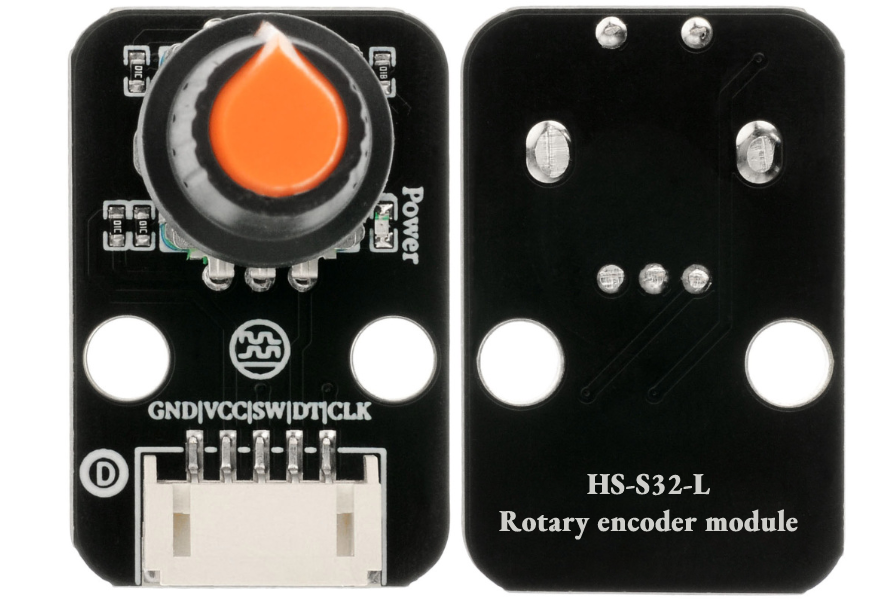 Model:HS-S32-LName:Rotary EncoderSeries:SensorDescription:This module integrates rotation angle detection and button functionality, featuring built-in photoelectric/Hall sensing components and signal processing circuits. It converts mechanical rotational motion into pulse electrical signals (determining forward and reverse rotation through phase difference) and includes a push-button for “rotation adjustment + button confirmation” composite control, making it a core component for high-precision human-machine interaction and parameter adjustment.Usage Scenarios:Industrial equipment parameter adjustment (e.g., setting machine tool speed); smart home control (adjusting light brightness by rotation, switching modes by pressing); toy remote control (controlling steering angle of remote-controlled cars); consumer electronics (adjusting audio volume, setting clock time); accessibility aids (designing rotary controllers for individuals with mobility impairments to reduce the range of physical activity); aligning with AI education in primary and secondary schools by building “rotary control cars” and “parameter adjustment systems” to help students understand the logic of pulse encoding and mechanical motion conversion, in accordance with the “Guidelines for Artificial Intelligence General Education in Primary and Secondary Schools (2025 Edition)” practical requirements.Disciplinary Integration:Physics, Mathematics, Labor, Information TechnologyEthical Education:The precise operation of the rotary encoder may not be user-friendly for individuals with physical disabilities, necessitating discussions on “adjustable damping” design; if recording rotation operation data (e.g., adjustment frequency) could leak user habits, clear boundaries for data collection must be established; incompatibility of different device encoding protocols leading to general difficulties prompts consideration of the significance of “unified interface standards” in reducing electronic waste; over-reliance on automatic counting may diminish manual calculation skills, requiring a balance between technological convenience and foundational skill development; if equipment malfunctions due to encoding errors during experiments, proactive troubleshooting and correction are essential to cultivate a rigorous scientific attitude.
02Technical Parameters
Working Principle:
The module contains A and B phase pulse generation circuits and a push-button. When rotated, A and B output pulse signals alternately, determining the rotation direction by detecting the phase difference between the two pulses (A leading B indicates forward rotation, and vice versa indicates reverse rotation); pressing the button outputs a low-level signal from the SW pin, confirming or switching functions. It includes a debounce circuit to filter out signal interference caused by mechanical vibrations.
Parameter Analysis:
G(GND): Power input negative/ground
V(VCC): Power input positive/voltage
SW(Signal): Switch pin
DT: Data pin
CLK: Clock pin
Resolution: 16 pulses/revolution (16 sets of pulses generated per full rotation)Rotation Angle: 360° continuous rotation (no mechanical limit)Response Time: ≤2ms (pulse signal output delay)Button Lifespan: ≥50,000 pressesOperating Temperature: -10℃~60℃03Code Example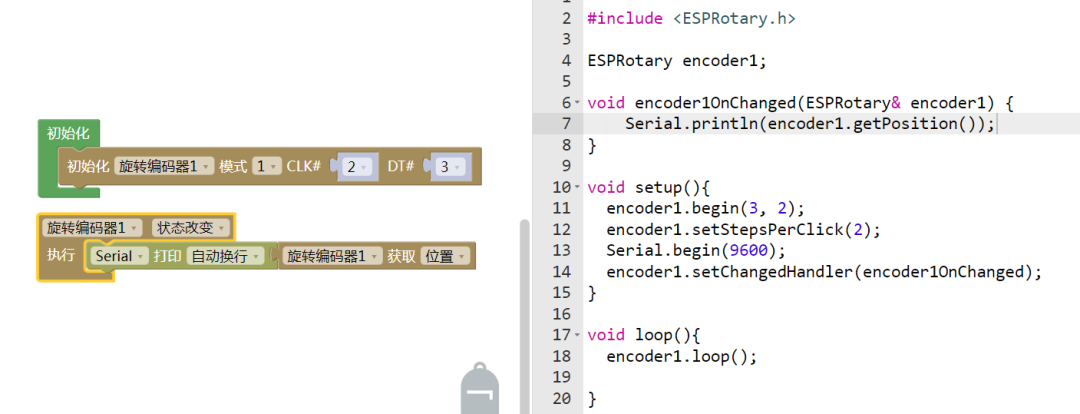
Connect the pins as follows: CLK-D2, DT-D3, SW-D4.
Note: Students should observe whether this value can be output, and if so, what the maximum value is.
04Safety Measures
1. Power off before wiring, confirm VCC (3.3V-5V) and GND polarity; reversing connections may damage the internal sensing circuit;
2. Avoid severe impacts or drops to prevent internal photoelectric components/magnets from shifting, leading to signal anomalies;
3. Do not exceed the mechanical load limit when rotating (instantaneous torque ≤0.5N・m) to prevent shaft breakage;
4. Keep away from strong magnetic fields (e.g., large motors) to avoid interference with the Hall-type encoder’s magnetic field detection;
5. In humid environments (humidity >80% RH), install a moisture-proof casing to prevent pin oxidation;
6. When pressing the button, avoid excessive force (≤5N) to prevent damage to the button spring;
7. When not in use for an extended period, rotate the encoder to the neutral position to avoid internal spring fatigue.
05Extensions
Students can try the following:
1. Create a “smart dimming knob”: map the rotation count to light brightness (0-255), and use the button to switch between warm and cool light;
2. Build a “closed-loop control system”: adjust motor speed through encoder feedback to achieve constant speed operation;
3. Design a “parameter setting terminal”: connect an OLED display to show real-time parameter values (e.g., temperature, time) adjusted by rotation, and save settings with the button;
4. Develop “interactive toys”: equip remote-controlled cars with encoders to control steering angles through rotation, and use the button to trigger acceleration mode.
 Arduino Sensor: HS-S01A Infrared SensorArduino Sensor: HS-S02P Infrared Sensor (Obstacle Avoidance)Arduino Sensor: HS-S03P Ultraviolet SensorArduino Sensor: HS-S05P Sound SensorArduino Sensor: HS-F07P Active BuzzerArduino Sensor: HS-S08P Flame SensorArduino Sensor: HS-S09LB Raindrop SensorArduino Sensor: HS-S09PC Soil Moisture Sensor
Arduino Sensor: HS-S10P Fog Sensor
Arduino Sensor: HS-S11-L Gas Sensor
Arduino Sensor: HS-S20P Ambient Light Sensor
Arduino Sensor: HS-S21P Tilt SensorArduino Sensor: HS-S22P Grayscale SensorArduino Sensor: HS-S23P Infrared Receiver ModuleArduino Sensor: HS-S24P Digital Temperature SensorArduino Sensor: HS-S26A Temperature and Humidity SensorArduino Sensor: HS-S28P Rotary Potentiometer
Arduino Sensor: HS-S29P Infrared Transmitter Module
Arduino Sensor: HS-S30P Clock Module
Arduino Sensor: HS-S31P Touch Sensor
 — Previous Recommendations —