Welcome to the Python teaching column! Today, we will explore a very practical automation operation and maintenance tool—Ansible. Ansible is an open-source tool written in Python that automates the configuration, coordination, and management of computer systems. Whether you are a beginner or an experienced developer, this article will quickly help you grasp the basic concepts, core functions, and how to apply Ansible in real projects. If you have any questions, feel free to leave a message, and I will do my best to answer.
What is Ansible?Ansible is an automation operation and maintenance tool used for configuration management and application deployment. It is based on the SSH protocol and does not require installing client programs on the target machines, simplifying the deployment process. Ansible uses simple declarative syntax and a modular architecture to automate various IT tasks, such as file transfer, command execution, application deployment, and task flow management.
Core Concepts
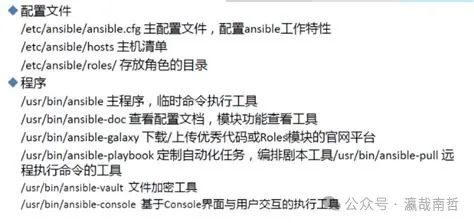
- Inventory: Ansible’s inventory file defines the target hosts and their groups.
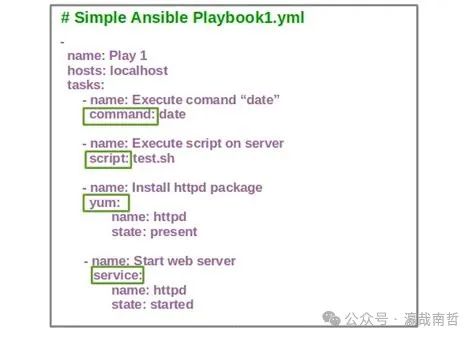
- Playbook: A task script written in YAML format that describes the tasks to be executed and their order.
- Modules: The core functional modules of Ansible, providing rich functionalities such as file operations and system management.
- Roles: Reusable collections of modules used to organize and manage complex tasks.
Why Choose Ansible?
- Easy to Use: No need to install clients; connect to target machines via SSH.
- Lightweight: No additional services or agents required.
- Modular: A rich library of modules supporting various tasks.
- Scalability: Supports custom modules and plugins.
Advantages of Ansible
- Efficiency: Fast execution speed for batch tasks.
- Flexibility: Supports various scenarios such as development, testing, and production environments.
- Security: Based on the SSH protocol, eliminating security concerns.
- Community Support: A strong open-source community with abundant documentation and resources.
EcologyAnsible has an active community that provides a large number of plugins and modules. Additionally, Ansible integrates with many other tools such as Git, Jenkins, and Zabbix, forming a complete automation operation and maintenance ecosystem.
Application Scenarios
- System Configuration Management: Automate the configuration of server environments.
- Application Deployment: Batch deployment and updates of applications.
- Task Flow Management: Define complex task flows.
- Monitoring and Log Management: Integrate monitoring tools to achieve automated monitoring and log management.
Code Tutorial (Detailed Example)
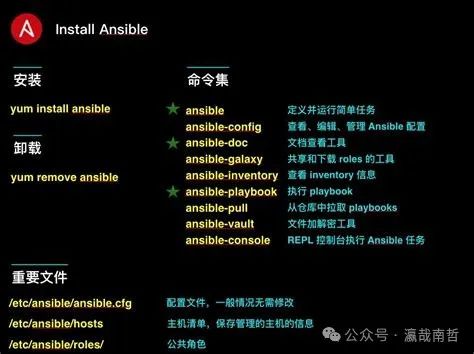
1. Install Ansible
sudo apt-get update
sudo apt-get install ansible
2. Create Inventory File
# inventory.yml
[webservers]
192.168.1.101
192.168.1.102

[databases]
192.168.1.103
3. Write Playbook
# site.yml
- name: Configure web servers
  hosts: webservers
  become: yes
  tasks:
    - name: Ensure Apache is installed
      apt:
        name: apache2
        state: present

    - name: Copy index.html to web server
      copy:
        src: /path/to/index.html
        dest: /var/www/html/index.html

    - name: Ensure firewall allows HTTP traffic
      ufw:
        rule: allow
        port: "{{ item }}"
        proto: tcp
      loop:
        - 80
        - 443

- name: Configure database servers
  hosts: databases
  become: yes
  tasks:
    - name: Ensure MySQL is installed
      apt:
        name: mysql-server
        state: present

    - name: Secure MySQL installation
      mysql_secure_installation:
       new_password: true
4. Execute Playbook
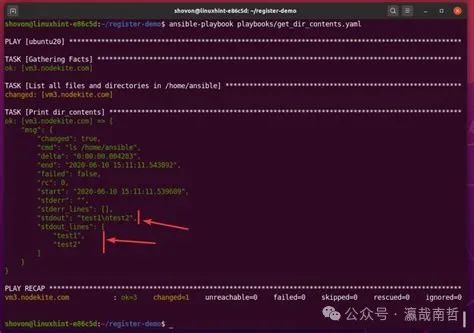
ansible-playbook -i inventory.yml site.yml
Conclusion
Through this article, you have initially mastered the basic concepts, core functions, and how to write and execute Playbooks in Ansible. Ansible is a powerful automation operation and maintenance tool that can help you efficiently manage and configure systems. If you have any questions, feel free to leave a message. I hope you continue to progress in your learning of Ansible and become an excellent automation operation and maintenance engineer!