WebVM is a serverless virtual environment that runs entirely on the client side using HTML5/WebAssembly. It is designed to be compatible with the Linux ABI.
It runs an unmodified Debian distribution and includes many native development toolchains.
WebVM is powered by the CheerpX virtualization engine, which allows x86 binaries to be executed securely and in a sandboxed manner on any browser.
CheerpX includes a JIT compiler that translates x86 to WebAssembly, a block-based virtual file system, and a Linux system call emulator.
Imagine this: opening Chrome to launch a Linux terminal, coding in Vim, or even running Python data analysis tasks—this is the revolutionary experience that WebVM brings.
Features
-
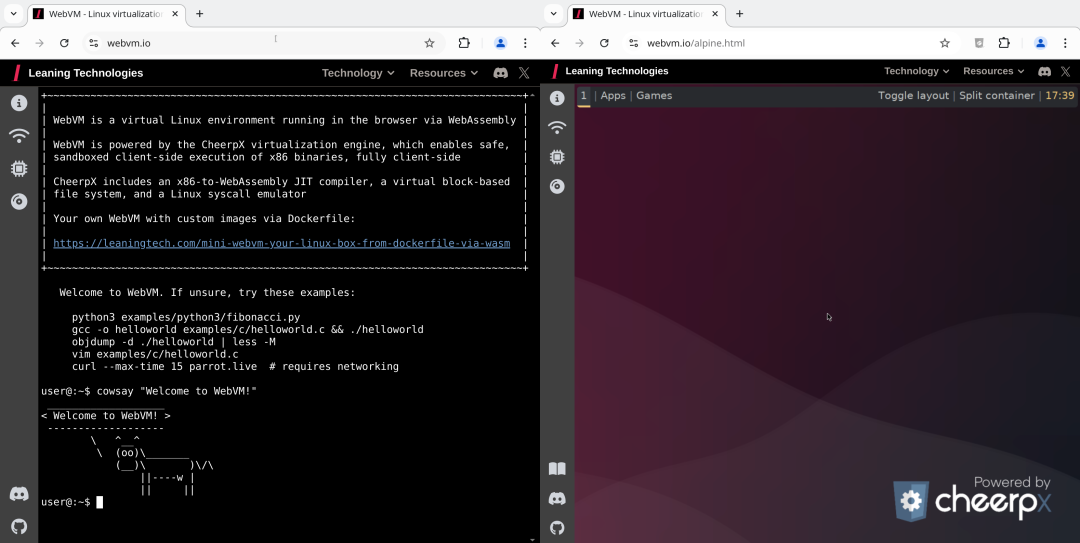
Complete Linux Environment: Runs an unmodified Debian distribution, supporting most native development toolchains.
-
Fully Client-Side Operation: All processing is done in the browser, eliminating server dependency and ensuring privacy and security.
-
Network Connectivity Support: Achieves networking capabilities through
<span><span>Tailscale VPN</span></span>, supporting WebSocket as the transport layer. -
Graphical Interface Support: Provides a
<span><span>Alpine/Xorg/i3</span></span>graphical environment, not limited to command-line operations. -
Custom Deployment: You can create your own WebVM environment from a Dockerfile, freely customizing the required features.
-
AI Assistant Integration: Supports integration with
<span><span>Claude AI</span></span>, helping to solve development issues.
Installation Guide
Installing and deploying WebVM is very simple, and we have multiple ways to use it:
1. Direct Access:
-
Open
<span><span>https://webvm.io</span></span>to use the official deployed version. -
To experience the graphical interface, visit
<span><span>https://webvm.io/alpine.html</span></span>
2. Self-Deployment:
-
Fork the GitHub repository.
-
Enable GitHub Pages in the settings.
-
Run the Deploy workflow.
-
Once the workflow is complete, you can access your WebVM via the generated URL.
3. Local Run:
-
Clone the WebVM repository.
-
Download the Debian mini Ext2 image.
-
Update the configuration file.
-
Build and start WebVM.
In Conclusion
WebVM is not just a technical demo; it opens the Pandora’s box of “browser as an operating system.” With the advancement of the WebAssembly GC proposal, we may soon be able to run heavyweight IDEs like Android Studio or Visual Studio smoothly in the browser, which is something to look forward to!
Open Source Address:
https://github.com/leaningtech/webvm
Author: Conglin
Source: Geek Home
Related Articles:Linux Foundation Releases FAIR Package Manager to Mediate Internal Disputes in WordPressMicrosoft Officially Open Sources Windows Subsystem for LinuxSupabase: A Free Open Source Alternative to Google Firebase