Today, I will explain pointers.
From basic to advanced, this article will combine practical applications to help you learn pointers while understanding what experts use pointers for!Long article warning! The entire text is about 5200 words, and this article is enough to learn pointers!Many people, like me when I first learned C language, are afraid of pointers.It was only after working on some IoT gateways that I realized the true meaning of the phrase “pointers are the soul of C language”.Without pointers, many functionalities become inconvenient to implement, such as achieving true modular programming.Okay, without further ado, let’s officially dive into the topic.1. Through this article, you will master the following knowledge:
-
Related concepts of pointers
-
Understanding the relationship between pointers and arrays
-
Understanding pointers to pointers
-
Understanding how to use pointer variables as function parameters
-
Understanding how to use pointer functions
-
Understanding how to use pointer array functions
This article corresponds to a video tutorial. If you prefer watching videos, you can search for “Infinite Microcontroller Programming” on the small broken station, or you can ask us for it.2. The Role of Pointers:Pointers are quite important in C language; the saying that pointers are the soul of C language is absolutely true.When used correctly and flexibly, they can effectively express complex data structures, such as dynamic memory allocation, message mechanisms, task scheduling, and flexible matrix timing, etc.Mastering pointers can make your programs more concise, compact, and efficient.In the field of microcontrollers, if you are working on a slightly larger project, you need to modularize each function, allowing the hardware driver layer and application layer to run independently.Even if you change the microcontroller model, you do not need to modify the application layer program, which makes it highly portable, all of which relies on pointers.In fact, without pointers, it would be very difficult to achieve this, and even the portability of the code would be poor.3. The Concept of PointersHaving discussed the role of pointers, I want to emphasize that pointers are a double-edged sword.When used well, they can be very flexible and improve program efficiency, but if misused, they can lead to fatal issues such as program crashes.These problems often arise from incorrect pointer usage, with the most common being memory overflow errors, where pointers point to unknown addresses.1. Addresses and PointersPointers are a relatively abstract concept. To truly understand pointers, we must first discuss how data is stored. Let’s look at a diagram to see how data is stored in memory.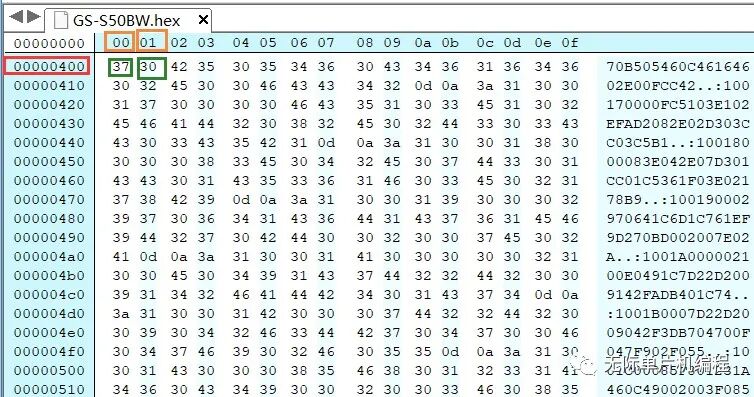 In this diagram, everything is displayed in hexadecimal.The red marked 0x00000400 represents the memory address, the green 37 and 30 represent the data, and the orange marked 00 01 represents the address increment, which indicates 0x00000400 and 0x00000401, where each address stores 1 byte of data.We can view this diagram as the storage form of data in memory; the memory address 0x00000400 stores the data 37, and the memory address 0x00000401 stores the data 30.When we define a byte variable in the program, the compiler will allocate such a memory address to store this variable.Assuming we define the following variable:unsigned char a;a = 0x37;According to this diagram, the compiler will allocate one byte of memory space for variable a and store the data 0x37 in it, renaming variable a to the address 0x00000400 for CPU access.Through this address, we can find the storage location of variable a, and this address 0x00000400 is actually the pointer, which allows access to the data of variable a.2. Pointer VariablesFrom the explanation above, we understand that we can access memory data through addresses, and this address is the pointer.However, pointers and pointer variables are different concepts, and it is important to remember this.A pointer is a concept, while a pointer variable is a specific application of this concept. Let’s first look at how to define pointer variables in C language.The general form for defining a pointer variable is:Variable Type *Variable Nameunsigned char *p;With this syntax, we can define a pointer variable p.Assigning Values to Pointer VariablesPointers and pointer variables are two concepts; like ordinary variables, pointer variables must be defined and assigned values (pointing to an address) before use.The value assigned to a pointer variable is different from that of ordinary variables; a pointer variable can only be assigned an address, and cannot be assigned any other value, otherwise it will cause an error.So how do we obtain the address of an ordinary variable? In C language, we can use “&” to get the address of an ordinary variable, generally represented in the following format:&Variable NameBy obtaining the variable address through &Variable Name, we can assign it to the pointer variable.Example: unsigned char a; unsigned char *p; int main() { p = &a }In this code, we define a variable a and a pointer variable p.We assign the memory address of variable a to variable p using the operator &, so p points to the memory storage address of variable a.Having discussed the assignment of pointer variables, how do we access and change the data at the memory address pointed to by the pointer variable? We can do this by:*Pointer Variable = ValueFor example: *p = 10;This operation can change the data at the memory address pointed to by the pointer variable.By:a = *p;we can access the data at the memory address pointed to by the pointer variable.Next, let’s illustrate this with a code experiment.
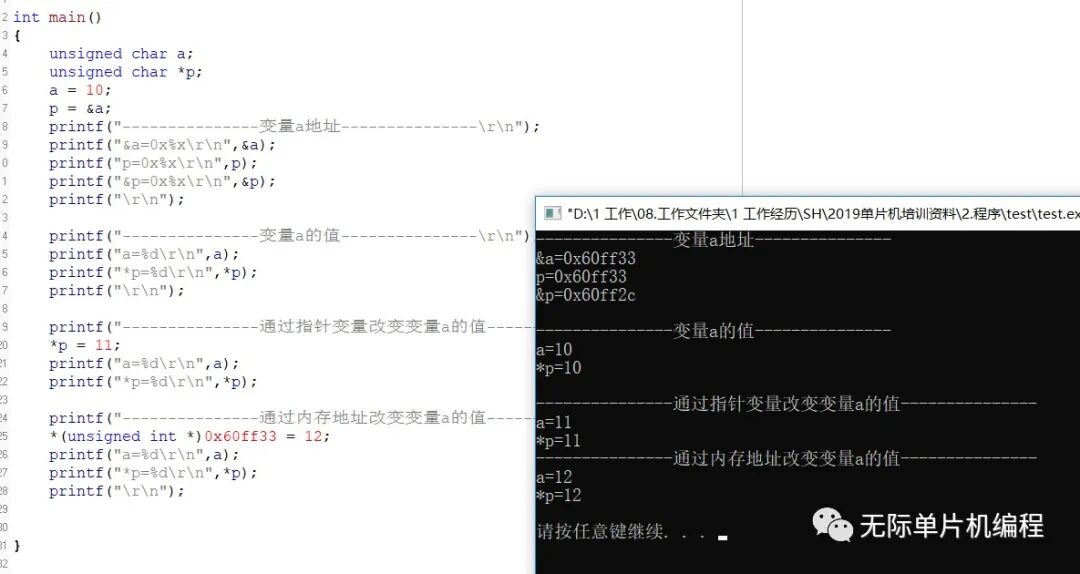 Here we define variable a and pointer variable p, then initialize the value of a to 10.We assign the address of a to pointer variable p, and then we output that the address of a is 0x60ff33.Since we previously assigned the address of a to pointer variable p, the address pointed to by p is also 0x60ff33.Next, we look at the memory address of the pointer variable, which is 0x60ff2c.So, please note that when we define a pointer variable, even though the pointer variable is used to point to an address, the compiler will also allocate a memory address to store the pointer variable.Next, let’s look at the output value of variable a.a=10, *p retrieves the data at the memory address pointed to by the pointer, so it is also 10.Next, we will change the value of variable a using the pointer variable, since pointer variable p points to the address of variable a, changing the data at the memory address pointed to by pointer variable p will change the value of variable a.So, based on this principle, can we change the value of a without using pointer variables or specifying what a equals? Of course! We can directly write 0x60ff33=12 to change the value of variable a.Of course, here we need to note that the compiler does not know what 0x60ff33 is during compilation, so we need to convert this integer address to a pointer type.Finally, we can change the data at this address using the *+address syntax.Looking at the output result, we can see that the value of a has been successfully changed to 12.In fact, changing the data at a certain memory address through pointer variables is based on this principle, but the advantage of pointer variables is that they can be named arbitrarily.We do not need to read the address of variable a first and then change its value through the address, which is very convenient, so pointer variables have replaced this method.4. Arrays and PointersGenerally, the system or compiler allocates contiguous addresses in memory to store the elements in an array. If we assign the array address to a pointer variable, we can reference the array through the pointer variable and read and write the elements in the array. Let’s conduct an experiment:
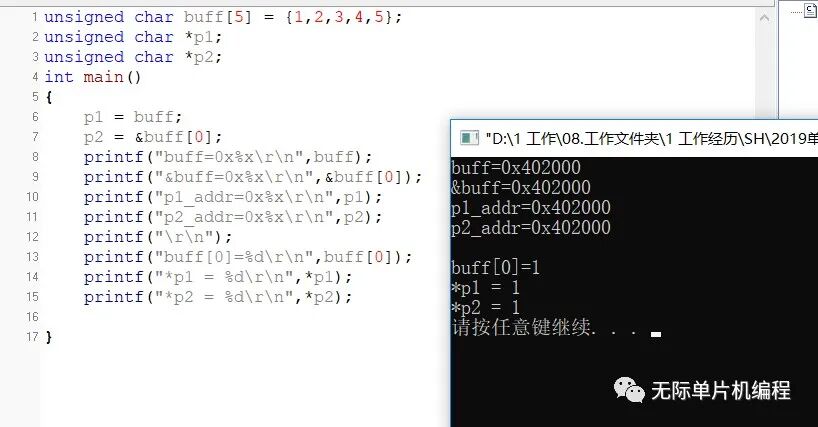 From this code, we define an array buff initialized to 1, 2, 3, 4, 5.We define two pointer variables p1 and p2, pointing to buff and &buff[0], respectively.buff defaults to the storage address of the element at index 0 of the array.So here buff and &buff[0] are the same memory address, just different notations.From the output results, we can see that the addresses of the array and pointer variables are the same, so you can use any of these notations.Now let’s look at the output results, which are both 1, indicating that the operation is correct.Pointer Increment and Decrement OperationsPointer variables can not only be used to retrieve the values of memory addresses but can also be used for addition and subtraction operations.However, this addition and subtraction is different from ordinary variables; ordinary variables add and subtract values, while pointer variables add and subtract addresses. Let’s explain this through code.
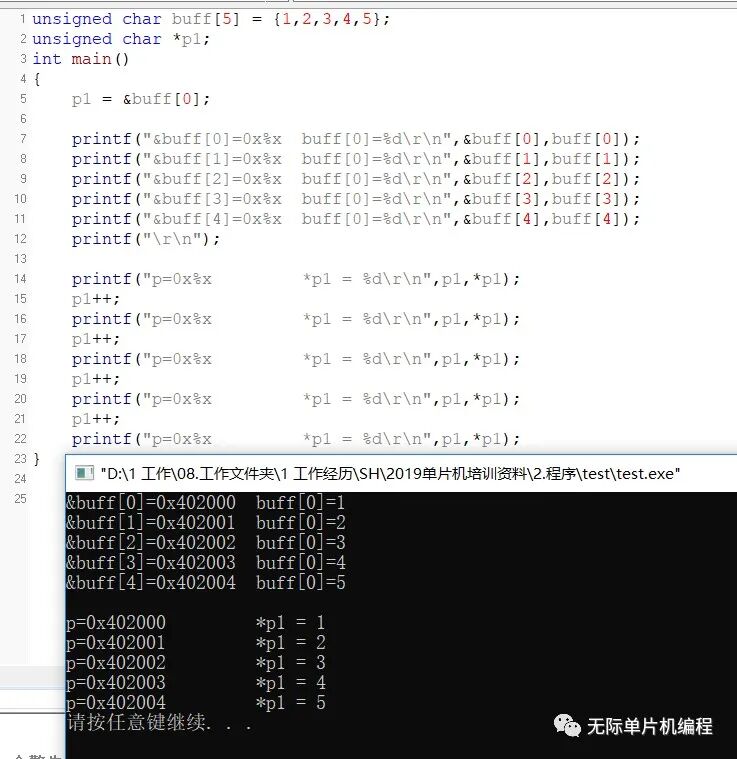 Here we define an array buff initialized to 1, 2, 3, 4, 5.We point the pointer variable p1 to the address of the first element of the array, which is 0x402000.Then we directly look at the operation p1++, after which we see p=0x402001, so the addition and subtraction operations of pointer variables are operations on addresses.Other subtraction, multiplication, and division operations are also based on address operations.Two-Dimensional Arrays and PointersThrough the explanation of one-dimensional arrays and pointers, I believe everyone has grasped the concept.Now, the operations of two-dimensional arrays and pointers are the same; two-dimensional arrays, like one-dimensional arrays, allocate contiguous addresses to store data.We will again practice this through an example:
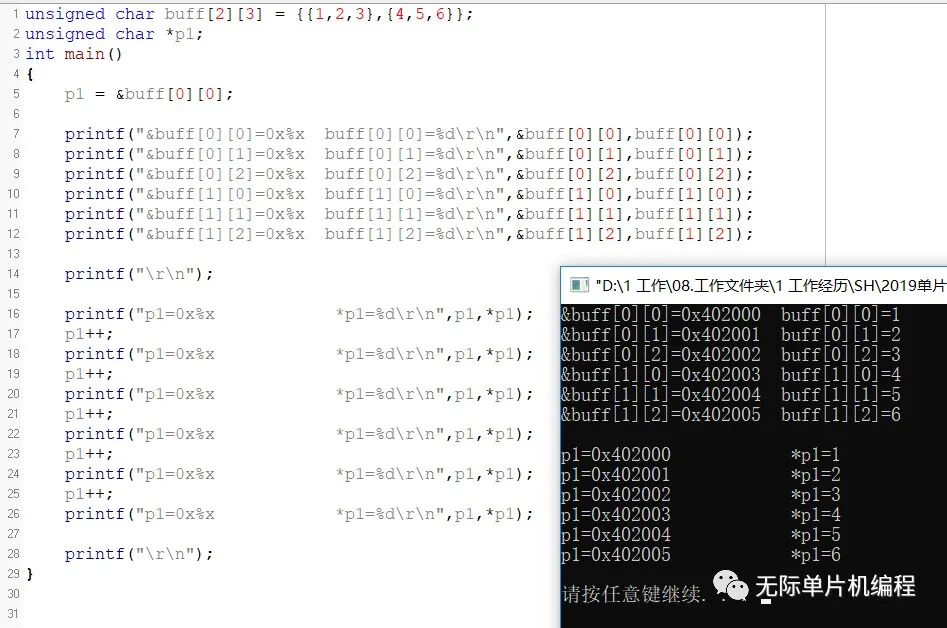 First, we define a two-dimensional array buff and a pointer variable p1.p1 points to the address of the element [0][0] of the two-dimensional array, which is the starting address allocated for this array.Then we print the address and value of each element in the two-dimensional array, followed by printing the address and value of the pointer variable. These demonstrate the usage of pointers and two-dimensional arrays, which are quite simple, and you can experiment with this code.5. Pointers to PointersA pointer variable can point to an integer variable or a character variable, and it can also point to another pointer variable. This type of pointer variable used to point to pointer type variables is called a pointer to pointer variable, or double pointer.Definition Method:Data Type **Pointer Variable Name;For example: unsigned char **p;This means defining a pointer to a pointer variable p, which points to another pointer variable. We will clarify this with code.
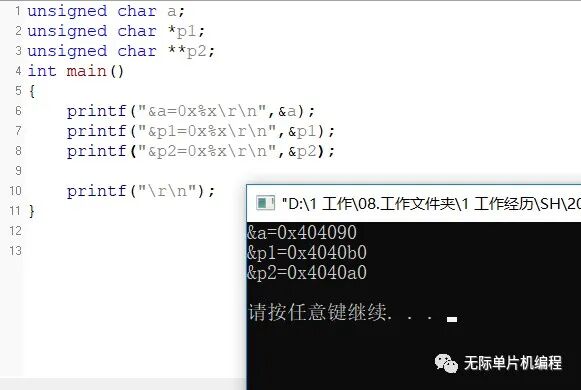 We define a variable a, a pointer variable p1, and a double pointer variable p2, then print the memory addresses of these three variables.During compilation, the compiler will also allocate storage space for pointer variables and double pointer variables.Although pointer variables point to other memory addresses, the variables themselves still require an address space for storage.What confuses many people about pointers is distinguishing between the storage address of the pointer variable and the address it points to; these are two different concepts, and everyone should remember this.Next, we will look at how to use double pointers through an experiment:
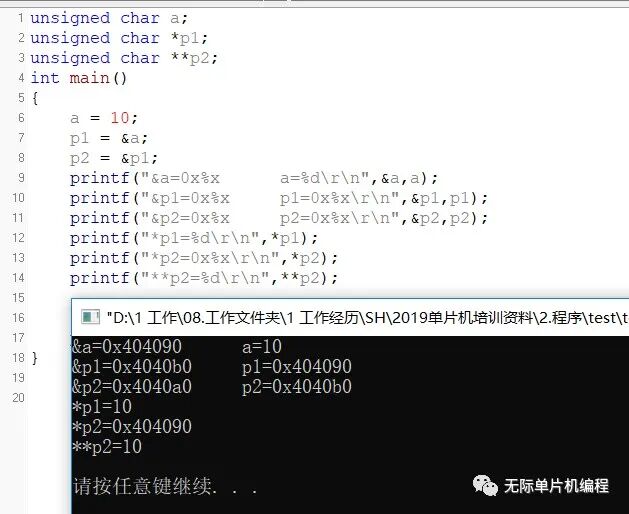 Here we define variable a and initialize it to 10, pointer variable p1, and double pointer variable p2.We assign p1 to point to variable a, and p2 to point to the storage address of p1; note that this is not the address pointed to by p1.Then we print the results, and we can see that the address of a is 0x404090.The storage address of pointer variable p1 is obtained using the & operator, which is 0x4040b0, and since p1 points to the address of a, p1 is also equal to 0x404090.Thus, pointer variables have both storage addresses and pointed addresses, which are two different concepts.p2 is a double pointer, pointing to the storage address of p1, which is 0x4040b0. By using *p2, we obtain the address pointed to by 0x4040b0, which is 0x404090, the address of p1 or variable a.Then, by using **p2, we can retrieve the value at the address 0x404090, which is 10.Another point to note is that the * operator is evaluated from right to left.So, **p2 is equivalent to *(*p2), first retrieving the pointed address, then retrieving the value stored at that address.In general, in microcontroller programs, it is advisable to use pointers to pointers sparingly to avoid difficult-to-trace bugs; I have used them in queues.6. Pointer Variables as Function ParametersGenerally, we use character types, integer types, arrays, etc., as function parameters.In addition, pointer variables can also be used as parameters, and they are used very frequently, mainly to change the value at the address pointed to by the pointer, a professional term known as changing the value of the actual parameter through the formal parameter.Let’s write some code to illustrate this:
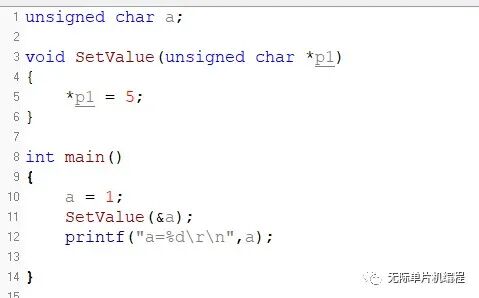 In this code, we define a function SetValue with the parameter being pointer variable p1.When we call SetValue, we assign the address of a to the formal parameter pointer variable p1.When we execute *p1=5, we can change the value at the address pointed to by p1 to 5, thus changing the value of a from 1 to 5.This is one of the functions of pointer variables as function parameters.In practice, the functionality used will not be this simple.For example, the commonly used memset library function has the prototype:Void *memset(void *s, int ch, size_t n);This function is used to initialize an array or structure.It uses a pointer variable s of unspecified data type, allowing us to easily encapsulate the code that implements certain functionalities, so users do not need to care about the implementation of the functional code, only how to use the function.This makes the code concise and compact, and improves portability; this is one of the functions of pointers as parameters. However, this is just the tip of the iceberg; in further studies, you will gradually discover the charm and power of pointers.7. Function PointersIf a function is defined in the program, the system will allocate a segment of storage space for this function’s code during compilation, and the starting address of this storage space is called the function’s address.The function name represents this address.Since it is an address, we can define a pointer variable to store it, and this pointer variable is called a function pointer variable, or simply a function pointer.In this section, we will learn how to define and use function pointers; in later chapters, we will teach you some practical applications of function pointers in infinite microcontroller programming.We mainly want to see where this knowledge can be applied, right?So how do we define a function pointer? The format for defining a function pointer is as follows:Return Value Type (*Pointer Variable Name)(Function Parameter List);
 This defines a function pointer variable func, which returns an unsigned char type and has two parameters, both of unsigned char type.After defining this function pointer variable, how do we use it? Let’s write some code to analyze it.
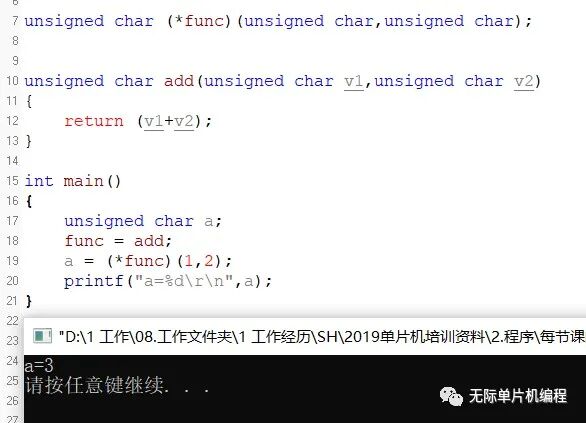 In this code, we first define a function pointer func, then define an addition function add, which returns the sum of the two parameters.We then point func to the add function; since the function name is the function’s starting address, we can simply do func=add to achieve this.Next, (*func)(1,2) represents executing the function pointed to by the function pointer func, so the result equals 3.The return parameter and parameters of function pointer func do not necessarily have to match those of function add, but it is generally not recommended to do so to avoid unnecessary errors.There is also a knowledge point to mention here; let’s write a piece of code:
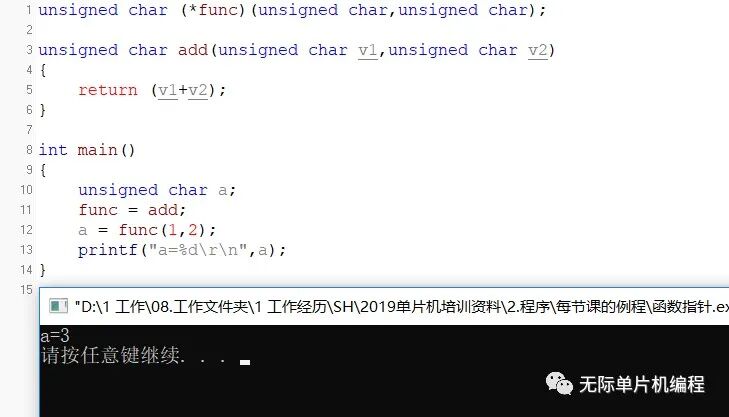 This code calls the function pointer without using (*func)(1,2); this usage is also valid, and the execution effect is the same. So what is the difference?Actually, this is an implementation issue of the compiler; we do not need to get caught up in such meaningless details unless you want to work on compilers.Just remember that function pointers are used this way.In future applications, practice this more, and you will use it in product development, making you familiar with it, and improving the program architecture of the products.8. Arrays of Function PointersJust like character types and integer types can be defined individually or as arrays, function pointers can also be defined as arrays. Here, we will not discuss too many theoretical concepts; just remember how to define, use, and where to apply them.The format for defining an array of function pointers is as follows:Return Value Type (*Pointer Variable Name[Array Size])(Function Parameter List);We will represent this with code:
 This defines a function pointer array that can point to three functions.After defining it, we need to assign values to the function pointers, which means letting them point to the function’s starting address. There are generally two ways to initialize them.
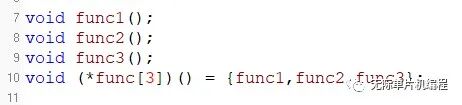 This is the first way, directly initializing when defining the function pointer array.
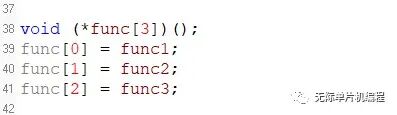 This is the second way, defining and then initializing. Here, we mainly need to remember these two writing methods.After assigning values to the function pointer array, we can execute it using the following code.
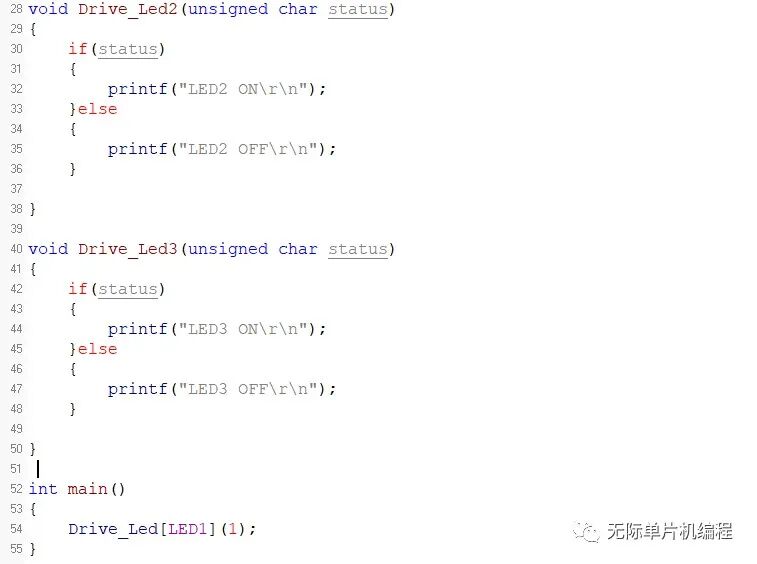
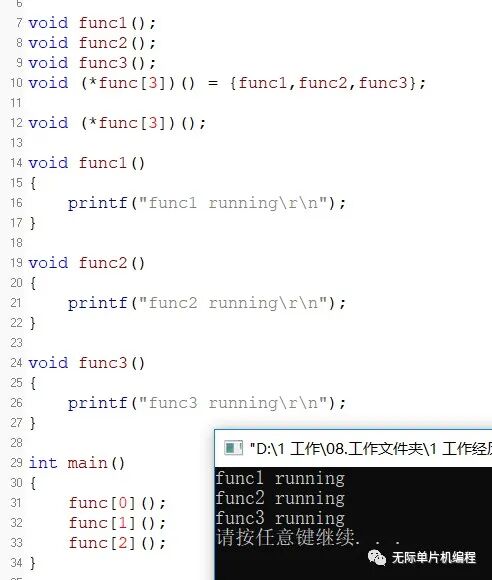 We can see that we can directly write func[0]() to execute the function pointed to by the function pointer array.So what is the use of this function pointer array?In fact, in real product applications, function pointer arrays are very useful.For example, when writing functions to control five LED lights, if using traditional methods, the process involves first determining which LED to control and then controlling the specified GPIO pin’s high and low levels.However, with function pointers, it can be done in a single statement, which is the characteristic of concise and compact code. When the code is concise and compact, it naturally saves CPU and memory resources.Below is the demonstration code: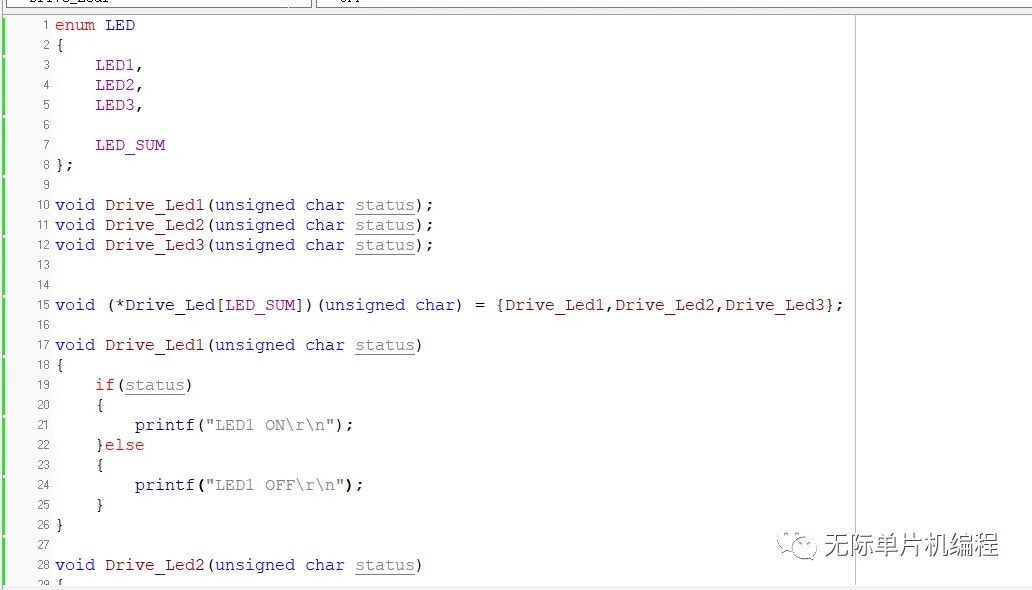

Recommended Reading
Click the image to read
C Language, a Kitchen Knife

The Structure of C Language Has Been Conquered! (An Absolutely Worth Collecting Article)
How to Save Microcontroller Memory? (C Language Version)

6 Advanced Application Scenarios for C Language Function Pointers