Cluster information management, employee information management, and alarm policy management have been sufficiently introduced in previous articles. Today, I will share how to create a scalable and generic HTTP monitoring framework with just 100 lines of code.
1. Common HTTP Monitoring Use Cases
Question: What are the common HTTP monitoring requirements?
Answer: There are two main types of common HTTP monitoring requirements:
-
Monitoring HTML pages
-
Monitoring HTTP interfaces that return JSON data
Question: How is common HTTP monitoring typically performed?
Answer: Generally, access logs are monitored by observing the following two parameters:
-
HTTP non-200 status codes
-
HTTP request response time
2. What Problems Exist in Common HTTP Monitoring?
Question: What are the drawbacks of monitoring common HTTP non-200 status codes and response times?
Answer: Every company has its own 404 page. For example, the 404 page for 58 Daojia looks something like this:

This page has an HTTP status code of 200 and returns very quickly, which does not accurately represent the actual operation of the HTML page, making it difficult to serve as a true monitoring tool.
Voiceover: This does not mean that monitoring HTTP status codes is useless. On the contrary, monitoring HTTP status codes is very necessary. An HTTP status code of 404 indicates that there is definitely a problem with the system, but an HTTP status code of 200 does not guarantee that the system is functioning correctly.
Question: If HTTP status codes do not indicate issues, what can represent that HTTP is functioning correctly?
Answer: Each HTTP request has its own business characteristics.
Characteristic 1: It needs to return specific page content. For example, the official website of 58 Daojia looks like this:
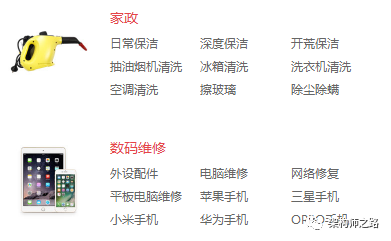
That is, when accessing http://daojia.com/, it must return an HTML page containing the word “家政” for it to be correct.
Characteristic 2: It needs to return specific interface content. For example, for a RESTful interface that retrieves user information, if uid=123 is passed in, it should return:
{“RET”:”SUCCESS”, “name”:”shenjian”, “uid”:”123″}
That is, when accessing http://daojia.com/userinfo/get/?uid=123, it must return a string containing “shenjian” for it to be correct.
Thus, we arrive at the idea of a scalable and generic HTTP monitoring platform (framework): not only should we monitor HTTP status codes, but more importantly, we need to monitor the business characteristics of the HTTP response content.
3. Architecture Details of the Scalable Generic HTTP Monitoring Platform
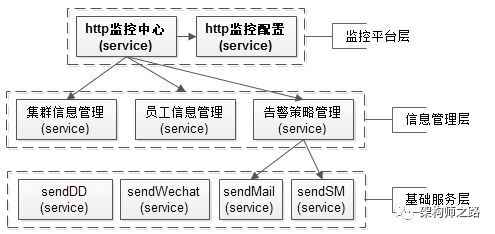
The architecture of the entire HTTP monitoring platform is shown above, divided into monitoring platform layer, information management layer, and basic service layer.
Monitoring Platform Layer
-
HTTP Monitoring Center: The main program for implementing monitoring
-
HTTP Monitoring Configuration: Manage expandable monitoring item information
The core information of monitoring items includes:
-
Which cluster the monitored HTML page/RESTful interface belongs to
-
The monitored URL
-
The data that needs to be passed into the monitored URL, including GET/POST/COOKIE data
-
What business characteristic strings must be included in the HTTP response data
For example, for the HTML of the 58 Daojia official website, the core information of the monitoring item is:
[http.monitor.item]
cluster.name : daojia_main
url : http://daojia.com/
result : 家政
That is, when accessing http://daojia.com/, the returned result must contain “家政”.
For the RESTful interface to retrieve user information, the core information of the monitoring item is:
[http.monitor.item]
cluster.name : daojia_user
url : http://daojia.com/userinfo/get/
get.data : uid=123
post.data : NULL
cookie.data : NULL
result : shenjian
That is, when accessing http://daojia.com/userinfo/get/?uid=123, the returned result must contain “shenjian”.
If we want to create a platform, we need a monitoring item management backend to add/modify/manage monitoring items.
The monitoring center will iterate through all monitoring items and concurrently monitor each HTTP monitoring item.
Information Management Layer
The information management layer is further divided into: cluster information management service, employee information management service, and alarm policy management service.
Voiceover: Yes, this is the content discussed in the recent two articles “Cluster Information Management” and “Employee Information Management, Alarm Policy Management”. Why do you think I introduced these two articles in advance?
The cluster information management service mainly provides this interface:
Info Service::getClusterInfo(String clusterName)
That is, retrieve cluster information by cluster name.
There is a lot of information about the cluster, but the main information related to monitoring includes:
-
Cluster IP list, every web server should be monitored
-
Cluster owner, to whom should alarms be sent in case of monitoring anomalies
The employee information management service mainly provides this interface:
Info Service::getYuanGongInfo(String name)
That is, retrieve employee information by employee name.
There is a lot of employee information, but the main information related to monitoring includes:
-
Employee phone number, email, WeChat ID, DingTalk ID, and other contact information
-
If multi-level alarm policies are to be implemented, it is also necessary to obtain information about the employee’s department and leader
The alarm policy management service mainly provides this interface:
Bool Service::trySendAlarm(
String clusterName,
String yuangongName,
String ip,
String url,
…
)
That is, attempt to send an alarm as soon as an anomaly is detected in the interface.
This attempt to send an alarm does not mean that a text message or email will definitely be sent, as a series of user-friendly alarm policies need to be implemented:
-
Cluster convergence policy, which can deduplicate by cluster name
-
Interface convergence policy, which can deduplicate by URL
-
Scheduled frequency policy, which can deduplicate by employee name
-
Day and night policy, which can be implemented based on the time of alarm sending
-
…
Basic Service Layer
After filtering the alarm policies, if an alarm truly needs to be sent, the basic service layer’s services will be called to send it out.
Sending emails and SMS are basic services that every company should have, so I won’t elaborate on them here.
Voiceover: I heard that your company does not have services for sending emails or SMS? Are you really working at an internet company?
4. Details of the Scalable Generic HTTP Monitoring Framework
Are you kidding? I work at a startup, and the HTTP monitoring configuration service, cluster information management service, employee information management service, and alarm policy management service you mentioned do not exist in my company! We only have an interface that can send SMS. Can we still create an HTTP monitoring framework? It needs to be generic and scalable too. You are a fraud, where is the promised 100 lines of code?
Well, don’t worry. Even if none of the above services exist, as long as you can send SMS alarms, you can still do it:
-
HTTP monitoring item information: can be configured through a configuration file
-
Cluster information: can be configured through a configuration file
-
Employee information: can be configured through a configuration file
-
Alarm policy information: no alarm policy needed, just send SMS for anomalies
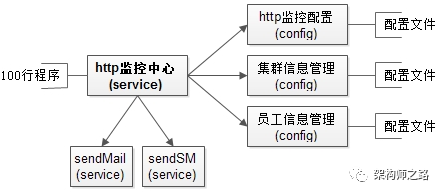
Thus, the HTTP monitoring framework looks like this, with services replaced by configuration files:
HTTP monitoring item configuration, monitor-item.config
[http.monitor.item]
cluster.name : daojia_main
url : http://daojia.com/
result : 家政
[http.monitor.item]
cluster.name : daojia_user
url : http://daojia.com/userinfo/get/
get.data : uid=123
post.data : NULL
cookie.data : NULL
result : shenjian
Cluster information configuration, cluster-info.config:
[daojia_main]
ip.list : ip1, ip2, ip3
port : 80
owner.list: shenjian, zhangsan, lisi
[daojia_user]
ip.list : ip11, ip22, ip33
port : 8080
owner.list: shenjian
Employee information configuration, owner-info.config
[shenjian]
email : [email protected]
phone :15912345678
[zhangsan]
email : [email protected]
phone :18611220099
5. Pseudocode for the HTTP Monitoring Framework
// Parse configuration files to extract monitoring items, clusters, employees, etc.
Array[monitor-item] A1=Parse(monitor-item.config);
Array[cluster-info] A2= Parse(cluster-info.config);
Array[owner-info] A3=Parse(owner-info.config);
// Iterate through all monitoring items
for(each item in A1){
// Extract the cluster name, URL, HTTP data, result, etc. from the monitoring item
clusterName= item.clusterName;
url= item.url;
getData= item.getData;
postData= item.postData;
cookieData= item.cookieData;
result= item.result
// Retrieve cluster information by cluster name
clusterInfo= A2[clusterName];
// Retrieve the cluster IP list and cluster owner list from the cluster information
List<String>ips = clusterInfo.ip;
List<String>owners = clusterinfo.owner;
// Each IP instance web server in the cluster needs to be monitored
for(each ip in ips){
// Construct request based on IP, URL, and HTTP data
httpClient client = new httpClient(ip, url, getData, postData, cookieData);
// Get the result of the HTTP request execution
httpResponse resp = client.execute();
// If the response is 200 and contains the business characteristic result from the monitoring item
if(resp.code==200&& resp.contain(result)){
// Normal, continue monitoring
continue;
}
// Otherwise, send alarms to all cluster owners
for(each owner in owners){
// Retrieve the owner’s email and phone number
email =A3[owner].email;
phone =A3[owner].phone;
// Send email and SMS alarms
sendEmail(email, ip,url, owner);
snedSM(phone, ip, url,owner);
}
}
}
Review the above pseudocode a few times, and I believe you will gain insights.
Do not get caught up in whether to use services, cron jobs, or multithreading details, nor whether a single line can parse the entire configuration file. Those who have used XML understand that the above configuration file is just a sample.
This framework has excellent extensibility and can be easily expanded through configuration files.
monitor-item.config, extensibility of monitoring items
-
To add HTML page monitoring or monitoring of JSON RESTful interfaces, simply add an item in the configuration
-
The configuration supports URL, GET, POST, COOKIE, and other parameters to assemble any HTTP monitoring request
-
The configuration supports different business logic to return different results for business characteristic checks
cluster-info.config, extensibility of cluster information
-
To add a cluster, simply add an item in the configuration
-
If a cluster adds an instance, just add an IP
-
If a cluster adds an owner, just add an owner
owner-info.config, extensibility of owner information
-
To add an owner, simply add an item in the configuration
-
If a phone number/email changes, just modify the corresponding configuration
Question: One last question, why split into three configuration files instead of using just one?
Answer: Haha, design decoupling, we all need to practice more.
Recommended, two highly relevant articles that will deepen your understanding of this article:
-
Cluster Information Management
-
Employee Information Management, Alarm Policy Management
Survey: Regarding the HTTP monitoring framework, your feelings are:
-
CA, sounds interesting, I will go back and implement one
-
Framework-based, extensibility is quite good, we have also implemented it in our company
-
Platform-based, we have also implemented it in our company
-
Weak, our HTTP monitoring is much stronger than this
Well, that makes sense, I need to share this.