Comprehensive Guide to Creating and Analyzing ESP32 Project Structures

Comprehensive Guide to Creating and Analyzing ESP32 Project Structures

Comprehensive Guide to Creating and Analyzing ESP32 Project Structures 1. Methods for Creating ESP32 Projects 1. Creating an ESP-IDF Project # Create a new project idf.py create-project my_esp32_project # Project directory structure my_esp32_project/ ├── CMakeLists.txt ├── main/ │ ├── CMakeLists.txt │ └── main.c └── sdkconfig 2. Creating an Arduino IDE Project File > New Save … Read more
Cross-Platform Embedded Development Toolchain: PlatformIO

Cross-Platform Embedded Development Toolchain: PlatformIO

Scan to FollowLearn Embedded Together, learn and grow together Introduction PlatformIO is a cross-platform embedded development toolchain that supports over 50 development platforms and more than 2000 development boards. Official resource link (copy to browser to open): https://docs.platformio.org/en/latest/what-is-platformio.html It integrates features such as a build system, library management, debugging tools, and continuous integration, providing embedded … Read more

Developing Arduino Software with Trae

Developing Arduino Software with Trae

Hello everyone, I am Liu Deng, a senior automotive engineer,and in the AI era, I hope to move forward together with everyone and make progress! Recently, due to work requirements, I needed to use Arduino to develop Damon products, but I am not familiar with coding, so I brought in a helper, Trae (I am … Read more

Lighting Up the IL9341 Display with ESP32 Using VSCODE and PlatformIO (Arduino Framework)

Lighting Up the IL9341 Display with ESP32 Using VSCODE and PlatformIO (Arduino Framework)

⚔️ First, let’s see the effect ⚔️ Install the TFT_eSPI Library Step 1: Click on the ant icon on the right Step 2: Click on Open in English Step 3: Click on Libraries in English Click on TFT_eSPI in English to go to the next interface Step 1: Click on Add to Project Step 2: … Read more

Controlling an OLED Display to Show a Dynamic Progress Bar Using the ESP32 Development Board

Controlling an OLED Display to Show a Dynamic Progress Bar Using the ESP32 Development Board

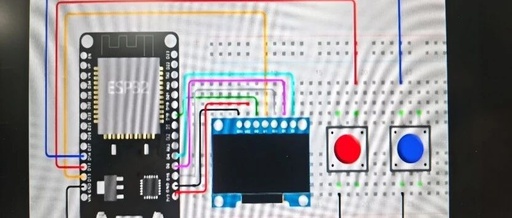
First, prepare the ESP32 development board, a breadboard, several DuPont wires, and an SSD1306 OLED display. Then, connect the development board, breadboard, and OLED display according to the wiring diagram. Next, use the PlatformIO plugin in VS Code to write and upload the code for the OLED display. The wiring diagram is as follows: