Everyone often uses Wi-Fi while working in the company.
In recent years, with the development of technology, high-bandwidth applications such as HD video conferencing have become increasingly common. However, the company’s network is quite inadequate, frequently lagging and severely affecting the user experience. Even though the IT colleagues have optimized the network well, it still cannot be resolved.
Why is this the case? What are the “difficulties” of the company’s Wi-Fi?
In this article, I will provide an in-depth analysis.
█ Why is the Wi-Fi Speed So Slow?
In simple terms, there are two main reasons for slow Wi-Fi speeds:
First, the outbound bandwidth is small. A narrow pipe means a slow speed.
Second, the wireless signal coverage is poor. This could be due to issues with the Wi-Fi itself or external environmental factors, such as distance, obstacles, or interference.
The wireless transmission from the Wi-Fi Access Point (AP) to the terminal is commonly referred to as the air interface.
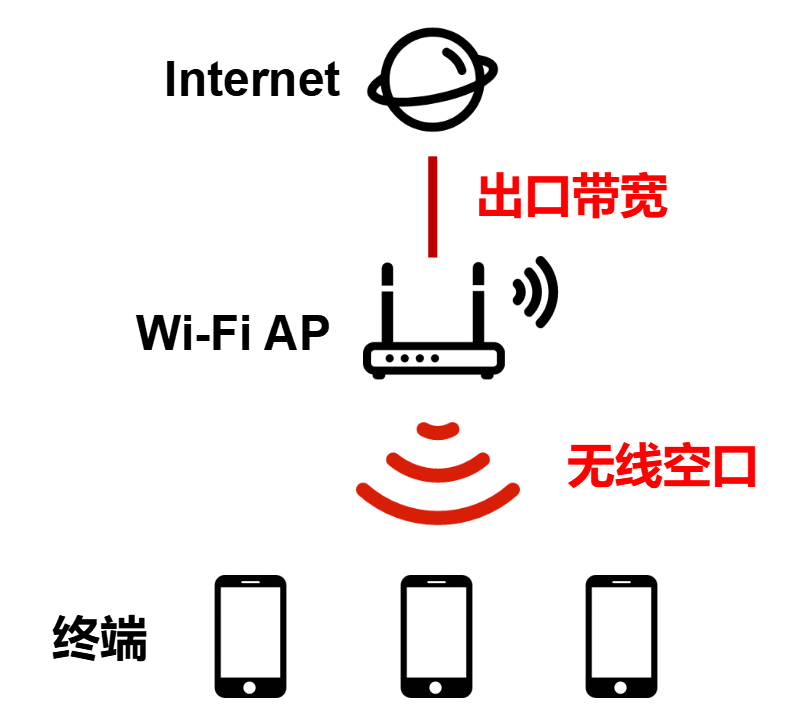
Many people encountering slow Wi-Fi speeds will first complain about the small bandwidth provided by the Wi-Fi provider. However, in reality, interference from wireless signals is likely the true source of the problem.
Everyone knows that wireless communication requires the use of radio frequency bands. Wi-Fi operates on the ISM (Industrial Scientific Medical) band, commonly known as the free band, with frequency ranges of 2.4GHz and 5GHz (there is also a 6GHz band abroad, but it is not open in China, so this article will not discuss it).
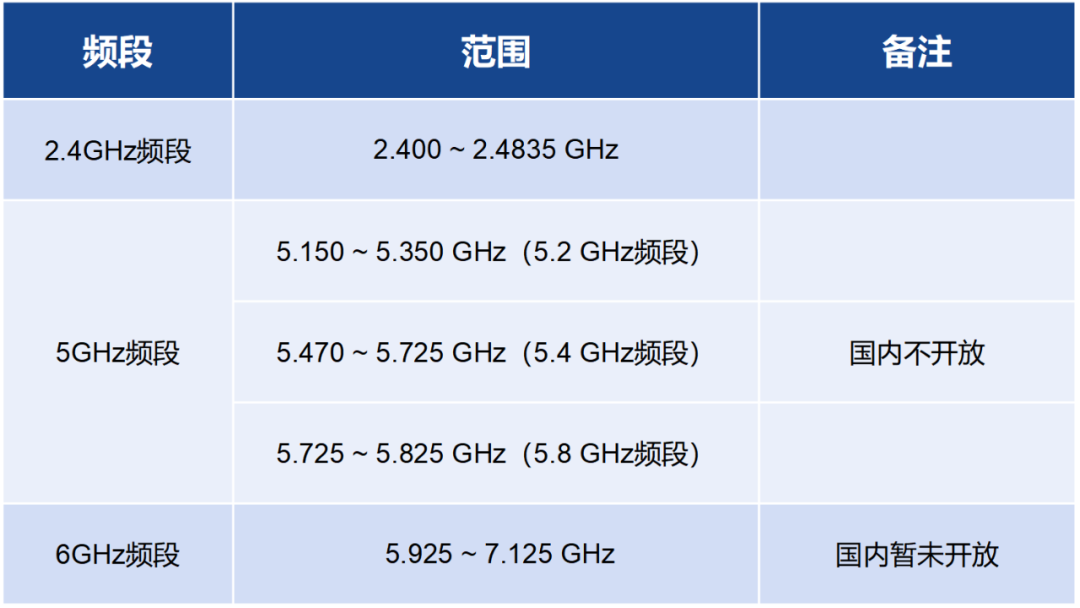
These frequency bands are divided into channels for terminals (such as mobile phones) to communicate with the AP.
The frequency width (bandwidth) of the channels is divided into 20MHz, 40MHz, 80MHz, 160MHz, and 320MHz (not available in China).
The yellow represents the channels used in China.
The larger the bandwidth, the higher the achievable network connection speed (equivalent to widening the lanes). However, the total bandwidth (authorized spectrum range) remains unchanged; if a larger bandwidth is used, the number of channels (lanes) will decrease.
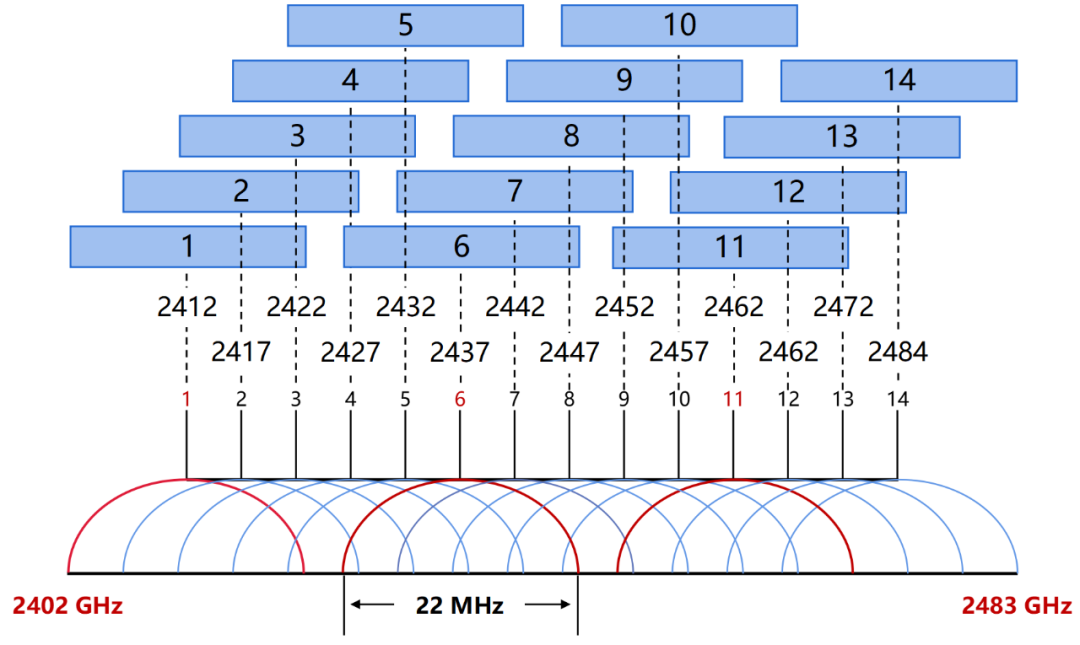
In the 2.4G band, there are a total of 14 channels (China uses channels 1-13), each with a bandwidth of 22MHz (including a 2MHz mandatory isolation band), and a 5MHz interval between each channel (the interval between channels 13 and 14 is 12MHz).
Channels in the 2.4G band.
The 2.4G band has less attenuation and can transmit over longer distances. However, its bandwidth is narrower, resulting in lower achievable connection speeds.
Its main issue is excessive interference. Although it has 13 channels, there are actually only 3 non-overlapping channels (channels 1/6/11). Currently, apart from a few IoT devices (which do not require high speeds), most terminals such as mobile phones, computers, and TVs that require high-speed connections do not use it.
The 5G band is the most commonly used now. It is divided into 24 non-overlapping channels. In China, the channel numbers used are 36-64 and 149-165, totaling 13 channels.
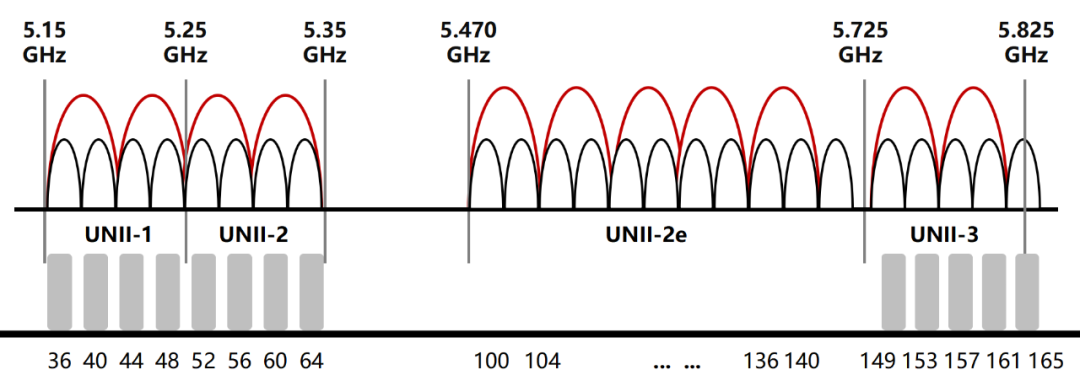
Channels in the 5G band.
The 5G band has a larger bandwidth, allowing for higher speeds. Additionally, there are fewer devices using this band, resulting in less interference and a more stable network. However, the 5GHz band has greater attenuation, and its coverage distance is shorter compared to the 2.4G band.
So, what issues arise when using the 5G band for networking?
If it is a small office, there is nothing much to say; just buy a router and choose a larger signal bandwidth (generally 80MHz or 160MHz) to balance speed and coverage, with minimal interference.
However, if it is a large office area that requires the deployment of many APs, problems arise—
The deployment distance between APs is usually in the range of 10-12 meters. If a bandwidth of 20MHz is used for networking, there will be many channels, and interference will be relatively low. But a 20MHz bandwidth is too small, resulting in low network connection speeds for single users, making it impossible to watch ultra-high-definition video conferences without lag.
If the bandwidth is set to 40MHz, although the theoretical speed for single users increases, the number of available channels decreases, and spectrum interference becomes more severe.
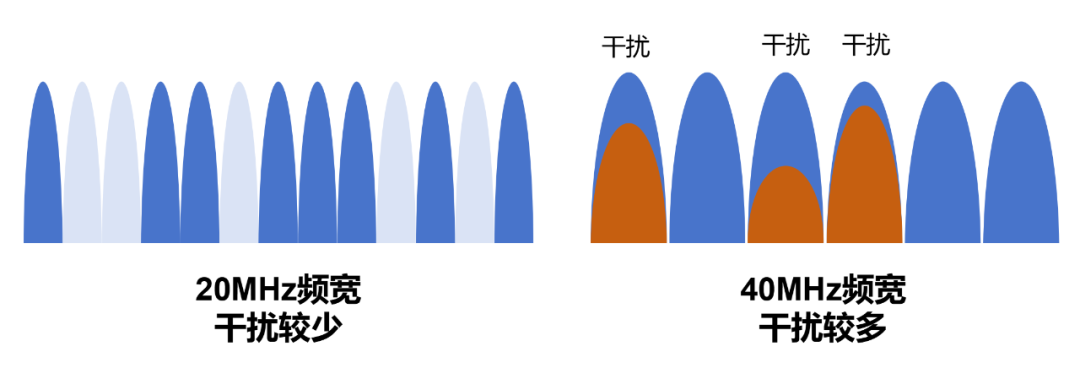
For most countries or regions, if a bandwidth of 40MHz is used, there are only 6 available channels. According to tests, under a 40MHz networking setup, the overall network performance will decrease by 30% due to co-channel interference.
If set to 80MHz (with APs deployed at a distance of 12 meters), most countries or regions will have only 3 available channels, leading to even more severe interference.
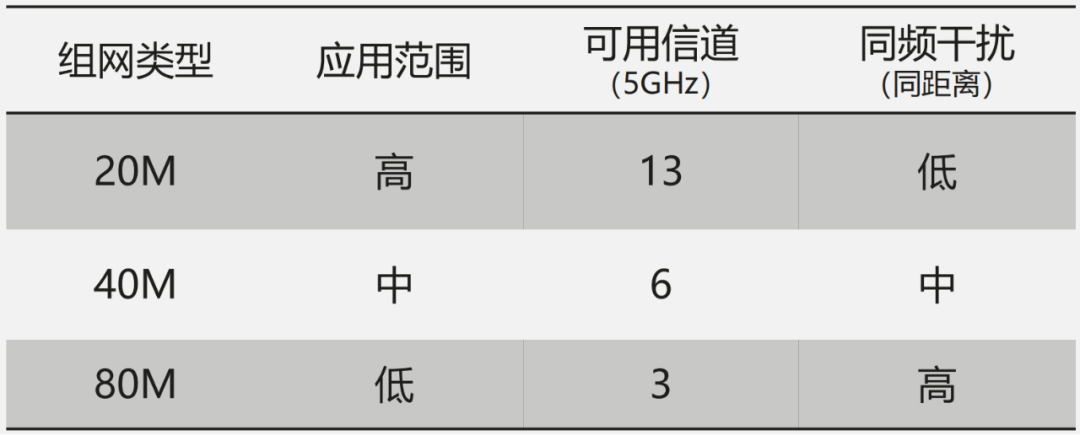
In fact, the capacity of an 80MHz network is logically twice that of a 40MHz network, but due to interference issues, the actual performance of an 80MHz network may be even worse than that of a 40MHz network.
Because of this, many enterprise customers still choose a smaller bandwidth (20MHz) when deploying Wi-Fi, sacrificing speed to increase channels, control interference, and ensure performance.
This is the main reason why everyone feels that the Wi-Fi speed in the company is slow. Co-channel interference is the culprit.
█ How to Reduce the Impact of Interference in Multi-AP Networking?
So, is the issue of co-channel interference unsolvable? Is there really no way to address the high-density networking in the company’s office area?
Of course not.
Recently, I saw that Huawei proposed a very unique solution specifically addressing the high-density Wi-Fi networking dilemma mentioned earlier. This solution is called: Intelligent Coordinated Scheduling and Spatial Reuse (iCSSR).
The iCSSR mainly includes two key technologies—AP collaboration and intelligent antennas.
● AP Collaboration
Let’s first look at AP collaboration.
AP collaboration is a technology for “team cooperation” among multiple APs, which includes several steps:
Step 1: Select the same frequency AP group.
Several APs share information such as RSSI (Received Signal Strength Indication) and traffic load to select a collaborative scheduling AP group (supporting up to 5 same-frequency APs in a group) and confirm priorities.
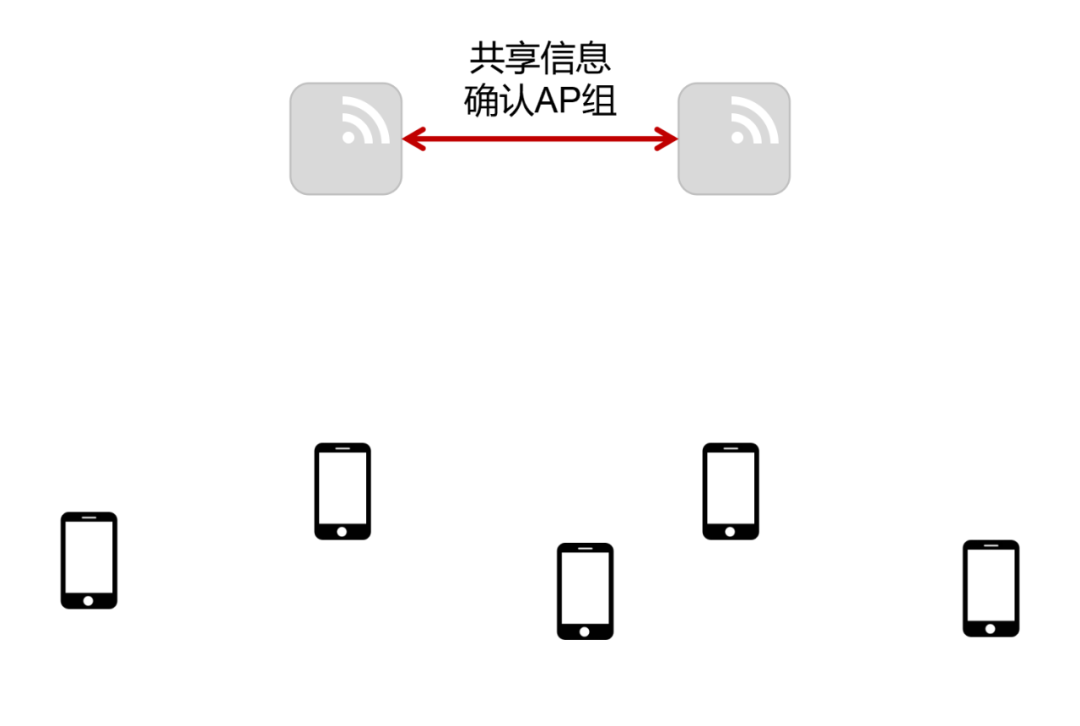
Step 2: Select inner circle user group and outer circle user group.
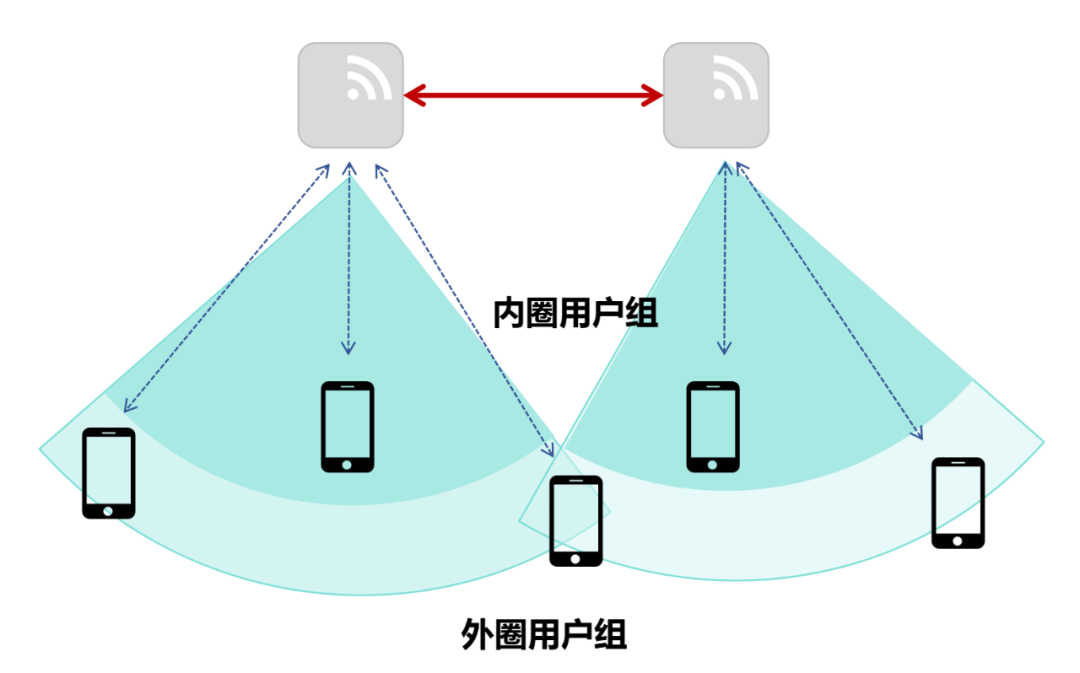
Based on the signal strength of the user’s uplink BA (Block ACK), determine the inner circle user group and outer circle user group.
As shown in the figure below, the dark area represents the inner circle user group (close to the AP), while the light area represents the outer circle user group (edge users, far from the AP):
Step 3: Conduct user group scheduling.
The scheduling methods for the inner circle user group and outer circle user group are different.
For the inner circle user group, the method used is “AP collaboration concurrent, sending data simultaneously”.
The specific steps are:
First, the AP that seizes the channel priority will become the main AP.
Then, the main AP sends a collaborative scheduling frame through the air interface to notify the selected subordinate APs to conduct “simultaneous scheduling”.
The main AP will instruct all subordinate APs to adjust parameters to avoid mutual interference.
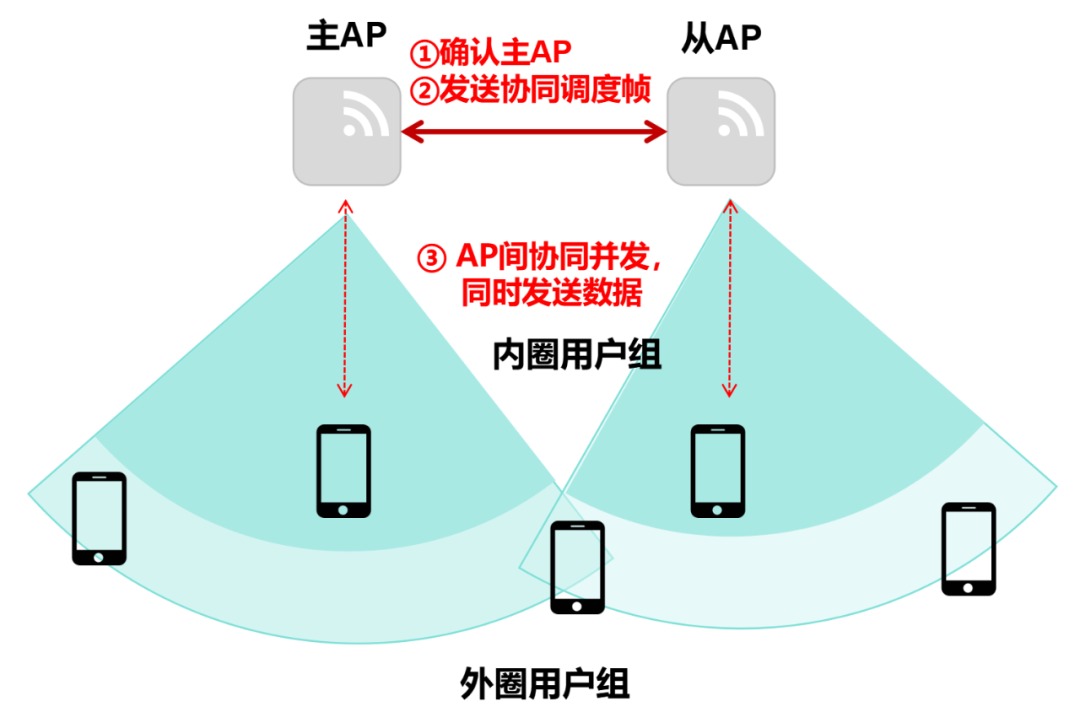
Inner circle user group scheduling.
This concurrent transmission allows users to achieve higher transmission speeds, resulting in a better network experience.
It is worth mentioning that the precise collaboration between APs is at the microsecond level, with a very fast response time.
Now let’s look at the outer circle user group.
For the outer circle user group, the method is “AP collaboration time division, sending data in turns”.
Once the main AP is determined, it will also send a collaborative scheduling frame to notify all subordinate APs. However, the command is to conduct “time division scheduling”.
Then, the main and subordinate APs will sequentially conduct time division scheduling for the outer circle user group (edge users).
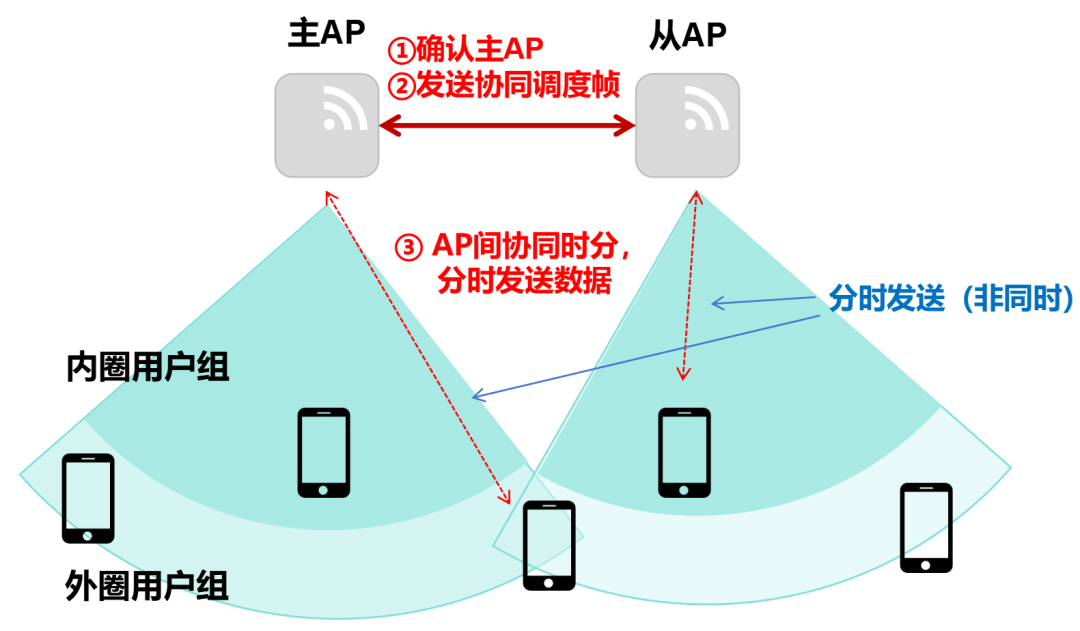
Outer circle user group scheduling.
This is the processing process of AP collaboration.
As you can see, AP collaboration allows multiple APs to form a “virtual team”. Through close cooperation among the “team”, an invisible “wall” is formed between them, significantly reducing interference and improving the efficiency of the wireless air interface. This clears the obstacles for high-density networking at 80MHz bandwidth, achieving a new balance between speed and coverage.
● Intelligent Antennas
Now let’s take a look at intelligent antenna technology.
Huawei’s intelligent antenna technology has two major functions.
First, it has the ability to follow signals.
Traditional AP antennas have fixed signal beams, while intelligent antennas can change their signal beams according to user movement.
The other function is dynamic zoom.
Traditional APs have only one antenna beam. They can either be omnidirectional antennas, emitting signals in all directions like a light bulb, providing good coverage but causing significant interference, or directional antennas, emitting signals in a fixed direction like a spotlight, causing less interference but poor edge coverage.
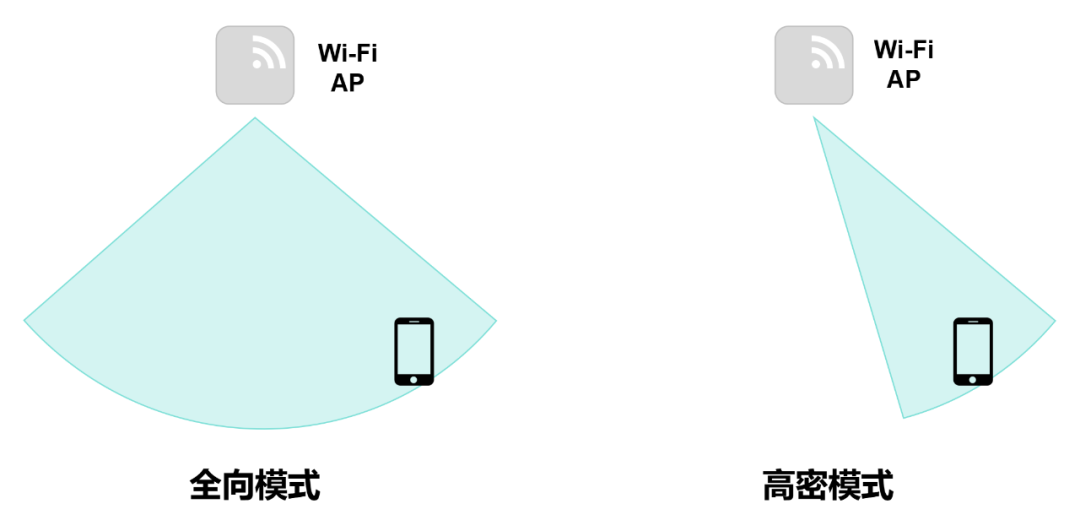
After introducing intelligent zoom antenna technology, Huawei’s AP can flexibly switch between omnidirectional mode and high-density mode.
In scenarios with fewer people, use omnidirectional mode. In crowded scenarios, use high-density mode.
In high-density mode, by introducing Huawei’s self-developed signal pre-correction technology (DPD algorithm), the antenna beam can dynamically adjust the beam width and angle based on user distribution, AP deployment distance, and other actual conditions.
This not only improves the signal strength for users but also avoids signal “spillage” that causes interference to other APs.
Those familiar with mobile communications might think: “This is exactly like the ‘beamforming’ technology in 5G!”
Indeed, mobile communication and Wi-Fi have always been “learning” from each other. The AP collaboration mentioned earlier also references the design of cellular mobile communication. Technologies such as OFDMA, beamforming, and DPD algorithms have inherited mobile communication technologies. This is Huawei’s unique advantage.
█ Final Thoughts
Wi-Fi technology was born in the 1990s and has become an indispensable part of our daily lives after decades of development.
Most of us first encountered Wi-Fi starting from Wi-Fi 3 (802.11g) or Wi-Fi 4 (802.11n) standards. Today, Wi-Fi has developed to Wi-Fi 7 (802.11be), with Wi-Fi 8 also in development.
From the perspective of wireless spectrum efficiency, Wi-Fi is nearing its performance limits, and the difficulty of further improving theoretical speeds is increasing. However, theoretical speeds do not equate to actual experience speeds. In practical applications, solving signal interference issues is the most effective way to enhance user experience.
Huawei’s iCSSR provides an innovative solution to address interference issues in high-density Wi-Fi networking. Looking ahead, Wi-Fi technology will undoubtedly see more innovations, enriching our network lives and accelerating the digital transformation of society as a whole.
Source: Fresh Date Classroom WeChat Official Account
Initial Review: Sha Yu, Yin Hang
Re-review: Xia Yan
Final Review: Zhang Danyang
END

Recommended Books
Recommended books
This is not just a history of the development of the technology industry…
It is a must-read for IT professionals in this intelligent era, and even non-IT professionals should read it.
The development and rise of an enterprise cannot be achieved solely by having strong leaders. Every decision, the concurrent business environment, and the ebb and flow of various energies also influence the rise and fall of enterprises. “On the Crest of the Wave” is not just a history book; it also discusses the development patterns of top technology companies, how Wall Street influences technology companies, and the impact of financial storms on the technology industry.
The fourth edition of “On the Crest of the Wave” adds 6 new chapters, exploring the source of Silicon Valley’s unending spirit of innovation, further elaborating on the regularities of the information industry from the perspectives of the industrial revolution paradigm and the revolution of production relations. Thus, through a systematic analysis of the management characteristics of companies in the information age, it provides judgments and predictions for the next wave of technology industry.
……