If you are in the market for replacing an old wireless router or adding a new one at home or in the office, it can be somewhat confusing. Currently, there are three wireless standards widely available on the market: Wi-Fi 6, Wi-Fi 6E, and Wi-Fi 7.
The first batch of Wi-Fi 6 devices was released in 2019, while the first Wi-Fi 6E devices did not appear until 2021. Wi-Fi 7 is the latest standard, entering the market at the end of 2023, with a limited number of routers available. You need to research the latest high-performance Wi-Fi 7 routers to achieve the fastest wireless speeds in your home. However, older routers using the Wi-Fi 6E standard are not entirely lacking in transmission speed, and in many cases, you can save some money by staying away from the cutting edge of router technology.
What are the Differences Between Wi-Fi 6E and Wi-Fi 7?
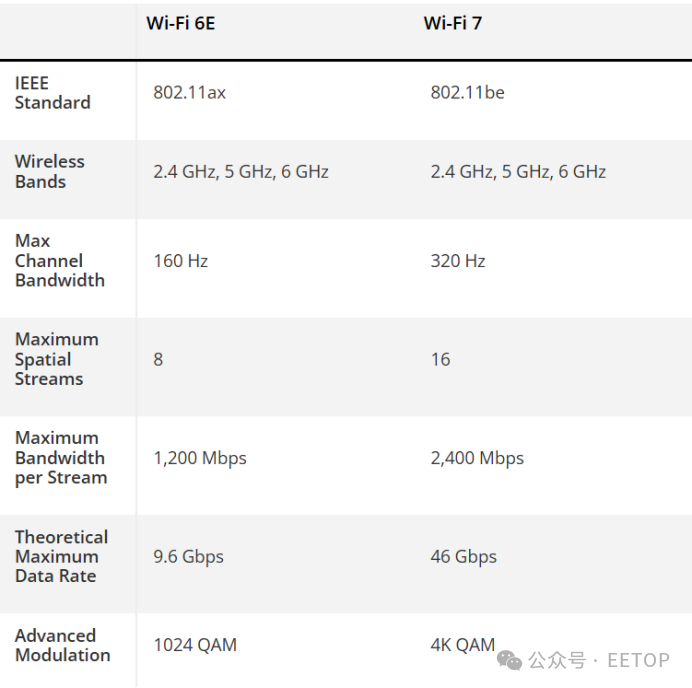
While both Wi-Fi 6E and Wi-Fi 7 support the 2.4 GHz, 5 GHz, and 6 GHz frequency bands, Wi-Fi 7 has made some performance enhancements to the latter band. Wi-Fi 7 increases channel bandwidth from 160 MHz to 320 MHz and doubles the maximum number of spatial streams from 8 to 16.
Combining these advancements with a maximum bandwidth of 2,400 Mbps per stream, the theoretical data rate ceiling for flagship Wi-Fi 7 routers reaches 46 Gbps. This represents a significant increase in throughput compared to the maximum of 9.6 Gbps for Wi-Fi 6E routers.
Wi-Fi 7 also supports Multi-Link Operation (MLO), allowing routers to connect to Wi-Fi 7 clients simultaneously across multiple wireless bands. For example, a Wi-Fi 7 client can connect to a Wi-Fi 7 router using a single aggregated link that combines the 2.4 GHz and 5 GHz bands or the 5 GHz and 6 GHz bands. The Wi-Fi 7 specification even allows for all three bands to be bonded together for a single client. MLO not only provides improved performance but also enhances network reliability through load balancing and can reduce network latency.
Be Cautious About the Type of Wi-Fi 7 Router You Purchase
When Wi-Fi 6 replaced Wi-Fi 5, we knew to expect a comprehensive improvement in performance, and the same was true when Wi-Fi 6E added the faster 6 GHz band that was not present in Wi-Fi 6. For Wi-Fi 7, you need to understand the two categories of routers before hitting the purchase button.
Generally, all Wi-Fi 7 routers support 4K-QAM and MLO; however, that is where the similarities end. At the low end, dual-band Wi-Fi 7 routers only support the 2.4 GHz and 5 GHz wireless bands. They lack the 6 GHz band, which Wi-Fi 6E and Wi-Fi 7 routers excel at in short-range performance. In this regard, their maximum performance potential is closer to that of Wi-Fi 6 routers compared to Wi-Fi 6E or Wi-Fi 7 routers. Dual-band Wi-Fi 7 routers also typically lack the full 320 MHz channels provided by the Wi-Fi 7 specification, with products like MSI Roamii BE Lite and Amazon Eero 7 having a maximum frequency of 240 MHz.
On the other hand, fully-featured tri-band and quad-band Wi-Fi 7 routers include the 6 GHz band, allowing them to fully leverage the specification. Of course, maximum throughput largely depends on the number of streams and channels supported by the router. However, under the same conditions, tri-band or quad-band Wi-Fi 7 routers outperform their smaller dual-band counterparts.
Therefore, if you are looking to purchase a new Wi-Fi 7 router, look for terms like “Lite” or “Dual-Band,” as this clearly indicates that the product you are buying is not a full-spec device. Of course, given the lower performance, you will pay less, but do not be misled; you will not realize the true performance potential of the complete Wi-Fi 7 specification.
Performance of Wi-Fi 6E vs. Wi-Fi 7
The performance difference between the best Wi-Fi 6E and the best Wi-Fi 7 routers is substantial. With channels expanding from 160 MHz to 320 MHz and the inclusion of MLO, which allows routers to combine available bandwidth from multiple bands, we have seen some incredible throughput from Wi-Fi 7 routers.
While the Wi-Fi 6E routers we tested had maximum speeds of around 1,700 to 1,600 Mbps on the 1,600 GHz band, the fastest Wi-Fi 7 routers exceeded 3,000 Mbps at close range.
On the 5 GHz band, Wi-Fi 6E routers typically flirt with 1,500 to 1,600 Mbps at the high end. Based on our experience, the improvements of Wi-Fi 7 routers in this metric are not as significant as on the 6 GHz band, but we have seen Wi-Fi 7 routers like the Archer GE800 exceed 1,800 Mbps at close range.
Cost of Wi-Fi 6E vs. Wi-Fi 7
There is no doubt that (tri-band and quad-band) Wi-Fi 7 routers can provide higher sustained performance than their predecessor Wi-Fi 6E, so the only real reason to buy a Wi-Fi 6E router today is if they are offered at a significant discount. If you are looking for a reasonably priced Wi-Fi 6E router, the TP-Link AXE5400 andAsus RT-AXE7800 are standalone tri-band solutions priced at $149.99 and $199.99, respectively. If you prefer a mesh setup, the TP-Link Deco XE75 Wi-Fi 6E mesh router 2-pack is priced at $169.99, whileAsus ZenWiFi AXE7800 3-pack is priced at $349.99.
From the perspective of Wi-Fi 7, you can get a tri-band TP-Link Archer BE7 Wi-Fi router for $550, while the Netgear Nighthawk RS300 is priced at $279.99. However, when you start looking at mesh setups, the prices for Wi-Fi 7 solutions are much higher. For example, the TP-Link Deco BE63 is priced at $449, whileAsus ZenWiFi BT8 is priced at $499.
In other words, if you do not need the extended coverage that a mesh router provides, using a standalone Wi-Fi 7 router does not come with a significant price premium over Wi-Fi 6E routers. Considering the performance, security, and capacity improvements of Wi-Fi 7 over Wi-Fi 6E, there is little reason to stick with the older wireless standard.
The situation is even murkier for Wi-Fi 7 mesh routers, as they are still priced much higher than their Wi-Fi 6E counterparts. Of course, you can get the MSI Roamii BE Lite for $229, but
the performance you get is more akin to high-end Wi-Fi 6 mesh systems rather than something that can compete with or surpass Wi-Fi 6E mesh routers.
Is it worth paying nearly $75 more for the TP-Link Deco BE63 compared to the Deco XE300? In my opinion, absolutely not. Wi-Fi 7 is more forward-looking than Wi-Fi 6E, but that premium is only worth it if you are willing to absorb the cost for the fastest wireless speeds possible.
The opportunities to upgrade from old technology to Wi-Fi 7 are increasing. For better or worse, many manufacturers are investing fewer resources in Wi-Fi 6E routers and shifting most of their attention to dual-band, tri-band, and quad-band Wi-Fi 7 solutions. As chipset prices decline and production increases, we can expect the prices of Wi-Fi 7 products to decrease accordingly.
Related Reading:
「 Technical Seminar Registration 5.22 Wuhan」LabVIEW + Open Source Large Model / WiFi 7 / Cutting-Edge RF

Recommended Reading
- Chip Giants Ban Chinese EDA!
- Chip First Tape-Out Success Rate Plummets!
- Jensen Huang, Su Zifeng Family Relationship Chart (High Definition)
- DeepSeek Magic Operation: Replacing “Assembly” with CUDA Performance Surge!
- Chip Wars – The Peak Showdown Between Cousin and Uncle!
- Chip Company Collapse, Chairman Flees! Self-Developed High-End CPU Becomes a Bubble!
Follow Us and Bookmark


EETOP
Millions of Chip Engineers Professional Technical Forum
Official WeChat Account
Chuangxin Lecture Chip Course 5.1 Mega Discount