For us operations personnel, “0.0.0.0” is a special IP address that frequently appears but can easily cause confusion.
From a basic networking perspective, “0.0.0.0” represents all IPv4 addresses on the local machine. Unlike a specific IP address (like 192.168.1.100), it does not point to any particular network interface but rather encompasses a collection of all network interface IPs on the local machine. This characteristic plays a crucial role in service listening scenarios — when a service is configured to listen on “0.0.0.0”, it means that the service will respond to requests from all network interfaces on the local machine.
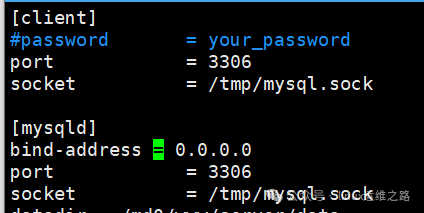
For example, in middleware configuration, the listening setting of “0.0.0.0” is also common. Taking MySQL as an example, its default listening address is “127.0.0.1:3306”, which means that only the local machine can connect to the MySQL service through port 3306. To allow other servers or clients to access the MySQL service remotely, the configuration file (usually my.cnf or my.ini) needs to be modified to set the “bind-address” parameter to “0.0.0.0”. When configured as “bind-address = 0.0.0.0”, the MySQL service will listen on port 3306 for all network interfaces on the local machine, allowing connections from all IP sources (it seems that the username also needs to be set to %?).
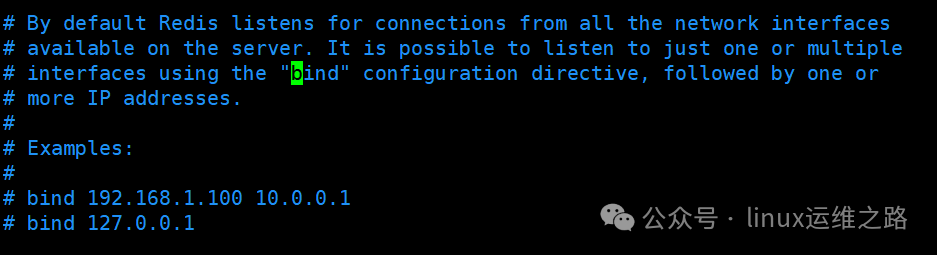
Similarly, in Redis middleware, by default, it only listens on “127.0.0.1:6379”. To allow Redis to accept connections from external sources, you need to find the “bind” configuration item in the redis.conf file and change it to “bind 0.0.0.0”. This way, Redis will listen on port 6379 for all IP addresses on the local machine, enabling remote access. However, when opening remote access for such middleware, it is important to avoid security risks. In previous work, we almost encountered a major incident because the message queue (MQ) had no login authentication mechanism and allowed access from all network segments.
In the routing table, “0.0.0.0” represents the default route, meaning that when the target IP address is not in the local routing table, packets will be forwarded according to the gateway pointed to by “0.0.0.0”. When viewing the routing table using the route -n or ip route command, you will typically see entries like “0.0.0.0 0.0.0.0 192.168.1.1”, where 192.168.1.1 is the default gateway. This mechanism is fundamental for servers to communicate with external networks (such as the internet); if the default route is configured incorrectly, the server will be unable to access external networks.
Additionally, in some network configuration files and commands, “0.0.0.0” is often used as a placeholder, indicating “any address” or “unspecified address”. For example, when setting firewall rules, if the source address is set to “0.0.0.0/0”, it means requests from any IP address are allowed; when binding network interfaces, if no specific IP is specified, the system may default to using “0.0.0.0” as a temporary identifier.
For Linux operations personnel, accurately understanding the meaning of “0.0.0.0” is fundamental for troubleshooting network issues, configuring service listening, and managing routing policies. In practical work, it is necessary to assess its role in specific scenarios: when a service cannot be accessed externally, check if the listening address has mistakenly been set to 127.0.0.1 instead of 0.0.0.0; when the server cannot access external networks, confirm whether the default route (the gateway corresponding to 0.0.0.0) is configured correctly; when setting network permissions, be cautious of the range represented by “0.0.0.0/0” to avoid excessive permission exposure leading to security risks.