(Click the public account above to quickly follow)
Source: Wu Qin
Link: http://www.cnblogs.com/skynet/archive/2010/12/12/1903949.html
“Everything is a Socket!”
This statement may be somewhat exaggerated, but the fact is that almost all network programming today uses sockets.
—— Reflections from practical programming and open-source project research.
We deeply understand the value of information exchange. How do processes communicate over the network? For example, when we open a browser to browse the web, how does the browser process communicate with the web server? When you chat on QQ, how does the QQ process communicate with the server or the QQ process of your friend? All of this relies on sockets. So what is a socket? What types of sockets are there? What are the basic functions of sockets? These are the topics this article aims to introduce. The main content of this article is as follows:
-
1. How do processes communicate over the network?
-
2. What is a Socket?
-
3. Basic operations of sockets
-
3.1. socket() function
-
3.2. bind() function
-
3.3. listen(), connect() functions
-
3.4. accept() function
-
3.5. read(), write() functions, etc.
-
3.6. close() function
-
4. Detailed explanation of the TCP three-way handshake for establishing a connection
-
5. Detailed explanation of the TCP four-way handshake for releasing a connection
-
6. An example (let’s practice)
-
7. A question left for everyone, welcome to reply!!!
1. How do processes communicate over the network?
There are many ways for local inter-process communication (IPC), but they can be summarized into the following four categories:
-
Message passing (pipes, FIFO, message queues)
-
Synchronization (mutexes, condition variables, read-write locks, file and write record locks, semaphores)
-
Shared memory (anonymous and named)
-
Remote procedure calls (Solaris doors and Sun RPC)
However, these are not the focus of this article! We want to discuss how processes communicate over the network. The primary issue to solve is how to uniquely identify a process; otherwise, communication cannot take place! Locally, a process can be uniquely identified by its PID, but this does not work over the network. In fact, the TCP/IP protocol suite has already solved this problem for us. The “IP address” at the network layer can uniquely identify a host on the network, while the “protocol + port” at the transport layer can uniquely identify an application (process) on that host. Thus, using the triplet (IP address, protocol, port), we can identify processes on the network, allowing them to communicate with other processes using this identifier.
Applications using the TCP/IP protocol typically employ the application programming interface: UNIX BSD sockets and UNIX System V TLI (which has been deprecated) to achieve communication between network processes. Currently, almost all applications use sockets, and since we are in the network age, inter-process communication over the network is ubiquitous, which is why I say “Everything is a socket.”
2. What is a Socket?
As we have learned, processes on the network communicate through sockets. So what is a socket? The socket originated in Unix, and one of the basic philosophies of Unix/Linux is “Everything is a file”; everything can be operated using the “open -> read/write -> close” model. My understanding is that a socket is an implementation of this model; a socket is a special type of file, and some socket functions are operations performed on it (read/write IO, open, close), which we will introduce later.
The origin of the term socket
The first use of the term in the networking field was found in the document IETF RFC33 published on February 12, 1970, written by Stephen Carr, Steve Crocker, and Vint Cerf. According to the Computer History Museum, Crocker wrote: “Elements of the namespace can be referred to as socket interfaces. A socket interface constitutes one end of a connection, and a connection can be completely specified by a pair of socket interfaces.” The Computer History Museum adds: “This predates the BSD socket interface definition by about 12 years.”
3. Basic operations of sockets
Since a socket is an implementation of the “open -> write/read -> close” model, it provides function interfaces corresponding to these operations. Below, we will introduce several basic socket interface functions using TCP as an example.
3.1. socket() function
int <strong>socket</strong>(intdomain,inttype,intprotocol);
The socket function corresponds to the open operation for a regular file. The open operation for a regular file returns a file descriptor, while socket() is used to create a socket descriptor (socket descriptor), which uniquely identifies a socket. This socket descriptor is used in subsequent operations, just like a file descriptor, and is passed as a parameter for read/write operations.
Just as different parameter values can be passed to fopen to open different files, different parameters can also be specified when creating a socket to create different socket descriptors. The three parameters of the socket function are:
-
domain: This is the protocol domain, also known as the protocol family. Common protocol families include AF_INET, AF_INET6, AF_LOCAL (or AF_UNIX, Unix domain socket), AF_ROUTE, etc. The protocol family determines the address type of the socket, and the corresponding address must be used in communication. For example, AF_INET determines that an IPv4 address (32 bits) and port number (16 bits) combination must be used, while AF_UNIX determines that an absolute pathname must be used as the address.
-
type: Specifies the socket type. Common socket types include SOCK_STREAM, SOCK_DGRAM, SOCK_RAW, SOCK_PACKET, SOCK_SEQPACKET, etc. (What types of sockets are there?).
-
protocol: As the name suggests, this specifies the protocol. Common protocols include IPPROTO_TCP, IPPROTO_UDP, IPPROTO_SCTP, IPPROTO_TIPC, etc., which correspond to the TCP transport protocol, UDP transport protocol, SCTP transport protocol, and TIPC transport protocol (which I will discuss in a separate article!).
Note: The type and protocol above cannot be combined arbitrarily; for example, SOCK_STREAM cannot be combined with IPPROTO_UDP. When the protocol is set to 0, the default protocol corresponding to the type is automatically selected.
When we call socket to create a socket, the returned socket descriptor exists in the protocol family (address family, AF_XXX) space but does not have a specific address. If we want to assign it an address, we must call the bind() function; otherwise, when calling connect() or listen(), the system will automatically assign a random port.
3.2. bind() function
As mentioned above, the bind() function assigns a specific address from an address family to the socket. For example, for AF_INET and AF_INET6, it assigns an IPv4 or IPv6 address and port number combination to the socket.
intbind(intsockfd,conststructsockaddr *addr,socklen_t addrlen);
The three parameters of the function are:
-
sockfd: This is the socket descriptor created by the socket() function, uniquely identifying a socket. The bind() function binds a name to this descriptor.
-
addr: A const struct sockaddr * pointer that points to the protocol address to be bound to sockfd. This address structure varies depending on the address protocol family used when creating the socket, such as for IPv4:
structsockaddr_in{
sa_family_t sin_family;/* address family: AF_INET */
in_port_t sin_port; /* port in network byte order */
structin_addr sin_addr; /* internet address */
};
/* Internet address. */
structin_addr{
uint32_t s_addr; /* address in network byte order */
};
For IPv6, it corresponds to:
structsockaddr_in6{
sa_family_t sin6_family; /* AF_INET6 */
in_port_t sin6_port; /* port number */
uint32_t sin6_flowinfo;/* IPv6 flow information */
structin6_addr sin6_addr; /* IPv6 address */
uint32_t sin6_scope_id;/* Scope ID (new in 2.4) */
};
structin6_addr{
unsignedchar s6_addr[16]; /* IPv6 address */
};
For Unix domain, it corresponds to:
#define UNIX_PATH_MAX 108
structsockaddr_un{
sa_family_t sun_family; /* AF_UNIX */
char sun_path[UNIX_PATH_MAX]; /* pathname */
};
-
addrlen: This corresponds to the length of the address.
Typically, a server binds a well-known address (such as an IP address + port number) when it starts, which is used to provide services, allowing clients to connect to the server through it. The client does not need to specify this; the system automatically assigns a port number and combines it with its own IP address. This is why the server usually calls bind() before listen(), while the client does not call it and instead has the system randomly generate one during connect().
Network byte order vs. host byte order
Host byte order refers to the big-endian and little-endian modes we commonly refer to: different CPUs have different byte order types, which refer to the order in which integers are stored in memory, known as host order. The standard definitions of Big-Endian and Little-Endian are as follows:
a) Little-Endian means that the low-order byte is stored at the low address end of memory, and the high-order byte is stored at the high address end of memory.
b) Big-Endian means that the high-order byte is stored at the low address end of memory, and the low-order byte is stored at the high address end of memory.
Network byte order: A 32-bit value of 4 bytes is transmitted in the following order: first 0-7 bits, then 8-15 bits, then 16-23 bits, and finally 24-31 bits. This transmission order is called big-endian byte order. Since all binary integers in the TCP/IP header must be transmitted in this order over the network, it is also known as network byte order. Byte order, as the name suggests, refers to the order of bytes, meaning that the storage order of data types larger than one byte in memory is what matters; a single byte does not have an order issue.
Therefore, when binding an address to a socket, please convert the host byte order to network byte order first, and do not assume that the host byte order is also using Big-Endian for network byte order. This issue has caused significant problems! In company project code, this issue led to many inexplicable problems, so please remember not to make any assumptions about the host byte order; always convert it to network byte order before assigning it to the socket.
3.3. listen(), connect() functions
If acting as a server, after calling socket() and bind(), the listen() function will be called to listen on this socket. If the client calls connect() at this time to send a connection request, the server will receive this request.
intlisten(intsockfd,intbacklog);
intconnect(intsockfd,conststructsockaddr *addr,socklen_t addrlen);
The first parameter of the listen function is the socket descriptor to be listened to, and the second parameter is the maximum number of connections that can be queued for the corresponding socket. The socket created by the socket() function is by default an active type, and the listen function changes the socket to a passive type, waiting for client connection requests.
The first parameter of the connect function is the client socket descriptor, the second parameter is the server socket address, and the third parameter is the length of the socket address. The client establishes a connection with the TCP server by calling the connect function.
3.4. accept() function
After the TCP server sequentially calls socket(), bind(), and listen(), it will listen on the specified socket address. The TCP client sequentially calls socket() and connect() and sends a connection request to the TCP server. After the TCP server detects this request, it will call the accept() function to accept the request, thus establishing the connection. After that, network I/O operations can begin, similar to reading and writing I/O operations for regular files.
intaccept(intsockfd,structsockaddr *addr,socklen_t *addrlen);
The first parameter of the accept function is the server socket descriptor, the second parameter is a pointer to struct sockaddr *, used to return the client’s protocol address, and the third parameter is the length of the protocol address. If accept is successful, its return value is a new descriptor automatically generated by the kernel, representing the TCP connection with the returned client.
Note: The first parameter of accept is the server socket descriptor, which is generated by the server calling the socket() function and is called the listening socket descriptor; the accept function returns the connected socket descriptor. A server typically creates only one listening socket descriptor, which exists throughout the server’s lifecycle. The kernel creates a connected socket descriptor for each client connection accepted by the server, and when the server completes its service for a client, the corresponding connected socket descriptor is closed.
3.5. read(), write() functions, etc.
Now that everything is in place, the server and client have established a connection. Network I/O operations can be called for read and write operations, achieving communication between different processes over the network! Network I/O operations include the following pairs:
-
read()/write()
-
recv()/send()
-
readv()/writev()
-
recvmsg()/sendmsg()
-
recvfrom()/sendto()
I recommend using the recvmsg()/sendmsg() functions, as these two functions are the most general I/O functions and can actually replace the other functions mentioned above. Their declarations are as follows:
#include <unistd.h>
ssize_t read(intfd,void *buf,size_t count);
ssize_t write(intfd,constvoid *buf,size_t count);
#include <sys/types.h>
#include <sys/socket.h>
ssize_t send(intsockfd,constvoid *buf,size_t len,intflags);
ssize_t recv(intsockfd,void *buf,size_t len,intflags);
ssize_t sendto(intsockfd,constvoid *buf,size_t len,intflags,
conststructsockaddr *dest_addr,socklen_t addrlen);
ssize_t recvfrom(intsockfd,void *buf,size_t len,intflags,
structsockaddr *src_addr,socklen_t *addrlen);
ssize_t sendmsg(intsockfd,conststructmsghdr *msg,intflags);
ssize_t recvmsg(intsockfd,structmsghdr *msg,intflags);
The read function is responsible for reading content from fd. When the read is successful, read returns the actual number of bytes read; if the returned value is 0, it indicates that the end of the file has been reached, and if it is less than 0, an error has occurred. If the error is EINTR, it indicates that the read was interrupted, and if it is ECONNRESET, it indicates a network connection issue.
The write function writes nbytes bytes of content from buf into the file descriptor fd. On success, it returns the number of bytes written. On failure, it returns -1 and sets the errno variable. In network programs, when we write to a socket file descriptor, there are two possibilities: 1) the return value of write is greater than 0, indicating that part or all of the data has been written; 2) the return value is less than 0, indicating an error. We need to handle the error based on its type. If the error is EINTR, it indicates an interruption error during writing. If it is EPIPE, it indicates a network connection issue (the other side has closed the connection).
I will not introduce each of these pairs of I/O functions in detail; please refer to the man documentation or search on Baidu or Google. The following example will use send/recv.
3.6. close() function
After establishing a connection between the server and client, some read and write operations will be performed. Once the read and write operations are completed, the corresponding socket descriptor must be closed, just as we call fclose to close an opened file.
#include <unistd.h>
intclose(intfd);
Closing a TCP socket marks it as closed and immediately returns to the calling process. This descriptor can no longer be used by the calling process, meaning it cannot be used as the first parameter for read or write.
Note: The close operation only decrements the reference count of the corresponding socket descriptor by 1; only when the reference count reaches 0 will it trigger the TCP client to send a termination request to the server.
4. Detailed explanation of the TCP three-way handshake for establishing a connection
We know that establishing a TCP connection requires a “three-way handshake,” which involves exchanging three packets. The general process is as follows:
-
The client sends a SYN J to the server.
-
The server responds to the client with a SYN K and acknowledges SYN J with ACK J+1.
-
The client then sends a confirmation ACK K+1 to the server.
Only after this is the three-way handshake complete, but which socket functions are involved in this three-way handshake? Please see the diagram below:
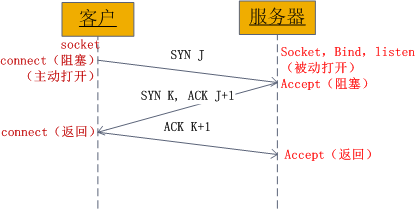
Figure 1: TCP three-way handshake sent in the socket
From the diagram, we can see that when the client calls connect, it triggers a connection request and sends a SYN J packet to the server, at which point connect enters a blocking state; the server, upon receiving the connection request (SYN J packet), calls the accept function to accept the request and sends a SYN K, ACK J+1 to the client, at which point accept enters a blocking state; after the client receives the server’s SYN K, ACK J+1, connect returns and acknowledges SYN K; when the server receives ACK K+1, accept returns, and thus the three-way handshake is complete and the connection is established.
Summary: The client’s connect returns on the second return of the three-way handshake, while the server’s accept returns on the third return of the three-way handshake.
5. Detailed explanation of the TCP four-way handshake for releasing a connection
Having introduced the TCP three-way handshake process for establishing a connection and the socket functions involved, we will now introduce the process of the four-way handshake for releasing a connection in sockets. Please see the diagram below:
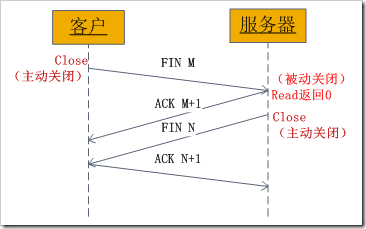
Figure 2: TCP four-way handshake sent in the socket
The process is as follows:
-
A certain application process first calls close to actively close the connection, at which point TCP sends a FIN M;
-
The other end receives FIN M and performs a passive close, acknowledging this FIN. Its reception is also passed to the application process as a file end marker, as receiving FIN means that the application process can no longer receive additional data on the corresponding connection;
-
After a while, the application process that received the file end marker calls close to close its socket. This causes its TCP to send a FIN N;
-
The source TCP that receives this FIN acknowledges it.
Thus, there is a FIN and ACK in each direction.
6. An example (let’s practice)
Having discussed so much, let’s practice. Below is a simple server and client (using TCP) — the server listens on port 6666 of the local machine, and if it receives a connection request, it will accept the request and receive messages sent by the client; the client establishes a connection with the server and sends a message.
Server code:
Server
#include<stdio.h>
#include<stdlib.h>
#include<string.h>
#include<errno.h>
#include<sys/types.h>
#include<sys/socket.h>
#include<netinet/in.h>
#define MAXLINE 4096
intmain(intargc,char** argv)
{
int listenfd,connfd;
structsockaddr_in servaddr;
char buff[4096];
int n;
if((listenfd = socket(AF_INET,SOCK_STREAM,0)) == –1){
printf(“create socket error: %s(errno: %d)
“,strerror(errno),errno);exit(0);
}
memset(&servaddr,0,sizeof(servaddr));
servaddr.sin_family = AF_INET;
servaddr.sin_addr.s_addr = htonl(INADDR_ANY);
servaddr.sin_port = htons(6666);
if(bind(listenfd,(structsockaddr*)&servaddr,sizeof(servaddr)) == –1){
printf(“bind socket error: %s(errno: %d)
“,strerror(errno),errno);exit(0);
}
if(listen(listenfd,10) == –1){
printf(“listen socket error: %s(errno: %d)
“,strerror(errno),errno);exit(0);
}
printf(“======waiting for client’s request======
“);while(1){
if((connfd = accept(listenfd,(structsockaddr*)NULL,NULL)) == –1){
printf(“accept socket error: %s(errno: %d)”,strerror(errno),errno);
continue;
}
n = recv(connfd,buff,MAXLINE,0);
buff[n] = ‘\0’;
printf(“recv msg from client: %s
“,buff);close(connfd);
}
close(listenfd);
}
Client code:
Client
Client
#include<stdio.h>
#include<stdlib.h>
#include<string.h>
#include<errno.h>
#include<sys/types.h>
#include<sys/socket.h>
#include<netinet/in.h>
#define MAXLINE 4096
intmain(intargc,char** argv)
{
int sockfd,n;
char recvline[4096],sendline[4096];
structsockaddr_in servaddr;
if(argc != 2){
printf(“usage: ./client <ipaddress>
“);exit(0);
}
if((sockfd = socket(AF_INET,SOCK_STREAM,0)) < 0){
printf(“create socket error: %s(errno: %d)
“,strerror(errno),errno);exit(0);
}
memset(&servaddr,0,sizeof(servaddr));
servaddr.sin_family = AF_INET;
servaddr.sin_port = htons(6666);
if(inet_pton(AF_INET,argv[1], &servaddr.sin_addr) <= 0){
printf(“inet_pton error for %s
“,argv[1]);exit(0);
}
if(connect(sockfd,(structsockaddr*)&servaddr,sizeof(servaddr)) < 0){
printf(“connect error: %s(errno: %d)
“,strerror(errno),errno);exit(0);
}
printf(“send msg to server:
“);fgets(sendline,4096,stdin);
if(send(sockfd,sendline,strlen(sendline),0) < 0)
{
printf(“send msg error: %s(errno: %d)
“,strerror(errno),errno);exit(0);
}
close(sockfd);
exit(0);
}
Of course, the above code is very simple and has many shortcomings; it is just a simple demonstration of the basic functions of sockets. In fact, no matter how complex a network program is, it uses these basic functions. The above server uses an iterative model, meaning it can only handle one client request at a time before moving on to the next; this limits the server’s processing capability. In reality, servers need to have concurrent processing capabilities! To achieve concurrent processing, the server needs to fork() a new process or thread to handle requests, etc.
7. Get Hands-On
Here’s a question for everyone, welcome to reply!!! Are you familiar with network programming under Linux? If so, write a program to achieve the following functionality:
Server:
Receive client information from address 192.168.100.2; if the information is “Client Query”, print “Receive Query”.
Client:
Send the messages “Client Query test”, “Client Query”, and “Client Query Quit” in order to the server at address 192.168.100.168, then exit.
The IP addresses mentioned in the question can be set according to the actual situation.
—— This article only introduces simple socket programming.
More complex topics require further exploration.
[Today’s recommended WeChat public account↓]

For more recommendations, see“Public Accounts Worth Following”.
Among them, recommendations include popular public accounts related to technology, design, geeks, and IT matchmaking. Technology covers: Python, Web front-end, Java, Android, iOS, PHP, C/C++, .NET, Linux, databases, operations, big data, algorithms, IT careers, etc. Click on “Public Accounts Worth Following” to discover exciting content!