Recently, I spoke with two users of Xinchang computers, one being a Lenovo computer and the other an Qinyun computer.
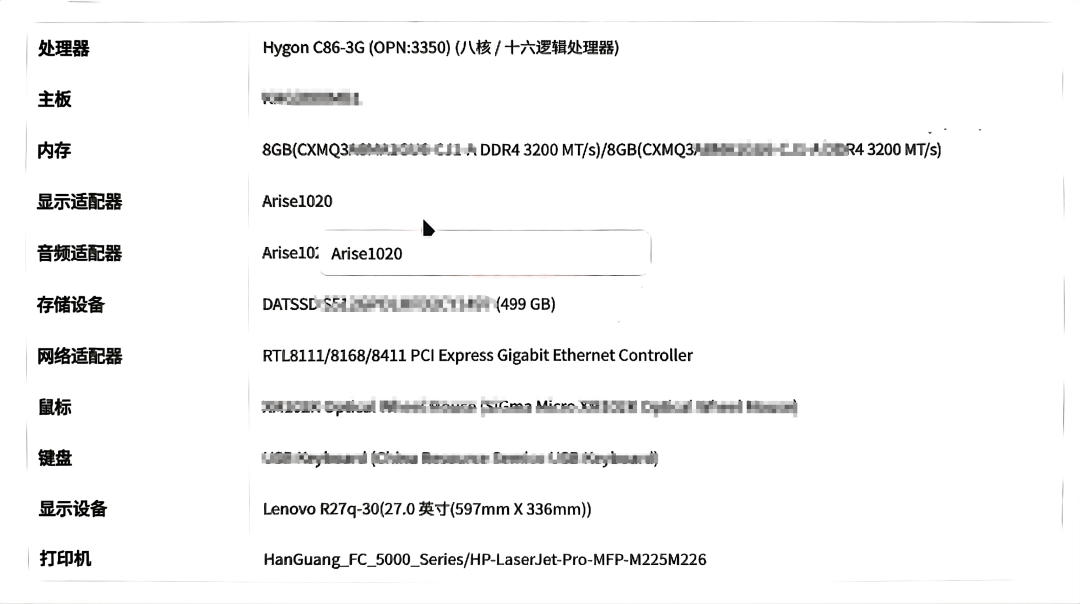
The Lenovo computer has a Haiguang 3350 CPU, and the user is a male with a regular undergraduate degree and DIY experience.
The Qinyun computer has a Kirin 9000C CPU, and the user is a female with a 985 master’s degree, who is a novice with computers.
The screenshot parameters of the Lenovo computer are quite comprehensive.
The CPU is Haiguang 3350, with 8 and 16 threads, a 14nm process, and a main frequency of 3GHz. This performance is considered top-tier in the Xinchang market.
The GPU is a Glenfi, which essentially serves as a basic display card.
The memory is Changxin 2*8G DDR4 3200, which is standard.
The hard drive is a Datang 500G SSD, with unknown NAND and controller suppliers.
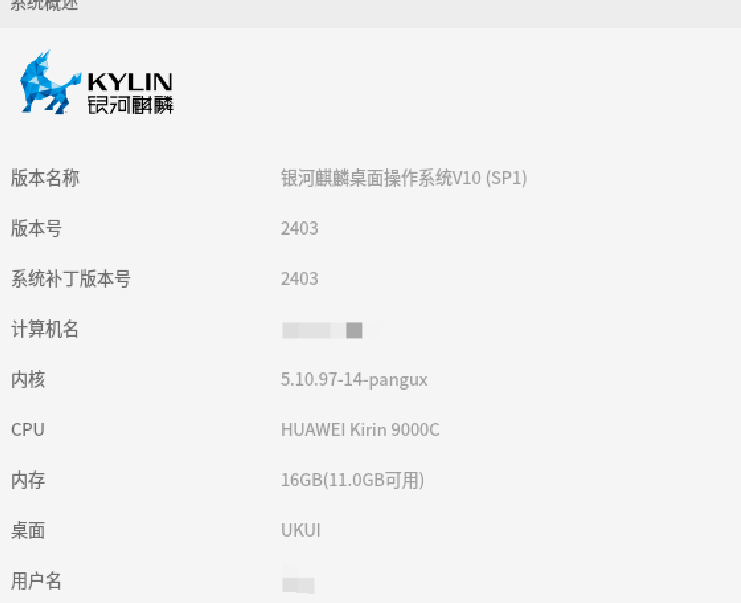
The screenshot information of the Qinyun computer is much less.
The CPU is Kirin 9000C, which is essentially a Kirin 9000S with the baseband disabled, using a mobile chip as a computer chip, with a main frequency of 2.3GHz.
Geekbench official test results indicate that under Windows, running GB6, the Snapdragon X Elite has single-core performance over three times that of Kirin 9000C, and multi-core performance over six times that of 9000C.
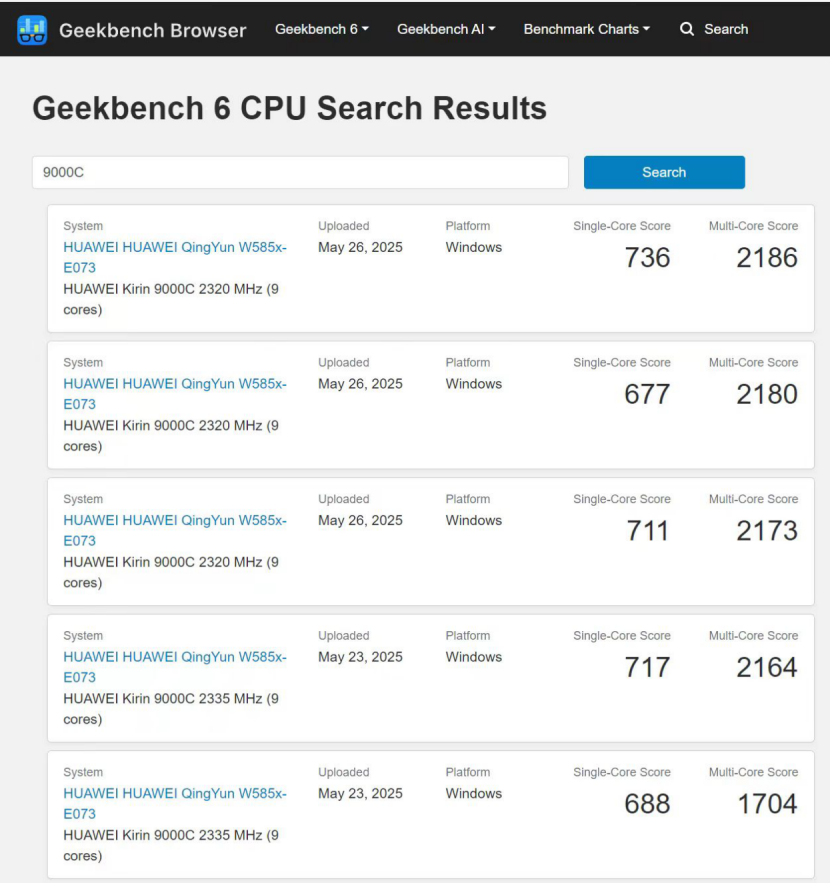
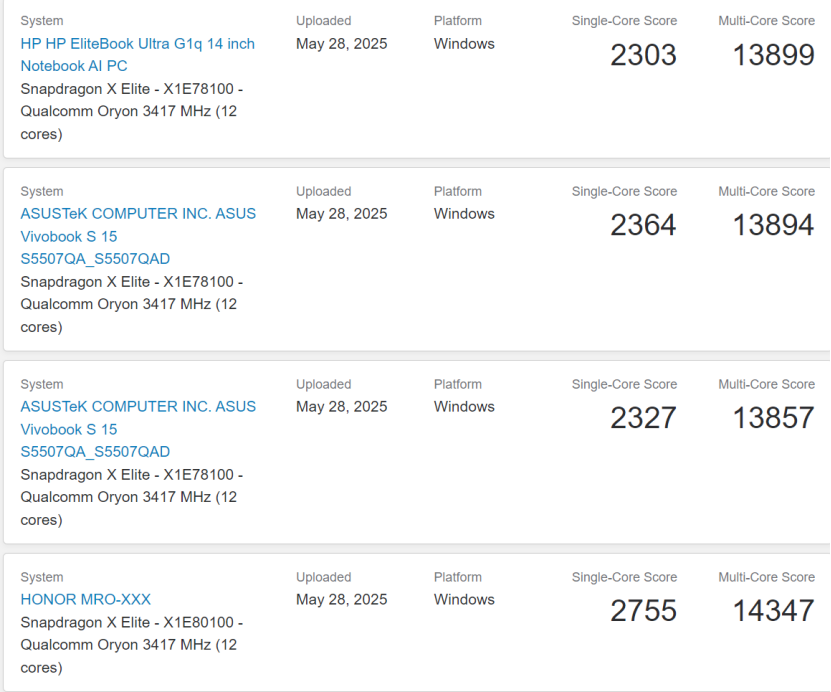
Even in the Xinchang market, within the ARM CPU camp, the single-core performance of Kirin 9000C is comparable to that of Feiteng D3000, while its multi-core performance is inferior to D3000.
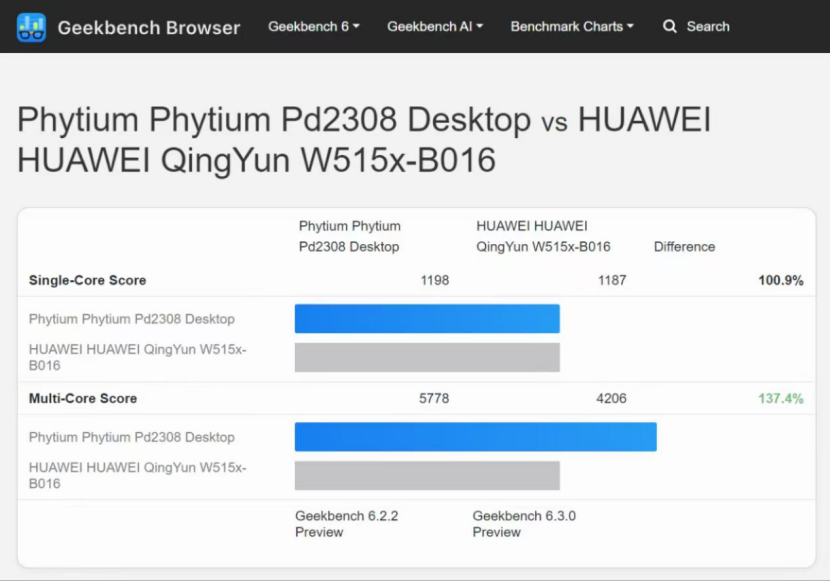
The GPU is integrated graphics, essentially a basic display card, and cannot be compared to a true desktop-level high-performance discrete graphics card.
The memory is 16G, manufacturer unknown, and the hard drive information is not displayed.
The operating system is Kirin.
The male user has a very positive evaluation of the Haiguang computer.
The male user originally used a Great Wall computer with a D2000 CPU, 8G memory, and a 256G hard drive. He rated the Great Wall computer and D2000 as average, feeling that using such a computer for work was exhausting.
Due to computer damage, the repair costs were too high, making it not worth repairing.
Thus, he switched to the Haiguang computer.
His daily operations include WPS, OA, OFD, and browsers. He reported that the Haiguang 3350 has excessive real performance, is very easy to use, and the new computer visibly improves the smoothness and speed of various office platforms and management systems, significantly enhancing work efficiency, making computer use less stressful than before.
The female user has an average evaluation of the Qinyun computer.
The user originally had a Wintel computer and found it difficult to adapt after switching to a domestic computer, constantly complaining about the poor usability of the domestic computer.
Tie Liu explained to her that not all domestic computers are bad, but this particular model is not good, suggesting she try Longxin and Haiguang computers next time.
The first issue reported by the female user is lag; the computer lags when opening more than ten windows.
The second issue is that software stability and compatibility are average. WPS unexpectedly crashes, and sometimes the system freezes. After several instances of forgetting to save before a crash, she has developed a habit of frequently saving manually. Documents and spreadsheets sent from external units often display garbled text.
The third issue is that the software features are limited. The functionality of WeChat and Zhejiang Zheng Ding is significantly inferior to that on Windows.
In fact, the sample of users discussed is not limited to just these two cases, but these two are relatively representative.
The user unit has purchased a batch of ARM laptops, and the feedback was also poor. Switching from ARM PCs to Haiguang, the operation and maintenance team noted that installing application software was significantly faster than before, and users reported a noticeably better experience.
However, the grassroots departments do not have procurement decision-making power; all purchases are centralized by higher-level units and distributed to lower-level units, making it difficult for feedback from lower-level units to reach decision-makers.
Even if real feedback is transmitted upwards, it ultimately may not make a difference.
Tie Liu has experience with FT2000/4, D2000, D3000, Longxin 5000, Longxin 6000, KX6000G, Kirin 9006C, Kirin 9000C, Haiguang No. 2, Haiguang No. 3, and other CPUs.
The issues reported by the female user, such as WPS crashing unexpectedly and limited functionality of WeChat and Zhejiang Zheng Ding, are problems that were also encountered years ago when using ARM PCs.
The optimization of various platforms and systems in institutional units is very poor, and one should not have any expectations. When using ARM PCs in the past, the mouse would feel like it was wandering in a dream when logging into certain systems.
Later, when the computer was switched to Haiguang, the user experience improved significantly, and many frustrating issues were greatly reduced.
Among the CPUs used, Haiguang and Longxin 6000 provide the best overall experience, and Tie Liu highly recommends them.
Tie Liu’s view is that for stability and cost-effectiveness, one should use Haiguang computers; if security and cost-effectiveness are a high priority, then Longxin computers should be used.
In fact, the current software ecosystem of Xinchang computers is sufficient for light office work within institutions, as the commonly used software is quite limited.
Discussing the ecosystem without considering application scenarios is meaningless. For institutional users, the usual software is just WPS, browsers, OA, OFD, and a few specific software for certain lines or positions. As long as these software are user-friendly, that is enough.
Good CPU performance, smooth operation, no lag when opening multiple applications, and a mouse that does not stutter or drift when logging into management platforms and systems, files and spreadsheets that do not display garbled text, and the ability to open CEB and PDF files instantly, and smoothly process OA files in bulk, can greatly enhance user experience.
Finally, let’s talk about peripherals.
Peripheral support is also crucial; not being able to connect to old printers, scanners, and other devices can be very time-consuming.
The male user’s unit switched early; when they replaced their Great Wall computer a few years ago, they did not include a printer.
The consumables and parts for Xinchang printers are significantly more expensive than those for old printers, and not just by a little. The ink for old HP printers can be completely replaced with third-party compatible products at a very low cost.
In a financially tight situation, and with higher-level requirements for frugality, reusing old printers has become inevitable.
Thus, this male user connected an old printer that a colleague had replaced to the Haiguang computer, and it worked; not only could it connect to the old HP printer, but also to the Hanguang printer.
The female user’s unit replaced their equipment later, and the old printer could not connect to the Qinyun computer, so they had to place an old computer in the office specifically to connect to the printer, making printing documents very inconvenient.
Since all Wintel computers need to be replaced, they can only hope that there will be support for old printer drivers before the old computers are phased out.
Overall, user feedback indicates that Haiguang computers have better overall performance, more stable software, greater peripheral support, and a better user experience.