I know this sounds crazy.
Instead of using the hundreds of well-crafted community nodes, I stubbornly focus on the most primitive and seemingly “difficult to use” HTTP Request node. My friends say I’m self-torturing, and my colleagues think I’m just showing off.
But when I accomplished a task with one node that others needed ten plugins to achieve, they fell silent.
This isn’t about showing off; it’s my awakening from being a “tool slave” to an “efficiency master.” If you’re also tired of searching for nodes, waiting for updates, and hitting walls, this article will completely change your automation life.

“Node Minimalism”: From Dependency to Freedom
Do you remember the excitement of opening n8n for the first time? Hundreds of nodes laid out like building blocks, allowing automation with just drag and drop. I was like a greedy child, frantically collecting various community nodes—Feishu, Notion, various databases… I wanted to bring all community nodes home.
Then reality slapped me hard. One time, my boss suddenly asked me to integrate a niche industry-specific SaaS. I searched the entire community and found no ready-made nodes. I found a “similar” one, but the API version was wrong, and errors flooded the screen. The most desperate part was that I knew this SaaS had an open API, and the documentation was right in front of me, yet I was helpless because there was no “node”.
At that moment, I suddenly realized: I wasn’t using the tools; I was being used by them.
Even more frustrating experiences followed:
- • A workflow I painstakingly built collapsed completely because the node author abandoned it.
- • The API supports batch operations, but the node can only handle one at a time, making it incredibly inefficient.
- • Encountering bugs meant waiting in agony on GitHub, with no response from the author in sight.
After hitting a few walls, I suddenly woke up:Relying on community nodes essentially hands over the stability and scalability of workflows to others.
And the HTTP Request node is what gives that control back to you. It communicates directly with the service’s API, with no middleman. As long as the other party provides an API, you can connect. This is the “first principle” of automated workflows. Community nodes are the fish given to you by others, while HTTP Request is the fishing boat you build yourself.

Why Community Nodes are a “Sweet Trap”
Don’t get me wrong; I’m not denying the value of community nodes. They are like automatic cars, allowing more people to get on the road. But if you want to be a race car driver, you must learn to drive a manual.
Let me use a painful comparison to tear away this gentle veil:
| Dimension | HTTP Request Node | Community Node |
|---|---|---|
| Capability Boundary | Unlimited possibilities; your strength matches the API’s strength | You can only use what the author has implemented |
| Update Speed | Real-time synchronization; official API updates are immediately available | Waiting for a savior, which may never come |
| Debugging Capability | Completely transparent; every parameter is under your control | Black box operation; errors can only be guessed |
| Learning Cost | One-time investment, lifelong benefits | Every time you switch services, you have to relearn the interface |
| Career Development | Mastering underlying capabilities makes you an expert anywhere | Relying on specific tools means you’re useless on a different platform |
| Psychological State | Proactively in control; can solve problems independently | Passively waiting; praying someone can help you |
| Security Risk | Direct connection, no middleman, lower risk | No one knows who is who |
The most painful part is: When you get used to the “convenience” of community nodes, you gradually lose the ability to solve problems. When faced with slightly more complex requirements, your first reaction is not “How should I implement this?” but “Is there a ready-made node?”
This mindset will keep you forever at the level of a beginner.

5-Minute Crash Course: Make HTTP Your Native Language
Many people feel overwhelmed when they hear HTTP. In fact, it’s much simpler than you think. Let me use a metaphor you can definitely understand:
HTTP is the “delivery system” of the internet world.
Imagine you want to send something to a friend:
1. URL (Delivery Address) is where you want to send it. For example:<span>https://api.openai.com/v1/chat/completions</span> is like writing: ChatGPT, XX Building, Chaoyang District, Beijing.

2. Method (Delivery Type)
- •
<span>GET</span>: Show me (retrieve data) - •
<span>POST</span>: Here’s something new (create data) - •
<span>PUT</span>/<span>PATCH</span>: Modify something old (update data) - •
<span>DELETE</span>: Remove this item (delete data) - •
<span>DELETE</span>= Return (send this item back)
3. Headers (Delivery Slip) contain various information, the most important being:
- •
<span>Authorization</span>= your identification (API Key is written here) - •
<span>Content-Type</span>= what’s inside the package (usually application/json)
4. Query Parameters (Address Notes) are like adding “turn left at the house number” to the address. Adding <span>?q=n8n&limit=10</span> to the URL means “I want n8n-related results, just give me 10.”
5. Body (Package Contents) is what you actually want to send. Usually in JSON format, like this:
{
  "message": "Hello, API!",
  "user": "Xiao Ming"
}
6. Ultimate Trick: One-Click cURL Import Many API documents will give you a cURL command that looks like a foreign language:
curl -X POST https://api.example.com/data \
  -H "Authorization: Bearer YOUR_KEY" \
  -d '{"name":"test"}'
Don’t panic! Just copy it, go to the HTTP Request node in n8n, click “Import cURL,” and paste it in. All configurations will be filled automatically, more accurately than if you filled them in manually!
Practical Exercise: Integrate Brave Search in 3 Minutes (Faster than Google)
Talking about it is shallow; let’s do a real case to enlighten you. We will use the Brave Search API because it’s free, powerful, and has no restrictions.
30 Seconds of Preparation:
- 1. Visit Brave Search API (https://brave.com/search/api/)
- 2. Register an account and get an API Key (a string of impressive characters)
- 3. Keep this Key safe; it’s your “pass”
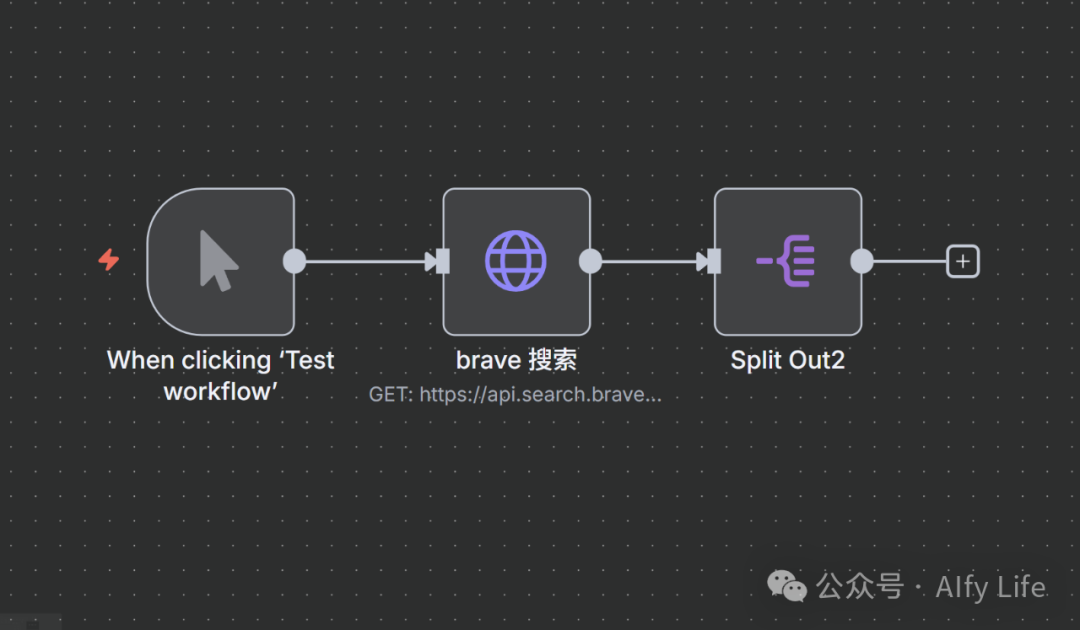
2 Minutes of Configuration:
Open n8n and drag in an HTTP Request node:
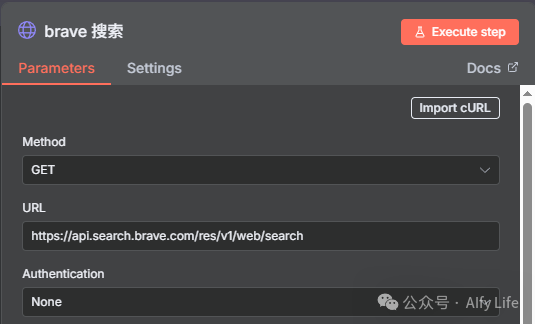
- 1. Method: Select
<span>GET</span>(we want to retrieve search results) - 2. URL: Paste
<span>https://api.search.brave.com/res/v1/web/search</span> - 3. Authentication: Select
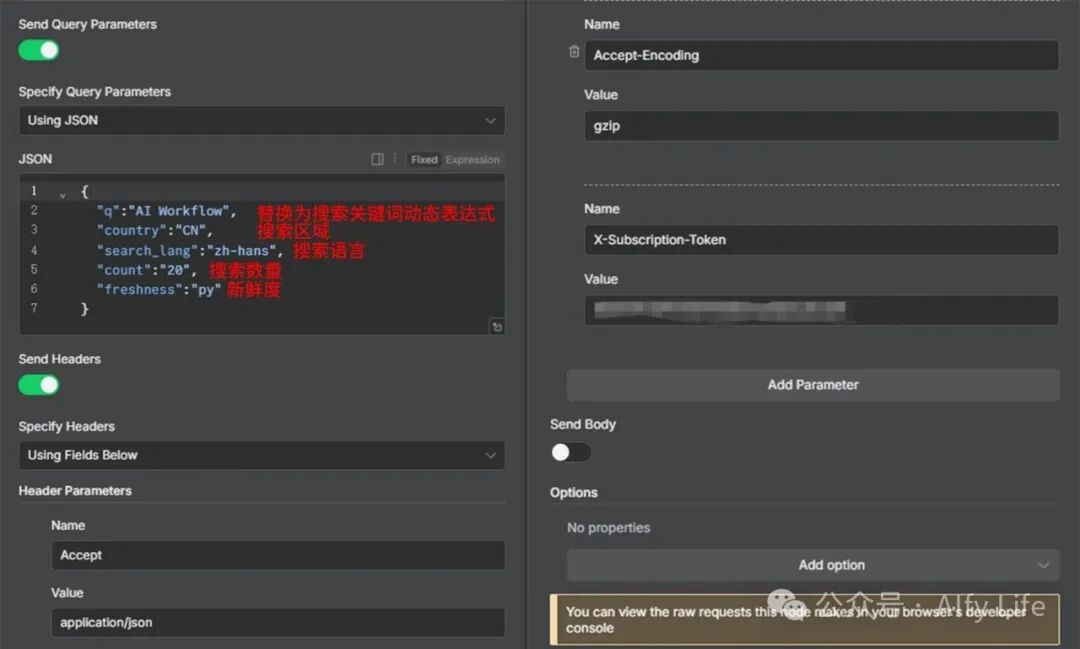
<span>Header Auth</span>or none, set in `Header Parameters` - • Name:
<span>X-Subscription-Token</span>(Brave’s special requirement)
- • Value: Paste your API Key
- 4. Query Parameters:
- • Name:
<span>q</span> - • Value:
<span>{{ "n8n automation" }}</span>(or anything you want to search)
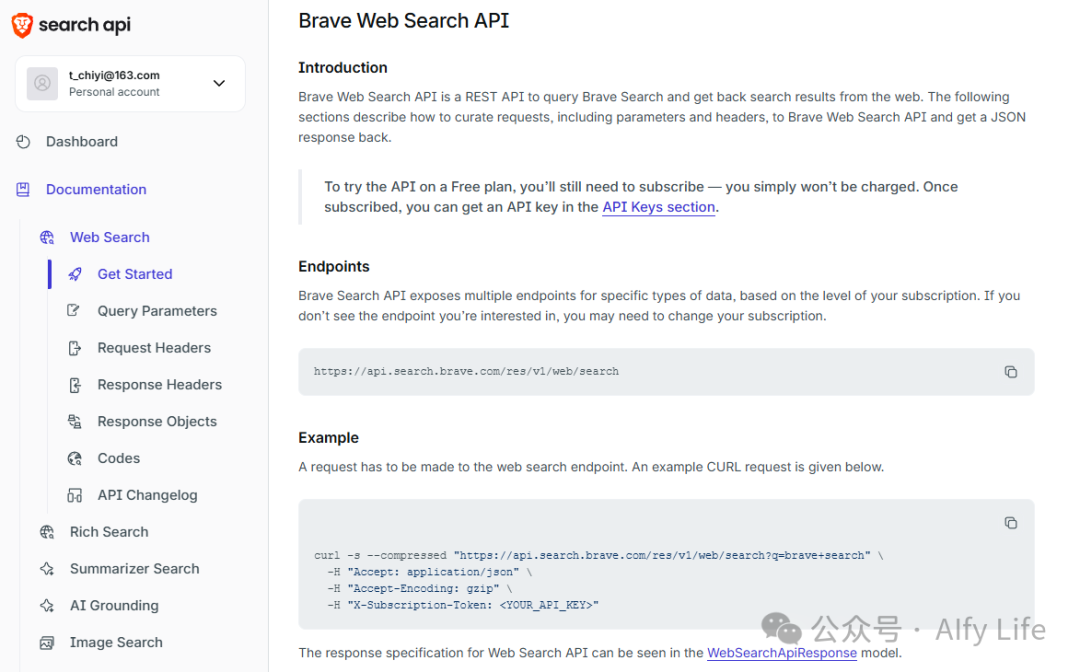
Brave API configuration parameters can be found at (https://api-dashboard.search.brave.com/app/documentation/web-search/query)
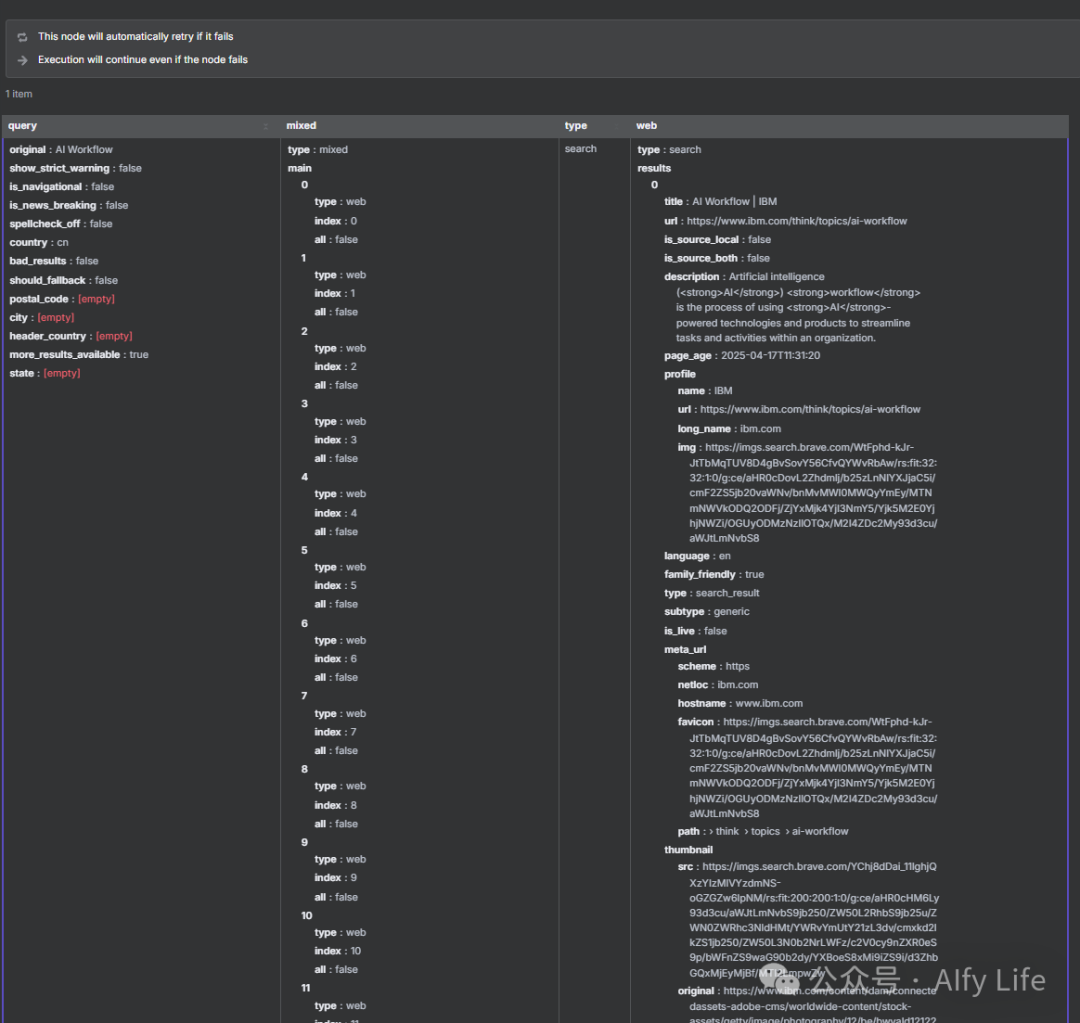
30 Seconds to Witness the Miracle: Click “Execute Node,” boom! The JSON data of the search results instantly appears on the right. Titles, links, summaries, everything you need.
Other case references:n8n Evil Guide: Three Steps to Open Coze’s Corner and Make Its Advantages Your Convenience
Congratulations, you now understand APIs better than 80% of n8n users.
Advanced Techniques: Three Tricks That Will Make Others Call You an Expert
Now that you have the basics down, it’s time to show off. These techniques are my prized secrets.
Trick One: Bulk Download Tool
Boss: “Download all 100 PDFs.” Ordinary person: Click one by one until their fingers cramp.You: Write a loop, combined with HTTP Request.
In the node’s <span>Add Option</span>, change <span>Response Format</span> to <span>File</span>. When the URL is a file link, it automatically downloads as binary data. Combined with the Loop node, 100 files? Done in 5 minutes.
Trick Two: API Relay Race
Real scenarios often require multiple API calls. For example:
- 1. Query user ID with email
- 2. Query user details with ID
- 3. Generate report with details
Ordinary person: Copy and paste parameters everywhere.You: <span>{{ $node["Node Name"].json.userId }}</span>, elegantly passing data between nodes.
Each HTTP node’s output can become the input for the next node. Like a relay race, data flows between APIs, ultimately forming the result you want.

Trick Three: A Workflow That Never Crashes
APIs are often unstable. Network fluctuations, rate limits, server maintenance… Ordinary workflows crash when they encounter errors.
Experts do it this way:
- 1. In
<span>Add Option</span>, check<span>Never Error</span> - 2. Follow up with an IF node to check
<span>{{ $node["HTTP Request"].responseCode }}</span> - 3. If it’s not 200, enter the retry branch (Set node delay + loop)
This way, even if the API occasionally acts up, your workflow can automatically retry until it succeeds.This is the difference between a professional and an amateur.
Exclusive Resources: My API Treasure Map
To do a good job, one must first sharpen their tools. Here are the APIs I have accumulated over the years, and today I’m sharing them all with you:
- • Tianju Shuhang: Large data volume, wide coverage, suitable for enterprise applications.
- • istero: Mostly free APIs, very suitable for individual developers and enthusiasts to explore.
- • xzdx.top: An API navigation site to help you discover more interesting APIs.
- • Aggregation Data: A well-established API platform, stable and reliable, with rich interfaces.
Hidden Treasures: Open Platforms of Major Companies
- • WeChat, Alipay, Douyin… all have open APIs
- • Usually have free quotas, enough for personal use for a long time
- • Key point: Carefully read the documentation; many features are hidden deep
Ultimate Tip: When you encounter a website/app you like, directly search for “XXX API” or “XXX Open Platform.” You will be surprised to find that almost everything in this world has an API.
What You Gain is Not Just a Skill, But Freedom
Today, we completed a mental upgrade together.
From relying on ready-made nodes to mastering the essence of HTTP; from passive waiting to proactive creation. This is not just a technical advancement, but a shift in mindset.
When you truly understand HTTP Request, you will find:What you gain is the freedom to connect everything.
P.S. If this article helped you, don’t hesitate to give it a thumbs up & a little red heart, so more people can master the universal connector HTTP Request.
n8n Evil Guide Transporter:
n8n Evil Guide: The Gap Between Beginners and Experts is Just This Dynamic Expression Pitfall Guide
n8n Evil Guide: 90% of People Are Wrong! Stop Using Chat Thinking, Design AI Workflow
n8n Evil Guide: Public Network “Running Naked” Equals Handing Over Your Head, Please Immediately Add Free Ultimate Protection!
n8n Evil Guide: No-Code Mastery of Data Flow, Three Moves to Solve 99% of Problems!
n8n Evil Guide: Three Steps to Open Coze’s Corner and Make Its Advantages Your Convenience