1. Overview of Computer Networks
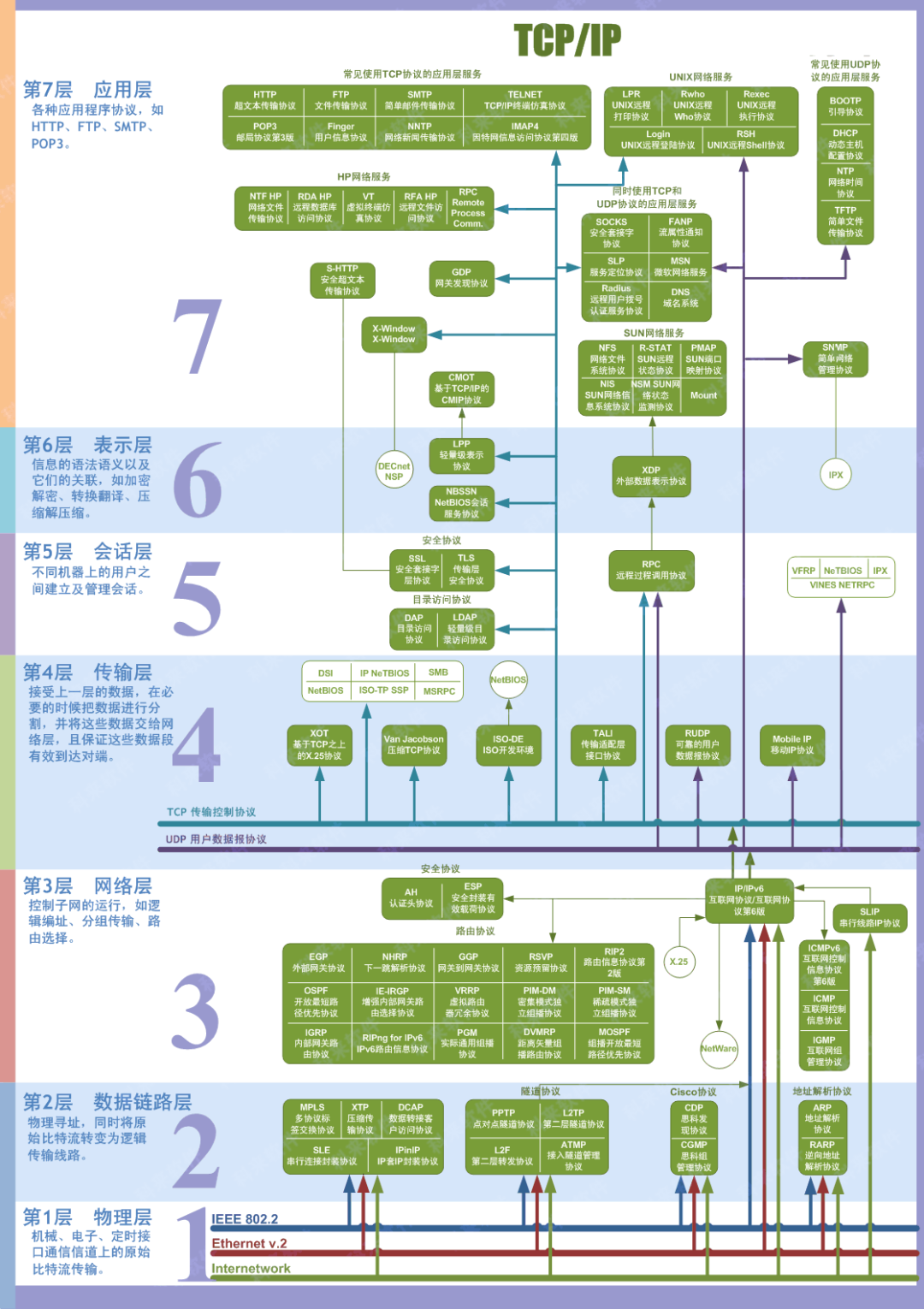
1.1 Classification of Computer Networks
Based on the scope of the network: Wide Area Network (WAN), Metropolitan Area Network (MAN), Local Area Network (LAN);
Based on the users of the network: Public networks, Private networks.
1.2 Hierarchical Structure of Computer Networks
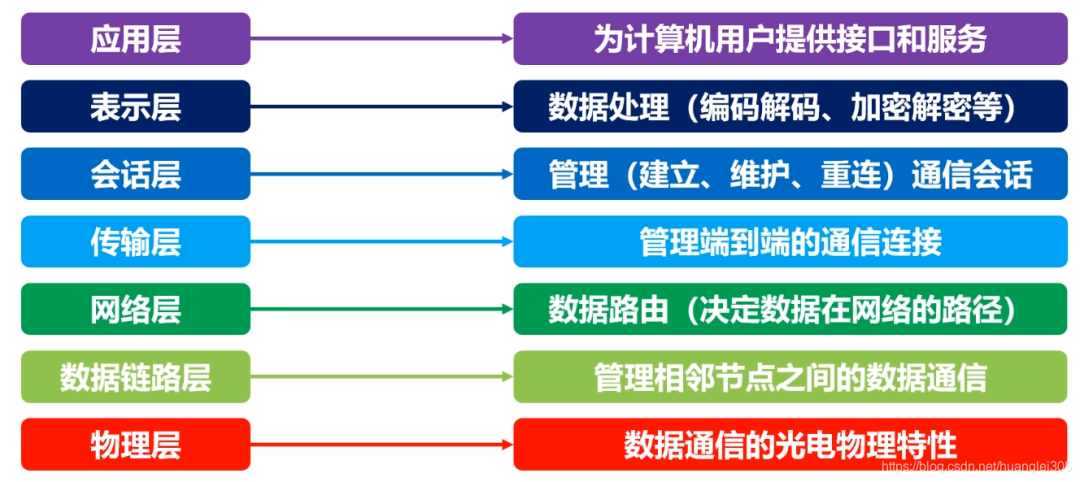
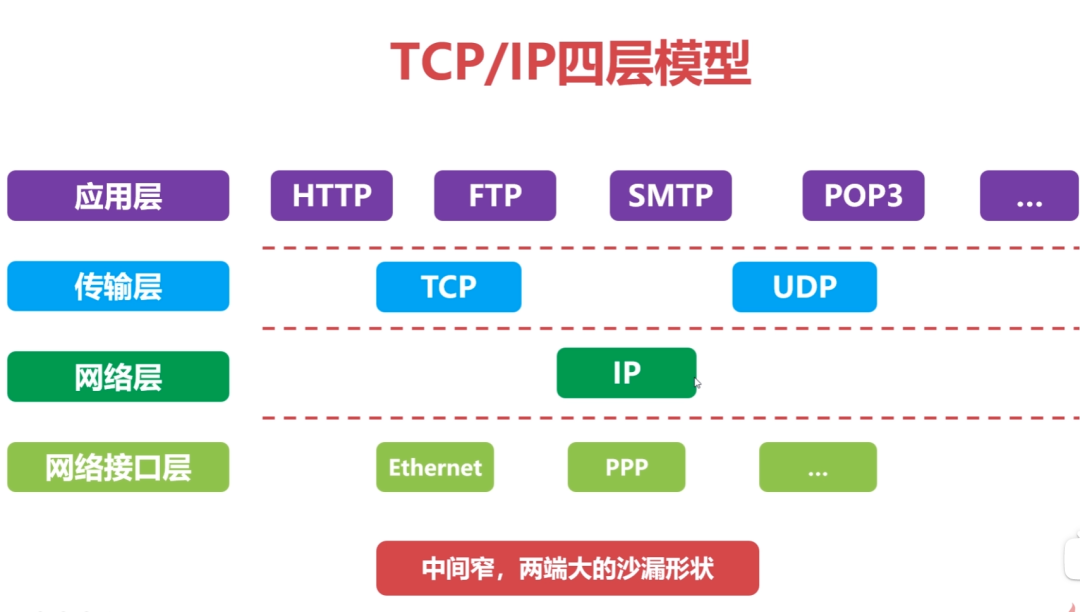
Comparison of the TCP/IP four-layer model and the OSI architecture:
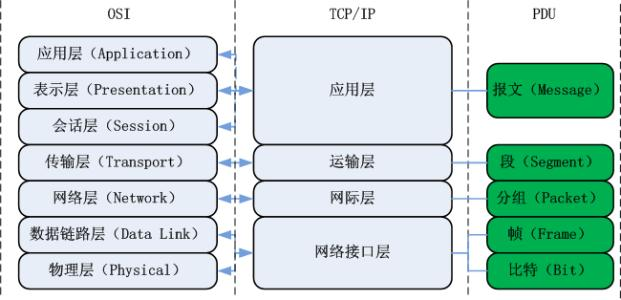
1.3 Basic Principles of Hierarchical Design
-
Each layer is independent of each other;
-
Each layer needs to have sufficient flexibility;
-
Complete decoupling between layers.
1.4 Performance Metrics of Computer Networks
Rate: bps = bit/s; Delay: transmission delay, propagation delay, queuing delay, processing delay; Round Trip Time (RTT): the time taken for a data packet to travel from end to end.
2. Physical Layer
The role of the physical layer: to connect different physical devices and transmit bit streams. This layer provides a reliable physical medium for data transmission to upper-layer protocols. In simple terms, the physical layer ensures that raw data can be transmitted over various physical media.
Physical layer devices:
-
Repeater: regenerates signals within the same local area network; both ends of the segment must use the same protocol; 5-4-3 rule: in a 10BASE-5 Ethernet, a maximum of 4 repeaters can be cascaded, and only 3 segments can connect to hosts;
-
Hub: regenerates and amplifies signals within the same local area network (a multi-port repeater); half-duplex, cannot isolate collision domains or broadcast domains.
Basic concept of a channel: A channel is a medium for transmitting information in one direction. A communication circuit includes a sending channel and a receiving channel.
-
Simplex communication channel: can only communicate in one direction, with no feedback in the opposite direction;
-
Half-duplex communication channel: both parties can send and receive information, but cannot send and receive simultaneously;
-
Full-duplex communication channel: both parties can send and receive simultaneously.
3. Data Link Layer
3.1 Overview of the Data Link Layer
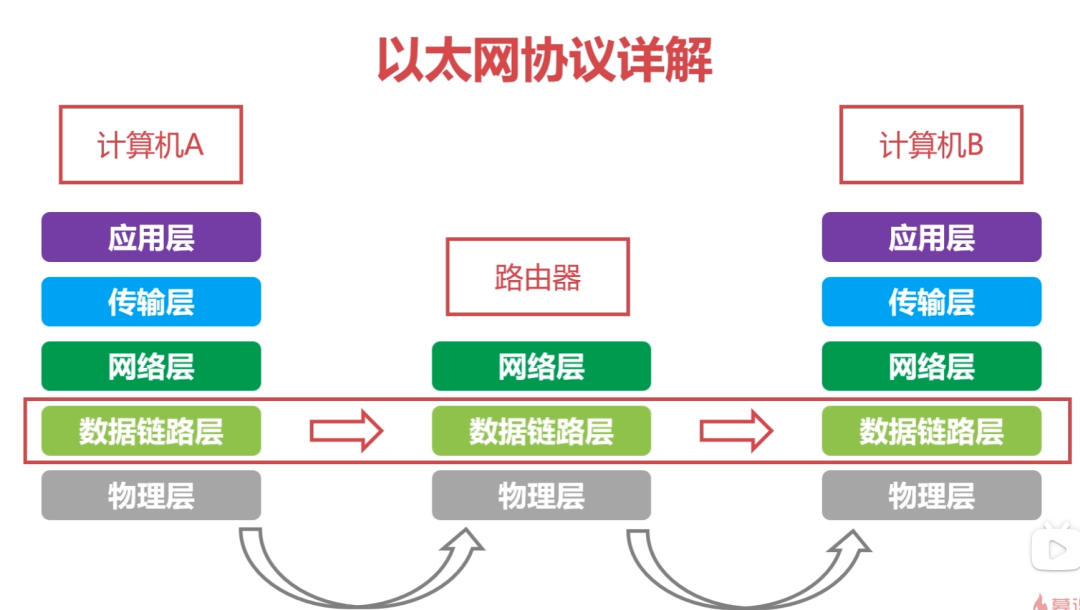
The data link layer provides services to the network layer based on the services provided by the physical layer, with the fundamental service being the reliable transmission of data originating from the network layer to the target machine’s network layer at adjacent nodes. The data link layer provides reliable transmission over unreliable physical media.
The functions of this layer include: physical addressing, framing of data, flow control, error detection, retransmission, etc.
Important knowledge points about the data link layer:
-
The data link layer provides reliable data transmission for the network layer;
-
The basic data unit is a frame;
-
Main protocols: Ethernet protocol;
-
Two important device names: Bridge and Switch.
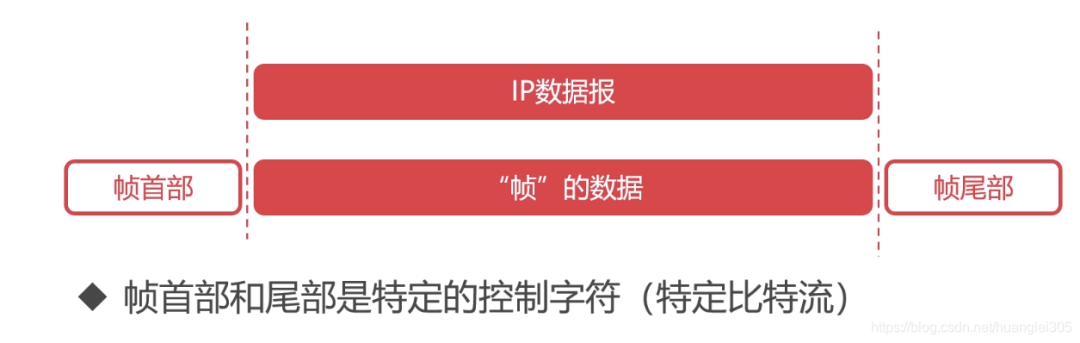
Framing: A “frame” is the basic unit of data in the data link layer:
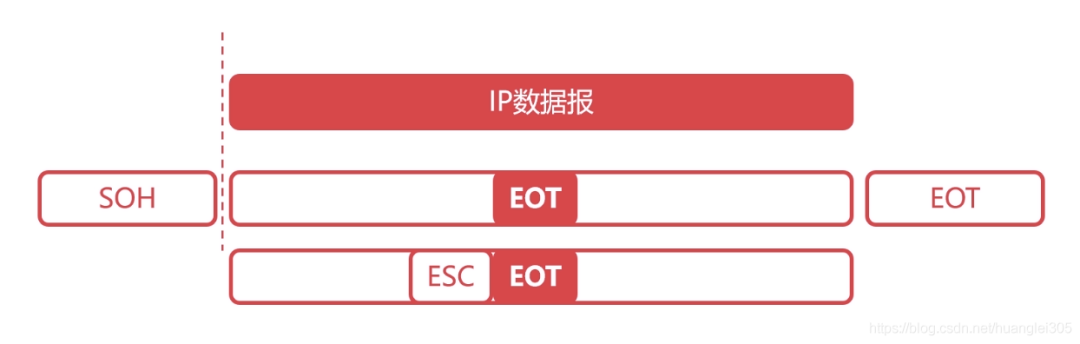
Transparent transmission: “Transparent” means that even if control characters are present in the frame data, they should be treated as if they do not exist. This means adding an escape character ESC before the control character.
3.2 Error Detection in the Data Link Layer
Error detection: Parity check, Cyclic Redundancy Check (CRC)
-
Parity check – limitations: cannot detect errors when two bits are incorrect.
-
Cyclic Redundancy Check: generates a fixed-length checksum based on the data being transmitted or stored.
3.3 Maximum Transmission Unit (MTU)
The Maximum Transmission Unit (MTU) refers to the limit on the size of data frames in the data link layer.
Path MTU: determined by the minimum MTU in the links.
3.4 Detailed Explanation of Ethernet Protocol
MAC address: Each device has a unique MAC address, which is 48 bits long and represented in hexadecimal.
The Ethernet protocol is a widely used LAN technology, an application layer protocol used for data link layer frame transmission between adjacent devices:

Classification of Local Area Networks:
Ethernet IEEE802.3:
-
The first widely deployed high-speed LAN
-
Fast data rate
-
Low hardware cost, low network construction cost
Ethernet Frame Structure:
-
Type: identifies the upper-layer protocol (2 bytes)
-
Destination and Source Address: MAC address (6 bytes each)
-
Data: encapsulated upper-layer protocol packets (46-1500 bytes)
-
CRC: Cyclic Redundancy Code (4 bytes)
-
Minimum Ethernet frame: the shortest Ethernet frame is 64 bytes; excluding the data part of 18 bytes; the shortest data is 46 bytes;
MAC Address (Physical Address, Local Area Network Address)
-
MAC address length is 6 bytes, 48 bits;
-
MAC addresses are unique, with each network adapter corresponding to one MAC address;
-
Usually represented in hexadecimal notation, with each byte represented as a hexadecimal number, connected by – or :;
-
MAC broadcast address: FF-FF-FF-FF-FF-FF.
4. Network Layer
The purpose of the network layer is to achieve transparent data transfer between two end systems, with specific functions including addressing, routing, connection establishment, maintenance, and termination. Data exchange technology is based on message switching (essentially replaced by packet switching): it employs a store-and-forward method, with the data exchange unit being a message.
The network layer involves many protocols, including the most important protocol, which is the core protocol of TCP/IP – the IP protocol. The IP protocol is very simple, providing only unreliable, connectionless transfer services. Its main functions include: connectionless datagram transmission, datagram routing, and error control.
Protocols that work with the IP protocol to achieve its functions include the Address Resolution Protocol (ARP), Reverse Address Resolution Protocol (RARP), Internet Control Message Protocol (ICMP), and Internet Group Management Protocol (IGMP). Key points about the network layer include:
1. The network layer is responsible for routing data packets between subnets. Additionally, the network layer can implement congestion control, inter-network interconnection, etc.; 2. The basic data unit is an IP datagram; 3. Main protocols:
-
IP protocol (Internet Protocol);
-
ICMP protocol (Internet Control Message Protocol);
-
ARP protocol (Address Resolution Protocol);
-
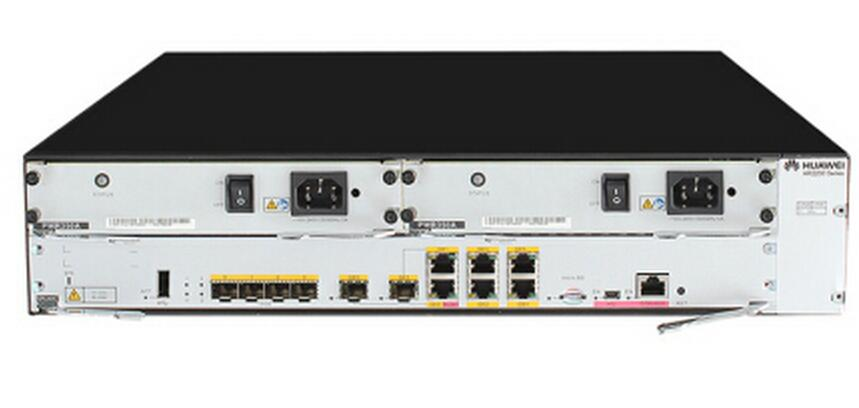
RARP protocol (Reverse Address Resolution Protocol). 4. Important devices: Routers.
Router related protocols
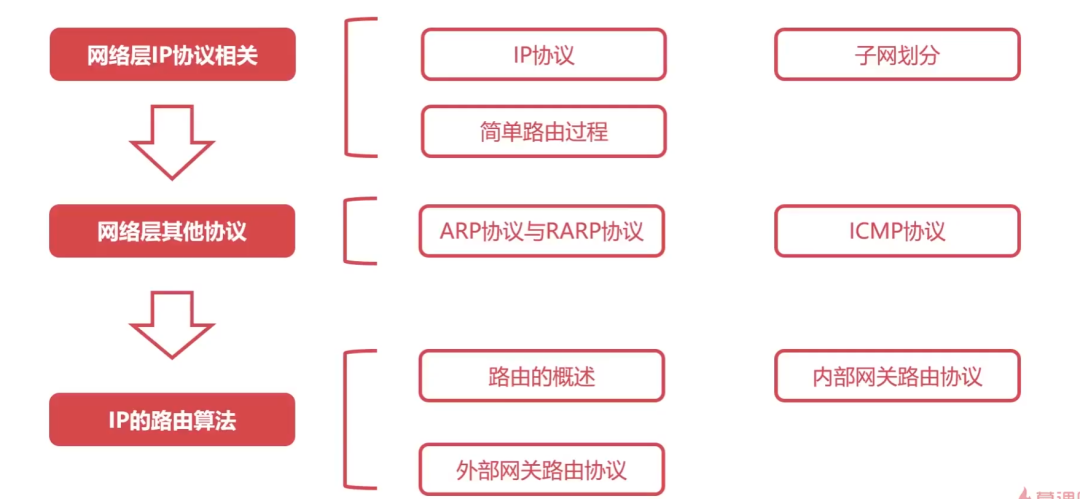
4.1 Detailed Explanation of IP Protocol
The IP protocol is the core protocol of the Internet network layer. The emergence of virtual interconnected networks: the actual computer networks are complex; physical devices using the IP protocol mask the differences between physical networks; when hosts in the network connect using the IP protocol, they do not need to focus on network details, thus forming a virtual network.
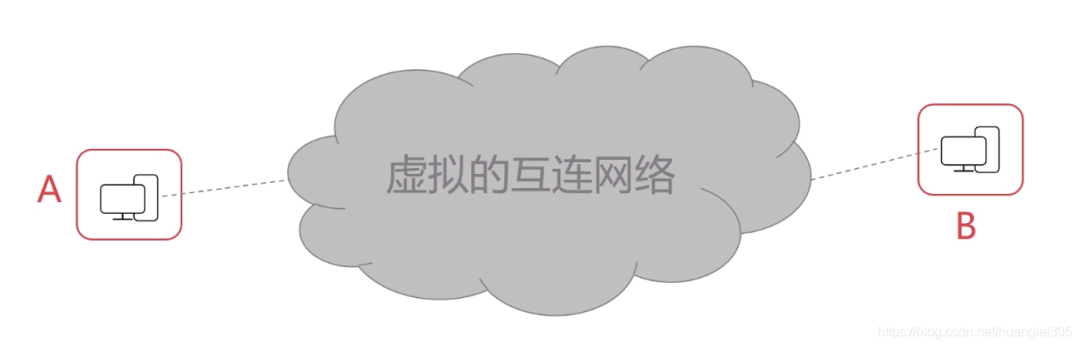
The IP protocol transforms complex actual networks into a virtually interconnected network; it also addresses the issue of datagram transmission paths within the virtual network.
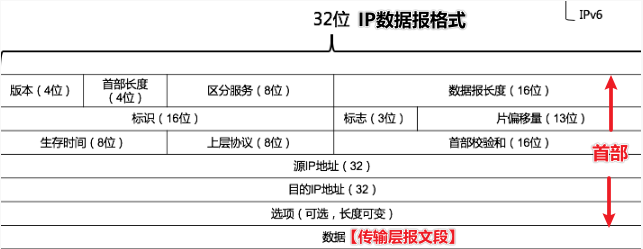
The version indicates the version of the IP protocol, occupying 4 bits, such as IPv4 and IPv6; the header length indicates the length of the IP header, occupying 4 bits, with a maximum value of 15; total length indicates the total length of the IP datagram, occupying 16 bits, with a maximum value of 65535; TTL indicates the lifetime of the IP datagram in the network, occupying 8 bits; the protocol indicates the specific protocol carried by the IP data, such as TCP or UDP.
4.2 IP Protocol Forwarding Process
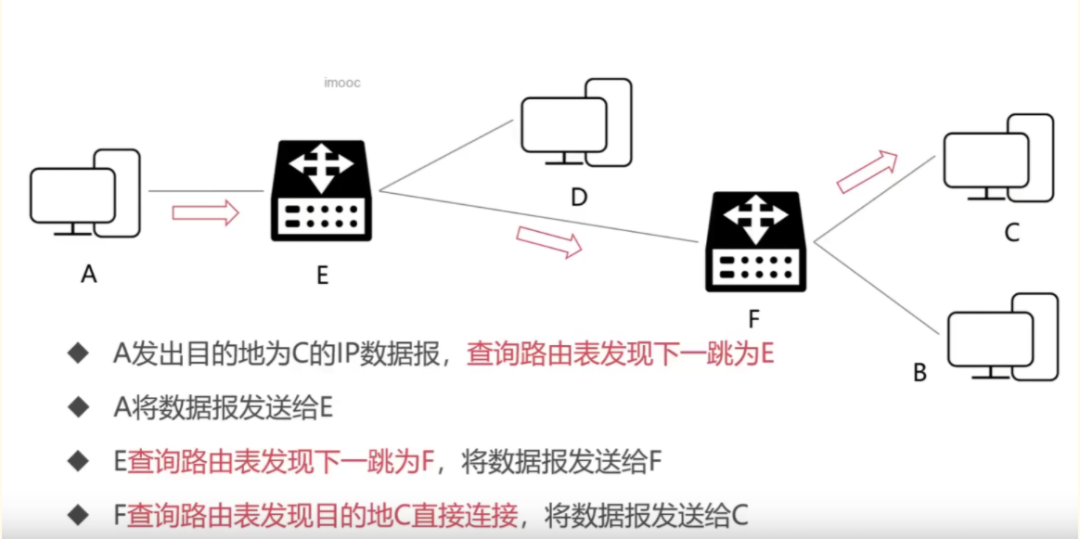
4.3 Subnet Division of IP Addresses
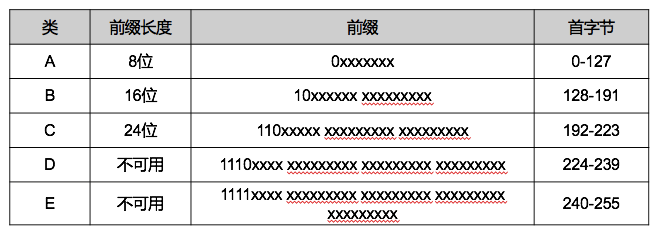
Class A (8 network bits + 24 host bits), Class B (16 network bits + 16 host bits), Class C (24 network bits + 8 host bits) can be used to identify hosts or routers in the network. Class D addresses are used for group broadcasting, and Class E addresses are reserved.

4.4 Network Address Translation (NAT) Technology
Used in private networks where multiple hosts access the internet through a single public IP, alleviating the depletion of IP addresses but increasing the complexity of network communication.
NAT Working Principle:
IP datagrams leaving the internal network have their IP address replaced with a valid public IP address owned by the NAT server, and the replacement relationship is recorded in the NAT translation table;
IP datagrams returning from the public internet retrieve the NAT translation table based on their destination IP address, replace the destination IP address with the retrieved internal private IP address, and then forward the IP datagram to the internal network.
4.5 ARP and RARP Protocols
The Address Resolution Protocol (ARP) provides dynamic mapping from the IP address of a network card (network adapter) to the corresponding hardware address. It can convert the 32-bit address at the network layer into the 48-bit MAC address at the data link layer.
ARP is plug-and-play, and an ARP table is automatically established without the need for system administrator configuration.
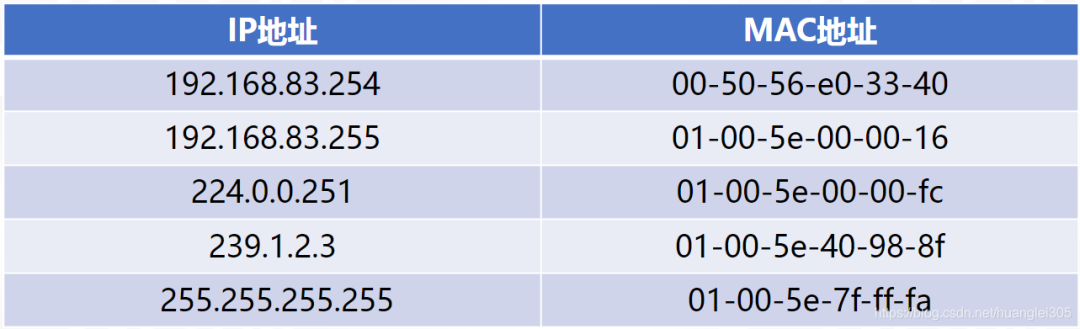
RARP (Reverse Address Resolution Protocol) can convert the 48-bit MAC address at the data link layer into the 32-bit address at the network layer.
4.6 Detailed Explanation of ICMP Protocol
The Internet Control Message Protocol (ICMP) can report error messages or exceptions, and ICMP messages are encapsulated within IP datagrams.
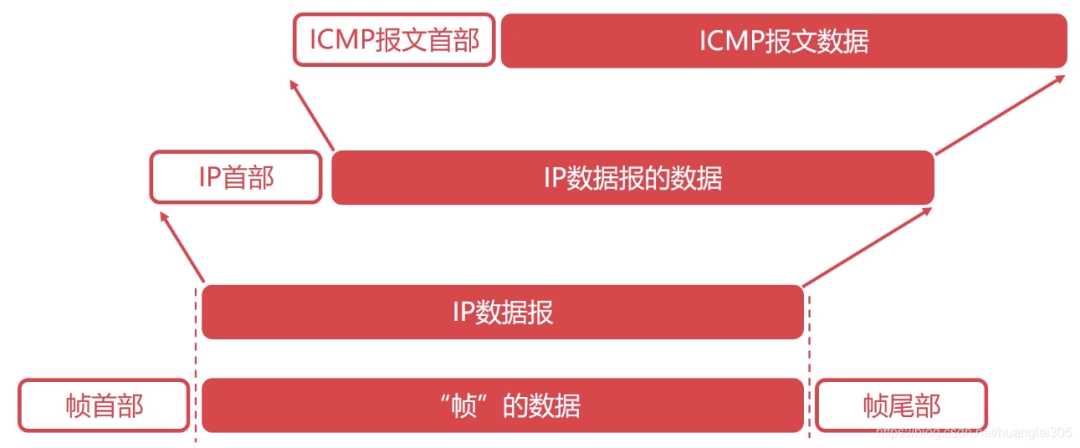
Applications of ICMP Protocol:
-
Ping application: for troubleshooting network failures;
-
Traceroute application: can detect the path IP datagrams take through the network.
4.7 Overview of Routing in the Network Layer
Requirements for routing algorithms: correct and complete, computationally simple as possible, adaptable to changes in the network, stable and fair.
Autonomous System (AS): refers to a group of network devices under a single management institution, with internal network autonomous management and providing one or more entry/exit points externally, where the routing protocol within the autonomous system is an Interior Gateway Protocol (IGP) such as RIP, OSPF, etc.; the routing protocol outside the autonomous system is an Exterior Gateway Protocol (EGP) such as BGP.
Static routing: manually configured, high difficulty and complexity;
Dynamic routing:
-
Link State Routing Algorithm (LS): quickly converges by sending information to all neighboring routers; global routing selection algorithm, where each router constructs the entire network topology graph when calculating routes; uses Dijkstra’s algorithm to find the shortest path from the source to the destination; Dijkstra’s algorithm.
-
Distance Vector Routing Algorithm (DV): slowly converges by sending information to all neighboring routers, may create loops; based on the Bellman-Ford equation (B-F equation);
4.8 RIP Protocol for Internal Gateway Routing
The Routing Information Protocol (RIP) [Application Layer], based on the distance-vector routing algorithm, is suitable for smaller AS (autonomous systems) and small networks; RIP messages are encapsulated in UDP datagrams.
Characteristics of RIP Protocol:
-
RIP uses hop count as the metric for paths (each router maintains distance records to every other router);
-
RIP’s cost is defined between the source router and the destination subnet;
-
RIP limits the network diameter to no more than 15 hops;
-
Exchanges all information with neighbors, actively every 30 seconds (broadcast).
4.9 OSPF Protocol for Internal Gateway Routing
The Open Shortest Path First (OSPF) protocol [Network Layer], based on the link-state routing algorithm (Dijkstra’s algorithm), is suitable for larger AS and large networks, directly encapsulated in IP datagrams for transmission.
Advantages of OSPF Protocol:
-
Secure;
-
Supports multiple paths with the same cost;
-
Supports differentiated cost metrics;
-
Supports unicast and multicast routing;
-
Hierarchical routing.
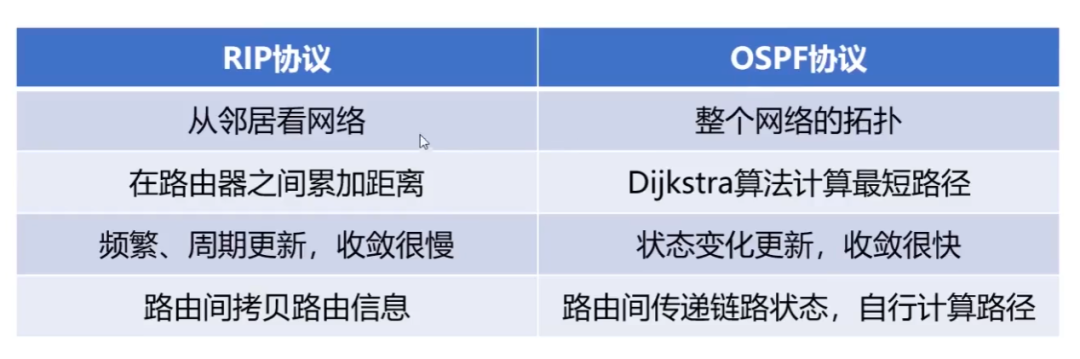
Comparison of RIP and OSPF (routing algorithms determine their properties):
4.10 BGP Protocol for External Gateway Routing
The Border Gateway Protocol (BGP) [Application Layer]: a protocol operating between AS, seeking a good route: initially exchanging all information, then only exchanging changes, encapsulated in TCP segments.
5. Transport Layer
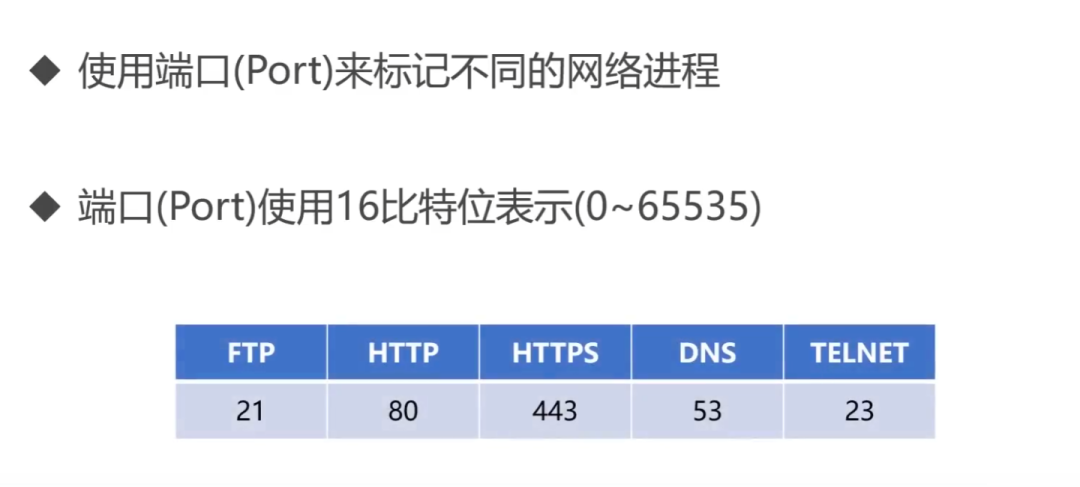
The first end-to-end layer, i.e., host-to-host. The transport layer is responsible for segmenting upper-layer data and providing end-to-end, reliable or unreliable transmission. Additionally, the transport layer handles end-to-end error control and flow control issues.
The task of the transport layer is to optimally utilize network resources based on the characteristics of the communication subnet, providing functions for establishing, maintaining, and terminating transmission connections between the session layers of two end systems, responsible for reliable data transmission from end to end. At this layer, the protocol data unit for information transfer is called a segment or message.
The network layer only transmits data packets from the source node to the destination node based on network addresses, while the transport layer is responsible for reliably delivering data to the corresponding port.
Key points about the transport layer:
-
The transport layer is responsible for segmenting upper-layer data and providing end-to-end, reliable or unreliable transmission and end-to-end error control and flow control issues;
-
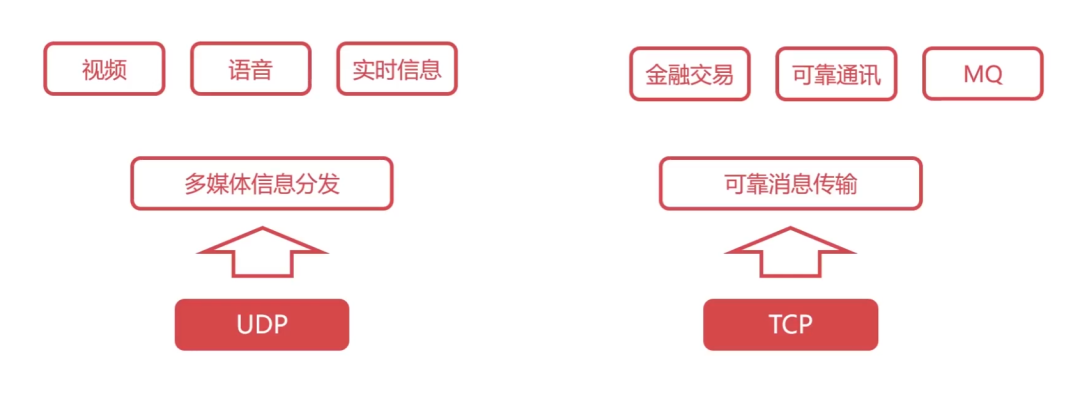
Main protocols: TCP protocol (Transmission Control Protocol), UDP protocol (User Datagram Protocol);
-
Important device: Gateway.
5.1 Detailed Explanation of UDP Protocol
UDP (User Datagram Protocol) is a very simple protocol.
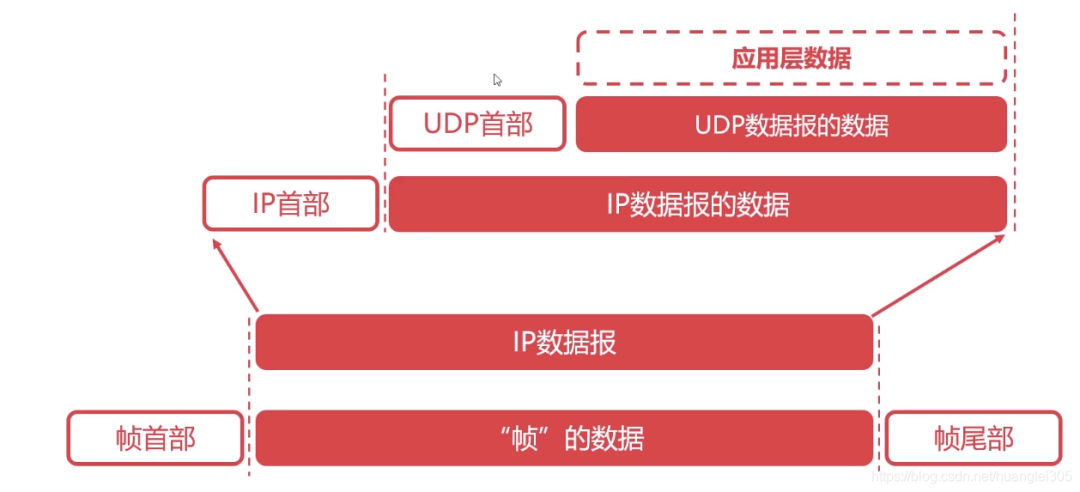
Characteristics of UDP Protocol:
-
UDP is a connectionless protocol;
-
UDP cannot guarantee reliable data delivery;
-
UDP is message-oriented;
-
UDP has no congestion control;
-
UDP header overhead is very small.
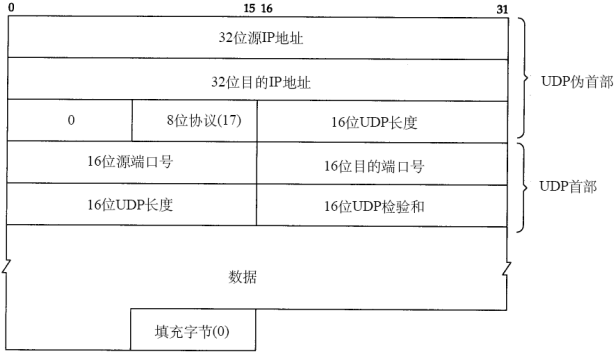
UDP Datagram Structure:
Header: 8B, four fields/2B [Source Port | Destination Port | UDP Length | Checksum] Data Field: Application Data
5.2 Detailed Explanation of TCP Protocol
TCP (Transmission Control Protocol) is a very complex protocol in computer networks.
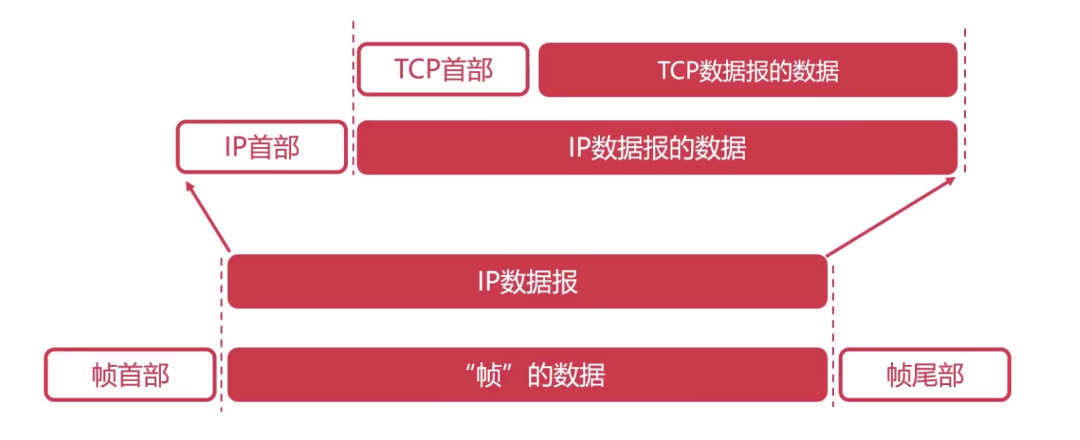
Functions of TCP Protocol:
-
Segments and reassembles application layer messages;
-
Multiplexes and demultiplexes at the application layer;
-
Implements end-to-end flow control;
-
Congestion control;
-
Transport layer addressing;
-
Performs error detection on received messages (checks both header and data parts);
-
Implements end-to-end reliable data transmission control between processes.
Characteristics of TCP Protocol:
-
TCP is a connection-oriented protocol;
-
TCP is a byte stream-oriented protocol;
-
A TCP connection has two ends, i.e., point-to-point communication;
-
TCP provides reliable transmission services;
-
TCP protocol provides full-duplex communication (each TCP connection can only be one-to-one).
5.2.1 Structure of TCP Segment:
The maximum segment length: the maximum length of application layer data encapsulated in the segment.
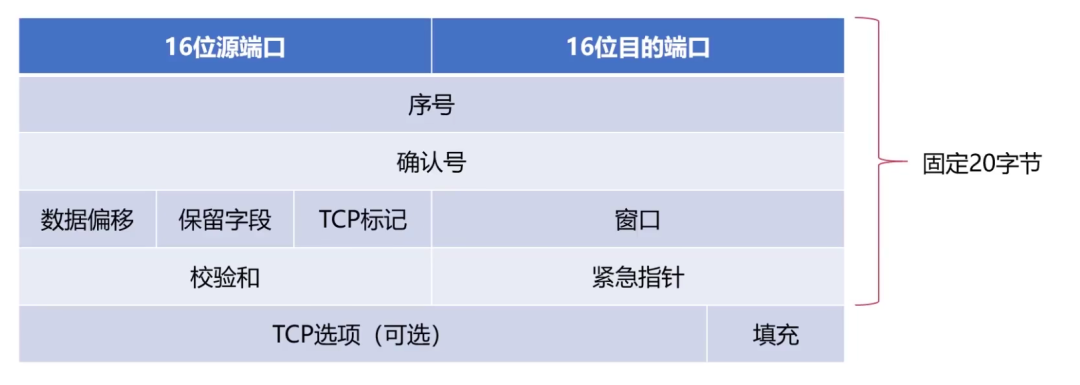
TCP Header:
-
Sequence Number Field: the sequence number is assigned to each byte of application layer data
-
Acknowledgment Number Field: the expected byte sequence number from the other party, indicating that the byte corresponding to this sequence number has not yet been received, identified by ack_seq;
-
The minimum TCP segment header length is 20B, and the maximum is 60 bytes. However, the length must be a multiple of 4B.
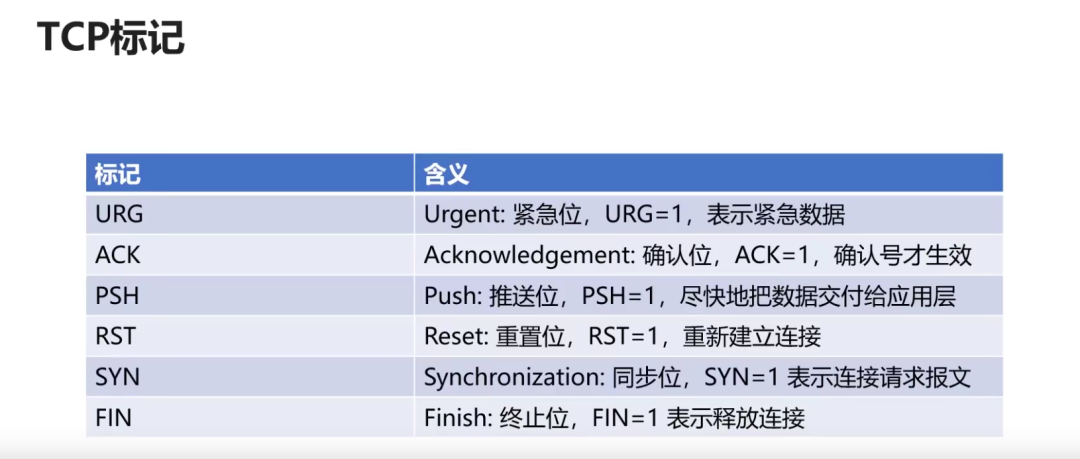
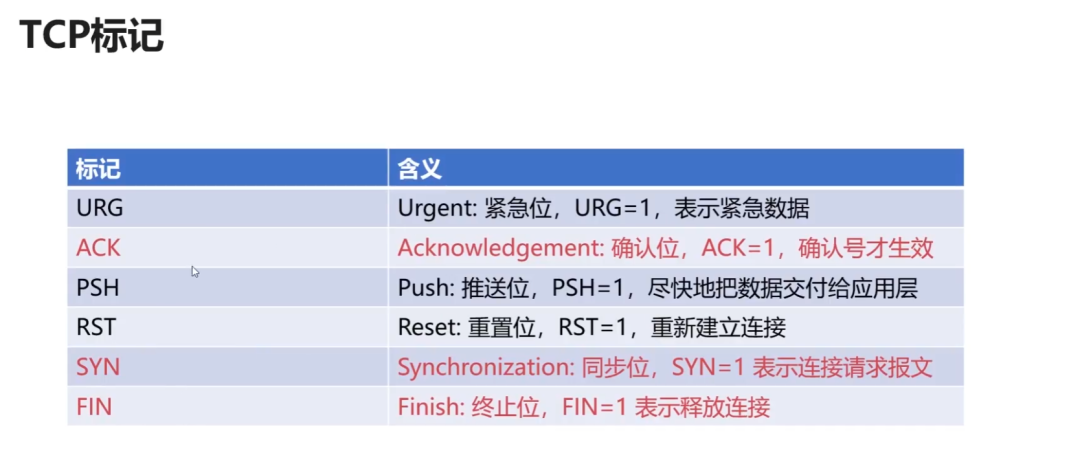
Functions of TCP Flags:
5.3 Basic Principles of Reliable Transmission
Basic Principles:
-
Possible issues in unreliable transmission channels: bit errors, out of order, retransmission, loss
-
Measures taken to achieve reliable data transmission based on unreliable channels:
“
Error detection: using coding to detect bit errors during packet transmission; Acknowledgment: the receiver provides feedback on the reception status to the sender; Retransmission: the sender resends data that the receiver has not correctly received; Sequencing: ensures data is submitted in order; Timer: addresses the issue of data loss;
The Stop-and-Wait protocol: the simplest reliable transmission protocol, but it does not utilize the channel efficiently.
Continuous ARQ (Automatic Repeat reQuest): sliding window + cumulative acknowledgment, greatly improves channel utilization.
5.3.1 Reliable Transmission of TCP Protocol
Based on the continuous ARQ protocol, in some cases, the efficiency of retransmission is not high, leading to the repeated transmission of bytes that have already been successfully received.
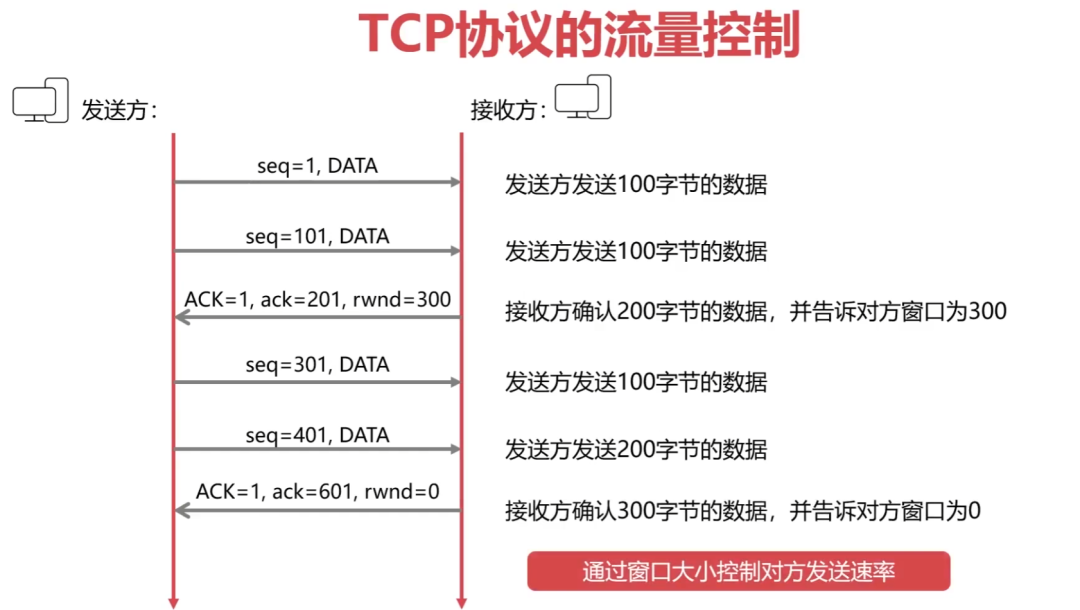
5.3.2 TCP Protocol Flow Control
Flow control: ensures that the sender’s transmission rate is not too fast; the TCP protocol uses a sliding window to implement flow control.
5.4 TCP Protocol Congestion Control
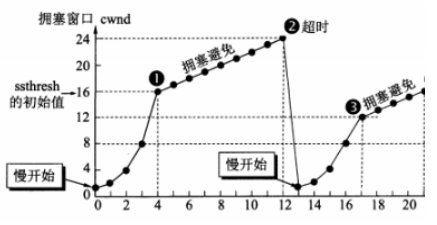
Difference between flow control and congestion control: flow control considers point-to-point communication volume control, while congestion control considers the entire network, making it a global consideration. Methods of congestion control: slow start algorithm + congestion avoidance algorithm.
Slow start and congestion avoidance:
-
[Slow Start] Congestion window starts at 1 and grows exponentially;
-
Upon reaching the threshold, it enters [Congestion Avoidance], growing by +1;
-
[Timeout], the threshold is set to half of the current cwnd (cannot be <2);
-
Then restart [Slow Start], where the congestion window starts at 1 and grows exponentially.
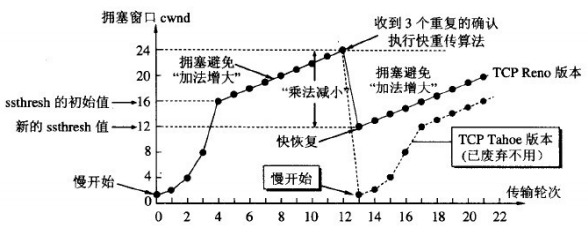
Fast retransmit and fast recovery:
-
If the sender receives three duplicate ACKs in a row, it executes [Fast Retransmit] without waiting for the timer to expire;
-
Executes [Fast Recovery], setting the threshold to half of the current cwnd (cannot be <2), and enters [Congestion Avoidance] from this new ssthresh point.
5.5 Three-Way Handshake of TCP Connection (Important)
TCP three-way handshake uses commands:
Common interview question: Why is a three-way handshake necessary?
-
First handshake: the client sends a request, at which point the server knows the client can send;
-
Second handshake: the server sends a confirmation, at which point the client knows the server can send and receive;
-
Third handshake: the client sends a confirmation, at which point the server knows the client can receive.
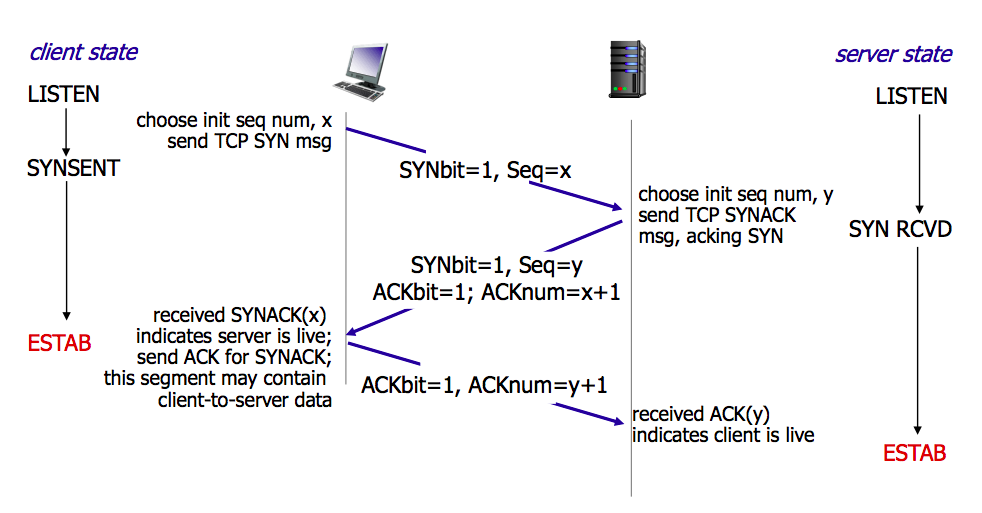
Establishing a connection (three-way handshake):
First: The client sends a connection request segment to the server, establishing a connection request control segment (SYN=1), indicating that the first data byte of the transmitted segment has a sequence number of x, representing the sequence number for the entire segment (seq=x); the client enters the SYN_SEND (synchronization sent state);
Second: The server sends back a confirmation segment, agreeing to establish a new connection with a confirmation segment (SYN=1), confirming the sequence number field is valid (ACK=1), and the server tells the client that the segment sequence number is y (seq=y), indicating that the server has received the client’s segment with sequence number x and is prepared to accept the client’s segment with sequence number x+1 (ack_seq=x+1); the server transitions from LISTEN to SYN_RCVD (synchronization received state);
Third: The client confirms the same connection with the server. The acknowledgment number field is valid (ACK=1), and the client’s segment sequence number is x+1 (seq=x+1), expecting to receive the server segment with sequence number y+1 (ack_seq=y+1); when the client sends ack, the client enters the ESTABLISHED state; when the server receives the client’s ack, it also enters the ESTABLISHED state; the third handshake can carry data;
5.6 Four-Way Handshake of TCP Connection (Important)
Releasing a connection (four-way handshake)
First: The client sends a release connection segment to the server, indicating that data transmission is complete and requesting to release the connection (FIN=1), with the sequence number of the first data byte as x (seq=x); the client state transitions from ESTABLISHED to FIN_WAIT_1 (terminate wait 1 state);
Second: The server sends a confirmation segment to the client, confirming the segment number is valid (ACK=1), with the data sequence number as y (seq=y), and the server expects to receive the client’s data sequence number as x+1 (ack_seq=x+1); the server state transitions from ESTABLISHED to CLOSE_WAIT (close wait); the client, upon receiving the ACK segment, transitions from FIN_WAIT_1 to FIN_WAIT_2;
Third: The server sends a release connection segment to the client, requesting to release the connection (FIN=1), confirming the segment number is valid (ACK=1), indicating that the server expects to receive the client’s data sequence number as x+1 (ack_seq=x+1); indicating that the first byte transmitted by itself is y+1 (seq=y+1); the server state transitions from CLOSE_WAIT to LAST_ACK (last acknowledgment state);
Fourth: The client sends a confirmation segment to the server, confirming the segment number is valid (ACK=1), indicating that the client’s data sequence number is x+1 (seq=x+1), indicating that the client expects to receive the server’s data sequence number as y+1+1 (ack_seq=y+1+1); the client state transitions from FIN_WAIT_2 to TIME_WAIT, waiting for 2MSL time, and then enters the CLOSED state; the server transitions from LAST_ACK to CLOSED upon receiving the last ACK;
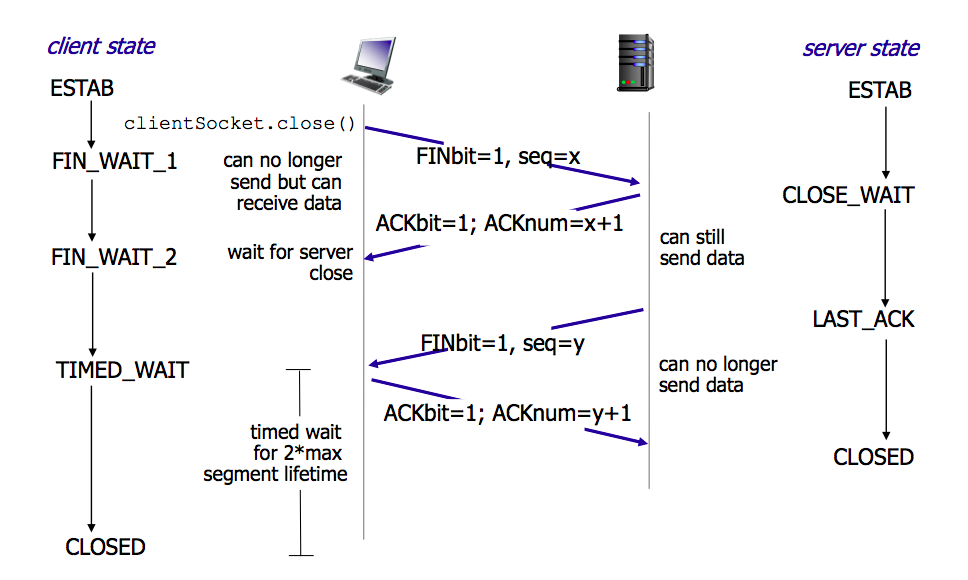
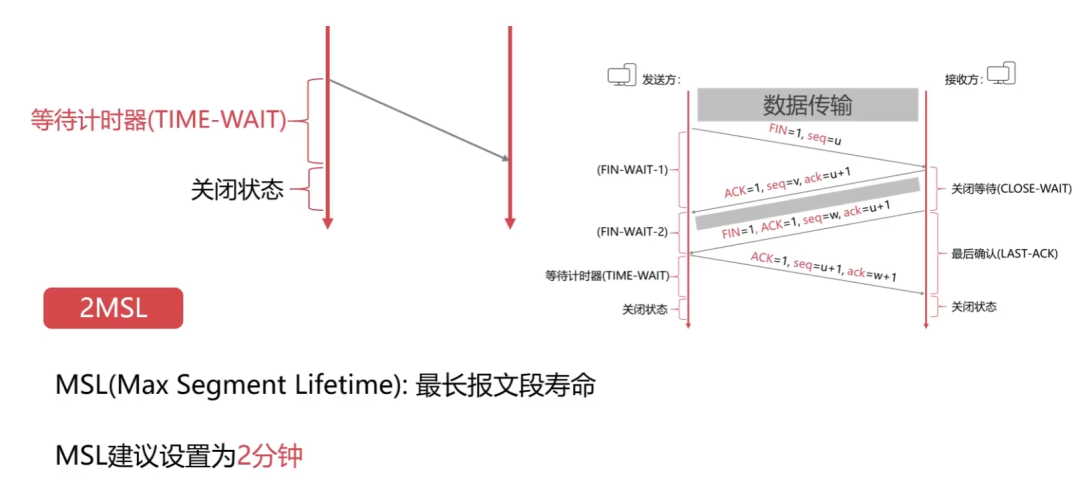
Why wait for 2MSL?
-
The last segment has not been acknowledged;
-
To ensure that the sender’s ACK can reach the receiver;
-
If not received within 2MSL, the receiver will retransmit;
-
To ensure that all packets of the current connection have expired.
6. Application Layer
Provides an interface for operating systems or network applications to access network services. Key points of the application layer:
-
The basic unit of data transmission is a message;
-
Main protocols include: FTP (File Transfer Protocol), Telnet (Remote Login Protocol), DNS (Domain Name System), SMTP (Simple Mail Transfer Protocol), POP3 (Post Office Protocol), HTTP (HyperText Transfer Protocol).
6.1 Detailed Explanation of DNS
DNS (Domain Name System) [C/S, UDP, Port 53]: Solves the problem of complex and hard-to-remember IP addresses, storing and completing the mapping of domain names to IP addresses for hosts within its jurisdiction.
The order of domain name resolution:
-
[1] Browser cache,
-
[2] Check the local hosts file,
-
[3] Routing cache,
-
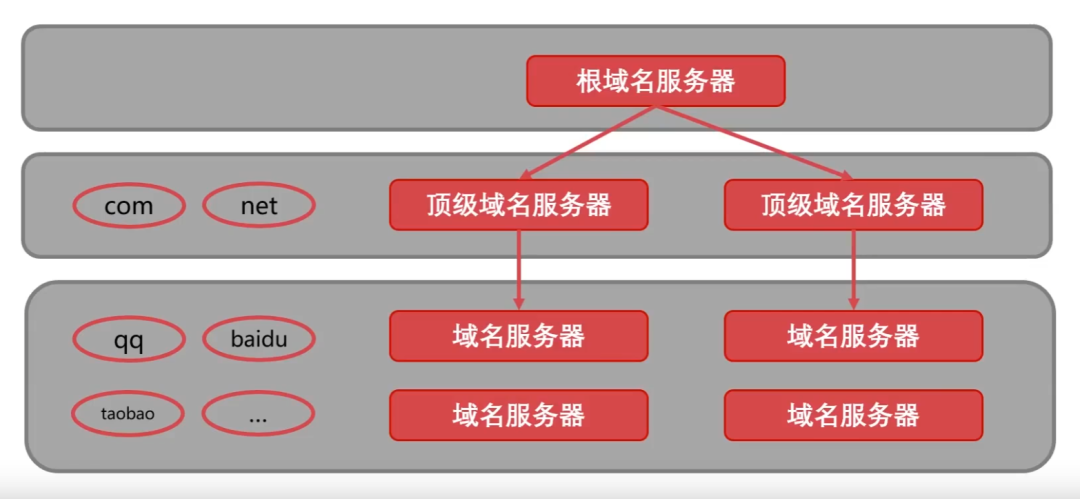
[4] Check DNS servers (local domain, top-level domain, root domain) -> iterative resolution, recursive query.
IP -> DNS service -> easy-to-remember domain name
Domain names consist of dots, letters, and numbers, divided into top-level domains (com, cn, net, gov, org), second-level domains (baidu, taobao, qq, alibaba), and third-level domains (www) (12-2-0852)
6.2 Detailed Explanation of DHCP Protocol
DHCP (Dynamic Host Configuration Protocol): a LAN protocol, an application layer protocol using UDP. Its function is to automatically assign IP addresses to users temporarily accessing the local area network.
6.3 Detailed Explanation of HTTP Protocol
File Transfer Protocol (FTP): Control Connection (Port 21): Transmits control information (connection, transfer requests) in 7-bit ASCII format. The entire session remains open.
HTTP (HyperText Transfer Protocol) [TCP, Port 80]: a reliable data transmission protocol, where the browser establishes a TCP connection with the server before sending and receiving messages, using TCP connection (HTTP itself is connectionless).
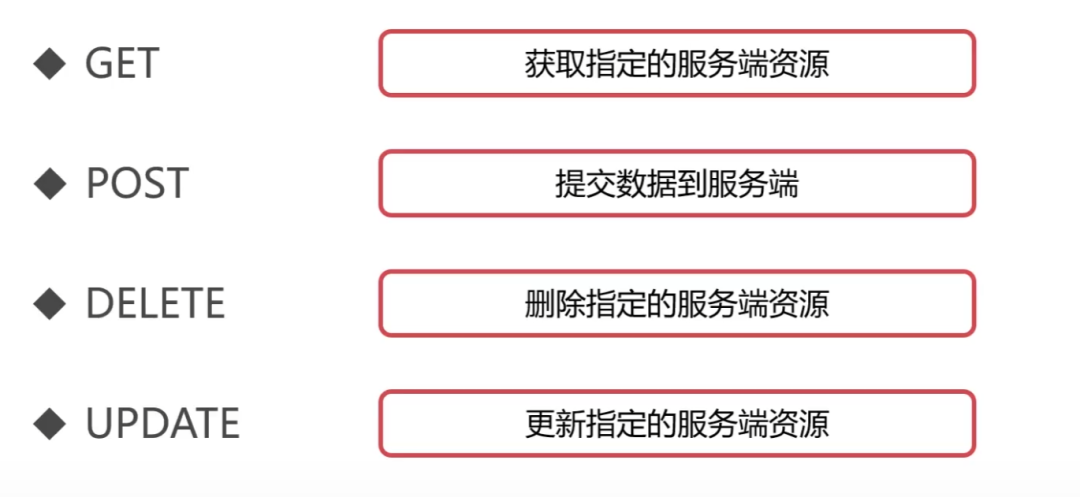
HTTP request message methods:
-
GET: requests specified page information and returns the entity body;
-
POST: submits data to the specified resource for processing;
-
DELETE: requests the server to delete the specified page;
-
HEAD: requests to read the header information of the URL identifier, returning only the message header;
-
OPTIONS: requests some options information;
-
PUT: stores a document under the specified URL.

6.3.1 Structure of HTTP Working
6.3.2 Detailed Explanation of HTTPS Protocol
HTTPS (Secure) is the secure version of HTTP, using port 443. Based on HTTP protocol, it provides encryption for data processing, verifies the identity of the other party, and protects data integrity.

Recommended Previous Issues
-
Monitorix – Linux System and Network Monitoring Tool
- How to Change and Reset Forgotten Root Password in RHEL 9
- How to Cache Content in NGINX
- How to Control Access in NGINX Based on Client IP Address
- How to Create Custom 404 Error Page in NGINX
- How to Limit Network Bandwidth in NGINX Web Server – Part 3
- How to Limit Connection (Request) Rate in NGINX – Part 2
- How to Limit Connection Count (Request Count) in NGINX – Part 1
- How to Install SUSE Linux Enterprise Server 15 SP4
- How to Upgrade from RHEL 8 to RHEL 9
- How to Create Local Yum or DNF Repository on RHEL 9