When shutting down or restarting a Linux system, you might think of the commands shutdown、halt、poweroff、reboot. These four commands are used for shutting down or restarting Linux systems, differing in functional objectives, execution processes, and flexibility.
shutdown command
The most flexible “scheduled” shutdown/restart
Core Functions:
-
Supports immediate execution as well asdelayed execution (e.g., shutdown or restart after 5 minutes)
- Will notify all users in the system that the system is about to shut down or restart.
Execution Process:
1. Send a system shutdown notification to all logged-in users (e.g., a prompt saying The system is going down))
2. Prevent new users from logging in
3. Synchronize cached data in the file system to disk
4. Gradually stop running system services and processes5. If there are stubborn processes, forciblykill the stubborn processes6. Finally execute halt/poweroff (shutdown) or reboot (restart)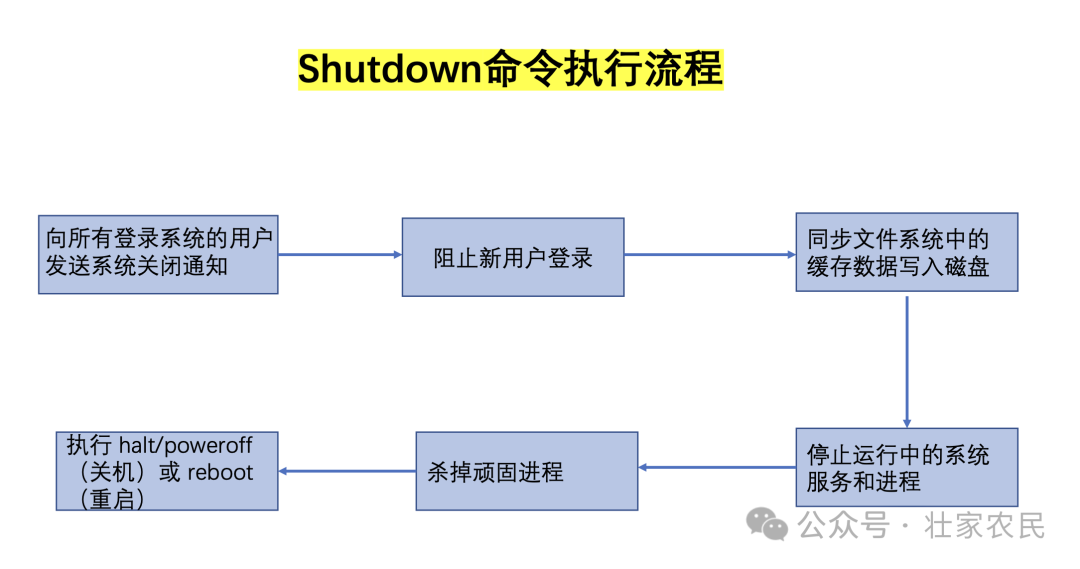
Common Examples:
- Immediate shutdown:shutdown -h now(-h means halt/poweroff, now means immediately).
- Immediate restart: shutdown -r now
- Restart after 5 minutes:shutdown -r +5 “will restart” (-r means reboot, +5 means delay of 5 minutes).
- Shutdown after 5 minutes:shutdown -h +5 “will shut down” (-h means shutdown, +5 means delay of 5 minutes).
- To cancel a scheduled shutdown/restart, use:shutdown -c to cancel.
Features:
The shutdown command is the most flexible and is a relatively elegant and user-friendly way to shut down or restart the system, preventing data corruption. It is very suitable for scenarios that require “prior notification to users” or “scheduled operations” and is the preferred choice for shutting down/restarting servers in production environments.
- halt command
Only “stops the system” without cutting off power (a feature of older versions of Linux)
Core Functions:
Stops all processes and system services, putting the system into a “halted state” (CPU stops working), butdoes not cut off physical power (some modern systems may automatically power off due to ACPI support, depending on configuration). ACPI (Advanced Configuration and Power Interface) is a standardized interface specification for power management, device configuration, and thermal management in modern computer systems. It allows the operating system to directly control hardware power states (such as sleep, shutdown) and device configuration, replacing earlier proprietary BIOS power management schemes.
Execution Process:
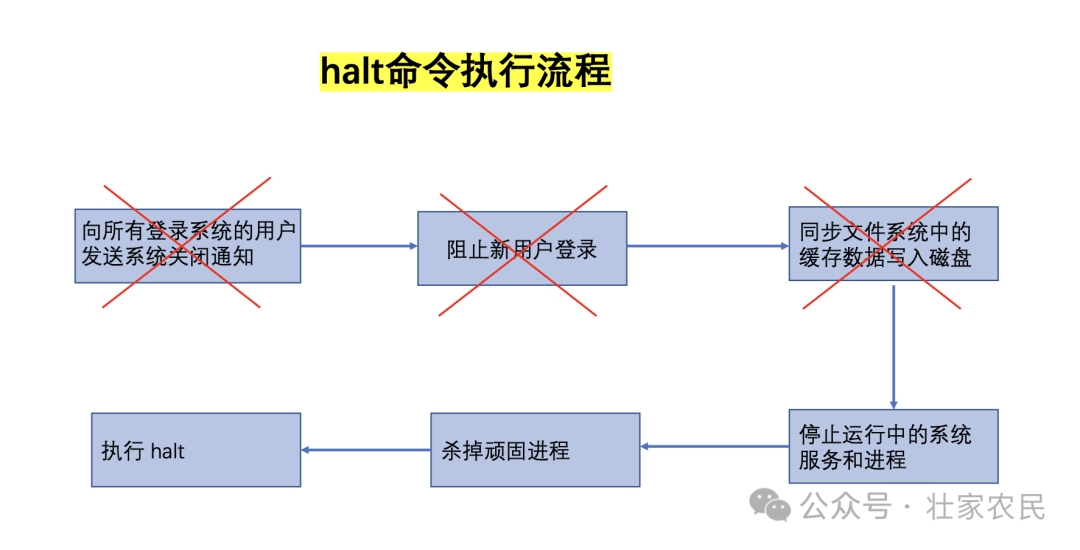
Directly terminates processes and services, skipping the “user notification” step, ultimately putting the system into a “halted” state (the screen may display System halted).
Common Examples:
halt (executed directly, no notification).
Features:
A single function, only used to “stop the system”, not actively cutting off power, now rarely used alone (mostly replaced bypoweroff).
- poweroff command
- Stops the system + cuts off power
Core Functions:
On the basis of halt, additionally triggersphysical power cut (depends on motherboard ACPI support, modern computers all support), i.e., “shutdown and cut off power”. It executes a shutdown process similar to reboot, but the last step is to send a shutdown command to the motherboard’s ACPI, completely cutting off power to the computer.
Execution Process:
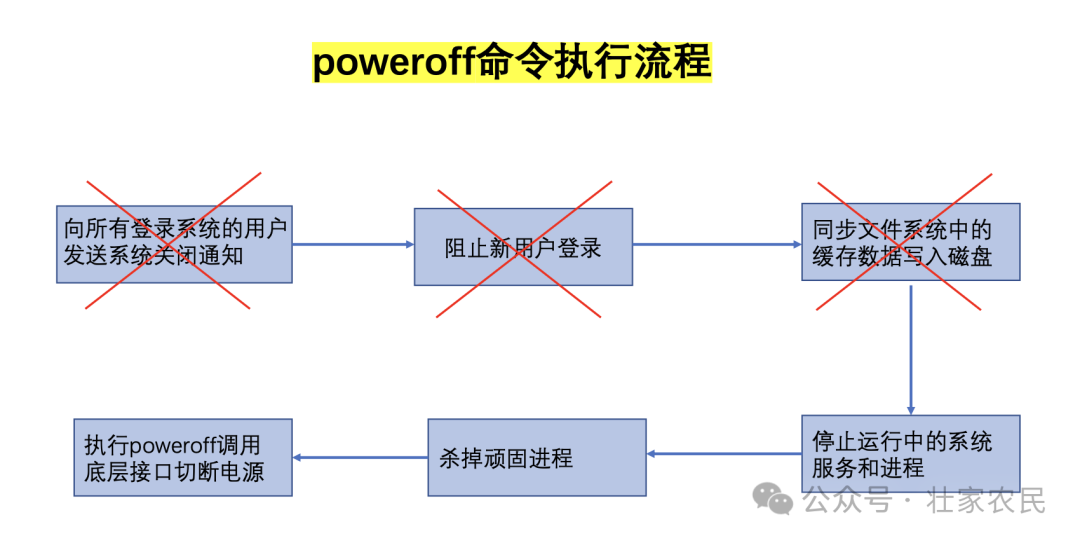
Stop processes and services → call the underlying interface to cut off power → system completely shuts down.
Common Examples:
poweroff (immediate shutdown and power cut, no user notification).
Features:
It is the direct command for “complete shutdown”, more aligned with modern users’ needs for “shutdown means power cut”, but lacks delay and notification functions.
- reboot command
- Directly “restarts the system”
Core Functions:
Stops all processes and services, then immediately restarts the system (equivalent to “shutting down and powering back on”).
Execution Process:
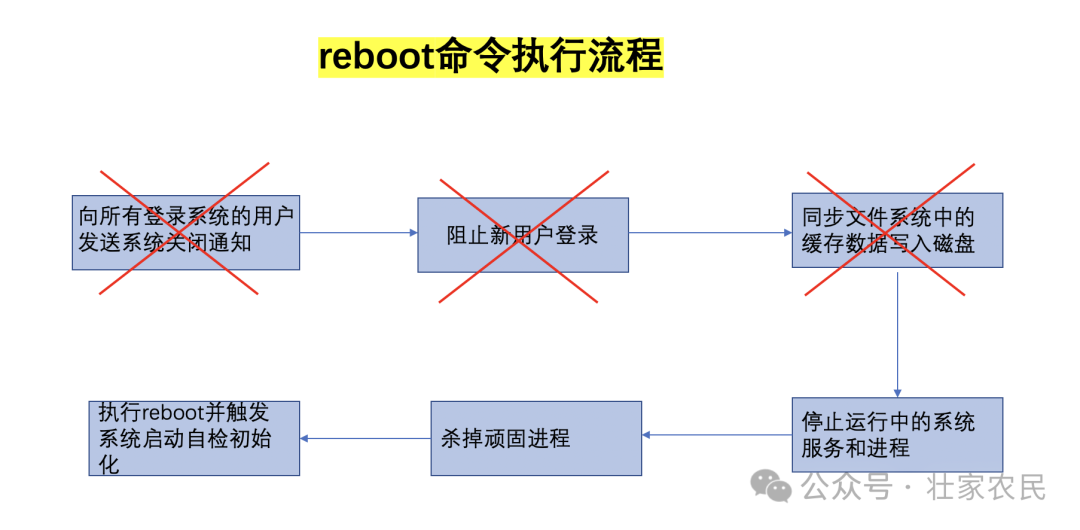
Stop processes and services → trigger system restart (hardware reinitialization).
Common Examples:
reboot (immediate restart, no user notification).
Features:
Single function, only used for “immediate restart”, no delay and notification, suitable for quick restart scenarios.
- Summary
Most modern Linux distributions (such as CentOS 7+, Ubuntu 16.04+, Debian 8+) have system initialization and service management handled by systemd.

For example, in the almalinux version, shutdown, reboot, poweroff, halt actually all point to soft links to /sbin/systemctl. When you execute these commands in modern versions of Linux, you are actually executing systemctl. For instance, executing poweroff actually runs systemctl poweroff; executing reboot actually runs systemctl reboot.
systemd unifies these operational interfaces.
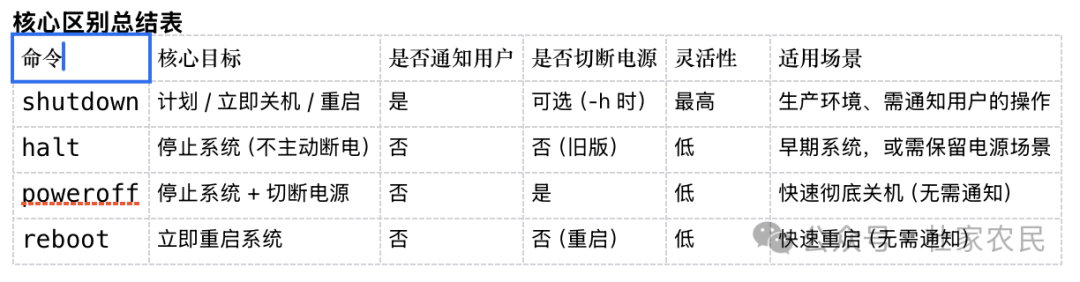
- For daily desktop use: use poweroff for quick shutdown, and reboot for quick restart.
- For production servers / multi-user environments: must use shutdown (to avoid sudden shutdowns causing data loss and to notify users).
- For historical compatibility: halt is an early command that you can completely ignore now. In modern Linux systems, poweroff is its “power cut enhanced version”, shutdown -h now is equivalent to poweroff.
In summary, whether for personal or production environments, it is best to develop the habit of using shutdown, which will greatly reduce the occurrence of unexpected situations and appear more professional.