In C/C++ programming languages, when a program is compiled, it is sent to the compiler, which converts the program into machine language and then completes the compilation and execution of the program. The preprocessor is also known as the macro preprocessor. Macros in C/C++ can be defined as a set of program statements and can be used by referencing that name when the code set is needed.
These macros always start with the symbol “#”, and statements that begin with this symbol are called by the compiler.
#define Wonderful Uses
- Special Symbols: #, ##, #@
This macro can also be used to pass tokens that can be converted to strings by using the special symbol “#” before the token. Let’s look at an example:
#include<stdio.h>
#define GET_STRING(n) #n
int main(int argc, char *argv[]) {
    printf("%s\n", GET_STRING(minger));
    return 0;
}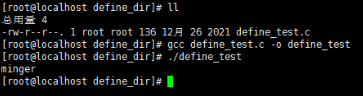
In the above code, we defined a function-like macro where the parameter “n” is passed with “#n”, which allows you to retrieve a string literal.
This macro also supports passing tokens to concatenate the two values “p” and “q” using the special operator “##”. Let’s look at an example:
#include<stdio.h>
#define CONCATE(p, q) p##q
int main(int argc, char *argv[]) {
    printf("%d \n", CONCATE(12, 13));
    return 0;
}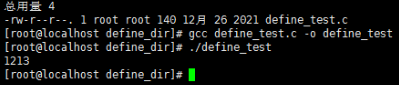
The above code defines a function-like macro where tokens are passed to concatenate the values of “p” and “q”.
Next, let’s take a look at the usage of #@.
#include<stdio.h>
#define TO_STRING(s) #s
int main(int argc, char *argv[]) {
    printf("%s\n", TO_STRING(812));
    return 0;
}
In the above code, we defined a function-like macro, where #s indicates that the parameter s is enclosed in double quotes, returning a string.
- Multi-line Macros
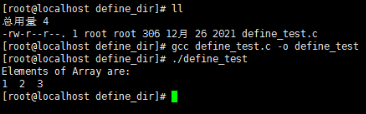
Function-like macros can have multiple lines. Therefore, to create a multi-line macro, you must use a backslash to indicate a line break.
#include<stdio.h>
#define ELE 1, \
            2, \
            3
int main(int argc, char *argv[]) {
    int i = 0;
    int arr[] = { ELE };
    printf("Elements of Array are:\n");
    for (i = 0; i < 3; i++) {
        printf("%d  ", arr[i]);
    }
    printf("\n");
    return 0;
}
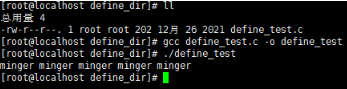
Macros can also be written in multiple lines, with statements starting with “\” and not needing to end with “\”. Let’s look at another example:
#include<stdio.h>
#define MACRO(n, limit) while (n < limit) \
{
    printf("minger ");
    n++;
}
int main(int argc, char *argv[]) {
    int n = 0;
    MACRO(n, 5);
    printf("\n");
    return 0;
}
- Variable Argument Macros
Variable argument macros are macros that can take a variable number of arguments (you can also write variable argument functions in C). Here is an example:
#include<stdio.h>
#define debugPrintf(...) printf("DEBUG: " __VA_ARGS__);
int main(int argc, char** argv) {
    debugPrintf("Hello World!\n");
    return 0;
}
In simple terms, … represents all remaining arguments, and __VA_ARGS__ is replaced by the … parameter in the macro definition. This is a special rule in the GNU extension syntax of C: when __VA_ARGS__ is empty, the preceding comma is eliminated.
- Conditional Compilation
#include<stdio.h>
#define debugPrintf /* Define a macro switch, disable to turn off, enable to turn on */
#ifdef debugPrintf
#define debugPrintf(...) printf("DEBUG: " __VA_ARGS__);
#else
#define debugPrintf(...)
#endif
int main(int argc, char** argv) {
    debugPrintf(" This is Debug info\n");
    printf(" This is printf info\n");
    return 0;
}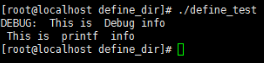
If we want to output the DEBUG version, we enable this macro switch (by not commenting out #define debugPrintf), at which point all debugPrintf() macro definition information will be replaced with printf().
Summary
A macro is a piece of code that is replaced by the value of the macro in the program. Macros are defined using the #define directive. Whenever the compiler encounters a macro name, it replaces the name with the macro definition. Macro definitions do not need to end with a semicolon.
Source of the article
https://blog.csdn.net/chen1415886044