1. Command Pattern
The Command Pattern is a type of behavioral design pattern that encapsulates requests as independent objects, allowing users to parameterize client objects and supporting advanced features such as request queuing, logging requests, and undo operations.
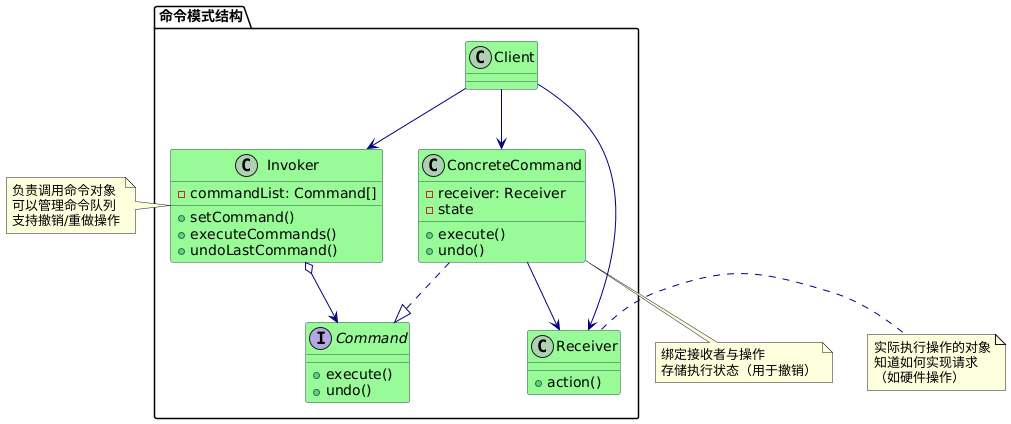
The Command Pattern includes the following main roles:
-
Invoker: Requests the command object to execute the request, typically holds the command object and can hold many command objects.
-
Command Interface: Declares the interface for executing operations.
-
ConcreteCommand: Binds a receiver object to an action, calling the corresponding operation on the receiver.
-
Receiver: Knows how to implement the operations associated with executing a request; any class can act as a receiver.
-
Client: Creates concrete command objects and sets their receivers.
2. Embedded Application Case
In embedded systems, some requirements necessitate setting configuration parameters in groups, and if the operation to reset the configuration parameters is mistakenly triggered, it should be possible to revert to the previous settings.
For example, in a scenario managing configuration parameters such as brightness, volume, and temperature, the requirement is to be able to revert to the previous configuration state.
Structure Diagram:
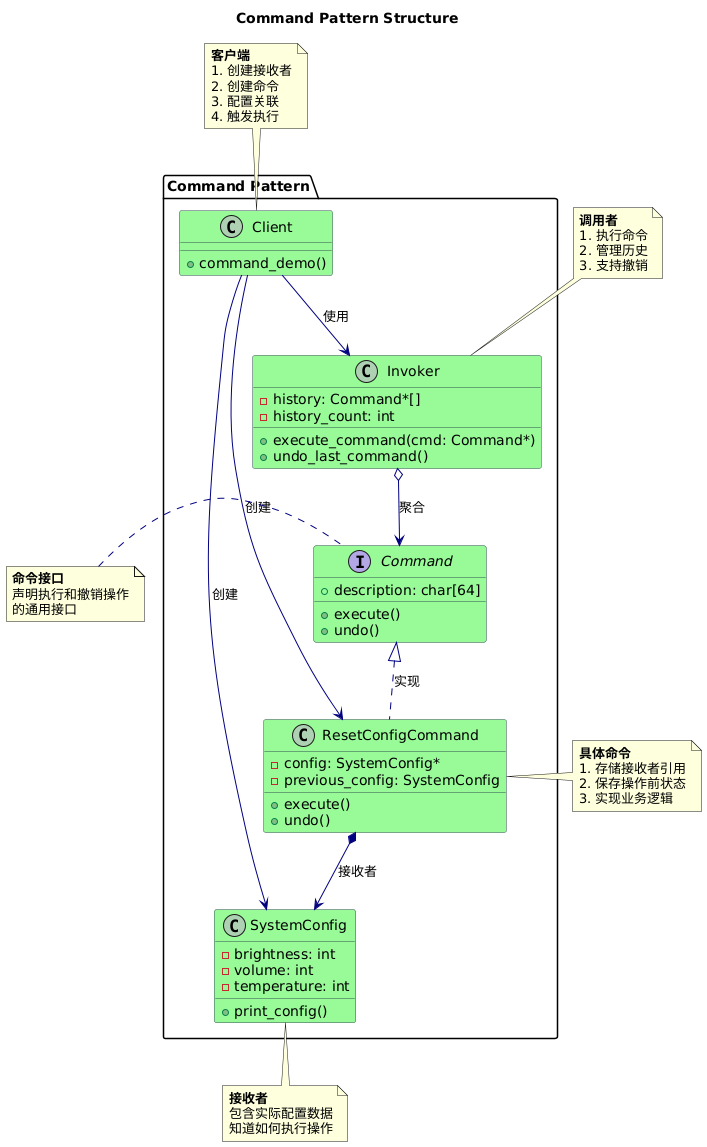
1. Command Interface (Command):
- Defines a common interface for all commands
- Includes execute (
<span>execute</span>) and undo (<span>undo</span>) methods - Includes operation description (
<span>description</span>)
typedef struct Command Command;
struct Command
{
    void (*execute)(Command*);
    void (*undo)(Command*);
    char description[64];
};
2. Concrete Command (ResetConfigCommand):
- Holds a reference to the receiver (
<span>SystemConfig</span>) - Stores the receiver’s state (
<span>previous_config</span>) during execution - Implements specific business logic (reset configuration)
typedef struct
{
    Command base;  // Inherits command interface
    SystemConfig* config;
    SystemConfig previous_config;
} ResetConfigCommand;

void reset_execute(Command* cmd)
{
    ResetConfigCommand* rcc = (ResetConfigCommand*)cmd;
    rcc->previous_config = *rcc->config;  // Save current configuration

    // Reset to default values
    rcc->config->brightness = 50;
    rcc->config->volume = 50;
    rcc->config->temperature = 22;

    strcpy(cmd->description, "Reset all parameters");
    printf("Executed: %s\n", cmd->description);
}

void reset_undo(Command* cmd)
{
    ResetConfigCommand* rcc = (ResetConfigCommand*)cmd;
    *rcc->config = rcc->previous_config;  // Restore previous configuration
    printf("Reverted reset operation\n");
}

Command* create_reset_command(SystemConfig* config)
{
    ResetConfigCommand* cmd = malloc(sizeof(ResetConfigCommand));
    cmd->base.execute = reset_execute;
    cmd->base.undo = reset_undo;
    cmd->config = config;

    return (Command*)cmd;
}
3. Receiver (SystemConfig):
- The object that actually stores configuration data
- Does not directly participate in the command execution process
- Is indirectly operated through commands
typedef struct
{
    int brightness;
    int volume;
    int temperature;
} SystemConfig;
4. Invoker:
- The core scheduling center
- Manages command history
- Provides execution and undo functionality
- Does not depend on specific command types
Command* history[MAX_HISTORY];
int history_count = 0;

void execute_command(Command* cmd)
{
    cmd->execute(cmd);
    if (history_count < MAX_HISTORY)
    {
        history[history_count++] = cmd;
    }
}

void undo_last_command(void)
{
    if (history_count > 0)
    {
        Command* cmd = history[--history_count];
        printf("Undo: %s\n", cmd->description);
        cmd->undo(cmd);
    }
}
5. Client:
- Assembles command objects
- Configures the relationship between commands and receivers
- Triggers the command execution process
- Responsible for resource cleanup
void command_demo(void)
{
// Create receiver
SystemConfig current_config = {60, 40, 30};
// Create concrete command
Command* reset_cmd = create_reset_command(¤t_config);
// Execute command through invoker
execute_command(reset_cmd);
// Undo command through invoker
undo_last_command();
// Clean up resources
free(reset_cmd);
}
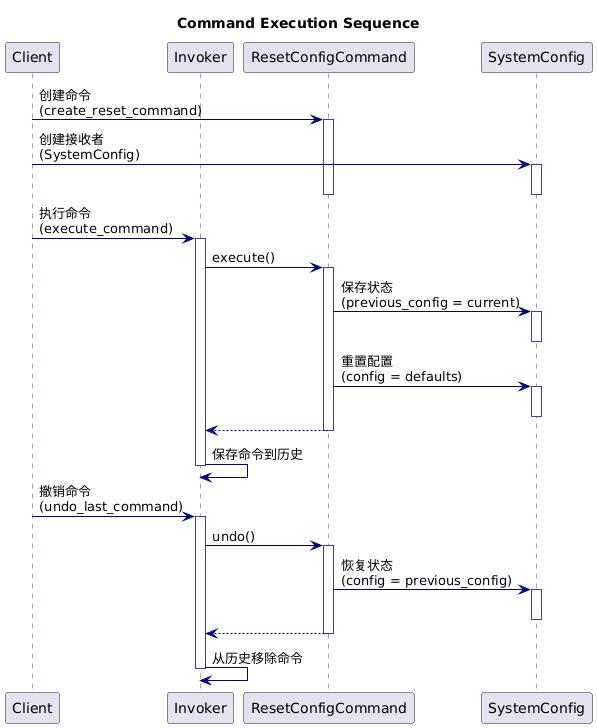
Sequence Diagram:
1. Code Implementation
C Language:
#include <stdio.h>
#include <stdlib.h>
#include <string.h>
// Configuration parameter structure
typedef struct
{
int brightness; // Brightness (0-100)
int volume; // Volume (0-100)
int temperature; // Temperature (10-30°C)
} SystemConfig;
// Print configuration
void print_config(const SystemConfig* config, const char* title)
{
printf("%s:\n", title);
printf(" Brightness: %d%%\n", config->brightness);
printf(" Volume: %d%%\n", config->volume);
printf(" Temperature: %d°C\n\n", config->temperature);
}
// Command interface
typedef struct Command Command;
struct Command
{
void (*execute)(Command*);
void (*undo)(Command*);
char description[64];
};
// Command history
#define MAX_HISTORY 10
Command* history[MAX_HISTORY];
int history_count = 0;
void execute_command(Command* cmd)
{
cmd->execute(cmd);
if (history_count < MAX_HISTORY)
{
history[history_count++] = cmd;
}
}
void undo_last_command(void)
{
if (history_count > 0)
{
Command* cmd = history[--history_count];
printf("Undo: %s\n", cmd->description);
cmd->undo(cmd);
}
}
// Reset configuration command
typedef struct
{
Command base;
SystemConfig* config;
SystemConfig previous_config; // Save the complete configuration before reset
} ResetConfigCommand;
void reset_execute(Command* cmd)
{
ResetConfigCommand* rcc = (ResetConfigCommand*)cmd;
rcc->previous_config = *rcc->config; // Save current configuration
// Reset to default values
rcc->config->brightness = 50;
rcc->config->volume = 50;
rcc->config->temperature = 22;
strcpy(cmd->description, "Reset all parameters");
printf("Executed: %s\n", cmd->description);
}
void reset_undo(Command* cmd)
{
ResetConfigCommand* rcc = (ResetConfigCommand*)cmd;
*rcc->config = rcc->previous_config; // Restore previous configuration
printf("Reverted reset operation\n");
}
Command* create_reset_command(SystemConfig* config)
{
ResetConfigCommand* cmd = malloc(sizeof(ResetConfigCommand));
cmd->base.execute = reset_execute;
cmd->base.undo = reset_undo;
cmd->config = config;
return (Command*)cmd;
}
void command_demo(void)
{
printf("===== Command Pattern Demo =====\n");
// Batch set system configuration
SystemConfig current_config = {60, 40, 30};
print_config(¤t_config, "Batch Config");
// Mistaken operation: reset configuration
Command* reset_cmd = create_reset_command(¤t_config);
execute_command(reset_cmd);
print_config(¤t_config, "After Reset (Mistake)");
// Undo reset operation
printf("--- Undo reset command ---\n");
undo_last_command();
print_config(¤t_config, "After Undo Reset");
printf("================================\n");
// Clean up memory
free(reset_cmd);
}
int main(void)
{
command_demo();
return 0;
}
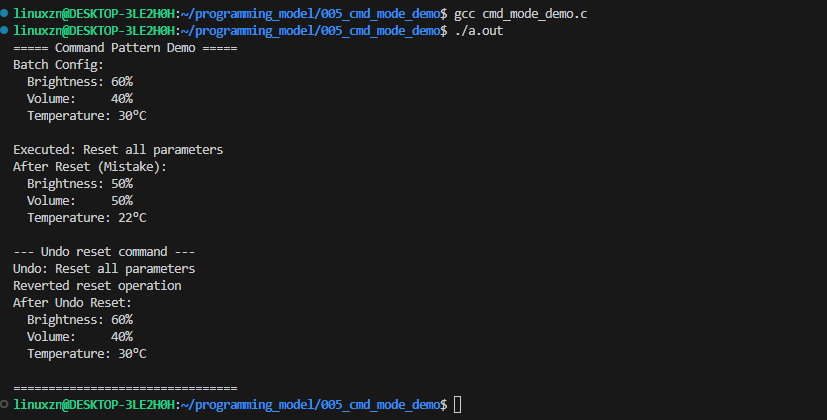
In this example, there is only one concrete command: the reset configuration command. Using the command pattern allows for easy extension of other commands, such as:
Creating a batch setting command: inheriting from the command interface and implementing the corresponding logic for batch setting commands.
// Batch setting command
typedef struct {
    Command base;
    SystemConfig* config;
    SystemConfig new_config;
    SystemConfig previous_config;
} BatchSetCommand;

void batch_set_execute(Command* cmd) {
    BatchSetCommand* bsc = (BatchSetCommand*)cmd;
    bsc->previous_config = *bsc->config;  // Save current configuration
    *bsc->config = bsc->new_config;       // Apply new configuration

    snprintf(cmd->description, 50, "Batch set: B=%d%%, V=%d%%, T=%d°C",
             bsc->new_config.brightness,
             bsc->new_config.volume,
             bsc->new_config.temperature);

    printf("Executed: %s\n", cmd->description);
}

void batch_set_undo(Command* cmd) {
    BatchSetCommand* bsc = (BatchSetCommand*)cmd;
    *bsc->config = bsc->previous_config;  // Restore previous configuration
    printf("Reverted batch settings\n");
}

Command* create_batch_set_command(SystemConfig* config,
                                 int brightness, int volume, int temp) {
    BatchSetCommand* cmd = malloc(sizeof(BatchSetCommand));
    cmd->base.execute = batch_set_execute;
    cmd->base.undo = batch_set_undo;
    cmd->config = config;

    // Set new configuration values
    cmd->new_config.brightness = brightness;
    cmd->new_config.volume = volume;
    cmd->new_config.temperature = temp;

    return (Command*)cmd;
}
C++:
#include <iostream>
#include <vector>
#include <string>
#include <memory>
// Configuration parameter structure
class SystemConfig {
public:
int brightness; // Brightness (0-100)
int volume; // Volume (0-100)
int temperature; // Temperature (10-30°C)
SystemConfig(int b = 50, int v = 50, int t = 22)
: brightness(b), volume(v), temperature(t) {}
void print(const std::string& title) const {
std::cout << title << ":\n";
std::cout << " Brightness: " << brightness << "%\n";
std::cout << " Volume: " << volume << "%\n";
std::cout << " Temperature: " << temperature << "°C\n\n";
}
};
// Command interface
class Command {
public:
virtual ~Command() = default;
virtual void execute() = 0;
virtual void undo() = 0;
virtual std::string getDescription() const = 0;
};
// Invoker
class CommandInvoker {
private:
std::vector<std::unique_ptr<Command>> history;
static const size_t MAX_HISTORY = 10;
public:
void executeCommand(std::unique_ptr<Command> cmd) {
cmd->execute();
if (history.size() < MAX_HISTORY) {
history.push_back(std::move(cmd));
}
}
void undoLastCommand() {
if (!history.empty()) {
std::cout << "Undo: " << history.back()->getDescription() << "\n";
history.back()->undo();
history.pop_back();
}
}
};
// Concrete command: Reset configuration command
class ResetConfigCommand : public Command {
private:
SystemConfig& config;
SystemConfig previousConfig;
std::string description = "Reset all parameters";
public:
ResetConfigCommand(SystemConfig& cfg) : config(cfg) {}
void execute() override {
previousConfig = config;
config = SystemConfig(50, 50, 22);
std::cout << "Executed: " << description << "\n";
}
void undo() override {
config = previousConfig;
std::cout << "Reverted reset operation\n";
}
std::string getDescription() const override {
return description;
}
};
// Client
void commandDemo() {
std::cout << "===== Command Pattern Demo =====\n";
// Batch set system configuration
SystemConfig currentConfig(60, 40, 30);
currentConfig.print("Batch Config");
// Create invoker
CommandInvoker invoker;
// Mistaken operation: reset configuration
invoker.executeCommand(std::make_unique<ResetConfigCommand>(currentConfig));
currentConfig.print("After Reset (Mistake)");
// Undo reset operation
std::cout << "--- Undo reset command ---\n";
invoker.undoLastCommand();
currentConfig.print("After Undo Reset");
std::cout << "======================================\n";
}
int main() {
commandDemo();
return 0;
}
2. Advantages and Disadvantages of Command Pattern
Advantages:
- Decoupling: Separates the request initiator from the executor
- Extensibility: New commands can be added without modifying existing code
- Supports advanced operations: Built-in undo/redo functionality
Disadvantages:
- Class bloat: Each command requires a separate class
- Indirect invocation: Increases system complexity
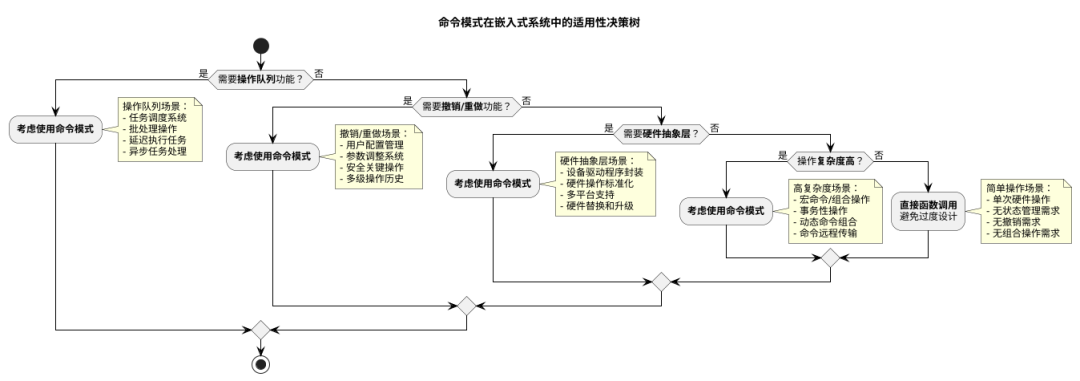
3. Summary of Applicability in Embedded Scenarios
In embedded systems that require operation queues, undo functionality, or hardware abstraction layers, the command pattern can be considered, while simple operations can be called directly to avoid over-design.
Writing is not easy; if this article has helped you, please like and share it. Thank you all!

END
Source: Embedded Miscellaneous
Copyright belongs to the original author. If there is any infringement, please contact for deletion..▍Recommended ReadingWhy is C++ rarely used in microcontroller development?Oh no! Encountered another microcontroller crash caseXiaomi is really stingy; one MCU actually handles all functions→ Follow for more updates ←