Solving Problems for Classmates
——C++ Programming Arrays
Hello everyone! After finishing the study of basic content such as variables, statements, and functions, we officially enter the “first advanced level” of C++ programming—arrays. Many students may have heard the saying: “Arrays are the watershed of programming understanding.” Unlike basic knowledge points that are intuitive and easy to understand, arrays contain many details that can be confusing, becoming a “roadblock” for many beginners. However, as a core tool for batch data storage, arrays play an irreplaceable role in algorithm implementation and project development. In fact, as long as we clarify the logical types of arrays and thoroughly understand their essential principles, we can easily identify various traps in problems and even turn arrays into a “bonus item” for solving problems. Next, let us analyze the “core” of arrays step by step, guiding everyone from “confusion” to “clarity” and mastering the usage skills of arrays comprehensively!

01
One-Dimensional Arrays
Definition: An array is a collection of ordered variables of the same type, sorted according to certain rules, occupying a block of contiguous storage space in memory.
1. Declaration of One-Dimensional Arrays
The declaration format of an array is type specifier array_name[constant_expression];
For example: int a[4];
Here, the constant expression represents the number of elements in the array, i.e., the length of the array. In the above expression a[4], the 4 indicates that the array a has 4 elements: a[0], a[1], a[2], a[3].
Note:
(1) The index starts from 0, and the maximum valid index is the array length – 1;
(2) The constant expression in the definition must be a constant and cannot include variables, i.e., dynamic definition of the array size is not allowed; however, in array applications, the index can be a variable or expression;
(3) Note that the array name represents the memory address and is a constant, so it cannot be assigned! That is, int a[3]; a={1,2,3}; is incorrect!

01
One-Dimensional Arrays
2. Initialization of One-Dimensional Arrays
There are several common forms of initializing one-dimensional arrays:
1. Complete initialization: Assign initial values to all elements in the array.
For example: int a[5]={1,2,3,4,5};
2. Partial initialization: Assign initial values to some elements in the array, and the uninitialized elements are default initialized to 0.
For example: int a[10]={1,2,3,4,5};
3. Omitted length initialization: When all initial values of the array are given, the size of the array can be omitted.
For example: int a[5]={1,2,3,4,5}; can be written as int a[]={1,2,3,4,5};
Distinction:
(1) When the array is defined as a global array or static array, all elements are default initialized to 0;
(2) When the array is defined as a local array, the elements of the array do not have determined initial values, and their values are random;
(3) When the array is defined as a local array and partially initialized, the uninitialized elements default to 0.

02
Two-Dimensional Arrays
1. Declaration of Two-Dimensional Arrays
The declaration format of a two-dimensional array is type specifier array_name[constant_expression1][constant_expression2];;
Two-dimensional arrays are stored in memory using row-major order, meaning that all elements of the first row are stored first, followed by all elements of the second row, and so on. Since they are stored contiguously in memory, we can calculate the address of each element using a formula.
For a two-dimensional array a[M][N], the address of the element a[i][j] can be calculated using the following formula:
Address = base address + (i×N + j)×sizeof(element type)
For example, when defining a two-dimensional array int a[3][3]: the array has a total of 3 rows and 3 columns, with 9 elements in total. The memory arrangement order is: a[0][0], a[0][1], a[0][2], a[1][0], a[1][1], a[1][2], a[2][0], a[2][1], a[2][2]
According to the address calculation formula:
The address of a[0][3] = base address + (0×3 + 3)×4 = base address + 12
The address of a[1][0] = base address + (1×3 + 0)×4 = base address + 12
Thus, a[0][3] and a[1][0] point to the same memory address, even though a[0][3] is a syntax error for out-of-bounds access.

02
Two-Dimensional Arrays
2. Initialization of Two-Dimensional Arrays
(1) Row-wise initialization
For example: int a[2][3]={{1,2,3},{4,5,6}};
(2) Partial row initialization: uninitialized elements are automatically assigned 0
For example: int a[3][4]={{1,2},{3},{4,5,6}};
Equivalent to
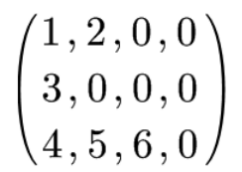
(3) List the values of each element in order according to the array element’s sorting order
For example: int a[2][3]={1,2,3,4,5,6};
Note!
1) Global arrays and static arrays that are not initialized are defaulted to 0 by the system. For example: static int a[2][3];
2) When defining a two-dimensional array, the number of rows can be omitted, but the number of columns cannot be omitted! The compiler will automatically calculate the required number of rows based on the number of initialization data and the specified number of columns.
For example: int a[][3]={1,2,3,4,5,6} where only the number of columns is specified as 3, but the compiler will automatically calculate the number of rows as 2, forming a 2-row 3-column two-dimensional array, which is equivalent to int a[2][3]={1,2,3,4,5,6}.
Distinction: int a[3][3]={1,2,3}; and int a[3][3]={{1},{2},{3}};
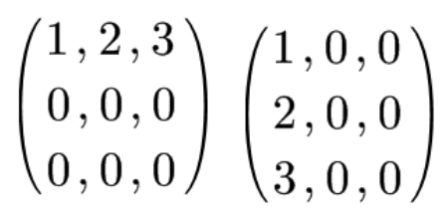
The left image shows int a[3][3] = {1,2,3}; and the right image shows int a[3][3] = {{1},{2},{3}};

03
Character Arrays
Character arrays are used to store character data, and their definition format is the same as that of numerical arrays, for example: char ch[10];
1. Initialization of Character Arrays
(1) Individual character initialization: similar to the initialization of numerical arrays.
For example: char ch[5]={‘a’,’ ‘,’b’,’e’,’m’};
Note! If the number of characters exceeds the array length, the compiler will report an error; if the number of values is less than the array length, only the first elements will be initialized, and the remaining elements will be automatically filled with ‘\0’.
(2) Omitted array length initialization: when the length is omitted during array definition, the compiler will automatically determine the array length based on the number of initial values.
For example: char ch[]={‘a’,’ ‘,’b’,’e’,’m’}; the length of the array ch is automatically determined to be 5.

03
Character Arrays
2. Strings and String Termination Character
In C++, strings typically exist in the form of character arrays, with the core feature being the use of ‘\0’ as the string termination character. This ‘\0’ occupies one byte of memory but is not counted in the effective length of the string. The program determines the end of the string by detecting ‘\0’, rather than relying on the size of the array.
Note!
(1) When initializing a character array with a string constant, the compiler automatically adds ‘\0’ at the end.
For example: char str1[] = “China”; the system will automatically add ‘\0’, so the actual length of the array str1 is 6. This method occupies one more byte than initializing with a character list {‘C’,’h’,’i’,’n’,’a’} to store ‘\0’.
(2) Input and output of strings: When using cin>> to input strings, it stops reading when encountering spaces, tabs, or newline characters, and automatically adds ‘\0’ after the read content. If you need to read strings containing spaces, you should use cin.getline(array_name, maximum_number_of_characters_allowed) function.
For example: if executing char str[20]; cin>>str; cout<<str; when inputting “hello world”, what will be the output?
Since cin>> stops reading at spaces, the output will be hello.

03
Character Arrays
3. String Processing Functions
C++ provides a series of standard library functions (header file <cstring>) for processing strings.
(1) String Concatenation Function strcat
Format: strcat (array_name1, array_name2)
Function: Concatenates array2 completely to the end of array1, overwriting the original ‘\0’ of array1, and automatically adds ‘\0’ at the end of the new concatenated string. The function returns the base address of array1.
Note! Array1 must have enough space to accommodate the new concatenated string, i.e., the space of array1 must be greater than or equal to (original length + length of array2 + 1).
For example:
char str1[20]=”I am a “;
char str2[]=”boy!”;
cout<<strcat(str1,str2);
Output:
I am a boy!
(2) String Copy Function strcpy
Format: strcpy (array_name1, array_name2)
Function: Copies the string from array2 to array1, overwriting the original content, and ‘\0’ is also copied to array1.
For example:
char str1[20]=”I am a “;
char str2[]=”boy”;
strcpy(str1,str2);
cout<<str1;
Output:
boy
Application: In the program, you cannot use the assignment operator = to directly assign values to character arrays, i.e., str1=str2; is incorrect. Because the array name represents the base address of the array in memory, which is a constant. Using strcpy is the correct method to achieve this functionality, implementing the “assignment” function.
For example:
char ss[90];
strcpy(ss, “student”);
After execution, the string in the character array ss will be student.
(3) String Comparison Function strcmp
Format: strcmp(array_name1, array_name2)
Function: Compares two strings character by character according to ASCII values until a different character is encountered or ‘\0’ is reached.
Return value rules:
① Returns 0: the two strings are completely equal;
② Returns a positive integer: the ASCII value of the first different character in string1 is greater than that of the corresponding character in string2;
③ Returns a negative integer: the ASCII value of the first different character in string1 is less than that of the corresponding character in string2;
(4) String Length Function strlen
Format: strlen(array_name)
Function: Calculates the actual effective length of the string, i.e., the number of characters from the start of the string to the first ‘\0’ (not including ‘\0’ itself), and not the size of the array in memory.
For example:
char c1[80]=”china”;
cout<<strlen(c1)<<endl;
The output result is: 5

The core of learning arrays lies in grasping the three key points: index rules, memory layout, and initialization details, while deepening understanding through practical exercises. Next, I hope everyone will boldly move forward with this knowledge and flexibly apply array knowledge to more programming practices, unlocking more complex programming challenges!

Planning | Undergraduate Academic Guidance Center
Text and Images | Lu Yuyan, Zhu Xinyu
Editing | Yao Yiwei
Initial Review | Li Haoyang
Final Review | Chen Zuoyu
Verification | Shang Wenhao

Recommended Reading

When the Weather Turns Cold, Keep Your Heart Warm

Issue 210 of the “Famous Teacher Forum”: Learning Methods and Skills for University Physics (1)