Dear friends, I believe many of you have played the number guessing game in the command line before! Playing the number guessing game in the command line means staring at a black command line, right? In this issue, I will guide you to bring the number guessing game into a graphical interface! We will create a graphical version of the number guessing game using Turtle Graphics, allowing you to input numbers directly in a dialog box without facing the black command line, and the results will be displayed on the screen, achieving an interactive learning experience while playing.

Why use Turtle Graphics for the number guessing game?
Compared to the command line, Turtle Graphics makes the game more visually appealing! The biggest advantage is that you don’t have to remember complex codes; you can input numbers in the dialog box, and the results are displayed more intuitively. Additionally, the results will be textually feedback on the canvas, so you don’t have to keep scrolling through the command line to find information!
Another benefit of using Turtle Graphics is that it allows for graphical effects (for example, drawing a small trophy when you guess correctly), which adds a sense of achievement!

Hands-on Practice
Step 1: First, you need to import the Turtle module, create the canvas, and set the font and color (Note: when importing the Turtle module, you also need to import the random number module “random”).
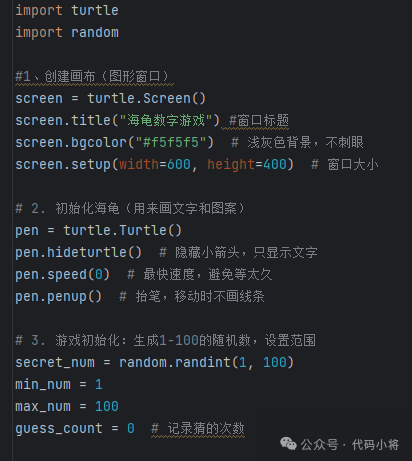
After running this code, a window will pop up, and you will enter the game interface!
Step 2: To allow players to play repeatedly, we need to add a loop; after each input, use Turtle to draw the prompt on the screen, and remember to clear the previous text.
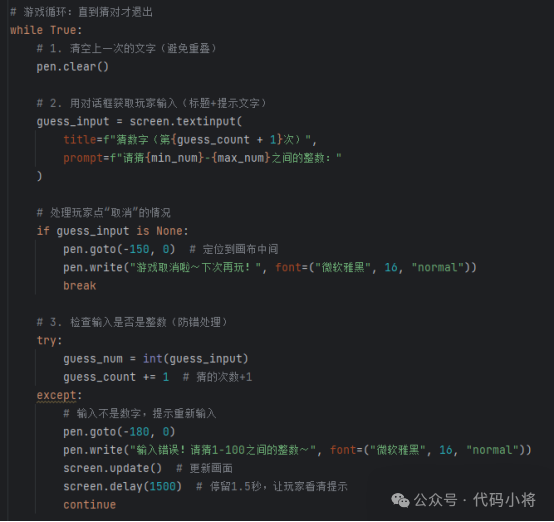
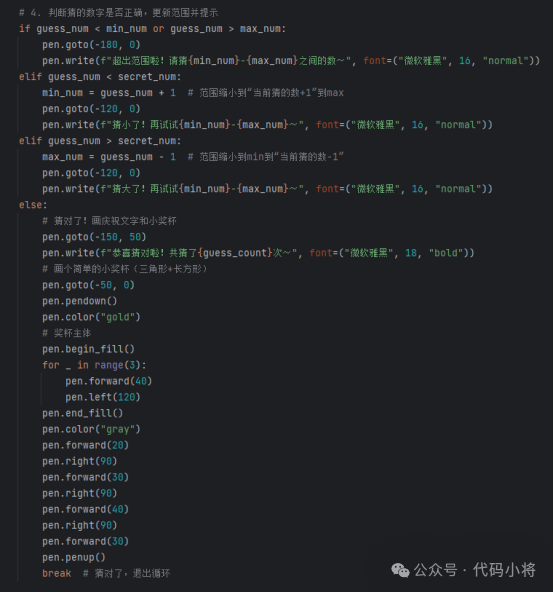
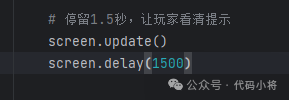
The key here is pen.clear() (to clear old text) and textinput() (for dialog input), which solves the problem of “text piling up and input difficulties” in the command line version!
Step 3: Finally, add a line of code to keep the window open; pay attention to the file name suffix, so you can double-click to play directly!
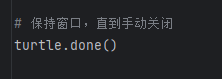
Combine the three segments of code above, and you will have the complete code! Note that the file name should be named turtle_guessnum.pyw (with the suffix .pyw, not .py), so you can run it directly on your computer by double-clicking, and it won’t pop up the black command window, making the experience more like a proper game!
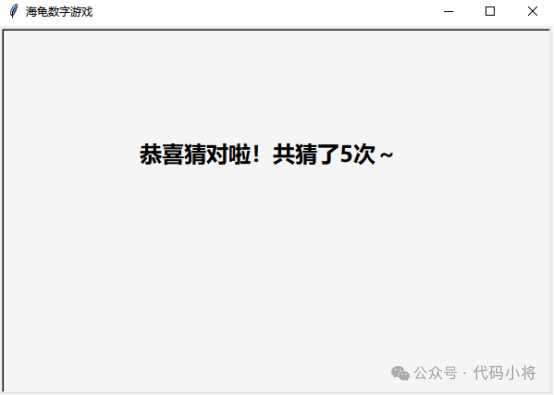
This is the state after running!
Summary
By creating the number guessing game, you have quietly mastered advanced Turtle usage such as: graphical interaction (textinput() for dialog input), text drawing (write() to draw results on the canvas, clear() to clear old content), as well as window control and error handling, all learned through this game.
Next time, we will continue to use Turtle or other modules to create more complex games! You can also try upgrading this number guessing game, for example, changing the range to “0-1000” etc.; if you encounter problems while modifying the code, feel free to leave a message in the comments! Follow our public account to unlock more Python practical tutorials, making programming as addictive as playing games!

Welcome to the “Code Young General” classroom, where we are dedicated to youth programming. With lively and interesting courses, we lead children into the world of programming and experience the charm of code. We help children learn programming knowledge while having fun, cultivate programming thinking, and provide rich project practice, allowing children to apply what they have learned to real projects and experience the joy of creation. 





For those who want to learn about youth programming, feel free to follow us, or click the menu bar for “Consultation” to contact us! 





Once again, welcome everyone to join our “Code Young General” programming family, letting children set sail in the ocean of programming!