1. Project Overview
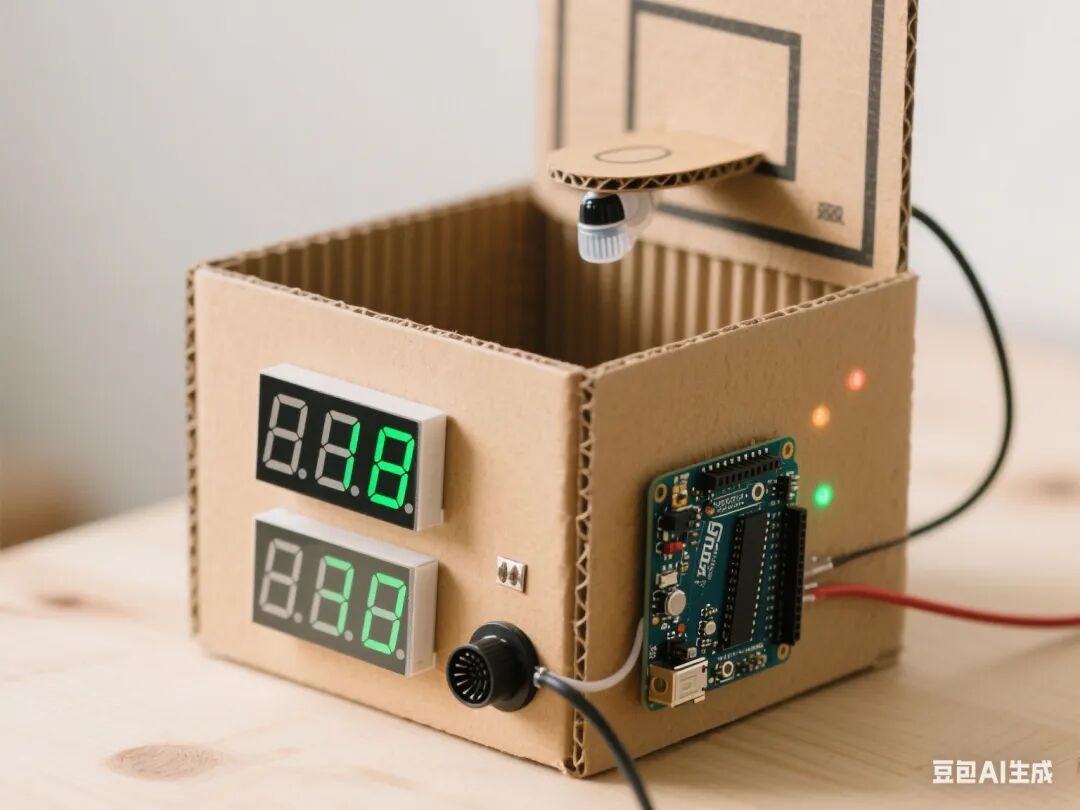
This project is themed “Sports Data Assistant,” guiding students to comprehensively apply sensor technology, graphical programming, and mechanical structure design. Through phased tasks, students will create an intelligent basketball scoring assistant device with counting and prompting functions. The project deeply integrates the Doubao Classroom Assistant AI, providing students with real-time learning support and personalized guidance, fostering interdisciplinary engineering practice skills and innovative thinking.
2. Overall Project Goals
1. Knowledge and Skills Goals
◦ Master the signal detection and threshold calibration methods of infrared sensors
◦ Understand the role and lifecycle of variables in the counting system
◦ Learn dynamic display and data refresh of two-digit seven-segment displays
◦ Implement multi-tone output for the buzzer and button reset function
2. Process and Method Goals
◦ Cultivate system thinking through the engineering process of “prototype design – functional iteration – system testing”
◦ Learn to use the serial monitor and AI for debugging
3. Emotional Attitude and Values Goals
◦ Appreciate the application value of intelligent technology in sports training
◦ Cultivate a rigorous engineering attitude and interest in sports
3. Required Hardware
1. Arduino Nano + Expansion Board
2. Infrared Sensor (Digital Signal Type)
3. Two-Digit Seven-Segment Display Module (Common Cathode/Common Anode)
4. Active Buzzer
5. Tactile Button Module
6. Corrugated Cardboard Box and Auxiliary Materials (Wood Sticks, Zip Ties, etc.)
7. Battery Holder (4 AA Batteries)
8. Dupont Wires, Hot Glue Gun, and Other Tools
4. Class Schedule and Lesson Design
First Lesson: Infrared Sensor Testing
1. Learning Objectives
◦ Master the working principle of infrared sensors and digital signal detection
◦ Achieve triggering signal detection for basketball actions
2. Teaching Key Points and Difficulties
◦ Key Point: Connection method between the sensor and Arduino
◦ Difficulty: Effective detection distance and threshold setting
3. Teaching Steps
◦ Introduction (5 minutes): Show a video of the NBA smart scoring system to introduce the project theme
◦ Knowledge Explanation (15 minutes):
◦ Function of infrared sensor pins (VCC/GND/D0)
◦ Signal detection logic (high-level trigger)
◦ Hardware Practice (20 minutes):
◦ Connect the sensor to pin D2
◦ Write code: Display “Score” on the serial monitor when an object is detected
◦ Calibration Experiment (10 minutes):
◦ Adjust sensor sensitivity (effective distance 0-10cm)
◦ Record detection stability at different angles
◦ AI Interaction: Doubao provides signal waveform diagrams, real-time detection of sensor status
Second Lesson: Variable Application and Seven-Segment Display Counting
1. Learning Objectives
◦ Master the definition and increment operation of variables
◦ Achieve dynamic display of two-digit seven-segment displays
2. Teaching Key Points and Difficulties
◦ Key Point: Use of seven-segment display library functions
◦ Difficulty: Decomposing values into tens and units
3. Teaching Steps
◦ Review Introduction (5 minutes): Review sensor functions and introduce counting needs
◦ Knowledge Explanation (15 minutes):
◦ Variable declaration and initialization (int score=0)
◦ Seven-segment display pin definitions (CLK/DIO)
◦ Hardware Practice (20 minutes):
◦ Connect the seven-segment display to pins D3/D4
◦ Write code: Increment score when the sensor is triggered and display it
◦ Display Optimization (10 minutes):
◦ Add leading zeros (display 0-99)
◦ Achieve dynamic refresh (no flicker)
◦ AI Interaction: Doubao provides variable lifecycle diagrams, real-time detection of display errors
Third Lesson: Buzzer Sound Design
1. Learning Objectives
◦ Master PWM signal control of buzzer pitch
◦ Achieve multi-mode sound feedback
2. Teaching Key Points and Difficulties
◦ Key Point: Frequency setting of the tone() function
◦ Difficulty: Timing coordination of sound effects and actions
3. Teaching Steps
◦ Task Introduction (5 minutes): Show basketball scoring sound effects to introduce functional needs
◦ Knowledge Explanation (15 minutes):
◦ Difference between active and passive buzzers
◦ Sound effect coding (e.g., scoring: C note 1000Hz)
◦ Hardware Practice (20 minutes):
◦ Connect the buzzer to pin D5
◦ Write code: Play sound effect when scoring (1 second)
◦ Sound Design (10 minutes):
◦ Add error feedback sound (short beep)
◦ Achieve volume adjustment (potentiometer control)
◦ AI Interaction: Doubao provides pitch frequency comparison tables, real-time detection of sound logic
Fourth Lesson: Button Reset Function
1. Learning Objectives
◦ Master debouncing processing for button modules
◦ Achieve reset function for the counting system
2. Teaching Key Points and Difficulties
◦ Key Point: Button state detection and variable reset
◦ Difficulty: Logic for distinguishing long press and short press
3. Teaching Steps
◦ Task Introduction (5 minutes): Discuss the need for a game pause, introducing the reset function
◦ Knowledge Explanation (15 minutes):
◦ Two methods for button debouncing (delay/state detection)
◦ Variable reset logic (score=0)
◦ Programming Practice (20 minutes):
◦ Connect the button to pin D6
◦ Write code: Reset count on long press for 3 seconds
◦ Logic Optimization (10 minutes):
◦ Add confirmation sound (two short beeps)
◦ Achieve flashing of the seven-segment display during reset
◦ AI Interaction: Doubao provides button state machine diagrams, real-time detection of code logic
Fifth Lesson: System Integration and Project Presentation
1. Learning Objectives
◦ Achieve programming logic for multi-module collaboration
◦ Complete the mechanical structure of the basketball scoring counter
2. Teaching Key Points and Difficulties
◦ Key Point: Timing coordination of sensor, seven-segment display, and buzzer
◦ Difficulty: Balancing structural stability and operational smoothness
3. Teaching Steps
◦ Design Introduction (5 minutes): Show excellent structural design cases, emphasizing human-computer interaction needs
◦ Structure Building (30 minutes):
◦ Use corrugated cardboard to make the basketball hoop and counter casing
◦ Install sensor brackets and button panels
◦ System Debugging (20 minutes):
◦ Test counting accuracy at different shooting distances
◦ Adjust buzzer volume and seven-segment display brightness
◦ Final Testing (15 minutes):
◦ Simulate competition scene testing (10 shots)
◦ Record false triggers, display delays, and other issues
◦ Summary (10 minutes): Reflect on system strengths and weaknesses, propose improvement plans
5. Assessment Methods
1. Process Evaluation (40%)
◦ Hardware connection standardization (10%)
◦ Code logic rationality (15%)
◦ Problem-solving ability (15%)
2. Summative Evaluation (60%)
◦ Completeness of functional implementation (30%)
◦ Innovation in structural design (20%)
◦ Presentation of project display (10%)
6. Safety Tips
1. Ensure correct connection of battery holder’s positive and negative terminals to avoid short circuits
2. Buzzer volume should not be too loud to prevent hearing damage
3. Be cautious of high temperatures when using a hot glue gun
7. Doubao AI Application Design
1. Real-time Guidance: Provide step-by-step voice prompts during hardware connections, code writing, etc.
2. Error Diagnosis: Automatically identify circuit errors and code logic errors, providing modification suggestions
3. Resource Expansion: Push case studies of smart sports devices and sensor application materials
4. Learning Archives: Record student debugging data, generating personalized ability analysis reports
8. Teaching Resources
1. Mind+ software and extension libraries
2. Technical documentation for each module
3. Engineering log templates
4. Code examples for dynamic display of seven-segment displays