f-strings, introduced in Python 3.6, are one of the most commonly used features in Python. They allow us to write cleaner, more efficient, and more maintainable code. Today, we will delve into some tips for using them from basic to advanced.
Aligning Text
When formatting output, alignment is crucial for readability. Whether generating reports, logging data, or creating user interfaces, aligned text looks cleaner and is easier to read.
variable = "some text" print(f"|{variable:>30}|") print(f"|{variable:<30}|") print(f"|{variable:^30}|")You can also fill spaces with other chosen characters, for example:
variable = "some text" print(f"|{variable:*^30}|")These options provide a universal way to format text output, making it more readable and visually appealing.
Date and Time Formatting
Handling dates and times is a common task in programming. Python’s datetime module provides a rich set of tools for this, and f-strings make it easier to format dates and times according to your preferences.
from datetime import datetime now = datetime.now() print(f"Date: {now:%d-%m-%Y}") print(f"Time: {now:%H:%M:%S}") print(f"Locale's Date and Time: {now:%c}") print(f"Time in AM/PM format: {now:%I:%M %p}")Customizing the output of date and time information can easily display timestamps in a human-readable format.
Numbers with Separators
Handling numbers in code can be tricky, especially when readability is important. You can directly use thousand separators in f-strings to format large numbers:
n = 1000000000 print(f"{n:_}") # Outputs: 1_000_000_000 print(f"{n:,}") # Outputs: 1,000,000,000Using underscores (_) or commas (,) as separators in f-strings makes numbers more readable. This practice is particularly useful when dealing with financial data, large datasets, or any applications where clarity is crucial.
Controlling Decimal Precision
When dealing with floating-point numbers, the representation of decimal places is often critical. f-strings provide a simple way to achieve this precision.
num = 13.234 print(f"{num:.2f}") # Result: 13.23Rounding a number to show only two decimal places. You can also completely remove the decimal places:
print(f"{num:.0f}") # Result: 13Removing the decimal places gives you an integer. You can also use the % sign to print percentages.
value = 0.75321 print(f"{value:.2%}") # Output: 75.32%You can pair this with thousand separators:
num = 13.234 print(f"{num:,.2%}") # Result: 1,323.40%This combination of features is particularly useful in scientific research, finance, and any situation requiring precise control over number formatting.
Quick Debugging Inline Expressions
f-strings can make the debugging process easier. Instead of writing multiple lines to display variable values, you can include expressions directly in the f-string for quick checks, and you can use the equals sign (=) inside the braces to display both the expression and its result simultaneously.
from dataclasses import dataclass @dataclass class Person: name: str age: int person1 = Person(name="Alice", age=30) person2 = Person(name="Bob", age=25) print(f"{person1.name = }, age {person1.age = }, {person2.name = }, age {person2.age = }")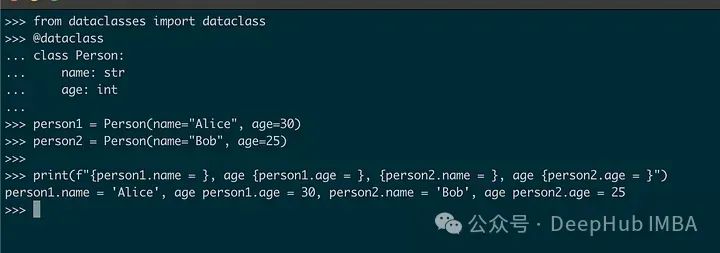
Conditional Expressions in f-strings
You can also use conditional expressions directly in f-strings. This allows you to create more dynamic outputs without writing separate conditional statements.
score = 85 print(f"Your score is {score}, which is {'passing' if score >= 50 else 'failing'}.")This line of code checks the value of score and includes the appropriate text in the string. This is a concise way to add conditional logic to string formatting.
Conclusion
f-strings are a very powerful string formatting technique that elegantly expresses Python strings. They can meet almost all our basic requirements with a mini syntax, even running expressions in strings. This is very helpful for our daily development.
Official Documentation:
https://docs.python.org/3/reference/lexical_analysis.html#f-strings
-END-