Previously, we discussed textual programming, where the most important aspect is structuring, similar to writing an article that needs to be divided into chapters, sections, and paragraphs. For ST programming, we also need to appropriately apply subroutines, function blocks (FB), and functions (FC) to break down the program, making it more organized and clear!
Chapter 10 of the original book is titled “Splitting up the PLC program,” which translates to program segmentation! In this issue, we will share important methods for structuring programs!

Subroutines
The original book refers to them as Program modules, which we understand as subroutines.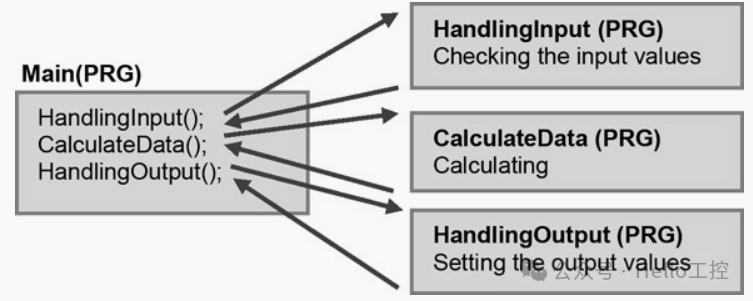 For engineers just starting out, the most basic structure is that there is only one Main program in the entire program. Other programs are called as subroutines within Main!The execution flow of the Main program is as follows:
In each program scan cycle (Program-scan), the Main program will be executed once, in the following order:
-
First, execute
<span><span>HandlingInput</span></span>code in the program module (handling input signals); -
Next, execute
<span><span>CalculateData</span></span>code in the program module (data calculation and processing); -
Finally, execute
<span><span>HandlingOutput</span></span>code in the program module (controlling output devices).
When a scan cycle ends, the PLC will restart a new round of scanning, calling the Main program again. For example:
-
If the scan cycle is set to 50ms, then the Main program is executed every 50ms.
-
Key requirement: The total execution time of all program modules must be less than 50ms, otherwise some code may not complete within the cycle.
Solutions for Scan Cycle Timeout
If the program module contains large arrays or complex calculations, it may cause the execution time to exceed the scan cycle. In this case, the following measures can be taken:
-
Increase the scan cycle time (e.g., adjust from 50ms to 100ms);
-
Optimize the code, checking if the calculation load can be reduced or the logic can be restructured.
Factors Affecting Scan Time
-
The number of conditional statements (IF/CASE) will affect execution time, so it must be designed according to the worst-case scenario (longest possible scan time) and additional buffer time should be reserved.
-
Typically, the PLC will issue a warning when the scan time is insufficient to prompt the programmer to adjust the settings.
Independent Scan Time Configuration for Program Modules
Different modules can be set with different scan times, suitable for cases with significant differences in execution time. For example:
-
High-speed I/O processing (e.g., sensor signals) can use a shorter cycle (10ms);
-
Low-speed tasks (e.g., communication or complex calculations) can use a longer cycle (100ms).

Functions (FC)
Basic Concept of Functions
Functions are important building blocks in PLC programs, containing a small amount of reusable (executable) code. Especially for common data calculations (mathematical formulas), data conversions, or frequently used code.
Calling Methods for Functions
-
No parameter call

-
Call with parameters

-
Call with expressions

Variable Scope and Passing Methods of Functions
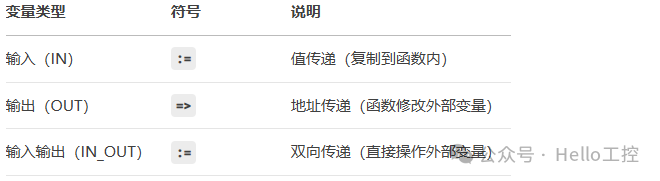
When calling a function, the direction of variable passing is clearly distinguished by symbols:
For example:
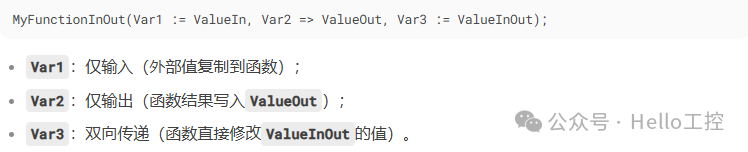 Advantages of Functions
Special Call: Array Index Parameter Passing

Functions can also be created as array ARRAY types, for this type of special call, for example, the above image shows the parameter passing method for the No.4 array element.

Functions (FC) vs Function Blocks (FB)
1. Core Differences
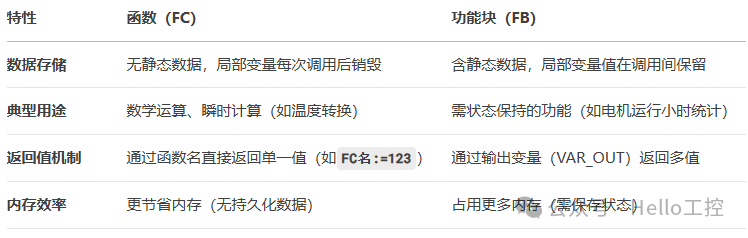
2. Syntax Structure Comparison
Function (FC) Syntax:
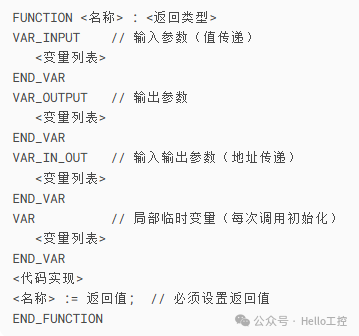
Function Block (FB) Syntax:
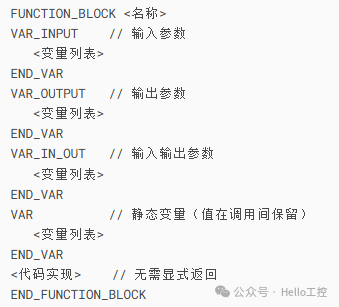
3. Key Feature Analysis
-
Parameter Passing Method:
-
VAR_INPUT (
<span><span>:=</span></span>) : Value passing (modifications within the function do not affect external variables) -
VAR_OUTPUT (
<span><span>=></span></span>) : Address passing (used for output results) -
VAR_IN_OUT (
<span><span>:=</span></span>) : Bidirectional passing (directly modifies external variables, suitable for arrays/structures)
Variable Lifecycle:
-
Local variables (VAR) in FC are reinitialized with each call, suitable for stateless operations.
-
Local variables (VAR) in FB are persistent, suitable for scenarios requiring memory, such as counters and timers.
Return Value Rules:
-
FC must explicitly return through
<span><span><function name>:=value</span></span>and can only return a single value. -
FB returns multiple values through VAR_OUTPUT, no function name assignment is required.
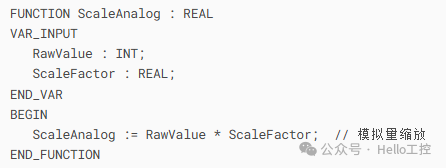
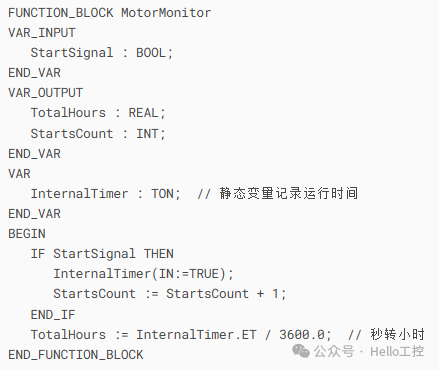
4. Typical Application Scenarios
- When to use FC:
-
When to use FB:
5. Design Considerations
-
Variable Initialization:
-
Local variables in FC must be explicitly initialized (e.g.,
<span><span>Counter := 0;</span></span>), to avoid residual value issues.
IN_OUT Parameter Risks:
-
Directly manipulating external variables may cause unintended side effects, it is recommended to add protective logic.
Performance Optimization:
-
Simple logic that is frequently called should prioritize using FC to reduce memory usage.
Naming Conventions:
-
Use
<span><span>verb+noun</span></span>format (e.g.,<span><span>CalculateAverage</span></span>,<span><span>CountMotorStarts</span></span>)

Function Implementation Design Guidelines
1. Core Objectives of Function Design
-
Reduce program errors
-
Increase code reusability
-
Build structured programs
2. Six Design Principles for Reusable Functions
| Principle | Specific Requirements | Consequences of Violation |
|---|---|---|
| Variable Isolation | Prohibit direct access to global variables or I/O modules, parameters must be passed through<span><span>VAR_IN/OUT/IN_OUT</span></span> |
High code coupling, difficult to port |
| Generic Naming | Avoid using specific identifiers like PLC models or company names, use function descriptive naming (e.g.,<span><span>CalcMotorEfficiency</span></span>) |
Poor readability, difficult to reuse |
| Cross-Platform Compatibility | Ensure functions can be used across different PLC models and programming languages | Strong hardware dependency |
| Flexible Calling | Support being called by program modules and other functions | Limited application scenarios |
| Parameter Simplification | Total number of input and output parameters ≤ 8, if exceeded, use<span><span>STRUCT</span></span> encapsulation (must be declared in<span><span>VAR_IN_OUT</span></span>) |
Difficult to maintain, prone to errors |
| Robustness Check | Must validate input parameter validity, return error flags (e.g.,<span><span>Error: BOOL</span></span>), to avoid runtime errors (RTE) |
Risk of program crashes |
3. Best Practices for Function Implementation
-
Control Code Size
-
Single function code lines ≤ 25 lines (visible on one screen)
-
If exceeded, split into sub-functions or optimize logic
Programming Language Choice
-
ST (Structured Text) is not mandatory, but consistency must be maintained
Special Component Considerations
-
If containing timers/counters, must be defined as Function Blocks (FB)
-
Recursive calls are strictly prohibited (self-calling functions)
4. Two Design Methodologies
Method A: Top-Down Design
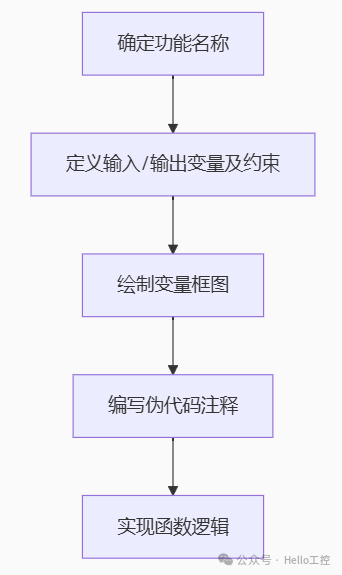 Advantages: Clear structure, suitable for complex functionsData Conversion Suggestions: Internal processing type conversion (e.g.,
<span><span>TIME</span></span> to <span><span>WORD</span></span> to simplify interfaces)Method B: Bottom-Up Design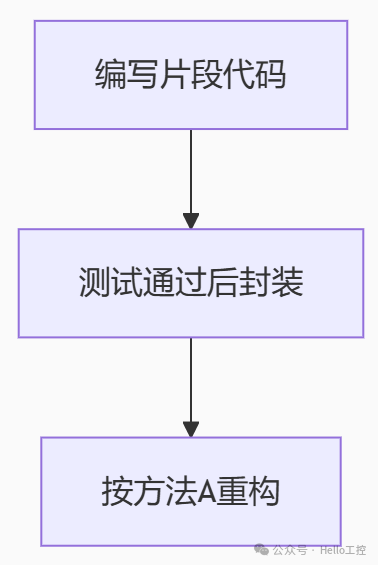
Advantages: Suitable for beginners, reduces error probability
Key Tip: When duplicate code (Copy-Paste) appears, it should be immediately abstracted into a function!
5. Standard Function Execution Process
-
Create local variables (memory allocation)
-
Validate input parameter validity
-
Initialize local variables (assign default values)
-
Execute core logic (calculation/data processing)
-
Set return value (FC) or update status (FB)
-
Release local variables (FC)
6. Five Advantages of Functional Programming
✅ Clear structure✅ Increased code reusability✅ Facilitates expansion and maintenance✅ Supports modular testing✅ Can be quickly disabled during debugging
7. Typical Function Application Scenarios
-
Sensor unit conversion (e.g., ℃→℉)
-
Device maintenance time prediction
-
Conveyor belt speed calculation
-
OEE (Overall Equipment Efficiency) statistics
-
Alarm monitoring logic
-
General algorithm encapsulation (e.g., PID control)
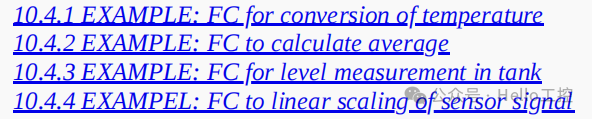 The original book contains four examples related to functions, interested friends can refer to it!
- [Video Course] Codesys V3.5 Series Introductory Course(150 people have learned)
- [Video Course] Codesys SoftMotion Basic Course(46 people have learned)
- [Video Course] Codesys SoftMotion Electronic Gear Course(17 people have learned)
- [Video Course] Codesys SoftMotion Electronic Cam Course(12 people have learned)
- [Video Course] Codesys Library Custom Library Creation(24 people have learned)
-
Efficient, real-time, flexible: In-depth analysis of EtherCAT bus technology (final part)
-
RS232, RS422, and RS485 serial communication technology comprehensive analysis (final part)
-
Comprehensive analysis of Modbus protocol (final part)
-
Comprehensive analysis of Profibus technology (final part)
-
Comprehensive analysis of Profinet technology (final part)
-
Comprehensive analysis of EtherNet/IP technology (final part)
-
Comprehensive analysis of CAN and CANopen bus technology (final part)
-
Comprehensive analysis of OPC UA communication technology (final part)

——–END——–
 If you like this article, please share and “like” it and “see it”