In ST language, operators are the smallest functional units for constructing program logic, just as letters are to an article. Their correct usage directly determines:
-
the accuracy of control logic
-
the reliability of device behavior
-
the convenience of code maintenance Mastering the characteristics of operators is a core competency requirement for PLC programmers.
This issue is Chapter 7, which describes the arithmetic, logical, and relational operators used in PLC programming. The built-in mathematical functions of PLCs are the same as those of ordinary calculators.

Arithmetic Operators
(+, -, *, /)
Like mathematical operations, the simplest arithmetic operators are: addition, subtraction, multiplication, and division!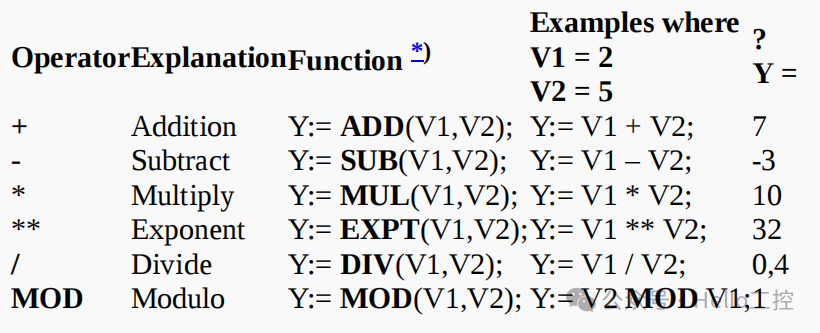 In ST language, arithmetic operators are used directly, unlike in ladder diagrams:
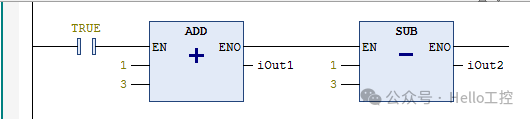 Thus, ST language has a significant programming advantage in mathematical calculations, being simple and direct! It should be noted that some PLCs do not support the operator “**”, so you can use EXPT(V1, V2) instead.Additionally, the variable types of the two objects being calculated need to be clear. For example, adding two integers:
 The normal result:
 Why are the data operation results different? The type of the former iResult is INT, while the latter is DINT. The range of INT type is:-32,768 ~ +32,767, so the normal result 50000 > 32767, thus the result overflowed, and the final result became negative.The type of DINT:32-bit signed integer (-2^31 ~ 2^31-1), so the result of 50000 can be obtained normally!Therefore, we must correctly determine the range of the operation variables and then determine the appropriate variable types!

Comparison Operators
(=, <, <=, >, >=, <>)
Comparison operators are used to compare the logical relationship between two values (integers or decimals). The two values being compared can be variables or direct numerical values.The return value data type of the comparison result is alwaysBoolean (BOOL), which can only be<span><span>TRUE</span></span> or <span><span>FALSE</span></span>.
Here is a list of several common comparison operators:

Basically consistent with our mathematical operations! Therefore, ST language has a natural advantage in mathematical operations and formula applications!
Previously, our company developed a six-axis robot system, especially in forward and inverse kinematics calculations, once the mathematical model is established, it is very convenient to develop the core robot system algorithms!
Here is a simple example:
HeaterOn := Temperature < SetPoint;// When the temperature (Temperature) is below the set point (SetPoint), the heater switch (HeaterOn) is set to TRUEWhere HeaterOn is a BOOL type variable, and the comparison result has only two values: TRUE and FALSE.

Mathematical Functions
PLCs have built-in mathematical operation functions, which are more convenient to use in ST language, similar to mathematical expressions:
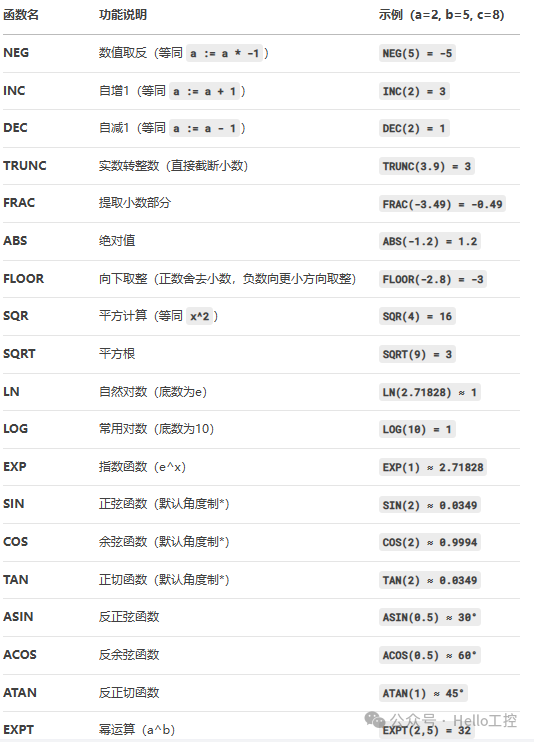
It should be noted that:
-
Different brands may have slight differences, so refer to the corresponding manuals!
-
The unit for trigonometric functions is radians, not degrees, as shown in the figure below:

-
For simple operations like incrementing by 1 INC(1), it is recommended to directly use a:=a+1; for better efficiency!

Logical Operators (AND, OR, XOR, NOT)
Logical operators are used to compare two different Boolean (BOOL) variables or values, and the return result is always <span><span>TRUE</span></span> or <span><span>FALSE</span></span>.
The following basic logical operators are shown in the table below:
| Operator | Description | Example (S1=TRUE, S2=FALSE, S3=TRUE) | Result |
|---|---|---|---|
| & | AND<span>AND</span> returns <span>TRUE</span> only when both values are <span>TRUE</span> |
<span>K1:= S1 & S2</span><span>K2:= S1 & S3</span> |
<span>K1=FALSE</span><span>K2=TRUE</span> |
| AND | Logical AND, returns <span>TRUE</span> when both values are <span>TRUE</span> |
<span>K1:= S1 AND S3</span><span>K2:= S1 AND S2</span> |
<span>K1=TRUE</span><span>K2=FALSE</span> |
| OR | Logical OR, returns <span>TRUE</span> when either value is <span>TRUE</span> |
<span>K1:= S1 OR S2</span><span>K2:= S1 OR S3</span> |
<span>K1=TRUE</span><span>K2=TRUE</span> |
| XOR | Exclusive OR, returns <span>TRUE</span> when the two values are not equal |
<span>K1:= S1 XOR S2</span><span>K2:= S1 XOR S3</span> |
<span>K1=TRUE</span><span>K2=FALSE</span> |
| NOT | Logical NOT, negates the value | <span>K1:= S1 AND NOT S2</span><span>K2:= NOT S1</span><span>K3:= NOT S2</span> |
<span>K1=TRUE</span><span>K2=FALSE</span><span>K3=TRUE</span> |
Note:
-
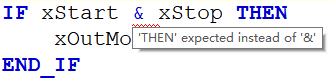
For some brands of PLCs, the operator “&” is illegal, and you can directly use “AND” instead:
-
Logical operators can directly process binary values, performing bitwise operations:
Var1 := 2#10010011 AND 2#10001010; // Bitwise AND → Result 2#10000010 (Decimal 130)Var2 := Var1 OR 2#10001010; // Bitwise OR → Result 2#10001010 (Decimal 138)
Logical Operations, Mathematical Formulas, and Parentheses Usage Norms
In PLC programming, the order of operations in mathematical formulas may vary depending on the controller model or the way the code is written. To ensure the reliability of calculations, the core principle is to explicitly use parentheses to clarify precedence.
The specific method is to handle these operators according to precedence. To prevent errors in the code, explicitly adding parentheses can solve such problems.
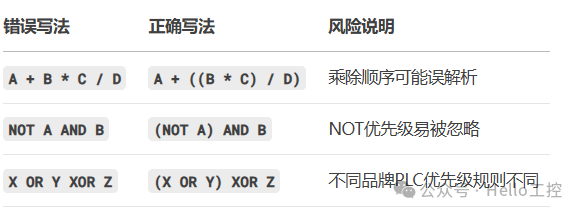
If the statements are too complex, you can process them step by step:
Temp := B2 AND B3;X := B1 OR Temp; // Replace X := B1 OR (B2 AND B3)The above is the content of Chapter 7. Please leave a message for the original English materials! In the next issue, we will continue to share: assignment (division by zero issues, type conversion issues, REAL precision issues, etc.), please stay tuned!

- [Video Course] Codesys V3.5 Series Introductory Course(150 people have learned)
- [Video Course] Codesys SoftMotion Basic Course(45 people have learned)
- [Video Course] Codesys SoftMotion Electronic Gear Course(17 people have learned)
- [Video Course] Codesys SoftMotion Electronic Cam Course(12 people have learned)
- [Video Course] Codesys Library Custom Library Creation(24 people have learned)
-
Efficient, real-time, flexible: In-depth analysis of EtherCAT bus technology (final part)
-
RS232, RS422, and RS485 Serial Communication Technology Comprehensive Analysis (final part)
-
Comprehensive Analysis of Modbus Protocol (final part)
-
Comprehensive Analysis of Profibus Technology (final part)
-
Comprehensive Analysis of Profinet Technology (final part)
-
Comprehensive Analysis of EtherNet/IP Technology (final part)
-
Comprehensive Analysis of CAN and CANopen Bus Technology (final part)
-
Comprehensive Analysis of OPC UA Communication Technology (final part)

——–END——–
 If you like this article, please share and “like” it and “see it”!