Tuples are one of the core data structures in Python, characterized by their “immutability”—like a sealed gift box, once packed, the internal elements cannot be modified or changed. Below, we will break down the knowledge of tuples from five dimensions: syntax, features, operations, practical applications, and common pitfalls!1. Basic Syntax of Tuples: How to Create Them Correctly?Creating a tuple seems simple, but there are several details that can lead to mistakes. Mastering these standards can help avoid errors:Standard CreationWrap elements in parentheses () and separate them with commas, applicable to any data type (strings, numbers, booleans, etc.):
# String tuple
fruit_tuple = ("apple", "orange", "grape")
# Numeric tuple
num_tuple = (10, 20, 30, 40)
# Mixed type tuple (supports coexistence of different types)
mix_tuple = ("Python", 2024, True, 3.14)
Single-element Tuple (Important!): Even if there is only 1 element, a comma must be added; otherwise, Python will treat it as a regular data type:
# Correct: single-element tuple (with comma)
single_tuple = (5,)  # Type is tuple
# Incorrect: not a tuple (no comma)
wrong_single = (5)  # Type is int (regular integer)
Creating without Parentheses: When the context is clear, parentheses can be omitted, relying on commas to separate elements (not recommended for beginners, as it can be confusing):
no_bracket_tuple = "pencil", "eraser", "ruler"
print(type(no_bracket_tuple))  # Output <class 'tuple'>
Creating an Empty Tuple: Can be done using () or tuple(), suitable for scenarios where temporary placeholders are needed:
empty_tuple1 = ()
empty_tuple2 = tuple()
print(len(empty_tuple1))  # Output 0 (length is 0)
2. Core Features of Tuples: Why Are They “Immutable”?Immutability is the essence of tuples, specifically meaning that the elements of a tuple cannot be modified, added, or deleted. However, it is important to note the boundaries of “immutability”:Three Specific Manifestations of ImmutabilityCannot Modify Elements: It is impossible to replace any element in a tuple, similar to not being able to swap an apple for a banana in a gift box:
fruit_tuple = ("apple", "orange", "grape")
fruit_tuple[0] = "banana"  # Error: TypeError (modification not supported)
Cannot Add Elements: It is impossible to append new elements to a tuple, for example, you cannot add “pen” to a stationery tuple:
pen_tuple = ("pencil", "eraser", "ruler")
pen_tuple.append("pen")  # Error: AttributeError (tuple has no append method)
Cannot Delete Elements: It is impossible to delete a specific element from a tuple, nor can you use the <span>del</span> statement to delete a single element:
num_tuple = (1, 2, 3)
del num_tuple[1]  # Error: TypeError (deletion of single element not supported)
3. Common Operations on Tuples: 4 Practical Skills (with Code)
Although tuples are immutable, they support various practical operations covering four major scenarios: “querying, counting, concatenating, and converting”. Beginners can directly apply these:
1. Querying Elements: Precisely Finding “Items in the Gift Box”
Tuples query elements through “indexing”, starting from index <span>0</span> (similar to a queue’s “position number”, the first element is 0, the second is 1):
toy_tuple = ("Ultraman", "Barbie", "Lego")
print(toy_tuple[0])  # Output "Ultraman" (1st element)
print(toy_tuple[1])  # Output "Barbie" (2nd element)
Reverse Indexing: From right to left, indexing starts from <span>-1</span> (the last element is -1, the second to last is -2):
print(toy_tuple[-1])  # Output "Lego" (last element)
print(toy_tuple[-2])  # Output "Barbie" (second to last element)
Slicing Query: Get a “sub-segment” of the tuple, syntax:<span>tuple[start_index:end_index:step]</span> (left closed, right open):
num_tuple = (1, 2, 3, 4, 5)
print(num_tuple[1:4])  # Output (2, 3, 4) (from index 1 to 3, excluding 4)
print(num_tuple[::2])  # Output (1, 3, 5) (step 2, take one every other)
2. Counting Related: Counting “Items in the Gift Box”
Count Length: Use <span>len()</span> function to get the total number of elements in the tuple:
pen_tuple = ("pencil", "eraser", "ruler")
print(len(pen_tuple))  # Output 3 (3 stationery items)
Count Element Occurrences: Use the <span>count()</span> method to query how many times a specific element appears in the tuple:
score_tuple = (90, 85, 90, 95, 90)
print(score_tuple.count(90))  # Output 3 (90 appears 3 times)
Find Element Index: Use the <span>index()</span><code><span> method to return the index of the first occurrence of an element (an error is raised if the element does not exist):</span>
print(score_tuple.index(85)) # Output 1 (85 first appears at index 1)
3. Concatenation and Repetition: Combining “Multiple Gift Boxes”
Tuple Concatenation: Use <span>+</span> to merge two or more tuples into a new tuple, the original tuples remain unchanged:
tuple1 = (1, 2, 3)
tuple2 = (4, 5, 6)
new_tuple = tuple1 + tuple2
print(new_tuple)  # Output (1, 2, 3, 4, 5, 6)
print(tuple1)  # Output (1, 2, 3) (original tuple unchanged)
Tuple Repetition: Use <span>*</span> to repeat the elements of a tuple a specified number of times, generating a new tuple:
repeat_tuple = ("A", "B") * 3
print(repeat_tuple)  # Output ("A", "B", "A", "B", "A", "B")
4. Type Conversion: Converting Tuples with Other Structures
Convert Tuple to List: Use <span>list()</span> function to convert a tuple into a modifiable list:
tuple_to_list = tuple([1, 2, 3])
list_result = list(tuple_to_list)
list_result.append(4)  # List can add elements
print(list_result)  # Output [1, 2, 3, 4]
Convert List to Tuple: Use <span>tuple()</span> function to convert a list into an immutable tuple (protecting data from being modified):
list_to_tuple = [10, 20, 30]
tuple_result = tuple(list_to_tuple)
print(type(tuple_result))  # Output <class 'tuple'>
4. Practical Scenarios for Tuples: When to Use Tuples?
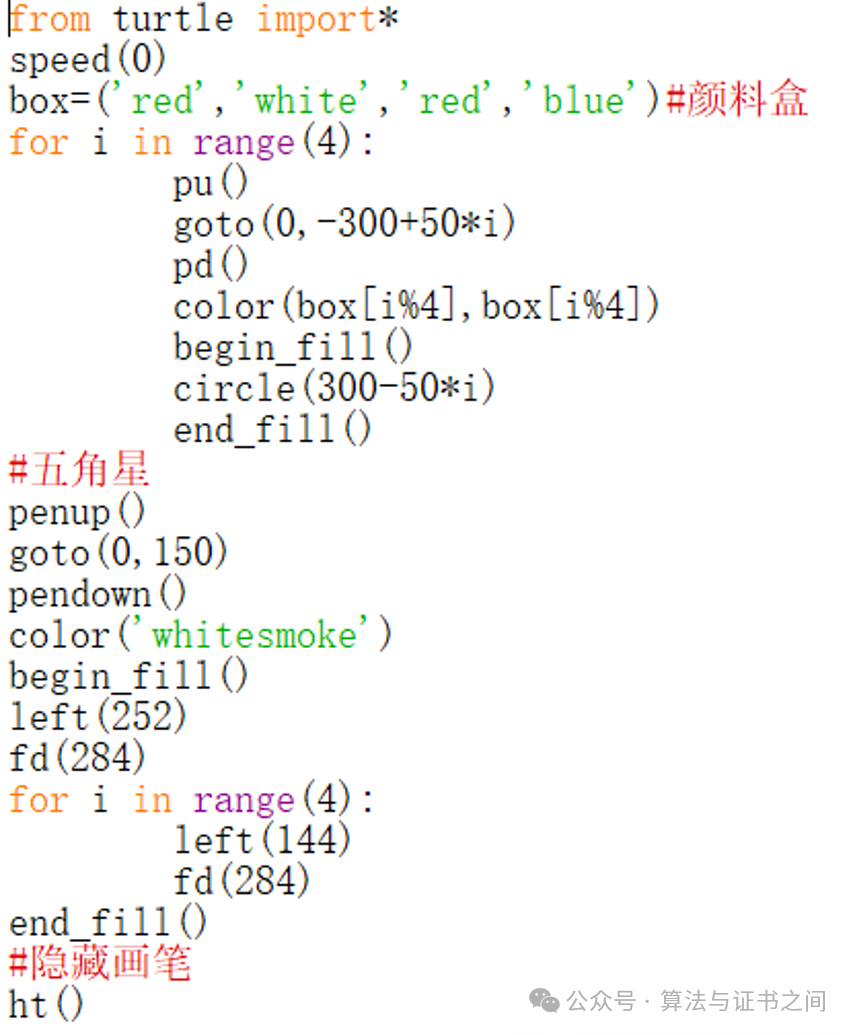
Store Fixed Configurations: For example, the color sequence of Captain America’s shield or fixed parameters of a program, to prevent accidental modifications:
# Fixed configuration of shield colors (stored in a tuple to prevent accidental changes)
shield_colors = ("red", "white", "red", "blue")
Optimized Version of Captain America’s Shield
5. Practical Exercises (Consolidate Knowledge)
1. Create a tuple containing your 3 favorite toys, named toy_tuple
2. Find the second toy in this tuple (Hint: the position number is 1)
3. Count how many toys are in this tuple
4. Concatenate toy_tuple with (“blocks”, “puzzle”) to form a new tuple
toy_tuple = ("Ultraman", "Barbie", "Lego")
#1. Create tuple
print(toy_tuple[1]) #2. Find the second toy output "Barbie"
print(len(toy_tuple)) #3. Count output 3
new_toy_tuple = toy_tuple + ("blocks", "puzzle")
print(new_toy_tuple) #4. Output the concatenated tuple