
Project Overview
This project implements a desktop client application based on the Qt framework for communication with an MQTT server. Through this application, users can connect to the MQTT server, subscribe to and publish topic messages, and receive and process messages from the server. The project utilizes the <span>QMqttClient</span> class to implement MQTT protocol functionality, allowing users to easily perform all operations through a graphical interface. The following sections will detail the key features of the project and their implementation details.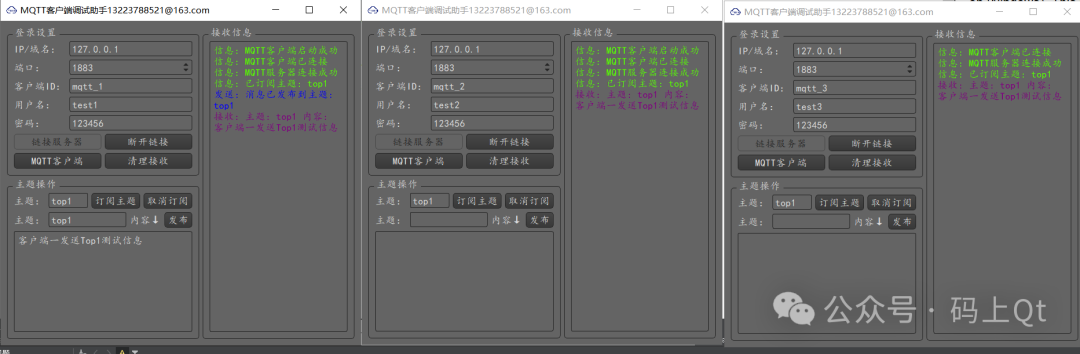
Core Functionality Explanation
1. Initialization and Connection of MQTT Client
During the initialization of the client, a <span>QMqttClient</span> object is first created to manage the connection and communication with the MQTT server.
client = new QMqttClient();  // Create MQTT client
// Connect signals and slots
connect(client, &QMqttClient::connected, this, &MainWindow::onRespondMqttConnected);
connect(client, &QMqttClient::errorChanged, this, &MainWindow::onRespondMqttError);
connect(client, &QMqttClient::stateChanged, this, &MainWindow::onMqttClientStatusChanged);
-
Function: This part of the code uses the signal and slot mechanism to ensure that when the client successfully connects to the server, encounters an error, or changes state, the corresponding handling function is automatically called.
2. Slot Function: Handling After Successful Connection
When the MQTT client successfully connects to the server, the <span>onRespondMqttConnected</span> slot function is called. This is a typical status feedback function used to handle the logic after a successful connection.
void MainWindow::onRespondMqttConnected(){    // Connect signal slot for receiving messages
    connect(client, &QMqttClient::messageReceived, this, &MainWindow::onRespondMqttTopicReceived);
    // Output success message
    WriteRunMsg(tc("MQTT server connected successfully"), Info);
    // Update button state
    updateButtonState(true);
}
-
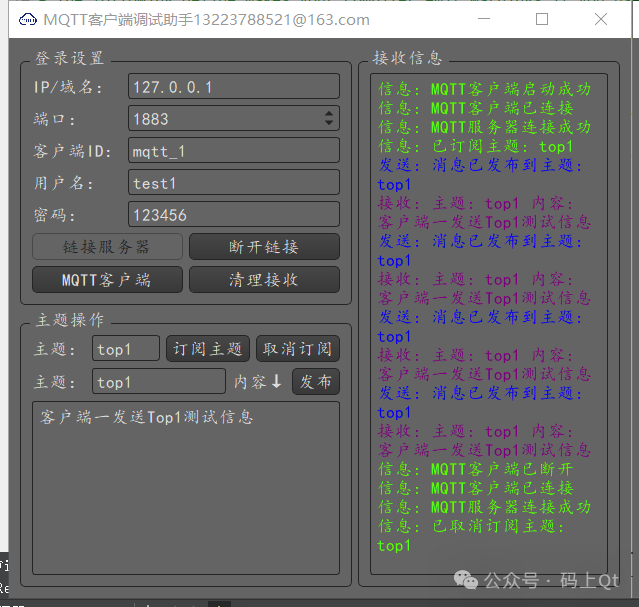
Function: After a successful connection, the program will:
-
Bind the
<span>messageReceived</span>signal to handle message reception. -
Output a log message indicating successful connection.
-
Update the interface button state to enable functionalities such as subscribe and publish.
3. Slot Function: Handling Message Reception
When the MQTT client receives a message from a subscribed topic, the <span>messageReceived</span> signal is triggered, calling the <span>onRespondMqttTopicReceived</span> slot function to process the message.
void MainWindow::onRespondMqttTopicReceived(const QByteArray &ba, const QMqttTopicName &topic){    QString msg = tc("Topic: %1\nContent: %2").arg(topic.name()).arg(QString::fromLocal8Bit(ba));    WriteRunMsg(msg, Receive);  // Display the received message in the log
}
-
Function: This function extracts and formats the received message content and the corresponding topic name, then displays it in the log area of the user interface for the user to view.
4. Slot Function: Publishing Messages
The publishing message slot function <span>on_BtnPushTopic_clicked</span> sends the user-input message to the specified topic using the MQTT client’s <span>publish</span> method.
void MainWindow::on_BtnPushTopic_clicked(){    qint32 packetId = client->publish(ui->EditPushTopic->text(), ui->EditPushMsg->toPlainText().toLocal8Bit().data());    if (packetId != -1) {        WriteRunMsg(tc("Message published to topic: %1").arg(ui->EditPushTopic->text()), Send);    } else {        WriteRunMsg(tc("Message publishing failed"), Error);    }
}
-
Function:
-
Retrieve the user-input topic name and message content from the interface.
-
Call the
<span>publish</span>method to send the message to the server. -
Check the returned
<span>packetId</span>to determine if the message was successfully published and update the log to display the result.
5. Slot Function: Handling MQTT Errors
When an error occurs in the MQTT client, the <span>onRespondMqttError</span> slot function is triggered to output detailed error information based on different error codes.
void MainWindow::onRespondMqttError(const QMqttClient::ClientError &errorMessage){    handleMqttError(errorMessage);  // Handle and output corresponding logs based on error code
    updateButtonState(false);  // Update button state to disable operations
}
-
Function:
-
Call
<span>handleMqttError</span>to parse the error type and output the corresponding error information. -
Disable buttons related to MQTT server operations to prevent user errors.
6. Subscribing and Unsubscribing Topics
The program allows users to dynamically subscribe to and unsubscribe from topics. Below are the slot functions for subscribing and unsubscribing:
void MainWindow::on_BtnSubTopic_clicked(){    auto subscription = client->subscribe(ui->EditTopic->text());    if (subscription) {        WriteRunMsg(tc("Subscribed to topic: %1").arg(ui->EditTopic->text()), Info);    } else {        WriteRunMsg(tc("Failed to subscribe to topic"), Error);    }
}
-
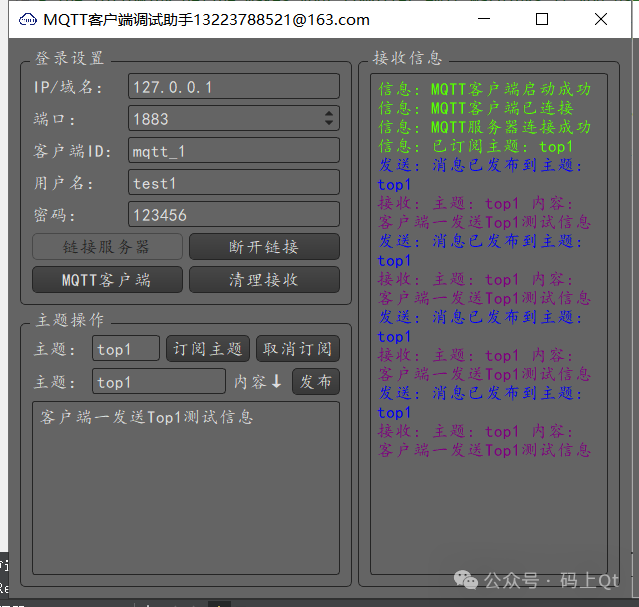
Function: When the user clicks the “Subscribe” button, the program attempts to subscribe to the topic specified in the input box and returns the subscription result. If successful, it displays the relevant log.
-
void MainWindow::on_BtnUnSubTopic_clicked(){    client->unsubscribe(ui->EditTopic->text());    WriteRunMsg(tc("Unsubscribed from topic: %1").arg(ui->EditTopic->text()), Info);
}
-
Function: When the user clicks the “Unsubscribe” button, the program will unsubscribe from the specified topic, update the log, and notify the user.
This project implements a fully functional desktop client based on Qt and MQTT. By interacting with the MQTT server through the <span>QMqttClient</span> class, the project includes functionalities for subscribing, publishing, receiving messages, and error handling. Additionally, the design of the project employs the signal and slot mechanism to achieve asynchronous event handling, ensuring efficient response and user experience.