
In previous articles, it was mentioned that the TAO toolkit abstracts most of the technical challenges in model training, significantly reducing the burden on developers,but the collection and organization of datasets still need to be handled manually, which is almost the last task left for operators.
Most issues regarding datasets involve the conversion of annotation formats, including influential datasets like Pascal VOC, OpenImages, and COCO. Some use different file formats such as .xml, .csv, .json, and the content and order of annotation fields vary, which is often the first hurdle for users.
Fortunately, the conversion between these formats can be accomplished with some simple Python tools; although tedious, it is not technically difficult.
At https://docs.nvidia.com/tao/tao-toolkit/text/data_annotation_format.html, the TAO toolkit provides the supported formats for different application types, summarized as follows:
-
Image Classification: Directory Structure Format
-
Object Detection: KITTI and COCO Formats
-
Instance Segmentation: COCO Format
-
Semantic Segmentation: UNet Format
-
Pose Recognition: COCO Format
-
Others: Custom Format
This section will explain the data formats for the more commonly used image classification and object detection applications; for other applications, please refer to the previously provided link.
1. Directory Structure Format for Image Classification:
This is a classification application based on “images” where each image will have only one classification attribute, so the format is relatively simple; just classify the images according to the rules of the directory structure.

To facilitate model training, we need to split the dataset into three main categories: “train”, “val”, and “test”, for training, validation, and testing purposes, respectively.
Under each dataset, we further extend subdirectories for “classification attributes”. For example, for the MNIST dataset used for recognizing handwritten digits from 0 to 9, we need to add 10 subdirectories labeled “0” to “9” under train/val/test, totaling 33 directories in 2 layers.

If using the 1000-class ImageNet dataset from the ILSVRC competition, we would need to create 1000 subdirectories for each classification attribute under the three directories, such as dog, cat, person, etc. Although it is cumbersome, it is not complex; for model training tools, the image file names are irrelevant.
Data sources typically fall into two categories: the first is self-collected from the internet or manually taken, and the second is extracted from existing datasets, including well-known general datasets like ImageNet, Pascal VOC, COCO, and OpenImages, which have abundant resources.
However, the biggest problem now is how to extract the required images from these datasets and store them in the TAO-supported format according to the “directory structure”?
This part requires users to study the structure of the required dataset and write simple extraction tools. For example, in the classification model training example project provided by TAO, the Pascal VOC 2012 dataset is used for image classification model training. However, this dataset uses the path distribution method shown on the left in the image below, which does not match the TAO-supported “directory structure” format. How should we handle this?

We must have a further understanding of the relevant resources of this dataset. In the VOC dataset’s ImageSets/Main, there are 63 .txt files. Excluding train.txt, trainval.txt, and val.txt, the remaining 60 files belong to three uses of the 20 image categories in the dataset, such as xxx_trainval.txt, xxx_train.txt, xxx_val.txt, where the former contains the merged content of the latter two files.
In the classification.ipynb script, two segments of Python code for data format conversion are provided (please refer to them). In the “A. Split the dataset into train/val/test” step, the following processing is executed:
(1) Using the classification list from xxx_trainval.txt, copy the image files stored in the left side of the image “JPEGImages” into the 20 classification subdirectories under the right side “formated“; (2) From each category of image data in “formated“, split into train/val/test categories and place them in the “split” directory as the data source for later conversion to tfrecords.
After two conversion processes, the data content here should have three identical image datasets, just stored in different path structures. If you do not want to waste storage space, you can delete the VOCdeckit and formatted directories, keeping only the structure of the split directory.
As for the conversion of other data, users also need to have a thorough understanding of the dataset, as the effort spent learning data conversion is far less than the time spent on self-collection, which is definitely worthwhile.
2. KITTI Format for Object Detection:
Most general datasets provide annotation content for multiple application categories to enhance popularity, among which “object location” is the most basic data. Others include skeletal structure annotations related to the human body, material annotations for semantic segmentation, scene description annotations, etc. Each dataset has its focus, so the types and formats of content vary, which is the first hurdle for everyone using the dataset.
Object detection is a more advanced deep learning application than image classification, aiming to identify qualifying objects within an image, with no limit on quantity, depending on the classification capabilities of the trained model.
The differences between datasets lie in the varying annotation content for the images they contain, with thousands to tens of millions of images and classification numbers ranging from 20 to thousands, all stored in different file formats. Some have a one-to-one correspondence between image files and annotation files, while others store millions of annotations in a single large annotation file.
For example, the COCO dataset stores millions of annotations in a .json file of over a hundred megabytes, while the OpenImages dataset contains tens of millions of annotations in a 1.3GB .csv file. In contrast, Pascal VOC and ImageNet provide one-to-one corresponding .txt and .xml formats for annotations, leading to inconsistencies.
In fact, for object detection applications, we only need the most basic elements from the annotation files, including “category” and “location”, which consist of five fields of data. For the category part, some datasets directly use “category names”, while others only provide “category numbers”, which must be matched with the category file; for location information, some provide “top-left” and “bottom-right” coordinates, while others use “starting coordinates” and “width-height” to represent, all of which are a set of four floating-point values.
Therefore, to extract the required category and location annotations from the vast dataset, we must study the individual annotation structures to achieve the desired results. Although there are many online tools for annotation format conversion, their universality is limited, and local modifications are still necessary.
Now let’s look at the content supported by the TAO toolkit for object detection model training in the KITTI format, with the main fields as follows:
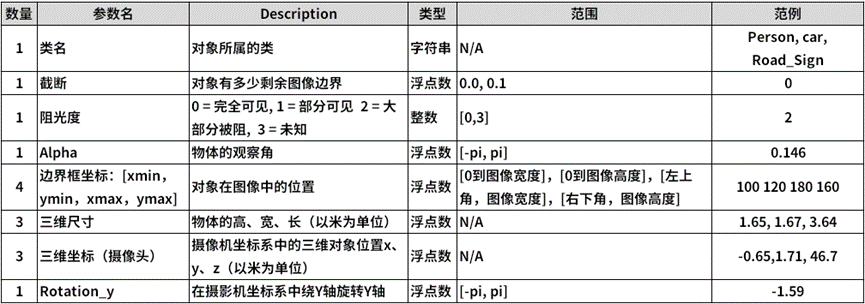
The annotation file is in .txt plain text format, expressed as follows:

Those familiar with object detection applications may feel that more than half of the fields in this KITTI annotation format are unnecessary. Why does NVIDIA prefer this format so much?
If we broaden our perspective to the fields of autonomous driving and 3D applications, we can understand NVIDIA’s reasoning for choosing this format, as the KITTI dataset was jointly established by the Karlsruhe Institute of Technology in Germany and the Toyota Technical Institute in America, and is currently the largest dataset for evaluating computer vision algorithms in autonomous driving scenarios internationally.
In object detection applications, we only need to use the “class name” and “bounding box coordinates“. When extracting data from other datasets, we only need to find these five data points. If the coordinate format is “starting coordinates + width-height”, it can also be easily converted to “starting coordinates + ending coordinates” format and written into the corresponding KITTI annotation file, with other fields filled with “0”, making the entire conversion process not too complicated.
In the TAO visual project, the face-mask-detection/data_utils directory provides about four tools for converting to KITTI format, which can serve as references for everyone.
As long as we can understand the format conversion between different datasets, we can efficiently extract the required category data from the vast dataset resources and further train our own models. Therefore, this process is a fundamental task for engineers using deep learning.

Recommended Reading
NVIDIA Jetson Nano 2GB Series Article (1): Unboxing Introduction
NVIDIA Jetson Nano 2GB Series Article (2): System Installation
NVIDIA Jetson Nano 2GB Series Article (3): Network Setup and Adding SWAPFile Virtual Memory
NVIDIA Jetson Nano 2GB Series Article (4): Experiencing Parallel Computing Performance
NVIDIA Jetson Nano 2GB Series Article (5): Experiencing Visual Function Libraries
NVIDIA Jetson Nano 2GB Series Article (6): Installing and Calling the Camera
NVIDIA Jetson Nano 2GB Series Article (7): Calling CSI/USB Cameras via OpenCV
NVIDIA Jetson Nano 2GB Series Article (8): Executing Common Machine Vision Applications
NVIDIA Jetson Nano 2GB Series Article (9): Adjusting CSI Image Quality
NVIDIA Jetson Nano 2GB Series Article (10): Dynamic Adjustment Techniques for Color Space
NVIDIA Jetson Nano 2GB Series Article (11): What You Should Know About OpenCV
NVIDIA Jetson Nano 2GB Series Article (12): Face Localization
NVIDIA Jetson Nano 2GB Series Article (13): Identity Recognition
NVIDIA Jetson Nano 2GB Series Article (14): Hello AI World
NVIDIA Jetson Nano 2GB Series Article (15): Hello AI World Environment Installation
NVIDIA Jetson Nano 2GB Series Article (16): The Power of 10 Lines of Code
NVIDIA Jetson Nano 2GB Series Article (17): Changing Models for Different Effects
NVIDIA Jetson Nano 2GB Series Article (18): Utils’ videoSource Tool
NVIDIA Jetson Nano 2GB Series Article (19): Utils’ videoOutput Tool
NVIDIA Jetson Nano 2GB Series Article (20): “Hello AI World” Extended Parameter Parsing Function
NVIDIA Jetson Nano 2GB Series Article (21): Identity Recognition
NVIDIA Jetson Nano 2GB Series Article (22): “Hello AI World” Image Classification Code
NVIDIA Jetson Nano 2GB Series Article (23): Object Recognition Application of “Hello AI World”
NVIDIA Jetson Nano 2GB Series Article (24): Object Recognition Application of “Hello AI World”
NVIDIA Jetson Nano 2GB Series Article (25): Model Training for Image Classification in “Hello AI World”
NVIDIA Jetson Nano 2GB Series Article (26): Model Training for Object Detection in “Hello AI World”
NVIDIA Jetson Nano 2GB Series Article (27): Introduction to DeepStream and Activation
NVIDIA Jetson Nano 2GB Series Article (28): First Experience with DeepStream
NVIDIA Jetson Nano 2GB Series Article (29): DeepStream Object Tracking Function
NVIDIA Jetson Nano 2GB Series Article (30): DeepStream Camera “Real-time Performance”
NVIDIA Jetson Nano 2GB Series Article (31): DeepStream Multi-Model Combination Detection-1
NVIDIA Jetson Nano 2GB Series Article (32): Architecture Explanation and deepstream-test Example
NVIDIA Jetson Nano 2GB Series Article (33): DeepStream License Plate Recognition and Privacy Information Masking
NVIDIA Jetson Nano 2GB Series Article (34): Installing Python Development Environment for DeepStream
NVIDIA Jetson Nano 2GB Series Article (35): Practical Explanation of Python Version test1
NVIDIA Jetson Nano 2GB Series Article (36): Adding USB Input and RTSP Output
NVIDIA Jetson Nano 2GB Series Article (37): Multi-Network Model Fusion Function
NVIDIA Jetson Nano 2GB Series Article (38): nvdsanalytics Video Analysis Plugin
NVIDIA Jetson Nano 2GB Series Article (39): Combining IoT Information Transmission
NVIDIA Jetson Nano 2GB Series Article (40): Introduction to Jetbot System
NVIDIA Jetson Nano 2GB Series Article (41): Software Environment Installation
NVIDIA Jetson Nano 2GB Series Article (42): Installation and Debugging of Wireless WIFI
NVIDIA Jetson Nano 2GB Series Article (43): Installation and Testing of CSI Camera
NVIDIA Jetson Nano 2GB Series Article (44): Jetson’s 40-Pin Header
NVIDIA Jetson Nano 2GB Series Article (45): I2C Bus and PiOLED
NVIDIA Jetson Nano 2GB Series Article (46): Installation of Mechatronic Control Devices
NVIDIA Jetson Nano 2GB Series Article (47): Attention to Detail in the Assembly Process
NVIDIA Jetson Nano 2GB Series Article (48): Control Actions with Keyboard and Joystick
NVIDIA Jetson Nano 2GB Series Article (49): Live Demonstration of Intelligent Obstacle Avoidance
NVIDIA Jetson Nano 2GB Series Article (50): Model Training for Intelligent Obstacle Avoidance
NVIDIA Jetson Nano 2GB Series Article (51): Implementing Pathfinding Function with Image Classification Method
NVIDIA Jetson Nano 2GB Series Article (52): Implementing Pathfinding Function with Image Classification Method
NVIDIA Jetson Nano 2GB Series Article (53): TAO Toolkit for Simplifying Model Training Process
NVIDIA Jetson Nano 2GB Series Article (54): Overview of NGC Content and Registration Key
NVIDIA Jetson Nano 2GB Series Article (55): Installing TAO Model Training Tools
NVIDIA Jetson Nano 2GB Series Article (56): Starter CLI Command Set and Configuration Files
NVIDIA Jetson Nano 2GB Series Article (57): Environmental Configuration and Mapping for Visual Scripts