“From today on, study hard and make progress every day”
Repetition is the best way to remember; spend one minute every day to memorize the basics of C language.
“Mastering C Language:C Language Graphics Programming and Game Programming“
“Mastering C Language: SpaceX Starship Test Flight Success, I Created a Simple Rocket Launch Animation with Over 100 Lines of C Code! Let’s Fly!”
Introduction
Today I saw that SpaceX’s Starship 10 successfully completed its test flight, and watching the video was truly shocking! Suddenly, I thought I could also create a rocket launch animation using C language. Although the animation is simple, it is straightforward and suitable for beginners.
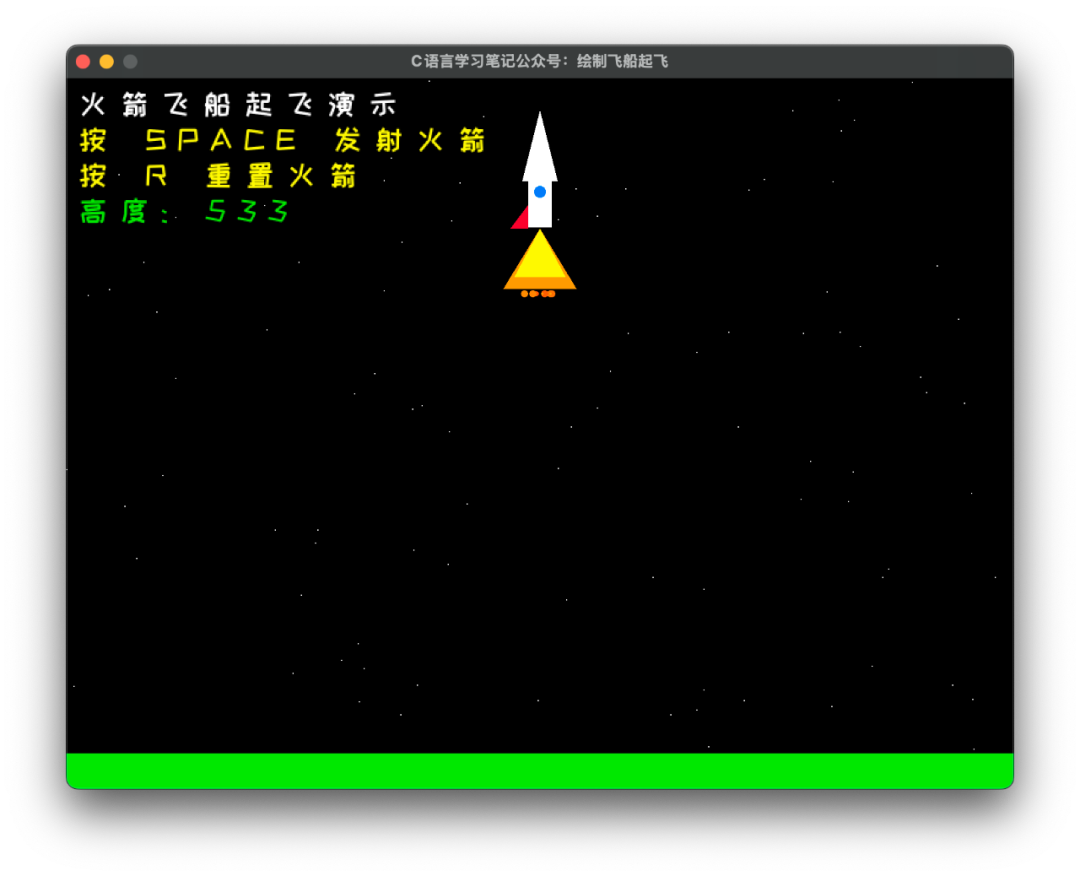
Without further ado, let’s take a look at the running effect
The implementation idea is very simple:
- • Background: Draw a starry sky background, with stars randomly generated.
- • Rocket: Draw simple shapes like triangles and circles to form the shape of the rocket.
- • Animation: By continuously changing the rocket’s position and angle, achieve the rocket launch animation.
- • Press the spacebar to launch, press the R key to relaunch.
Rocket launch animation source code, can be run directly, save it if you’re interested
#include "raylib.h"
#include <string.h>
void DrawRocket(Vector2 position, float flameSize);
int main(void)
{
    const int screenWidth = 800;
    const int screenHeight = 600;

    InitWindow(screenWidth, screenHeight, "C Language Learning Notes Public Account: Drawing Rocket Launch");
    SetTargetFPS(60);

    // Load Chinese font
    char allChars[300] = "";
    const char *menuArray[6] = {};
    menuArray[0] = "Rocket Launch Demonstration";
    menuArray[1] = "Press SPACE to launch the rocket";
    menuArray[2] = "Press R to reset the rocket";
    menuArray[3] = "Altitude: ";
    menuArray[4] = "Preparing for launch...";
    menuArray[5] = "0123456789";

    // Merge strings for loading the font library corresponding to Chinese characters
    for (int i = 0; i < sizeof(menuArray) / sizeof(menuArray[0]); i++)
    {
        strcat(allChars, menuArray[i]);
    }
    int fileSize = 0;
    int fontSize = 25;
    int spacing = 10;
    unsigned char *fileData = LoadFileData("AnyFont.ttf", &fileSize);
    int codepointsCount = 0;
    int *codepoints = LoadCodepoints(allChars, &codepointsCount);
    Font chineseFont = LoadFontFromMemory(".ttf", fileData, fileSize, fontSize, codepoints, codepointsCount);

    // Rocket position and animation parameters
    Vector2 rocketPosition = {screenWidth / 2, screenHeight - 50};
    float rocketSpeed = 2.0f;
    float flameSize = 10.0f;
    bool isLaunching = false;

    // Starry sky background stars
    Vector2 stars[100];
    for (int i = 0; i < 100; i++)
    {
        stars[i] = (Vector2){
            GetRandomValue(0, screenWidth),
            GetRandomValue(0, screenHeight)};
    }

    while (!WindowShouldClose())
    {
        // Launch the rocket
        if (IsKeyPressed(KEY_SPACE))
        {
            isLaunching = true;
        }

        // Reset the rocket
        if (IsKeyPressed(KEY_R))
        {
            rocketPosition.y = screenHeight - 50;
            isLaunching = false;
            flameSize = 10.0f;
        }

        // Update rocket position
        if (isLaunching && rocketPosition.y > 50)
        {
            rocketPosition.y -= rocketSpeed;
            rocketSpeed += 0.05f; // Accelerate
            flameSize += 0.2f;    // Flame grows
        }

        BeginDrawing();
        ClearBackground(BLACK);

        // Draw starry sky background
        for (int i = 0; i < 100; i++)
        {
            DrawPixel(stars[i].x, stars[i].y, WHITE);
        }

        // Draw ground
        DrawRectangle(0, screenHeight - 30, screenWidth, 30, GREEN);

        // Draw rocket
        DrawRocket(rocketPosition, flameSize);

        // Draw UI information

        DrawTextEx(chineseFont, "Rocket Launch Demonstration", (Vector2){10, 10}, fontSize, spacing, WHITE);
        DrawTextEx(chineseFont, "Press SPACE to launch the rocket", (Vector2){10, 40}, fontSize, spacing, YELLOW);
        DrawTextEx(chineseFont, "Press R to reset the rocket", (Vector2){10, 70}, fontSize, spacing, YELLOW);
        DrawTextEx(chineseFont, TextFormat("Altitude: %.0f", screenHeight - rocketPosition.y), (Vector2){10, 100}, fontSize, spacing, GREEN);

        if (!isLaunching)
        {
            DrawTextEx(chineseFont, "Preparing for launch...", (Vector2){screenWidth / 2 - 80, screenHeight / 2}, fontSize, spacing, ORANGE);
        }

        EndDrawing();
    }

    CloseWindow();
    return 0;
}

// Function to draw the rocket
void DrawRocket(Vector2 position, float flameSize)
{
    // Rocket body
    DrawTriangle(
        (Vector2){position.x, position.y - 40},      // Top
        (Vector2){position.x - 15, position.y + 20}, // Bottom left
        (Vector2){position.x + 15, position.y + 20}, // Bottom right
        WHITE);

    // Rocket body
    DrawRectangle(position.x - 10, position.y + 20, 20, 40, WHITE);

    // Rocket window
    DrawCircle(position.x, position.y + 30, 5, BLUE);

    // Rocket wings
    DrawTriangle(
        (Vector2){position.x - 10, position.y + 40},
        (Vector2){position.x - 25, position.y + 60},
        (Vector2){position.x - 10, position.y + 60},
        RED);
    DrawTriangle(
        (Vector2){position.x + 10, position.y + 40},
        (Vector2){position.x + 25, position.y + 60},
        (Vector2){position.x + 10, position.y + 60},
        RED);

    // Rocket flame
    if (flameSize > 0)
    {
        // Outer flame (orange)
        DrawTriangle(
            (Vector2){position.x, position.y + 60},
            (Vector2){position.x - flameSize, position.y + 80 + flameSize},
            (Vector2){position.x + flameSize, position.y + 80 + flameSize},
            ORANGE);

        // Inner flame (yellow)
        DrawTriangle(
            (Vector2){position.x, position.y + 60},
            (Vector2){position.x - flameSize * 0.7f, position.y + 70 + flameSize},
            (Vector2){position.x + flameSize * 0.7f, position.y + 70 + flameSize},
            YELLOW);

        // Spark particles
        for (int i = 0; i < 15; i++)
        {
            float offset = GetRandomValue(-flameSize * 2, flameSize * 2) * 0.2f;
            DrawCircle(position.x + offset, position.y + 85 + flameSize,
                       GetRandomValue(1, 3), (Color){255, GetRandomValue(100, 200), 0, 255});
        }
    }
}
Some friends contacted me, wanting to have a study and communication group. I had not set up a group before due to concerns about advertisements, but I think having a group would indeed be more convenient, so I will try to set one up this time.
If you need it, please join quickly; the validity period is 7 days.

———- End ———-
[Special Statement: All articles in this public account are original or authorized by the author, please feel free to consume, and the views are for learning reference only~~]


“If you like C, please like it” Click the bottom right corner to see more
 “
“