Linux (Part 7) – File Operations with llseek and ioctl
Overview
In the Linux system, llseek is a system call used to control the read and write position of files. Its name comes from <span> "long long seek"</span>, indicating that it can handle positioning operations for large files (over 4GB).
In simple terms, llseek acts like a “bookmark” or “cursor” in a file—it allows us to <span>precisely locate</span> a specific position in the file and then start reading or writing from that position.
Since llseek is a long long seek, there must be an lseek as well. What are the differences between the two?
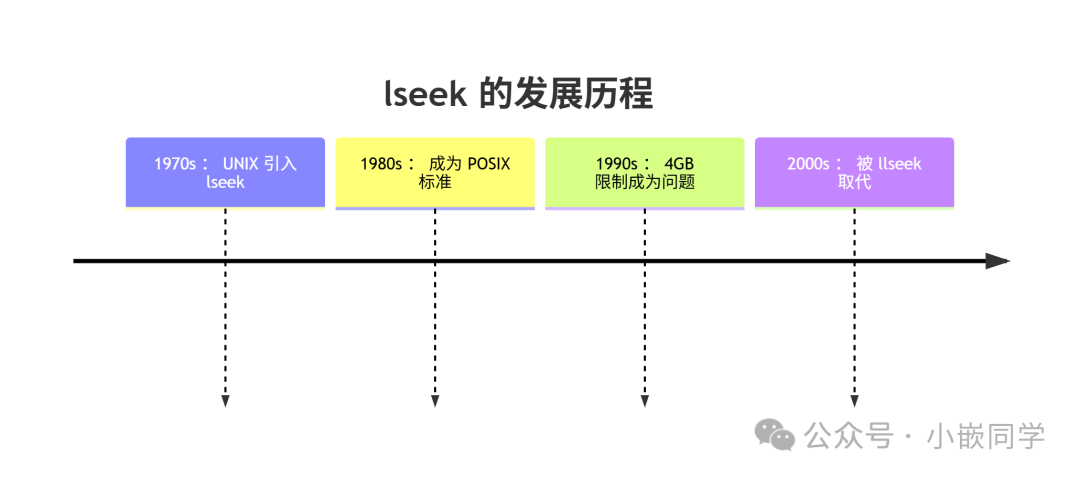
| Feature | lseek | llseek |
| Maximum File Size | 4GB (2³²-1) | 16EB (2⁶⁴-1) |
| Offset Type | off_t (traditional 32-bit) | loff_t (64-bit) |
| Design Goal | Traditional 32-bit systems | Support for large files |
Comparison of Practical Application Scenarios
- • Embedded systems (small files)
- • Maintenance of traditional 32-bit applications
- • Operations on small configuration files
Kernel Processing Differences
In the Linux kernel:
- • lseek ultimately calls llseek for implementation
- • File system drivers only need to implement the llseek operation
- • The kernel automatically handles 32-bit/64-bit compatibility
llseek: The Tool for File Positioning
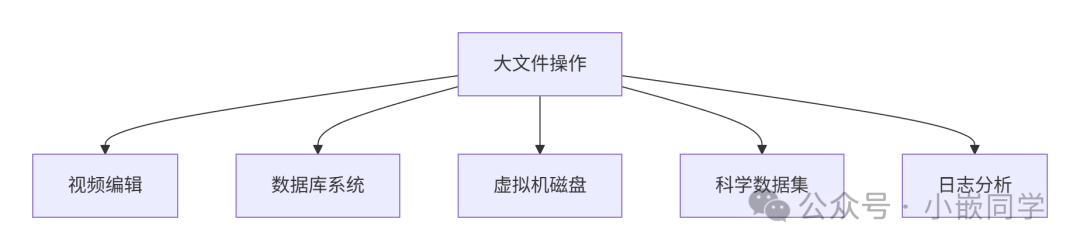
What is llseek? llseek is a system call used to change the <span>file offset</span> pointed to by a file descriptor. In simple terms, it is a <span>"pointer mover"</span> for file operations, allowing us to <span>jump to any position</span> in the file.
Kernel Implementation Process
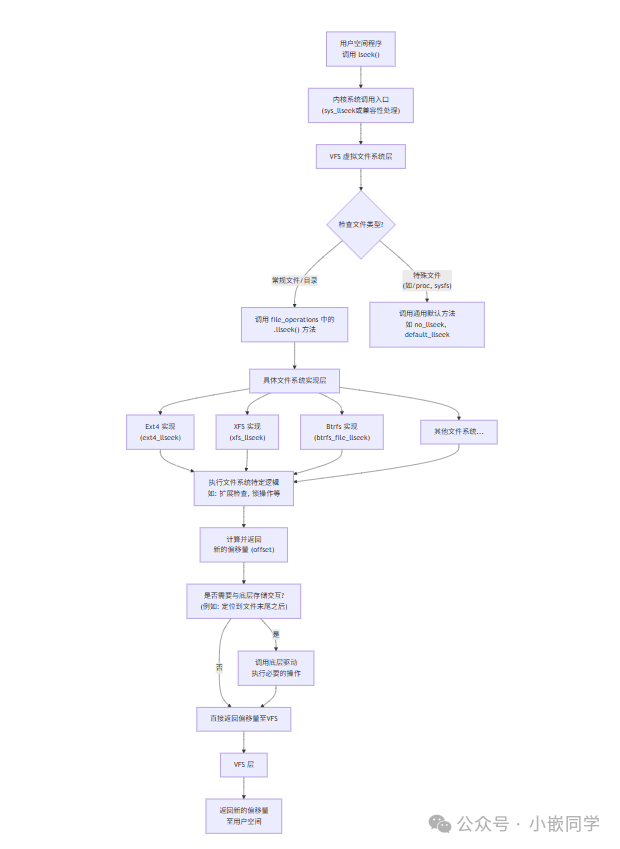
From the kernel’s perspective, the implementation of llseek involves the following layers:
- • VFS layer: Provides a unified file operation interface
- • File system layer: Ext4, XFS, Btrfs, etc., each implement specific addressing logic
- • Device driver layer: Handles addressing operations for specific devices
The user calls lseek(fd, offset, SEEK_SET) -> VFS finds the corresponding file’s file_operations -> calls the file system registered ext4_llseek -> Ext4 may call generic_file_llseek -> this function simply updates the in-memory file->f_pos = offset -> the function returns, informing user space of the new position.
Subsequent read(fd, buf, count) -> VFS finds ext4_read_iter -> Ext4 calculates which data blocks need to be read based on file->f_pos and count -> reads data from specific sectors on the disk through the block device layer and driver -> updates file->f_pos += count.
Thus, llseek itself is a “lightweight” operation that mainly modifies a pointer’s value in memory, setting the starting point for subsequent read and write operations.
Each file system implements its own llseek operation, but most conventional file systems follow a similar pattern.Function Prototype
#include <sys/types.h>
#include <unistd.h>
off_t lseek(int fd, off_t offset, int whence);
Parameter Description
- • fd: File descriptor
- • offset: Offset, in bytes, relative to the reference point
- • whence: Reference position, which can be:
- • SEEK_SET: Offset from
<span>the beginning of the file</span> - • SEEK_CUR: Offset from
<span>the current position</span> - • SEEK_END: Offset from
<span>the end of the file</span> - • Return Value
- • Success: Returns the new file position
- • Failure: Returns -1 and sets errno
Usage Example
#include <fcntl.h>
#include <unistd.h>
#include <stdio.h>
#include <sys/stat.h>

int main() {
    // Create or open a file
    int fd = open("example.txt", O_RDWR | O_CREAT, 0644);
    if (fd == -1) {
        perror("open failed");
        return 1;
    }

    // Write initial content
    const char *content = "Hello, this is a sample text for demonstration.";
    write(fd, content, strlen(content));

    // 1. SEEK_SET: Offset from the beginning of the file
    off_t pos = llseek(fd, 10, SEEK_SET);
    printf("Position from start (SEEK_SET): %ld -> Character: '%c'\n",
           pos, (char)getc(fd));

    // 2. SEEK_CUR: Offset from the current position
    pos = llseek(fd, 5, SEEK_CUR);
    printf("Position from current (SEEK_CUR): %ld -> Character: '%c'\n",
           pos, (char)getc(fd));

    // 3. SEEK_END: Offset from the end of the file - this is the part you asked about
    // Positive: Beyond the end of the file
    pos = llseek(fd, -5, SEEK_END);
    printf("Position from end (negative offset): %ld -> Character: '%c'\n",
           pos, (char)getc(fd));

    // Negative: Offset towards the beginning of the file
    pos = llseek(fd, 10, SEEK_END);
    printf("Position from end (positive offset): %ld (beyond EOF)\n", pos);

    // Writing data beyond EOF will create a file hole
    write(fd, "END", 3);

    // Get the actual file size
    struct stat st;
    fstat(fd, &st);
    printf("File size: %ld bytes\n", st.st_size);

    close(fd);
    return 0;
}
Special Usage
- • Get file size
off_t get_file_size(int fd) {
    off_t current = lseek(fd, 0, SEEK_CUR);  // Save current position
    off_t size = lseek(fd, 0, SEEK_END);     // Move to the end of the file to get size
    lseek(fd, current, SEEK_SET);            // Restore original position
    return size;
}- • Create file holes
// Create a 1MB file hole
lseek(fd, 1024 * 1024, SEEK_SET);
write(fd, "", 1);  // Write one byte, actually allocates the entire space
Special Usage and Precautions for llseek
Positioning Beyond the End of the File
llseek allows setting the position beyond the end of the file. If data is written in this case, a “hole” will be created between the original end of the file and the new position, which does not occupy actual disk space but will return zero bytes when read.
// Create a file with holes
int fd = open("sparse_file", O_CREAT | O_RDWR, 0644);
write(fd, "begin", 5);          // Write the beginning
lseek(fd, 1000000, SEEK_CUR);   // Skip 1MB of holes
write(fd, "end", 3);            // Write the end
close(fd);
Special Characteristics of Device Files
Not all device files support llseek. For example:
- • Terminal devices usually do not support addressing
- • Pipes and sockets do not support addressing at all
- • Some character devices may have their own positioning rules
- • Check whether the device supports addressing operations before use.
Error Handling
Common llseek errors include:
- • EBADF: Invalid file descriptor
- • EINVAL: Invalid whence parameter or unsupported addressing
- • ESPIPE: The file descriptor is associated with a pipe, socket, or other non-addressable object
Code
Driver Layer Code
#include <linux/init.h>
#include <linux/module.h>
#include <linux/moduleparam.h>
#include <linux/fs.h>
#include <linux/kdev_t.h>
#include <linux/cdev.h>
#include <linux/device.h>
#include <linux/uaccess.h>
#include <linux/slab.h>
#include <linux/string.h>

// Device data structure
struct dev_data {
    int major;              // Major device number
    int minor;              // Minor device number
    dev_t dev_num;          // Device number
    struct cdev cdev_test;  // Character device structure
    struct class *class;    // Device class pointer
    struct device *device;  // Device node pointer
    char kbuf[128];         // Kernel buffer (128 bytes)
    loff_t offset;          // File offset pointer position
};

struct dev_data dev1;  // Global device instance

// Device open function
static int cdev_test_open(struct inode *inode, struct file *file)
{
    printk("cdev file open!\n");
    file->private_data = &dev1;  // Attach device data to file

    // Initialize offset (reset to the beginning of the file each time opened)
    dev1.offset = 0;
    return 0;
}

// Device read function
static ssize_t cdev_test_read(struct file *file, char __user *buf,
                            size_t size, loff_t *off)
{
    struct dev_data *dev_test = file->private_data;

    // Calculate remaining readable data (prevent overflow)
    size_t available = sizeof(dev_test->kbuf) - dev_test->offset;
    if (available <= 0) return 0;  // Reached end of file

    if (size > available) size = available;  // Adjust read size

    // Copy kernel data to user space
    if (copy_to_user(buf, dev_test->kbuf + dev_test->offset, size))
        return -EFAULT;  // Copy failed, return error code

    // Update device offset and file position
    dev_test->offset += size;
    *off = dev_test->offset;

    return size;  // Return actual bytes read
}

// Device write function
static ssize_t cdev_test_write(struct file *file, const char __user *buf,
                             size_t size, loff_t *off)
{
    struct dev_data *dev_test = file->private_data;

    // Calculate remaining space (prevent buffer overflow)
    size_t remaining = sizeof(dev_test->kbuf) - dev_test->offset;
    if (remaining == 0) return -ENOSPC;  // Buffer is full

    if (size > remaining) size = remaining;  // Adjust write size

    // Copy user data to kernel space
    if (copy_from_user(dev_test->kbuf + dev_test->offset, buf, size))
        return -EFAULT;  // Copy failed, return error code

    // Update offset and file position
    dev_test->offset += size;
    *off = dev_test->offset;

    // Add string terminator (if text data)
    if (dev_test->offset < sizeof(dev_test->kbuf))
        dev_test->kbuf[dev_test->offset] = '\0';

    return size;  // Return actual bytes written
}

// File positioning function (llseek implementation)
static loff_t cdev_test_llseek(struct file *file, loff_t offset, int whence)
{
    struct dev_data *dev_test = file->private_data;
    loff_t new_offset;

    switch (whence) {
        case SEEK_SET:  // Offset from the beginning of the file
            new_offset = offset;
            break;
        case SEEK_CUR:  // Offset from the current position
            new_offset = dev_test->offset + offset;
            break;
        case SEEK_END:  // Offset from the end of the file
            new_offset = sizeof(dev_test->kbuf) + offset;
            break;
        default:       // Illegal positioning method
            return -EINVAL;
    }

    // Boundary check (ensure within 0-buffer size)
    if (new_offset < 0) new_offset = 0;
    if (new_offset > sizeof(dev_test->kbuf))
        new_offset = sizeof(dev_test->kbuf);

    // Update offset
    dev_test->offset = new_offset;
    file->f_pos = dev_test->offset;  // Update file position

    return dev_test->offset;
}

// Device close function
static int cdev_test_release(struct inode *inode, struct file *file)
{
    printk("Release cdev file\n");
    return 0;
}

// File operations structure (device functionality mapping)
static struct file_operations cdev_test_ops = {
    .owner = THIS_MODULE,
    .open = cdev_test_open,
    .read = cdev_test_read,
    .write = cdev_test_write,
    .llseek = cdev_test_llseek,  // llseek implementation
    .release = cdev_test_release
};

// Module initialization function
static int __init module_param_init(void)
{
    int ret;

    // Initialize buffer (zero out)
    memset(dev1.kbuf, 0, sizeof(dev1.kbuf));

    // Set initial buffer content (for demonstration)
    strncpy(dev1.kbuf, "Initial buffer content for testing llseek",
            sizeof(dev1.kbuf) - 1);

    // Dynamically allocate device number
    ret = alloc_chrdev_region(&dev1.dev_num, 0, 1, "seek_demo");
    if (ret) {
        printk("Failed to allocate chrdev region: %d\n", ret);
        return ret;
    }

    // Get major and minor device numbers
    dev1.major = MAJOR(dev1.dev_num);
    dev1.minor = MINOR(dev1.dev_num);

    // Initialize and add character device
    cdev_init(&dev1.cdev_test, &cdev_test_ops);
    ret = cdev_add(&dev1.cdev_test, dev1.dev_num, 1);
    if (ret) goto add_fail;

    // Create device class
    dev1.class = class_create(THIS_MODULE, "seek_class");
    if (IS_ERR(dev1.class)) {
        ret = PTR_ERR(dev1.class);
        goto class_fail;
    }

    // Create device node (/dev/seekdemo)
    dev1.device = device_create(dev1.class, NULL, dev1.dev_num,
                              NULL, "seekdemo");
    if (IS_ERR(dev1.device)) {
        ret = PTR_ERR(dev1.device);
        goto device_fail;
    }

    printk("llseek device driver initialized\n");
    return 0;

// Error handling flow
device_fail:
    class_destroy(dev1.class);
class_fail:
    cdev_del(&dev1.cdev_test);
add_fail:
    unregister_chrdev_region(dev1.dev_num, 1);
    return ret;
}

// Module exit function
static void __exit module_param_exit(void)
{
    // Clean up resources: device node -> device class -> character device -> device number
    device_destroy(dev1.class, dev1.dev_num);
    class_destroy(dev1.class);
    cdev_del(&dev1.cdev_test);
    unregister_chrdev_region(dev1.dev_num, 1);
    printk("llseek device driver unloaded\n");
}

module_init(module_param_init);
module_exit(module_param_exit);

MODULE_LICENSE("GPL");
MODULE_AUTHOR("XSX");
MODULE_DESCRIPTION("llseek Example Device Driver");
MODULE_VERSION("V1.0");
Application Layer Code
#include <stdio.h>
#include <stdlib.h>
#include <fcntl.h>
#include <unistd.h>
#include <string.h>
#include <errno.h>

#define DEVICE_PATH "/dev/seekdemo"  // Device node path
#define BUFFER_SIZE 128               // Buffer size

int main() {
    // Open device file (read/write mode)
    int fd = open(DEVICE_PATH, O_RDWR);
    if (fd < 0) {
        perror("Failed to open device");
        return EXIT_FAILURE;
    }

    printf("=== Starting llseek demonstration ===\n");
    char buffer[BUFFER_SIZE];

    /********** Test 1: Read initial content **********/
    memset(buffer, 0, BUFFER_SIZE);
    ssize_t bytes_read = read(fd, buffer, BUFFER_SIZE - 1);
    printf("[Starting Position] Read %zd bytes: '%s'\n", bytes_read, buffer);

    /********** Test 2: Position to 20 **********/
    lseek(fd, 20, SEEK_SET);  // Offset 20 bytes from the beginning of the file
    memset(buffer, 0, BUFFER_SIZE);
    bytes_read = read(fd, buffer, 10);  // Read 10 bytes
    printf("[Position 20] Read %zd bytes: '%s'\n", bytes_read, buffer);

    /********** Test 3: Move back 10 bytes from current position **********/
    lseek(fd, 10, SEEK_CUR);  // Currently at 30 bytes
    memset(buffer, 0, BUFFER_SIZE);
    bytes_read = read(fd, buffer, 10);
    printf("[Position 30] Read %zd bytes: '%s'\n", bytes_read, buffer);

    /********** Test 4: Move back 10 bytes from the end of the file **********/
    lseek(fd, -10, SEEK_END);  // Position at end of file - 10
    memset(buffer, 0, BUFFER_SIZE);
    bytes_read = read(fd, buffer, 10);
    printf("[End - 10] Read %zd bytes: '%s'\n", bytes_read, buffer);

    /********** Test 5: Write data at the end **********/
    const char *write_data = "EndData";
    lseek(fd, 0, SEEK_END);  // Position at the end of the file
    ssize_t bytes_written = write(fd, write_data, strlen(write_data));
    printf("Wrote %zd bytes at position %ld: '%s'\n",
           lseek(fd, 0, SEEK_CUR) - bytes_written, bytes_written, write_data);

    /********** Test 6: Verify complete content **********/
    lseek(fd, 0, SEEK_SET);  // Go back to the beginning of the file
    memset(buffer, 0, BUFFER_SIZE);
    read(fd, buffer, BUFFER_SIZE - 1);
    printf("[Final Content] %zd bytes: '%s'\n", strlen(buffer), buffer);

    close(fd);  // Close device
    printf("=== Demonstration Complete ===\n");
    return EXIT_SUCCESS;
}
Key Function Descriptions
Core Mechanism of Driver Layer:
- • Offset management: loff_t offset records the current file position
- • Boundary checks: All read and write operations have buffer boundary protection
- • llseek implementation: Supports standard positioning methods (SEEK_SET/SEEK_CUR/SEEK_END)
- • Kernel-user space interaction: Uses copy_to_user/copy_from_user
Application Layer Testing Logic
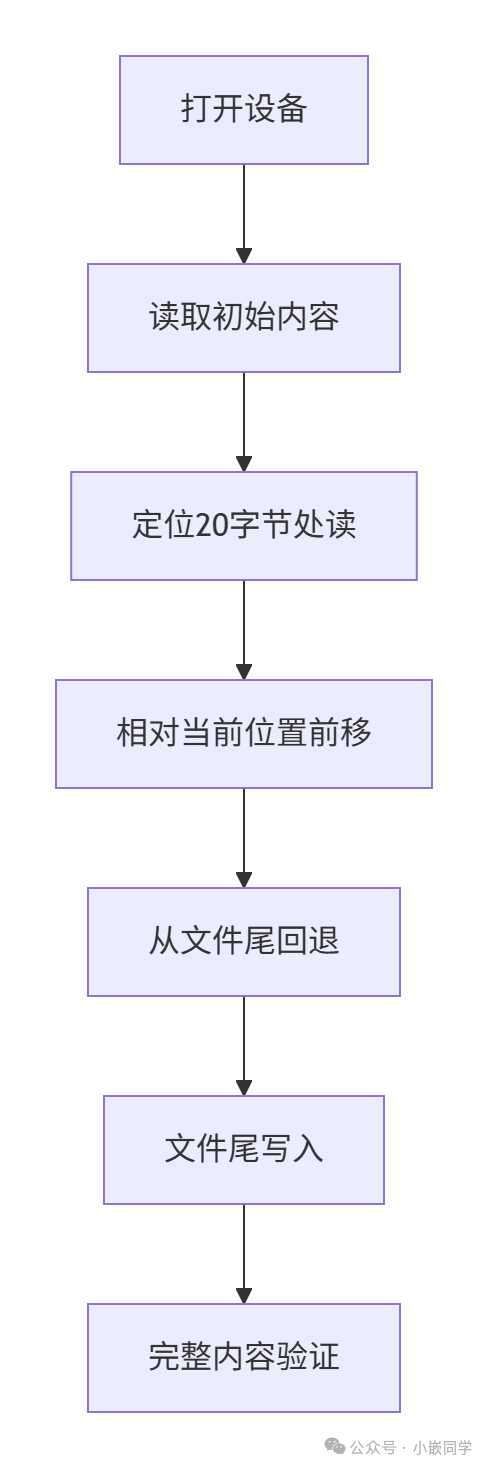
Output Example
=== Starting llseek demonstration ===
[Starting Position] Read 128 bytes: 'Initial buffer content for...'
[Position 20] Read 10 bytes: 'content f'
[Position 30] Read 10 bytes: 'testing l'
[End - 10] Read 10 bytes: 'llseek'
Wrote 7 bytes at position 128: 'EndData'
[Final Content] 135 bytes: 'Initial buffer...EndData'
=== Demonstration Complete ===
ioctl
Problem
In the world of Linux, we are familiar with system calls like read() and write(), which act like standardized instructions that allow applications to read data from files or devices or write data to them. But what if you want a device to do something “special,” like adjusting the <span>baud rate of a serial port</span>, making a speaker <span>change volume</span>, or querying a network interface’s <span>physical address (MAC address)</span>? What should you do?
What is ioctl? Why do we need it?
ioctl stands for Input/Output Control. It is a system call specifically designed to manipulate the low-level parameters and configurations of special files (usually device files).
A vivid analogy
- • Imagine your air conditioner at home. read(): It’s like reading the current temperature displayed on the air conditioner.
- • write(): It’s like setting a target temperature (e.g., 26°C) with the remote control.
- • But the air conditioner can do much more than that! You also need to:
- • Switch modes (cooling, heating, dehumidifying, fan)
- • Adjust fan speed (auto, low, medium, high)
- • Control the oscillation of the air vent blades
- • Set a timer for turning on and off
These <span>"non-standard"</span> and <span>device-specific</span> operations are the domain of ioctl. ioctl is the system call that allows you to press all the special function keys on the air conditioner’s remote control.
Why not implement all functions with read/write?
If a new system call were created for each special operation (like set_baud_rate(), set_volume(), get_mac_address()), the number of system calls would explode, lacking flexibility and uniformity. ioctl provides a unified interface to handle all device-specific and diverse requests.
How does ioctl work?
The function prototype of ioctl is as follows:
#include <sys/ioctl.h>
int ioctl(int fd, unsigned long request, ...);- • fd: File descriptor. Obtained by opening a device file (e.g., /dev/ttyS0, /dev/sda1).
- • request: Request code. This is the soul of the entire ioctl, a uniquely encoded number that clearly tells the device driver, “I want you to perform which operation”.
- • …: A variable third parameter. Usually, it is a pointer to a block of memory (which may be input data, output data, or both). It can also be any type, such as an integer, structure pointer, etc., depending on the operation defined by the request.
Core: Construction of Request Code (request)
Linux divides a 32-bit (or 64-bit) unsigned long into the following bit fields:
31                       16 15            8 7         0
+---------------------------+----------------+----------+
|         Size (16bit)      |   Type (8bit)  |  Nr (8bit)|
+---------------------------+----------------+----------+
|
|  +-- Direction Bits (2bit, 位于 30-31 位) --+
|
+---------------------------+----------------+----------+
Parsing ioctl Request Code (<span>request</span>) Fields
| Field | Bit Range | Macro Representation | Function | Kernel Constraints |
<span>direction</span> |
30-31 | <span>_IOC_DIRSHIFT</span> |
Data Transfer Direction:• <span>00</span> (<span>_IOC_NONE</span>): No data transfer• <span>01</span> (<span>_IOC_READ</span>): Read operation (user space → kernel)• <span>10</span> (<span>_IOC_WRITE</span>): Write operation (kernel → user space)• <span>11</span> (`_IOC_READ |
WRITE`): Bidirectional transfer |
<span>size</span> |
16-29 | <span>_IOC_SIZESHIFT</span> |
Associated Data Buffer Size(<span>arg</span> points to the length of the data structure) |
The kernel extracts the value using <span>_IOC_SIZE(request)</span>, used for automatic boundary checks (e.g., pre-check before <span>copy_from_user</span>). |
<span>type</span> |
8-15 | <span>_IOC_TYPESHIFT</span> |
Magic NumberDriver unique identifier (usually using ASCII characters) | Registered in <span>Documentation/ioctl/ioctl-number.rst</span><code><span>, conflicts lead to unpredictable behavior</span> |
<span>nr</span> |
0-7 | <span>_IOC_NRSHIFT</span> |
Command Sequence Number(0~255), unique operation code within the driver | The driver dispatches processing through <span>switch(cmd)</span>. |
Detailed Explanation of ioctl Request Code Construction Macros
| Macro | Calculation Logic | Usage | Example |
<span>_IO(type,nr)</span> |
<span>(direction=00, size=0)</span> |
Command with no data transfer | <span>#define DEV_RESET _IO('D', 0)</span> |
<span>_IOR(type,nr,size)</span> |
<span>(direction=01, size=sizeof(size))</span> |
Command to read data from the driver | <span>#define GET_CONFIG _IOR('D', 1, struct config)</span> |
<span>_IOW(type,nr,size)</span> |
<span>(direction=10, size=sizeof(size))</span> |
Command to write data to the driver | <span>#define SET_PARAM _IOW('D', 2, int32_t)</span> |
<span>_IOWR(type,nr,size)</span> |
<span>(direction=11, size=sizeof(size))</span> |
Command for bidirectional data transfer | <span>#define IOCTL_XCHG _IOWR('D', 3, struct data)</span> |
Macro Implementation Principle (Kernel Source Level)
// Actual implementation in <asm/ioctl.h>
#define _IOC(dir,type,nr,size) \
    (((dir)  << _IOC_DIRSHIFT) | \
     ((type) << _IOC_TYPESHIFT) | \
     ((nr)   << _IOC_NRSHIFT) | \
     ((size) << _IOC_SIZESHIFT))

#define _IO(type,nr)        _IOC(_IOC_NONE,(type),(nr),0)
#define _IOR(type,nr,size)  _IOC(_IOC_READ,(type),(nr),sizeof(size))
#define _IOW(type,nr,size)  _IOC(_IOC_WRITE,(type),(nr),sizeof(size))
#define _IOWR(type,nr,size) _IOC(_IOC_READ|_IOC_WRITE,(type),(nr),sizeof(size))
Simple Example
Suppose we have a very simple virtual “LED” device driver that supports two commands:
- • Turn on LED (LED_ON)
- • Turn off LED (LED_OFF)
Define Magic Number and Commands
// Define a magic number, choose a character that does not conflict with other drivers, such as 'L'
#define LED_MAGIC 'L'

// Define command sequence numbers
#define LED_ON _IO(LED_MAGIC, 0)   // _IO indicates this command does not require data transfer
#define LED_OFF _IO(LED_MAGIC, 1)
Implement ioctl Method in Driver
static long led_ioctl(struct file *file, unsigned int cmd, unsigned long arg) {
    switch (cmd) {
        case LED_ON:
            // Hardware operation: set the corresponding GPIO pin high
            gpio_set_value(led_gpio, 1);
            break;
        case LED_OFF:
            // Hardware operation: set the corresponding GPIO pin low
            gpio_set_value(led_gpio, 0);
            break;
        default:
            // Received an unrecognized command, return error
            return -ENOTTY; // Traditionally indicates "inappropriate ioctl control command"
    }
    return 0; // Successfully return 0
}
And assign this function led_ioctl to the .unlocked_ioctl member of the file_operations structure.Application Program
#include <sys/ioctl.h>
#include <fcntl.h>
#define LED_MAGIC 'L'
#define LED_ON _IO(LED_MAGIC, 0)
#define LED_OFF _IO(LED_MAGIC, 1)

int main() {
    int fd = open("/dev/led0", O_RDWR); // Open device file

    ioctl(fd, LED_ON);  // Turn on LED
    sleep(2);           // Wait for 2 seconds
    ioctl(fd, LED_OFF); // Turn off LED

    close(fd);
    return 0;
}
Analysis of Advantages and Disadvantages of Linux ioctl
Advantages
- 1. Extremely flexible, can implement almost any type of control command for devices, making it one of the most powerful tools in driver development.
- 2. User/kernel interface provides a standard channel for user space programs to interact with kernel space drivers.
- 3. Widely used many traditional devices and drivers rely on it.
Disadvantages
- 1. Lack of self-descriptiveness commands are hidden “magic numbers” that cannot be discovered through standard tools like
<span>ls</span>,<span>stat</span>, etc., to see which<span>ioctl</span>commands the device supports. You need to refer to the driver documentation or source code. - 2. Potential security risks due to its power and flexibility, incorrect usage may lead to kernel crashes or security vulnerabilities. Many devices’
<span>ioctl</span>commands require permissions like<span>CAP_SYS_ADMIN</span>. - 3. Portability issues
<span>ioctl</span>commands are highly device-specific, and code written for one driver’s<span>ioctl</span>calls usually cannot be directly used for another driver. - 4. Being replaced For new-style drivers and subsystems, the Linux community recommends exposing configuration interfaces through sysfs (files under the
<span>/sys</span>directory). Configuring devices by reading and writing these files is more transparent, easier to script, and manage than<span>ioctl</span>.
Code
Driver Layer Code
#include <linux/init.h>
#include <linux/module.h>
#include <linux/moduleparam.h>
#include <linux/fs.h>
#include <linux/kdev_t.h>
#include <linux/cdev.h>
#include <linux/device.h>
#include <linux/uaccess.h>
#include <linux/errno.h>
#include <linux/string.h>
#include <linux/timer.h>

// Define timer structure and related variables
static struct timer_list test_timer;        // Timer structure
static int timer_interval = 2000;           // Timer interval, default is 2000 milliseconds
static bool timer_active = false;           // Timer active status flag

// Define ioctl commands (consistent with application layer)
#define CMD_TEST0 _IO('L',0)
#define CMD_TEST1 _IO('L',1)
#define CMD_TEST2 _IO('A',0)
#define CMD_TEST3 _IOW('A',1,int)
#define CMD_TEST4 _IOR('A',2,int)
#define CMD_TEST5 _IOWR('A',3,int)
#define CMD_TEST6 _IOW('B',1,int)   // Note: The application layer passes a structure, but here defined as int

#define CMD_SETTIMER_CMD _IOW('C',1,int)  // Set timer interval
#define CMD_DEL_CMD      _IO('C',2)       // Delete timer

// Device number, device node related variables
static int major = 0;                      // Major device number
static int minor = 0;                      // Minor device number
static dev_t dev_num;                      // Device number (major + minor)
static struct cdev cdev_test;              // Character device structure
static struct class *class;                // Device class
static struct device *device;               // Device node

// Test structure (consistent with application layer)
struct test_val
{
   int   a;
   int   b_int;
   int   b_frac;
   char  c[6];
};

// Timer callback function
static void timer_function(struct timer_list *t)
{
   if (timer_active) {
       // Print timer trigger information
       printk(KERN_INFO "Timer triggered!\n");

       // Reset timer (using the currently set interval)
       mod_timer(&test_timer, jiffies + msecs_to_jiffies(timer_interval));
   }
}

// Device open function
static int cdev_test_open(struct inode *inode, struct file *file)
{
   printk("cdev file open!\r\n");
   return 0;
}

// Device read function
static ssize_t cdev_test_read(struct file *file, char __user *buf, size_t size, loff_t *off)
{
   char kbuf[32] = "Hello imx8mm!";
   // Copy kernel buffer data to user space
   if (copy_to_user(buf, kbuf, strlen(kbuf)) != 0)
   {
       printk("cdev test read error\r\n");
       return -EFAULT;
   }
   printk("read cdev file ....\r\n");
   return 0;
}

// Device write function
static ssize_t cdev_test_write(struct file *file, const char __user *buf, size_t size, loff_t *off)
{
   printk("write cdev file ....\r\n");
   char kbuf[32] = {0};
   // Copy data from user space to kernel buffer
   if (copy_from_user(kbuf, buf, size) != 0)
   {
       printk("write file error\r\n");
       return -EFAULT;
   }
   printk("write data is :%s\r\n", kbuf);
   return size;
}

// Device close function
static int cdev_test_release(struct inode *inode, struct file *file)
{
   printk("release cdev file ....\r\n");
   return 0;
}

// ioctl handling function
static long cdev_test_ioctl(struct file *file, unsigned int cmd, unsigned long arg)
{
   int val = 1;  // Fixed value for testing
   int tmp;      // Temporary variable for data transfer
   struct test_val dev_val; // Test structure

   switch (cmd)
   {
   case CMD_TEST0:
       printk("This is CMD_TEST0\n");
       break;
   case CMD_TEST1:
       printk("This is CMD_TEST1\n");
       break;
   case CMD_TEST2:
       printk("This is CMD_TEST2\n");
       break;
   case CMD_TEST3:
       // Copy integer data from user space
       if (copy_from_user(&tmp, (int __user *)arg, sizeof(tmp))) {
           printk("COPY FROM USER ERROR\n");
           return -EFAULT;
       }
       printk("This is CMD_TEST3, received value: %d\n", tmp);
       break;
   case CMD_TEST4:
       // Copy integer data to user space (fixed value 1)
       if (copy_to_user((int __user *)arg, &val, sizeof(val))) {
           printk("COPY TO USER ERROR\n");
           return -EFAULT;
       }
       printk("This is CMD_TEST4\n");
       break;
   case CMD_TEST5:
       // Read integer from user space, modify and write back
       if (copy_from_user(&tmp, (int __user *)arg, sizeof(tmp))) {
           printk("COPY FROM USER ERROR\n");
           return -EFAULT;
       }
       printk("This is CMD_TEST5, original value: %d\n", tmp);
       tmp += 10; // Modify value (add 10)
       if (copy_to_user((int __user *)arg, &tmp, sizeof(tmp))) {
           printk("COPY TO USER ERROR\n");
           return -EFAULT;
       }
       printk("This is CMD_TEST5, new value: %d\n", tmp);
       break;
   case CMD_TEST6:
       // Copy structure data from user space (note: command defined as int, but processed as structure)
       if (copy_from_user(&dev_val, (struct test_val __user *)arg, sizeof(dev_val))) {
           printk("CMD_TEST6 COPY FROM USER ERROR\n");
           return -EFAULT;
       }
       printk("This is CMD_TEST6\n");
       printk("A:%d--B:%d.%02d--C:%s\n", dev_val.a, dev_val.b_int, dev_val.b_frac, dev_val.c);
       break;
   case CMD_SETTIMER_CMD:  // Set timer
       // Get timer interval from user space
       if (copy_from_user(&timer_interval, (int __user *)arg, sizeof(int))) {
           printk("copy from user error\n");
           return -EFAULT;
       }

       printk("Set timer interval: %d ms\n", timer_interval);

       // If the timer is already active, delete it first
       if (timer_active) {
           del_timer_sync(&test_timer);
       }

       // Set timer
       timer_active = true;
       mod_timer(&test_timer, jiffies + msecs_to_jiffies(timer_interval));
       break;
   case CMD_DEL_CMD: // Delete timer
       printk("Delete timer command\n");
       if (timer_active) {
           del_timer_sync(&test_timer);
           timer_active = false;
       }
       break;
   default:
       printk("unknown command: 0x%x\n", cmd);
       return -ENOTTY; // Unsupported command
   }
   return 0;
}

// File operations structure
static struct file_operations cdev_test_ops = {
   .owner = THIS_MODULE,
   .open = cdev_test_open,
   .read = cdev_test_read,
   .write = cdev_test_write,
   .release = cdev_test_release,
   .unlocked_ioctl = cdev_test_ioctl, // Use unlocked_ioctl
};

// Module initialization function
static int __init module_param_init(void)
{
   int ret;

   // Initialize timer
   timer_setup(&test_timer, timer_function, 0);
   timer_active = false;

   // Allocate device number
   ret = alloc_chrdev_region(&dev_num, 0, 1, "alloc_chardev");
   if (ret) {
       printk("alloc register chrdev region error: %d\n", ret);
       return ret;
   }

   printk("alloc register chrdev is ok!\n");
   major = MAJOR(dev_num);
   minor = MINOR(dev_num);
   printk("alloc register major %d minor %d\n", major, minor);

   // Initialize and add character device
   cdev_test.owner = THIS_MODULE;
   cdev_init(&cdev_test, &cdev_test_ops);
   ret = cdev_add(&cdev_test, dev_num, 1);
   if (ret) {
       printk("cdev_add error: %d\n", ret);
       unregister_chrdev_region(dev_num, 1);
       return ret;
   }

   // Create device class
   class = class_create(THIS_MODULE, "test");
   if (IS_ERR(class)) {
       printk("class_create error\n");
       cdev_del(&cdev_test);
       unregister_chrdev_region(dev_num, 1);
       return PTR_ERR(class);
   }
   // Create device node
   device = device_create(class, NULL, dev_num, NULL, "test");
   if (IS_ERR(device)) {
       printk("device_create error\n");
       class_destroy(class);
       cdev_del(&cdev_test);
       unregister_chrdev_region(dev_num, 1);
       return PTR_ERR(device);
   }

   return 0;
}

// Module exit function
static void __exit module_param_exit(void)
{
   // Ensure timer is deleted
   if (timer_active) {
       del_timer_sync(&test_timer);
       timer_active = false;
   }

   // Destroy device node, class, delete character device, free device number
   device_destroy(class, dev_num);
   class_destroy(class);
   cdev_del(&cdev_test);
   unregister_chrdev_region(dev_num, 1);
   printk("----chrdev end----\n");
}

module_init(module_param_init);
module_exit(module_param_exit);

MODULE_LICENSE("GPL");
MODULE_AUTHOR("XSX");
MODULE_DESCRIPTION("Module with timer functionality");
MODULE_VERSION("V2.0");
Application Layer Code
#include <stdio.h>
#include <stdlib.h>
#include <sys/types.h>
#include <sys/stat.h>
#include <fcntl.h>
#include <unistd.h>
#include <sys/ioctl.h>
#include <string.h>

// Define ioctl commands
#define CMD_TEST0 _IO('L',0)        // Command with no data transfer
#define CMD_TEST1 _IO('L',1)        // Command with no data transfer
#define CMD_TEST2 _IO('A',0)        // Command with no data transfer
#define CMD_TEST3 _IOW('A',1,int)   // Write command (user space -> kernel space)
#define CMD_TEST4 _IOR('A',2,int)   // Read command (kernel space -> user space)
#define CMD_TEST5 _IOWR('A',3,int)  // Read-write command (bidirectional transfer)
#define CMD_TEST6 _IOW('B',1,int)   // Write command (actually passing structure)

// Timer related commands
#define CMD_SETTIMER_CMD _IOW('C',1,int)  // Set timer interval
#define CMD_DEL_CMD      _IO('C',2)        // Delete timer

// Test structure
struct test_val
{
   int   a;
   int   b_int;
   int   b_frac;
   char  c[6];
};

int main(int argc, char *argv[])
{
   printf("Timer test application\n");

   int fd;
   int val;
   int timer_val = 2000; // 2 seconds timer
   struct test_val test; // Test structure variable

   // Initialize structure
   test.a = 1;
   test.b_int = 1;
   test.b_frac = 10;
   strncpy(test.c, "cmd6", sizeof(test.c) - 1);
   test.c[sizeof(test.c) - 1] = '\0'; // Ensure string ends

   // Open device file
   fd = open("/dev/test", O_RDWR);
   if(fd < 0)
   {
       perror("open file error");
       return EXIT_FAILURE;
   }

   // Test basic commands
   printf("Testing basic commands\n");
   ioctl(fd, CMD_TEST0); // Send CMD_TEST0 command
   ioctl(fd, CMD_TEST1); // Send CMD_TEST1 command
   ioctl(fd, CMD_TEST2); // Send CMD_TEST2 command

   // Test CMD_TEST3: Write an integer to the driver
   val = 100;
   ioctl(fd, CMD_TEST3, &val); // Pass the value of val to the driver
   printf("Sent CMD_TEST3 with value: %d\n", val);

   // Test CMD_TEST4: Read an integer from the driver
   val = 0;
   ioctl(fd, CMD_TEST4, &val); // Driver writes data into val
   printf("CMD_TEST4 val is %d\n", val);

   // Test CMD_TEST5: Bidirectional transfer of integer
   int data = 50;
   ioctl(fd, CMD_TEST5, &data); // Driver reads the value of data and modifies it before writing back
   printf("CMD_TEST5 result: %d\n", data);

   // Test CMD_TEST6: Write a structure to the driver
   ioctl(fd, CMD_TEST6, &test);
   printf("CMD_TEST6 sent: a=%d, b=%d.%02d, c=%s\n",
          test.a, test.b_int, test.b_frac, test.c);

   // Timer test
   printf("\nStarting timer test (2 seconds interval)\n");
   ioctl(fd, CMD_SETTIMER_CMD, &timer_val); // Set timer interval to 2000 milliseconds

   sleep(5); // Wait for 5 seconds (the timer should trigger about 2 times)

   printf("\nChanging timer interval to 1 second\n");
   timer_val = 1000; // Change to 1 second timer
   ioctl(fd, CMD_SETTIMER_CMD, &timer_val); // Reset timer

   sleep(5); // Wait for another 5 seconds (the timer should trigger about 5 times)

   printf("\nDeleting timer\n");
   ioctl(fd, CMD_DEL_CMD); // Delete timer

   sleep(3); // Wait for 3 seconds, confirm the timer has stopped

   printf("\nRestarting timer with 500ms interval\n");
   timer_val = 500; // 0.5 second timer
   ioctl(fd, CMD_SETTIMER_CMD, &timer_val); // Reset timer

   sleep(3); // Wait for 3 seconds (the timer should trigger about 6 times)

   printf("\nDeleting timer and exiting\n");
   ioctl(fd, CMD_DEL_CMD); // Finally delete the timer

   close(fd); // Close device file
   return EXIT_SUCCESS;
}
Key Points Description
1. Definition of ioctl Commands:– Use different magic numbers (‘L’, ‘A’, ‘B’, ‘C’) to distinguish different devices/function groups– Use sequence numbers to distinguish different commands within the same group– Use IOR/IOW/_IOWR macros to define data transfer direction
2. Timer Implementation:
- • Use timer_setup to initialize the timer
- • In the callback function, reset the timer to achieve periodic triggering
- • Use mod_timer and del_timer_sync to control the timer
3. Communication Between User Space and Kernel Space
- • Use copy_from_user to safely copy data from user space
- • Use copy_to_user to safely copy data to user space
- • Strictly validate user space pointers
4. Character Device Registration Process
- • alloc_chrdev_region – Allocate device number
- • cdev_init – Initialize character device structure
- • cdev_add – Add character device to the system
- • class_create – Create device class
- • device_create – Create device node
5. Command Processing
- • Use switch-case structure to dispatch different ioctl commands
- • Validate parameters and perform boundary checks for each command
- • Return appropriate error codes (-EFAULT, -ENOTTY, etc.)
6. Resource Cleanup
- • Delete the timer when the module exits
- • Destroy device nodes and classes
- • Delete character devices and free device numbers