“Assembly Language” 3rd Edition by Wang Shuang
Chapter 7: More Flexible Methods for Addressing Memory Locations
Experiment 6 Program from the Practical Course (Page 160)
(1) Debug the programs discussed in the course on the machine, using Debug to trace their execution process, and further understand the content discussed during the process.
Teacher Wang Shuang has already provided detailed explanations for these programs in the book, so I will not elaborate further.
(2) Program to complete the task in Problem 7.9.
Problem 7.9: Write a program to convert the first four letters of each word in the datasg segment to uppercase letters.
assume cs:codesg, ss:stacksg, ds:datasgstacksg segment dw 0,0,0,0,0,0,0,0stacksg endsdatasg segment db '1. display ' db '2. brows ' db '3. replace ' db '4. modify 'datasg ends codesg segment start:codesg endsend start This programming task is not difficult; the key points have also been discussed in the book. I would like to mention one point: although the addressing mode [bx+si+idata] supports several syntactical forms, it is recommended to write it in this additive form, which is simpler and more intuitive. The reference code is as follows:
assume cs:codesg, ss:stacksg, ds:datasgstacksg segment dw 0,0,0,0,0,0,0,0stacksg endsdatasg segment db '1. display ' db '2. brows ' db '3. replace ' db '4. modify 'datasg ends codesg segment start: mov ax, stacksg mov ss, ax mov sp, 16 mov ax, datasg mov ds, ax mov bx, 0 mov cx, 4 s1: push cx mov si, 0 mov cx, 4 s2: mov al, [bx+3+si] and al, 11011111B mov [bx+3+si], al inc si loop s2 pop cx add bx, 16 loop s1 mov ax, 4c00H int 21Hcodesg endsend start
The debugging trace process is as follows:
After starting Debug, check the contents of various registers and the stack segment, data segment:
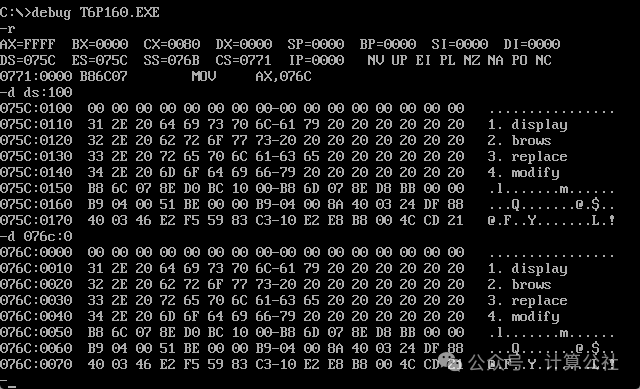
Use the ‘u’ command to view the line number of the ending statement, and use the ‘g 2b’ command to skip the loop and jump to the ending statement, then check the data; the first four letters of each line are now uppercase:
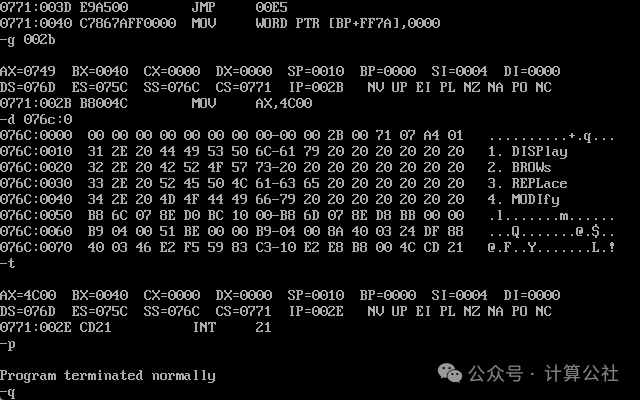
Use the ‘p’ command to end the program and return to Debug.
Finally, use ‘q’ to end the debugging session and return to DOS.