In xdb v4, the internal operation pointers are all using 4-byte unsigned int, with the maximum pointer value being 2^32 – 1, which means the maximum supported xdb file size is 4GiB (3.999..GiB). This is more than sufficient for the 40M open-source data, so there have been no issues in practical use until recently when commercial data appeared: Even the smallest basic version of the raw data is 3.4G, and the xdb file generated without any optimization is 3.1G. If this size is directly given to the Java query client, it will report an error similar to the following:
java.lang.NegativeArraySizeException: -1057887539When the client reported this error, I asked them to confirm the generation process and the integrity of the xdb file. However, using Golang/Python and other query clients worked perfectly fine, but Java did not. I knew this issue was definitely on my end  . Upon carefully reviewing the code:
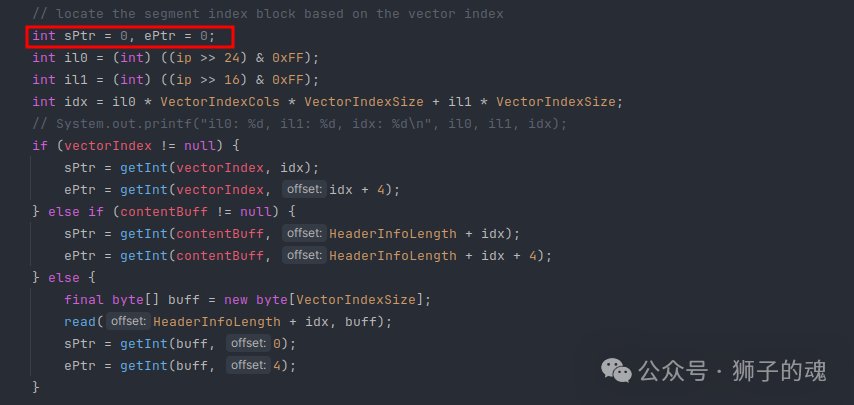 I found that both the start and end addresses of the index area were using int type. Java’s int is always signed, meaning its maximum value is 2^31 – 1, while the xdb file is 3.1G, which exceeds Integer.MAX_VALUE, causing ePtr to be negative and resulting in the aforementioned NegativeArraySizeException error during runtime. The fix is simple: change the int type to long for calculations:
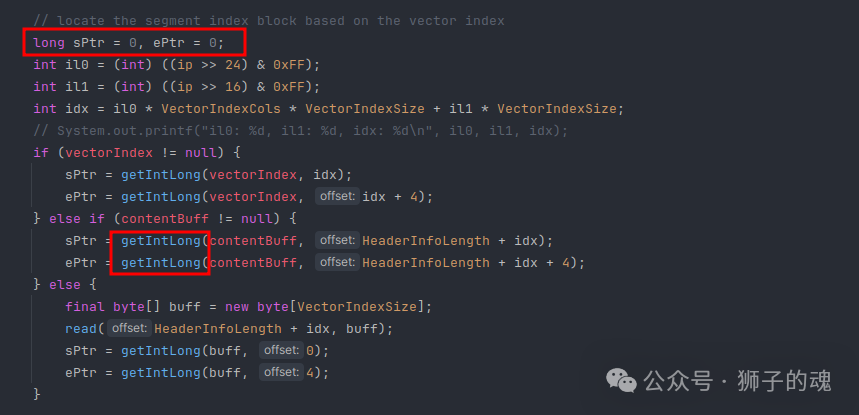 After this change, there were no issues with query methods based on pure files or VectorIndex caching. However, the entire xdb caching to memory method failed because Java’s array length is also strictly defined as int type, for example,
 byte[] buff = new byte[maxLen], meaning that reading a 3.1G xdb file into a byte[] array would definitely overflow. So, I temporarily provided a fix as follows: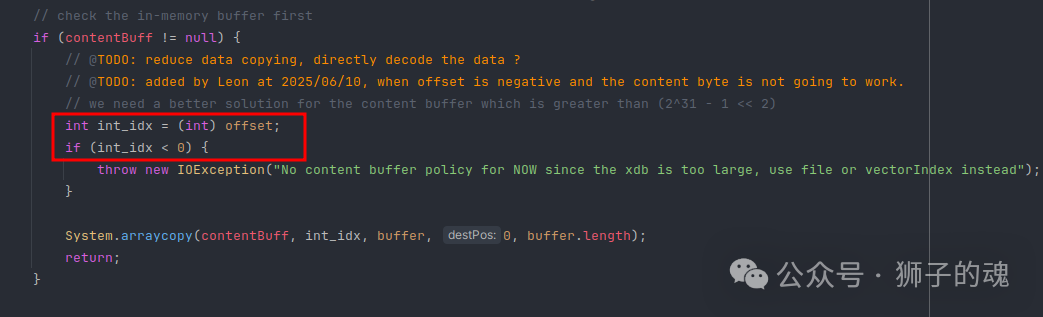 Force the offset to be converted to int type, and if the offset exceeds Integer.MAX_VALUE (becomes negative), throw a runtime exception indicating that the xdb file is too large and advise against using the fully memory-cached query method. This has no impact on xdb files smaller than 2^31 – 1 bytes, and I advised the client who reported the error to temporarily avoid using the fully memory-cached query method.Later, I optimized the generation of xdb, added support for custom fields, and removed completely useless fields. The xdb files generated for the three commercial versions were between 330M and 390M, meaning that even using a fully memory-based query mode would not trigger this error. This bug was discovered on June 10 and was left unresolved until August 22, when a complete fix was proposed. The feasible ideas are as follows:1. Change data type: A byte array theoretically can only reach 2^31 – 1 bytes. If it cannot fit, use a short array which can hold twice the size of a byte array, or an int array which can hold four times the size of a byte array.2. Use a collection of byte arrays: If one byte array cannot hold the data, use multiple byte arrays. The theoretical limit of a collection of byte arrays is the available memory of the process.Ultimately, I chose to use a collection of byte arrays to solve this problem, which is the implementation of the LongByteArray class now in the repository. The question arises: what should the maximum length of a byte array be defined as? The theoretical value is the maximum value of int, which is Integer.MAX_VALUE. I tried it, and there were no syntax or compilation errors, but during runtime, the following error occurred:
java.lang.OutOfMemoryError: Requested array size exceeds VM limitThis indicates that the array length exceeds the VM limit. So, what is this VM limit? After testing, I found that the maximum value is Integer.MAX_VALUE – 2. After modifying it to Integer.MAX_VALUE – 2, the error of exceeding the VM limit no longer occurred. The logic for reading the xdb file into memory is as follows:
final byte[] buff = new byte[(int) Math.min(toRead, Integer.MAX_VALUE - 2)];final int rLen = handle.read(buff); if (rLen != buff.length) { throw new IOException("incomplete read: read bytes should be " + buff.length + ", got `" + rLen + "`;"); }However, running the above logic to load xdb file data always reports the following error:
java.io.IOException: incomplete read: read bytes should be 2147483645, got `2147479552`The maximum length of the byte array is 2147483645, but handle.read can only read a maximum of 2147479552 bytes. Java’s documentation also states that handle.read will attempt to fill the entire buff. After various attempts, I found that the maximum it could read was 2147479552 bytes. Why is this? Just when I was at a loss, I thought to look for relevant kernel documentation:
➜ xdb man -wK "0x7ffff000"/usr/share/man/man2/read.2.gz/usr/share/man/man2/sendfile.2.gz/usr/share/man/man2/write.2.gzIndeed, after reading the man page for read, I found the following original description:
On Linux, read() (and similar system calls) will transfer at most 0x7ffff000 (2,147,479,552) bytes, returning the number of bytes actually transferred. (This is true on both 32-bit and 64-bit systems.)
In the Linux kernel, the read function and related system calls, such as write/sendfile, can transfer a maximum of 0x7ffff000 (2,147,479,552) bytes of data, and this is true for both 32-bit and 64-bit systems. Further research revealed a macro definition in the kernel:
#define MAX_RW_COUNT (INT_MAX & PAGE_MASK)This value (0x7ffff000) is exactly the maximum integer value minus the size of a page, and this definition is also aimed at improving system efficiency: for example, reducing integer overflow during runtime and avoiding unnecessary context switching between kernel and user processes. Linus Torvalds described this in a related commit (e28cc71572da3):
Author: Linus Torvalds <[email protected]>Date: Wed Jan 4 16:20:40 2006 -0800 Relax the rw_verify_area() error checking. In particular, allow over-large read- or write-requests to be downgraded to a more reasonable range, rather than considering them outright errors. We want to protect lower layers from (the sadly all too common) overflow conditions, but prefer to do so by chopping the requests up, rather than just refusing them outright.With this knowledge, I defined the maximum length of the byte array as MAX_WRITE_BYTES = 0x7ffff000, and the final solution for loadContent is as follows: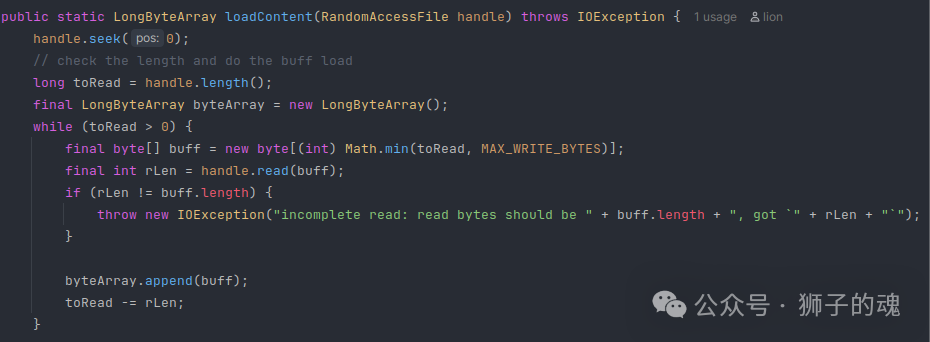 With this, the bug is completely fixed.After testing, it runs normally on Windows systems. What about Mac? I guess it works fine too
  .This fix will ultimately be released in the 2.8.1 version of the Java binding. For scenarios where the byte count of the xdb file does not exceed xxxx, continue using version 2.7.2. So, what should this xxxx value be?