Introduction
This article is the first in my journey of learning C++, and it is also the first article where I share my C++ notes. In this article, I will introduce the development history of C++, helping everyone transition from C to C++, and also explain why C++ is compatible with C syntax.
Just explaining the history of C++ would be too boring, so I will also add some extra content in this article – “Namespaces” and how to efficiently use namespaces in C++.
I will also teach you how to output “Hello World” in C++.
1. Introduction to C++
C is a structured and modular language suitable for handling smaller programs. For complex problems and larger programs that require high levels of abstraction and modeling, C is not suitable. To address the software crisis in the 1980s, the computer industry proposed the OOP (Object-Oriented Programming) concept, leading to the emergence of programming languages that support object-oriented design. Thus, we often say that C++ is an object-oriented language, while C is a procedural language.
In 1982, Dr. Bjarne Stroustrup introduced and expanded the concept of object-oriented programming based on C, inventing a new programming language. To express the relationship of this language to C, it was named C++. Therefore, C++ is derived from C, capable of procedural programming in C, object-oriented programming characterized by abstract data types, and object-oriented programming.
Please remember the year C++ was born (1982) and the inventor of C++ – “Bjarne”!
2. Development Stages of C++
It’s good to understand, but we should also know which version of C++ we are currently using.
|
Stage |
Content |
|---|---|
|
C with classes |
Classes and derived classes, public and private members, constructors and destructors, friends, inline functions, operator overloading, etc. |
|
C++1.0 |
Introduced the concept of virtual functions, function and operator overloading, references, constants, etc. |
|
C++2.0 |
Improved support for object-oriented programming, added protected members, multiple inheritance, object initialization, abstract classes, static members, and const member functions. |
|
C++3.0 |
Further improvements, introduced templates, resolved ambiguity issues from multiple inheritance, and handled corresponding constructors and destructors. |
|
C++98 |
The first version of the C++ standard, supported by most compilers, recognized by the International Organization for Standardization (ISO) and the American National Standards Institute, rewritten the C++ standard library using templates, and introduced the STL (Standard Template Library). |
|
C++03 |
The second version of the C++ standard, with no major changes in language features, mainly revised errors and reduced ambiguity. |
|
C++05 |
The C++ standard committee released a technical report (Technical Report, TR1), officially renaming it C++0x, indicating plans to release it sometime in the first decade of this century. |
|
C++11 |
Added many features, making C++ feel more like a new language, such as regular expressions, range-based for loops, the auto keyword, new containers, list initialization, and the standard thread library. |
|
C++14 |
Extensions to C++11, mainly fixing bugs and improving features, such as generic lambda expressions, auto return type deduction, binary literal constants, etc. |
|
C++17 |
Made minor improvements on C++11, adding 19 new features, such as optional text information for static_assert(), fold expressions for variadic templates, and initializers in if and switch statements. |
|
C++20 |
The largest release since C++11, introducing many new features such as modules, coroutines, ranges, and constraints, along with updates to existing features, such as lambda support for templates and range-based for loops supporting initialization. |
|
C++23 |
Introduced deducing this, if consteval, multi-dimensional subscript operators, built-in decay copy support, marking unreachable code (std::unreachable), platform-independent assumptions ([[assume]]), named universal character escapes, extending the lifetime of temporary variables in range-based for loops, constexpr enhancements, simplified implicit moves, static operator[] and class template argument deduction. |
C++ continues to evolve. However, the mainstream versions used in companies are still C++98 and C++11. As you work in the future, you can gradually explore the new features of C++. For now, we need to master the C++98 and C++11 standards proficiently.
Most of the standards we encounter during our learning phase are C++11 and C++98.
2. Namespaces
2.1 Why Do We Need Namespaces?
Take a look at the following code:
Code Language:javascript
AI Code Explanation
#include<stdio.h>

int rand =0;
int main()
{
	int rand =10;
printf("%d\n",rand);
return0;
}
Will the above code cause an error? Readers familiar with C syntax would say that the code can compile normally. Indeed, the above code has no issues.
But what if I make a slight change to the above code? Will it still compile normally?
Code Language:javascript
AI Code Explanation
#include<stdio.h>
#include<stdlib.h>
int rand =0;
int main()
{
	int rand =10;
printf("%d\n",rand);
return0;
}
If you test it yourself, you will clearly see a compilation error.
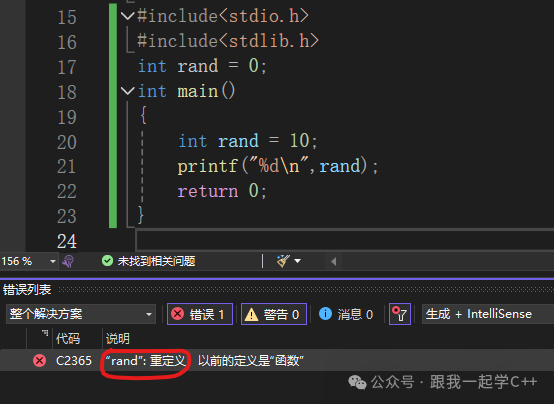
Compilation Error
What is the reason for this? The compiler says that rand is redefined, and the error only appears after we include the stdlib.h header file. At this point, we realize that there is a variable name or function name rand, and we know that during the preprocessing phase of compiling a .c/.cpp source file, the contents of the header file are expanded, leading to the redefinition of rand.
This issue in C can only be resolved by changing the variable name. C++ can solve this problem; even if you do not change the variable name, the compiler will not report an error. This powerful feature of C++ is namespaces.
To emphasize the importance of namespaces, let me give you a practical example from life:
For instance, there is an internet company that is preparing to develop a project. The boss assigns the project to a small team, where two members, Xiaoming and Xiaogang, are responsible for two modules of the project. They write and write, and one day they submit their respective projects, but upon compilation, an error occurs. After checking, they find that many of their variable names overlap, leading to naming conflicts. If they were using C, one of them would have to change their variable names, which neither would want to do. However, if they used C++ namespaces, this problem could be perfectly avoided.
Now that we have discussed the importance of namespaces, let’s understand how to use namespaces and the underlying principles!
2.2 Syntax of Namespaces
Code Language:javascript
AI Code Explanation
namespace NamespaceName
{
	Content
}
Now I will demonstrate and expand on this:
- This is how we define a normal namespace:
Code Language:javascript
AI Code Explanation
namespace test
{
	int rand =10;
	int Add(int x, int y)
{
	return x+y;
}

	struct Node
{
		int data;
		struct Node* next;
	}
}
🍉 We can not only define and initialize variables in a namespace but also define functions, structures, etc.
- Namespaces can be nested:
Code Language:javascript
AI Code Explanation
namespace N1
{
	int a;
	int b;
	int Add(int left, int right)
{
	return left + right;
}
	namespace N2
{
		int c;
		int d;
		int Sub(int left, int right)
{
		return left - right;
}
	}
}
🍉 As you can see, we can nest one namespace within another.
- Different files in the same project can have namespaces with the same name, but the compiler will merge the namespaces with the same name from different files:
Code Language:javascript
AI Code Explanation
// This is the namespace in test.h file
namespace N1
{
	int Mul(int left, int right)
{
	return left * right;
}
}

// This is the namespace in test.cpp file
namespace N1
{
	int a;
	int b;
	int Add(int left, int right)
{
	return left + right;
}
	namespace N2
{
		int c;
		int d;
		int Sub(int left, int right)
{
		return left - right;
}
	}
}
After compilation, the final merged result will be:
Code Language:javascript
AI Code Explanation
namespace N1
{
	int Mul(int left, int right)
{
	return left * right;
}
	int a;
	int b;
	int Add(int left, int right)
{
	return left + right;
}
	namespace N2
{
		int c;
		int d;
		int Sub(int left, int right)
{
		return left - right;
}
	}
}
2.3 Principles of Namespaces
When we mention namespaces, we cannot avoid discussing another concept: “scope”.
Many of you may have heard of the term “scope” (global scope, local scope) in C. This is one type of “scope”; in C++, there are also namespace scopes, class scopes, etc. The namespace we are discussing is essentially a type of namespace scope.
Some readers may ask, “What is a scope?” We can start with what we are familiar with: global scope and local scope. We know that when giving global and local variables the same name, the program does not report an error; this is the function of “scope”. We can think of “scope” as a wall that separates things from interfering with each other; you do your thing, and I do mine. At this point, I believe you have a sense of namespace scope. We can also think of namespace scope as a wall that separates local scope from global scope. Within this scope, there are variables that are maintained independently.
🍉 Therefore, we can summarize: namespaces solve the problem of naming conflicts between global variables and header files, or naming conflicts between different modules in the same project.
2.4 Three Ways to Use Namespaces
<spanwe a="" discussed="" do="" example:
Code Language:javascript
AI Code Explanation
namespace test
{
	// Variables/functions/types can be defined in the namespace
	int a =0;
	int b =1;
	int Add(int left, int right)
{
	return left + right;
}
	struct Node
{
		struct Node* next;
		int val;
	};
}
Code Language:javascript
AI Code Explanation
int main()
{
	// Compilation error: error C2065: "a": undeclared identifier
	printf("%d\n", a);
	return0;
}
2.4.1 Adding Namespace Name and Scope Resolution Operator (::)
Code Language:javascript
AI Code Explanation
int main()
{
	printf("%d\n",test::a);
	return0;
}
2.4.2 Using the using Keyword to Import a Member from the Namespace
Code Language:javascript
AI Code Explanation
using  test::b;
int main()
{
	printf("%d\n",test::a);
	printf("%d\n", b);
	return0;
}
This method is recommended!!!
2.4.3 Using using namespace NamespaceName to Import
Code Language:javascript
AI Code Explanation
using  namespace test;
int main()
{
	printf("%d\n",test::a);
	printf("%d\n", b);
	Add(10,20);
	return0;
}
🍉 Note: This method carries risks (if there are variables with the same name as global variables in this namespace), so we should use it only during practice or competitions.
3. A Brief Introduction to C++ Input and Output
When learning a new language, we often do one thing: output “Hello World” on the screen. So here we will briefly understand C++ input and output.
Code Language:javascript
AI Code Explanation
#include<iostream>
// std is the namespace name of the C++ standard library; C++ places the definitions and implementations of the standard library in this namespace
using namespace std;
int main()
{
	cout<<"Hello world!!!"<<endl;
return0;
}
Note: 1. When using the cout standard output object (console) and cin standard input object (keyboard), you must include the <iostream> header file and use the namespace method with std. 2. cout and cin are global stream objects, and endl is a special C++ symbol that indicates a newline output; they are all included in the <iostream> header file. 3. << is the stream insertion operator, and >> is the stream extraction operator. 4. C++ input and output is more convenient; you do not need to manually control the format like printf/scanf. C++ input and output can automatically recognize variable types. 5. In fact, cout and cin are objects of type ostream and istream, and >> and << also involve operator overloading, which we will learn later, so we will only briefly learn their usage here.
AI Code Explanation
#include <iostream>
using namespace std;
int main()
{
	int a =10;
	double b =3.1415;
	char c ='l';

	// Can automatically recognize variable types
	cin>>a;
	cin>>b>>c;

	cout<<a<<endl;
	cout<<b<<" "<<c<<endl;
return0;
}
🍉 Finally, let me clarify the usage convention of the std namespace: std is the namespace of the C++ standard library. How can we use std more reasonably?
- In daily practice, it is recommended to directly use using namespace std; this is very convenient.
- Using namespace std exposes the entire standard library; if we define types/objects/functions with the same name as those in the library, conflicts may arise. This issue rarely occurs in daily practice, but in project development with a lot of code and large scale, it can easily happen. Therefore, it is recommended to use specific namespace usage like std::cout to specify the namespace + using std::cout to expose commonly used library objects/types.
This concludes the article. If you think the article is well written, please give it a thumbs up!!!