If an interviewer asks you: Can you explain the principles of Linux permission allocation? Today, let’s discuss this.
1. Permission Abstraction
A complete permission management system requires reasonable abstraction. This includes abstractions for users, processes, files, memory, system calls, etc.
First, let’s talk about users and groups. Linux is a multi-user platform that allows multiple users to log in to the system simultaneously. Linux abstracts users into accounts, which can log into the system, for example, by entering a username and password; they can also log in using certificates.
To facilitate the allocation of permissions for each user, Linux also supports group accounts. A group account is a collection of multiple accounts, and groups can assign a certain type of permission to their members. Each user can belong to multiple groups, allowing for quick permission allocation through groups.
Groups are like WeChat groups, and each WeChat group has a group owner. The Root account, also known as the super administrator, is similar to the group owner, having complete control over the system. A super administrator can utilize all capabilities provided by the system.
Additionally, Linux abstracts permissions for files (note that directories are also a type of file). In Linux, a file can have the following three types of permissions:
-
Read permission (r): Controls the ability to read the file.
-
Write permission (w): Controls the ability to write to the file.
-
Execute permission (x): Controls the ability to execute the file, such as scripts, applications, etc.
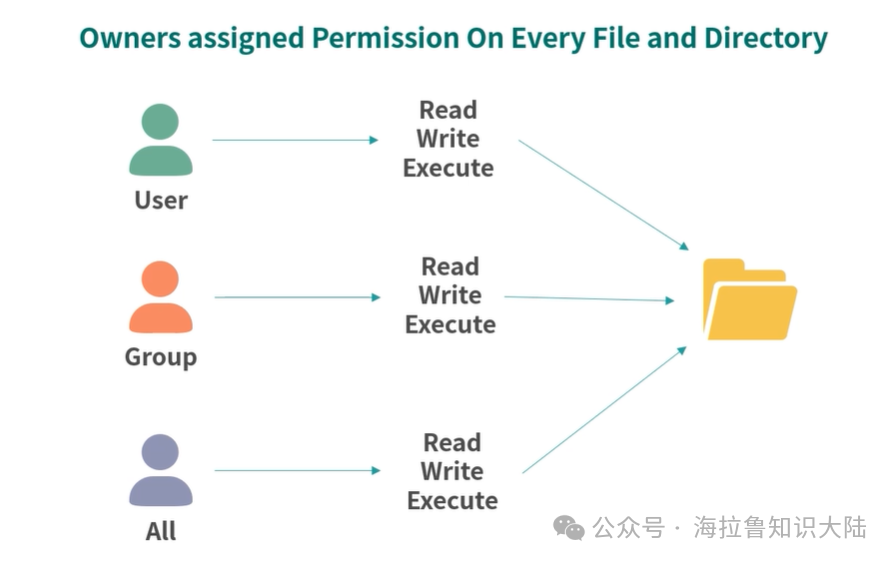
Each file can also configure the above three permissions from three dimensions:
-
User dimension. Each file can belong to one user, and the rwx configured in the user dimension is effective for that user;
-
Group dimension. Each file can belong to one group, and the rwx configured in the group dimension is effective for that group;
-
All users dimension. Sets permissions for all users.
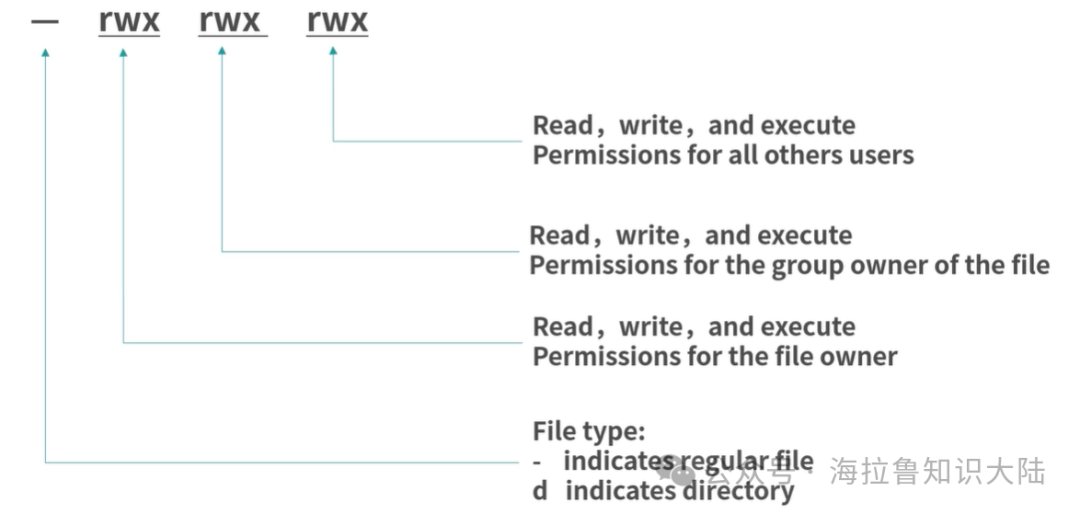
Therefore, in Linux, file permissions can be represented by 9 characters, with 3 groups of rwx: the first group is user permissions, the second group is group permissions, and the third group is permissions for all users. A dash (-) represents no permission. For example, rwxrwxrwx means all dimensions can read, write, and execute. rw–wxr-x means the user dimension cannot execute, the group dimension cannot read, and the all users dimension cannot write.
Typically, if you use ls -l to view a file’s permissions, there will be 10 characters. This is because the first character represents the file type.
2. Consider Four Questions
-
How are initial permissions set when a file is created?
-
How are permissions allocated for commands that need to be executable by all users, such as ls?
-
What happens if a text file is assigned executable permissions?
-
Can multiple users log in as root and only use the root account?
Question 1: Initial Permission Issue
When a file is created, the owning user of the file is set to the user who created it. This logic is straightforward: whoever creates it owns it. But how is the group of the file allocated?
Here, Linux uses a great method by creating a group with the same name for each user.
For example, when the account jiang is created, a group called jiang is also created.
After logging in, the working group will default to its corresponding group jiang. If jiang wants to switch working groups, they can use the newgrp command to switch to another working group. Therefore, the group to which the created file belongs is the working group of the user at that time; if not specifically set, it will belong to the user’s corresponding group.
The default permissions for a file created are usually: User and group dimensions cannot execute, and all users can read.
rw-rw-r--Question 2: Permissions for Public Executable Files
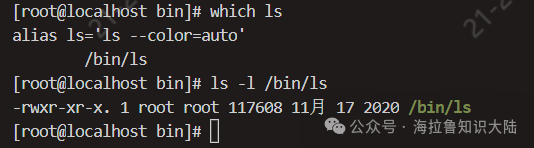
In the previous article, we mentioned that you can use the which command to find the directory of the ls command, and we found it in /bin/ls. Then, using ls -l to check the permissions of ls, we can see the following:
-
The first – indicates that this is a regular file, and the following rwx indicates that the user dimension can read, write, and execute;
-
The second r-x indicates that the group dimension cannot read or write;
-
The third r-x indicates that all users can read and execute;
-
The last two root indicate the owning user and group.
If a file is set to be unreadable but executable, what will happen? The answer is that it cannot be executed, as it cannot read the file content, it naturally cannot execute.
Question 3: Executable Files
In Linux, if a file is executable, it can be executed directly by entering the file path (relative or absolute). If you try to execute a non-executable file, Linux will return an error.
When a user inputs a file name without specifying the full path, Linux will search for the file in certain directories. You can use echo $PATH to see which directories Linux will search for executable files.

Question 4: Can everyone use root?
The answer is certainly no!
The production line must be secure. If you have a MySQL process running under the root (maximum permission) account, and a hacker breaches your MySQL service and gains SQL execution permissions, then your entire system is exposed to the hacker. This can lead to very serious consequences. For example, they could back up your critical files, delete them, and then extort you for payment through specified accounts.
The introduction to user and group-related permissions is complete. Next, let’s discuss kernel and system call permissions. The kernel is the program that connects the operating system to the hardware and provides the core capabilities.
The kernel provides the core capabilities to operate hardware, disks, memory paging, processes, etc., and has direct access to all memory. Therefore, the kernel cannot provide all its capabilities to users, nor can it allow users to perform system calls through shell commands. In Linux, the kernel provides some system calls needed by processes in the form of C language APIs. Some system calls will have permission checks, such as the system call to set the system time.
3. Permission Architecture Philosophy
An excellent permission architecture primarily aims to ensure that the system is secure, stable, and that users and programs mutually restrict and isolate each other. This requires that the permission divisions in the permission system are clear enough and that the cost of allocating permissions is low enough.
An excellent architecture should follow the principle of least privilege. Permission design needs to ensure the security and stability of the system (this is a philosophy; for example, we can refer to this when designing automation frameworks, scripts, etc.). For instance, each member should have minimal permissions, and each privileged program execution process should be as short as possible. For higher security levels, member permissions should mutually constrain each other. For example, in the financial sector, logging into an online database usually requires two logins, meaning two passwords, each held by two different roles. This way, even if one member has an issue, the entire system’s security can be ensured.
Similarly, each program should also minimize permissions, such as having only limited directory read/write permissions and being allowed to perform only a few system calls.
Permission Allocation
Furthermore, the philosophy of permission architecture should also adhere to a principle: the boundaries of permission allocation should be clear enough to achieve mutual isolation. Linux provides users and groups. However, Linux does not force you to allocate permissions in a specific way, allowing for more scenarios. Typically, important applications on our servers are executed by different accounts. For example, Nginx, web servers, and databases do not run under the same account. Now, with the development of containerization technology, we even hope that each application has its own virtual space, as if running in a separate operating system, preventing them from interfering with each other.
Hierarchical Protection
Because the kernel can directly manipulate memory and CPU, it is very dangerous. Drivers can directly control core devices such as cameras and displays, so security measures must be taken, such as preventing malicious applications from turning on the camera to steal privacy. Typically, operating systems adopt a circular protection mode.
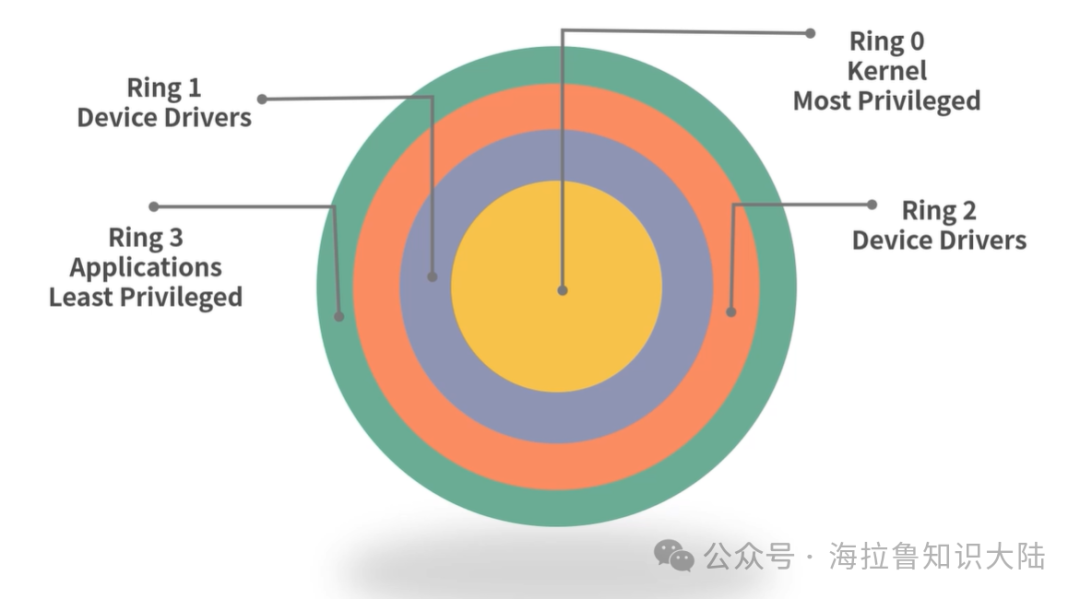
As shown above, the kernel is at the innermost layer, which is Ring 0. Applications are at the outermost layer, which is Ring 3. Drivers are in the middle, which are Ring 1 and Ring 2. For two adjacent Rings, the inner Ring has higher permissions and can change the outer Ring; while the outer Ring must use a specific program (or hardware) to access the resources of the inner Ring. For example, if a Ring 3 application needs to use the kernel, it must send a system call to the kernel. This system call will be verified by the kernel, such as checking whether the user has sufficient permissions and whether the action is safe, etc.
Privilege Bracketing
Previously, we discussed that when MySQL runs with root privileges, if MySQL is compromised, the entire machine is compromised. Therefore, we should not run all applications as root. If all applications run under normal accounts, there will be scenarios where temporary privilege escalation is needed. For example, an installation program may need temporary administrative privileges to install the application in the /usr/bin directory.
Linux provides the capability of privilege bracketing. For example, if an application temporarily needs elevated permissions, it can use an interactive interface (such as prompting the user to enter the root account password) to verify identity, then perform the operation requiring elevated permissions, and immediately revert to normal permissions afterward. This reduces the time the application operates with elevated permissions and ensures that it is used specifically for its intended purpose, preventing exploitation by malicious programs.
4. User Group Commands
We have discussed the architecture of Linux permissions; next, let’s learn some specific commands.
Viewing
If you want to view the current user’s groups, you can use the groups command.
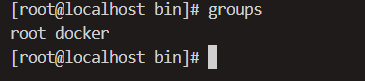
If you want to view all users, you can directly check /etc/passwd.
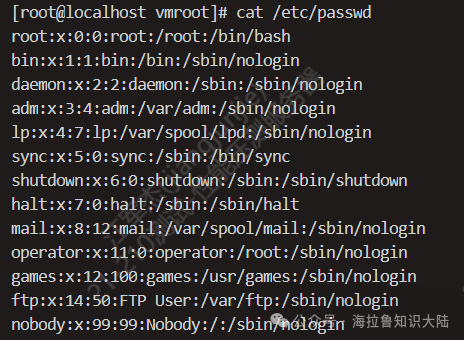
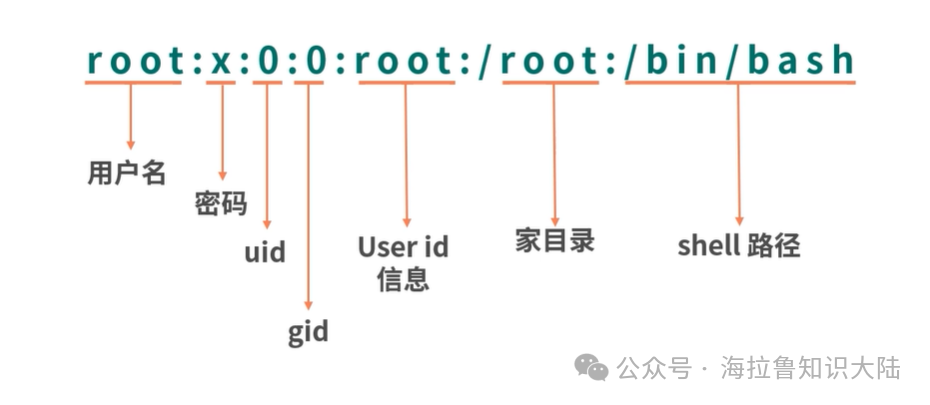
The /etc/passwd file stores all user information, as shown below:
Creating Users
To create a user, use the useradd command.
sudo useradd jmeterSudo originally means superuser do, and has evolved to mean executing a command as another user. If no user requiring sudo is specified, it can be executed as shown above, with super administrator privileges. Since useradd requires administrative privileges, this command will prompt for the administrator password.
Creating Groups
To create a group, use the groupadd command. The following command creates a group called hello.
sudo groupadd helloAdding Secondary Groups to Users
Groups are divided into primary groups and secondary groups. There can only be one primary group, but multiple secondary groups. If you want to add a secondary group to a user, you can use the usermod command. The following command adds the user jmeter to the sudo group, thereby granting jmeter sudo privileges.
sudo usermod -a -G sudo jmeter-a means append, -G indicates a list of secondary groups, and the last jmeter is the username.
Modifying a User’s Primary Group
To modify the primary group, use the usermod command, but the parameter is lowercase -g.
sudo usermod -g somegroup foo5. File Permission Management Commands
Next, let’s learn about commands related to file management.
Viewing
We can use ls -l to view file permissions, which has been used previously.
Modifying File Permissions
You can use chmod to modify file permissions. Chmod (change file mode bits) refers to the rwx we discussed earlier, but rwx is represented in Linux using three adjacent binary bits.
# Set jmeter to executablechmod +x ./jmeter# Disallow jmeter from executingchmod -x ./jmeter# You can also set multiple permissions at oncechmod +rwx ./jmeterIn Linux, rwx is represented by three adjacent bits. For example, 111 represents rwx, and 101 represents r-x. Since rwx has three groups, which are user permissions, group permissions, and all users’ permissions, it can be represented as 111111111 (9 ones represent) rwxrwxrwx. Since 111 in decimal is 7 (previously I didn’t understand why it was 7, just memorized it, but now it’s easy to get), when we need to set user permissions, group permissions, and all users’ permissions at once, we often use numeric representation.
# Set rwxrwxrwx (111111111 -> 777)chmod 777 ./jmeter# Set rw-rw-rw- (110110110 -> 666)chmod 666 ./jmeterModifying File Ownership
Sometimes we need to change the ownership of a file, in which case we use the chown command. The following command changes the ownership of the jmeter file to test.
chown test ./jmeterIn some cases, we may need to change both the user and group ownership of a file. For example, if we want to change the group to g and the user to u, we can use:
chown g.u ./jmeter6. Final Thoughts
Let’s talk about the principles of Linux permission allocation?
[Analysis] Linux follows the principle of least privilege.
Each user should have minimal permissions, and each group should also have minimal permissions. In actual production processes, it is best to split administrative privileges to mutually constrain and prevent issues.
Each application should use permissions as minimally as possible. Ideally, each application should occupy a separate container (such as Docker), so that there are no issues of mutual interference. Even if an application is compromised, it cannot breach the Docker protection layer.
Minimize the use of root. If a user requires root capabilities, then privilege bracketing should be implemented—immediately elevate permissions (such as sudo), handle the task, and then immediately release permissions.
At the system level, implement hierarchical protection of permissions, dividing system permissions into Rings, where outer Rings must perform permission checks when calling inner Rings.