Scan to follow“Finger Tips”Learn together, grow together

Preface
The author will publish the key points of C language knowledge and learning experiences in the form of articles. As the author is still a beginner, mistakes and biased views are inevitable. Thank you very much for the readers’ corrections! I hope to make progress together with everyone here and become an expert soon!
This series (Introduction to C Language) is just a simple introduction to each knowledge point and the basic knowledge of C language, aimed at giving readers (and myself) a general understanding of C language.
Part 1What is C Language?
C language is a timeless computer programming language. Everything starts with C. Mastering C language can lay a solid foundation for our programming journey. (I don’t know what else to write, but it’s very important.)
1.1 Development Environment and Compiler
We refer to computer programming languages as high-level languages. So what are low-level languages?
In high school physics, we know that electronic components can only convey two types of information: “on” or “off”. Therefore, electronic components (i.e., transistors) can only communicate in these two ways. People replace “on” with 1 and “off” with 0. In the early days of electronic computers, they could only recognize these two signals, so only scientists could perform programming tasks, which was very difficult at that time.
The aforementioned 0/1 signals provide a perfect application for binary, so we call the most basic language that computers can read directly as low-level language.
Here, low-level language is a string of 0s and 1s, which is converted into assembly language, and then into high-level language, which is what most of us learn.
The role of the compiler is to reverse the above process, converting high-level languages that are understandable to humans and close to natural language into low-level languages that machines can understand.
The first compiler I used was Dev C++, followed by Visual Studio 2019. I prefer VS2019 because it can remind me of my errors in Chinese while I write code, but sometimes code that cannot pass in VS can pass in Dev C++, so I currently use VS as my main tool.
If there are students just starting with C, I suggest using Dev C++ first to familiarize yourself with the programming environment. If you already have a certain foundation, go directly to VS2019.
1.2 Initial C Language
The first C language program, below is an example using Dev C++
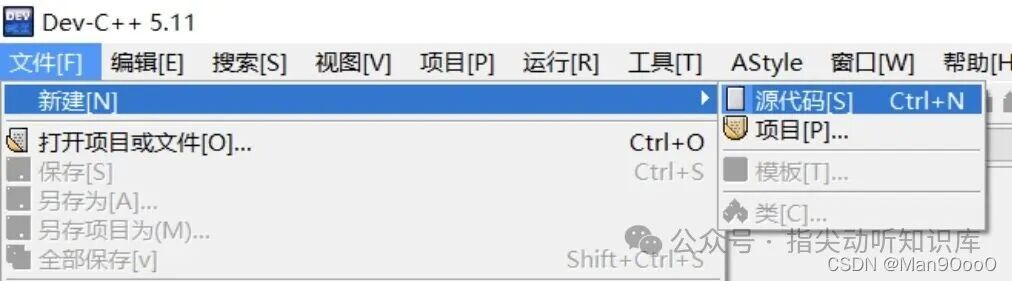
(1) First create a source file: File -> New -> Source Code;
(2) Write preprocessor commands, write the main function, and establish a basic framework;
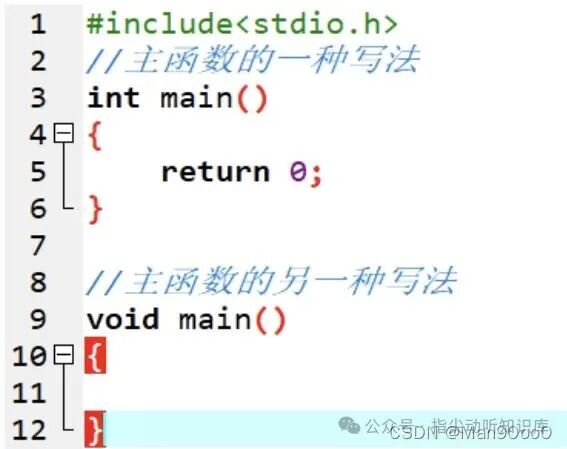
The content in angle brackets (<>) is called the standard input-output function, which is <span>standard input output.header</span>;
<span>#include</span> is a preprocessor command that finds the file in angle brackets (or English double quotes) and includes it in the current file. The text in the included file will replace the <span>#include</span> directive in the source code file (which is what we are writing).
Does that sound confusing? In simple terms: the content inside <> contains things we need to use in our code, and the code it includes helps us achieve certain functions. It’s just a name, but it actually contains a lot of code. Since we will use that function many times, it would be too cumbersome to write the content inside <> every time! The <span>#include</span> command replaces all that code with a single line, which is much more convenient, right?
For example: If we need to use input from the keyboard or output to the screen, we need to include <span>#include<stdio.h></span> to simplify the steps for implementing input and output functions. I may have been a bit verbose here; when I first encountered this, I was confused: why does every function need to include <span>#include<stdio.h></span>? Why so much redundancy? If any beginners read my article, I hope they can understand; by the way, the second way of writing the main function is an ancient version, and it’s best to use the first one.
A program/project can only have one main function <span>main()</span>, which is the entry point of the program/project. Note that main should not be written as mian!!
Part 2Data Types
2.1 Classification
char // Character data type // non-numeric characters
short // Short integer // small integer (absolute value)
int // Integer // whole numbers
long // Long integer // large integer (absolute value)
long long // Longer integer // rarely used
float // Single precision floating point // decimal numbers
double // Double precision floating point // decimal numbers with more digits
Why are there so many types? Because we need integers and decimals in real life.
So why do we have int and short for integers, and long and long long, and why do we have float and double for decimals? Why not just use one data type to represent them?
This is a good question. Just looking at the complexity of English letters and Chinese characters, it should not be hard to guess: different characters occupy different sizes in the computer. Let me briefly introduce the storage units in computers: the smallest unit is a bit, 8 bits = 1 Byte, 1024 Bytes = 1 KB, followed by MB, GB, TB, etc. A bit is the smallest unit.
As a side note, many people have this confusion when applying for broadband: Why did I buy a 200M broadband, but why is the maximum speed only a dozen or twenty megabytes per second?
The reason is: the 200M broadband advertised by the operator actually refers to the broadband access rate of 200 Mbps, where B stands for Byte. In theory, 200M broadband has a peak speed of 25.6MB/s. This is not important, just know it, let’s get back to the topic.
In fact, different data types occupy different sizes in memory. If we use boxes of different sizes to store cakes, there will inevitably be space waste, so people have defined different data types to make sure that space is used efficiently.
Here is a very important concept that I call the “black room concept”: Imagine memory as a series of small black rooms, where we store the things we want to keep, as well as things we cannot move, and of course, things we want to retrieve.
2.2 Length of Data Types
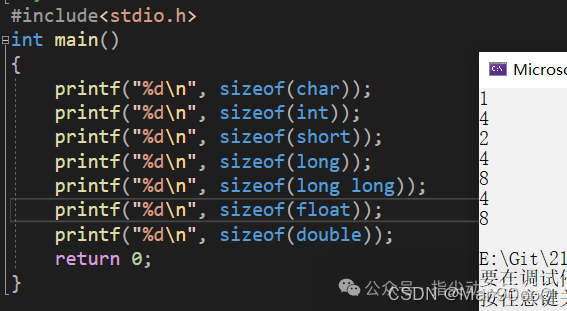
Here we use <span>sizeof()</span> to determine the length of a data type or expression.
<span>sizeof()</span> is not a function, which will be introduced later (though it seems there isn’t much to introduce = =).
C language specifies that <span>sizeof(long long) >= sizeof(long)</span>, and so on. The results above vary depending on the compiler and operating platform.
Part 3Variables & Constants
Some values in life are constant (e.g., pi, gender, ID number, blood type, etc.), while some values are variable (e.g., age, weight, salary).
3.1 How to Define Variables
Format: Variable Type (space) Variable Name (your choice);
It is best to initialize variables to avoid dirty data affecting subsequent debugging, such as <span>int a = 0</span>;
If the variable name has a real meaning, it is best to use the corresponding English (or pinyin, or English abbreviation) to represent it, which will be clearer later.
3.2 Classification of Variables
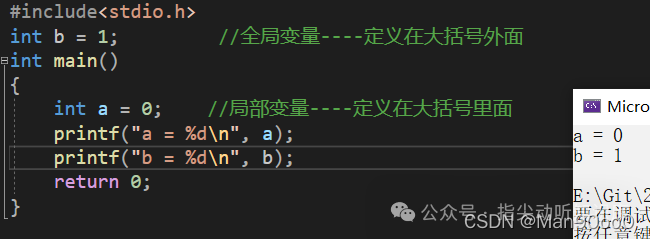
As the name suggests, global variables can be used throughout the entire project, while local variables can only be used within the {}. Here, the {} is not limited to the main function’s braces; it also applies to the {} in subsequent loops or conditional statements.
What if a global variable and a local variable have the same name? Which one takes effect?
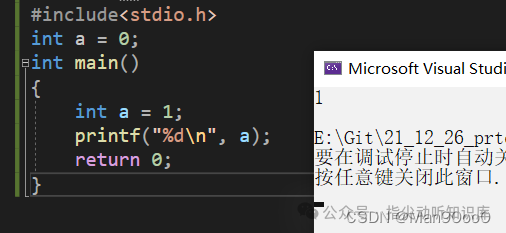
Clearly, in this case, the local variable will override the global variable with the same name.
Here, I will briefly introduce <span>printf()</span> and <span>scanf()</span> functions. As the names suggest, the former is for printing, and the latter is for scanning and reading (f stands for function), reading input from the keyboard. They are included in the <span>stdio.h</span> header file.<span>gets()</span> and <span>puts()</span> also serve similar functions, and the specific differences will be explained in later articles.
3.3 Scope of Variables
Scope (this term is important, as it may appear in compiler error messages later) is a programming design concept. Generally speaking, the names used in a piece of code are not always valid/available, and the range of code that limits the availability of that name is the scope of that name.
-
The scope of a local variable is the local range where the variable is located (i.e., the variable inside the braces can only be used within the braces).
-
The scope of a global variable is the entire project (i.e., the variable outside the braces can be used anywhere).
3.4 Lifetime
The lifetime of a variable refers to the time period from the creation of the variable to its destruction;
-
The lifetime of a local variable is: the lifetime starts when it enters the scope and ends when it exits the scope (the braces!).
-
The lifetime of a global variable is: the entire lifetime of the program. (It can be used anywhere!)
Have you finished reading? In layman’s terms, scope is where a variable can be used, and lifetime is when it is created and when it disappears.
3.5 Constants
3.5.1 Literal Constants
These are constants that can be represented by strings, including integer constants, character constants, string constants, and can also be structural symbolic constants.
3.5.2 Const-modified Constants
First, let’s look at variables that are not modified:
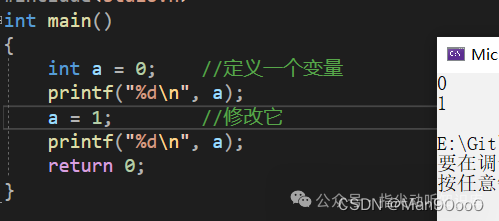
Clearly, the value of an unmodified variable can be changed.
Now let’s look at variables modified by <span>const</span>;
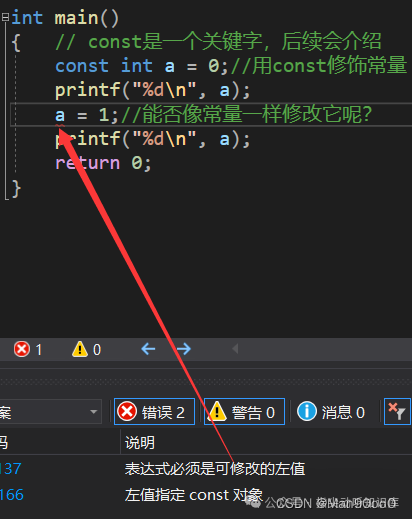
The compiler tells us that the value of a cannot be changed, meaning it is a constant, but not entirely; it is referred to as a constant variable.
The reason is: a variable modified by <span>const</span> is treated as a constant in syntax, but it is essentially still a variable, just for understanding.
Regarding the understanding of “constant variable”: a variable modified by <span>const</span>, whether it is a global variable or a local variable, has a lifetime from the start of the program to the end of the program, meaning that using a <span>const</span> modified local variable has a “static property“.
What variables have static properties? We know that global variables are static, and the static lifetime is the entire duration of the program. However, it is important to distinguish: a local variable modified by <span>const</span> only has a “static property”; it does not mean it becomes a “static variable”.
The reason for placing const at the end is that understanding its “static property” requires understanding global and local variables.
3.5.3 #define Defined Identifier Constants
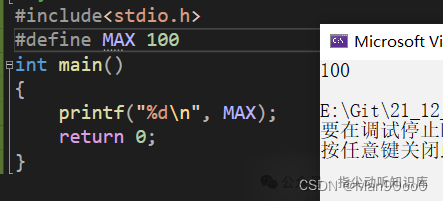
From the code in the image, we can see: Format: #define Constant Name Value, where there is no need for an equal sign between the constant name and value.
3.5.4 Enumeration Constants
#define MON  1
#define TUE  2
#define WED  3
#define THU  4
#define FRI  5
#define SAT  6
#define SUN  7
Suppose we need to use seven variables from Monday to Friday. If we define variables using <span>#define</span>, we need seven lines of code, while using enum (enumeration) constants can represent the same meaning with less code.
enum DAY
{
      MON = 0, TUE, WED, THU, FRI, SAT, SUN
};
The first enumeration member has a default value of integer 0 (here I use = 0 to indicate it, but it is actually omitted), and subsequent enumeration members have values incremented by 1 from the previous member, and so on.
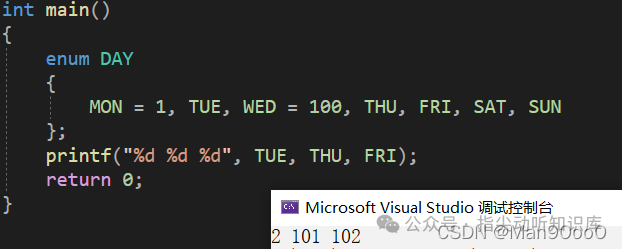
Of course, we can modify the value of any enumeration member during definition:
enum DAY
{
      MON = 1, TUE, WED = 100, THU, FRI, SAT, SUN
};
For enumeration elements without specified values, their values are the previous element plus 1. Here, <span>TUE = 2</span>, <span>THU = 101</span>, and so on.
We will stop here for enumeration constants. In fact, beginners use them less in subsequent projects; at least I haven’t encountered them yet (first semester of the first year).
The print result is as follows:
Part 4Strings/Escape Characters
4.1 Strings
"hello world!"
A string of characters enclosed in double quotes is called a string.

In the VS2019 compiler, type the above code, press F10, and then click Debug -> Window -> Watch. The result is shown in the image.
I did not initialize the array size when defining the array because the compiler will determine the array size based on the input content. From the values and types shown in the watch window, we can see that although the displayed content is the same, the string caused by the double quotes has an additional ”, which has an actual size in the array.
Since people need to process strings, but we cannot always know the number of characters in a text, it is difficult to ensure that we do not exceed the bounds and do not waste memory. Therefore, people thought of using ” as the end-of-string marker (it is an escape character, which will be introduced later), so that when processing strings, we do not have to worry about array overflow and unknown length issues.
Next, we define three arrays: arr1 is a string, while arr2 and arr3 are character arrays. The difference is that arr2 does not have ”, while arr3 does. What impact will this difference have? Let’s print it out.
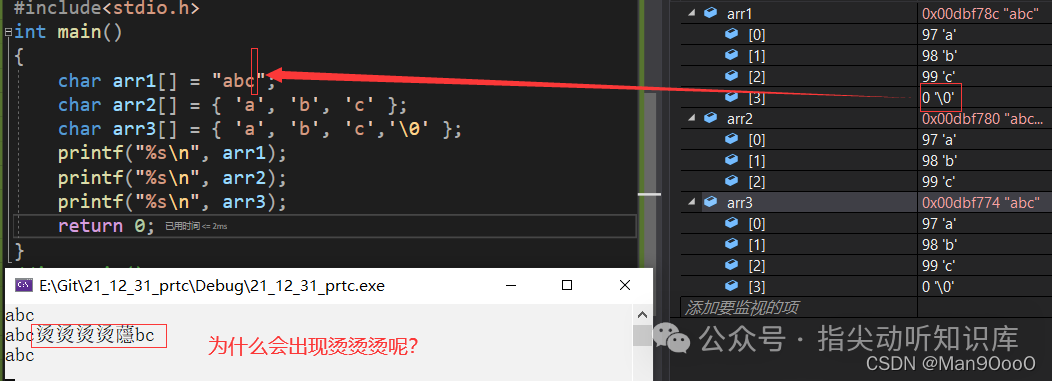
The result is quite amazing; why is there a strange character in the middle?
Let’s first look at arr1 and arr3, which contain the same members. Of course, we can consider that a character array plus ” is a string. But why does the character array arr2 display but not fully show?
As mentioned earlier, ” is the end-of-string marker (this confirms our guess that a character array plus ” is indeed a string). The print function only stops when it encounters ”, and since arr2 does not contain it, the machine keeps searching and ends up finding something in another black room, resulting in garbled characters like “烫烫烫”; you will encounter “锟斤拷” later (laughs).
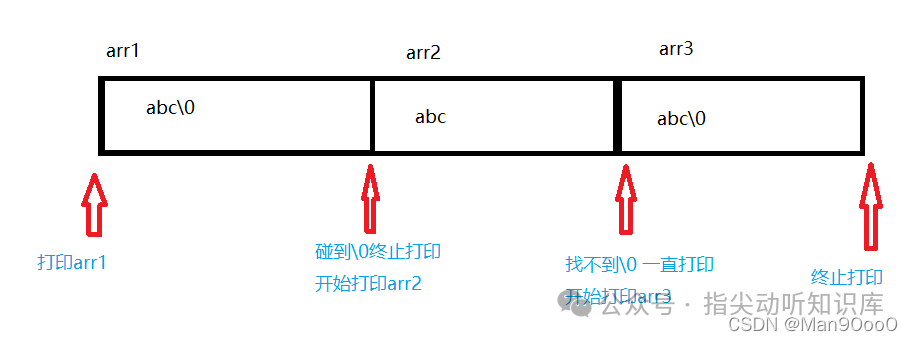
Here is a diagram briefly showing how arrays are processed in memory.
4.2 Escape Characters
When I want to print the path c:\code\test.c, why doesn’t it appear as I imagined?
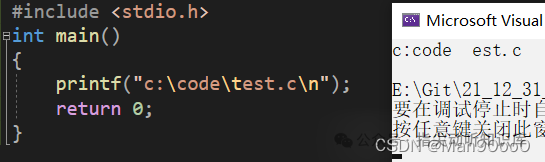
Here we must mention escape characters, which change the meaning. Below are some escape characters.
-
‘ represents single quote ‘;
-