Keil C51 is a software specifically designed for developing embedded systems based on the 8051 microcontroller. Developers can add chip support through the Keil C51 software, enhancing development efficiency and code quality. Adding chip support in Keil C51 brings many benefits, including optimized code generation, debugging and simulation capabilities, hardware feature support, and improved development efficiency.

How to Add Chips in Keil C51? Steps to Add Chips in Keil C51
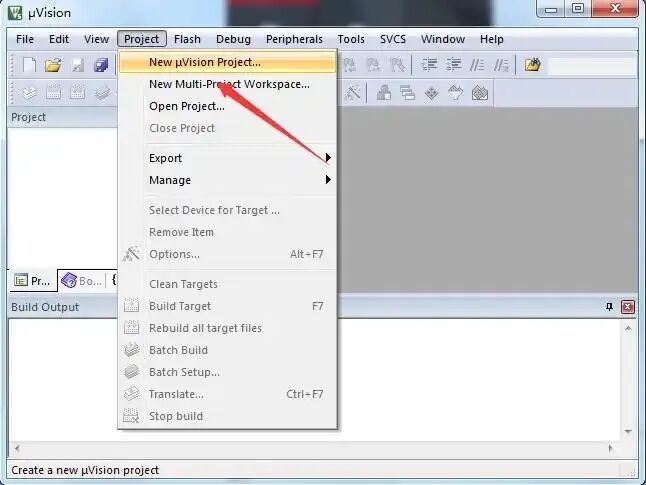
1. In the Keil C51 software, click Project -> New uVision Project -> select path -> add project name.
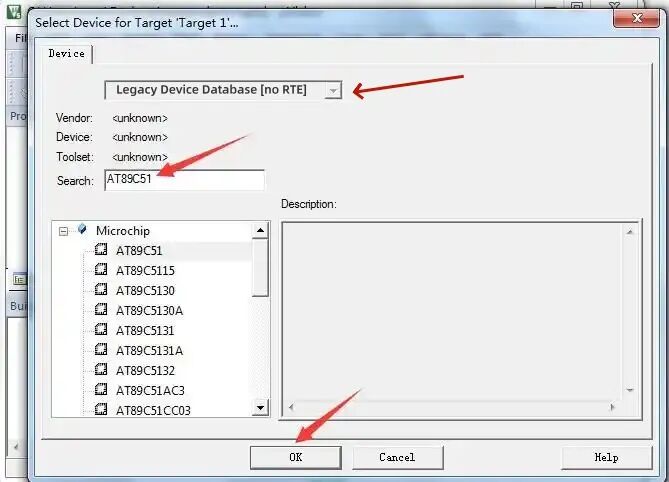
2. Click to select the dropdown “Legacy Device Database [no RTE]” to save, then select the model of the microcontroller, usually choosing the first 51 core model from Intel, and finally click “OK” to complete.