Each brand of wireless router may have some differences in mesh networking. Today, we will share information regarding the one-click networking feature of the Honor router. Some users may have noticed, which button is the one-click networking button on the Honor router, and which button should be pressed to set up the network.How to set up one-click networking on the Honor router?
In this article, we will share how to quickly complete the one-click networking setup for the Honor router through images and text.
1. Complete the Main Router Setup
The installation setup for the main router can refer to the tutorial: Honor Router Internet Setup Tutorial
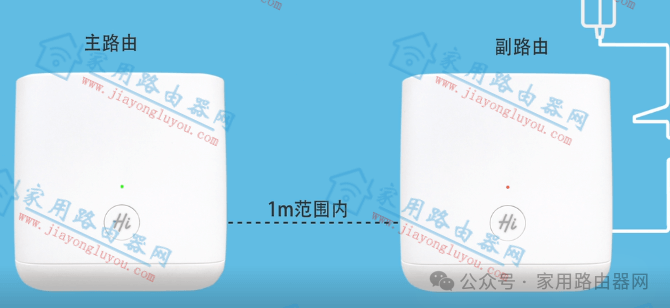
Honor Router One-Click Cascading Diagram
This device is referred to as the main router, while the second device is the secondary router.
2. Power on the Second Router
Place the secondary router (new or reset to factory settings) near the main router (recommended within 1 meter) and power it on.

Honor Router One-Click Networking Diagram
3. Wait for the Main Router’s Indicator Light to Flash Slowly, Then Press the Round Button on the Main Router
Observe the indicator light on the main router, and wait for about 1 minute until it starts to flash slowly. At this point, press the round button on the main router and release it; the indicator light will start to flash faster. When the indicator light on the secondary router turns solid green, it indicates a successful connection.
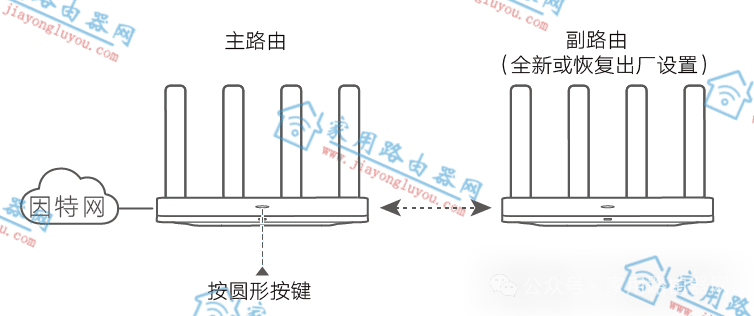
Honor Router One-Click Networking Press Round Button
Note: During the one-click networking operation, only the main router’s button needs to be pressed; no operation is required on the secondary router.
4. One-Click Networking Completed
After successful pairing, the Wi-Fi name and password of the secondary router will be the same as those of the main router. You can place the secondary router in a suitable location to improve Wi-Fi coverage.
It is recommended that there are no more than two walls between the main router and the secondary router.
The most important step in the above operations is step 3.