0. Introduction
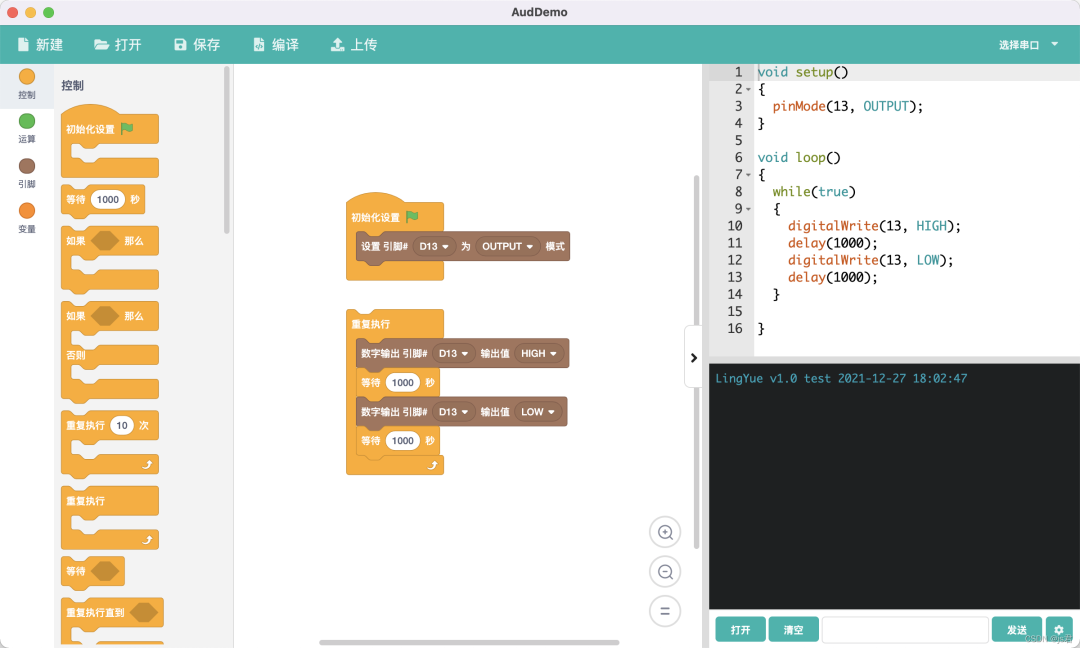
Scratch can be considered one of the earliest projects in visual programming. Scratch is a visual programming tool released in 2007 by the “Lifelong Kindergarten Group” at MIT, primarily aimed at young people worldwide. It is one of the most well-known visual programming tools, allowing everyone to create their own programs within the software. We wondered if we could do some work to enable complex instruction sets to be transformed into recognizable functions through dragging. I actually wanted to create something similar during my university days but never had the time. Here, the author first discovered js君(https://luzhimin.blog.csdn.net/article/details/122134856) which introduces and uses Scratch 3.0, and also learned how to design and write custom components for Scratch. The core of this part lies in writing JS code. For example, PythonEditor(http://www.tpyboard.com/pythoneditor/#) can be used for Python programming-related operations. Additionally, OpenBlock(https://openblockcc.gitee.io/zh/) is a system operated by the Open Atom Foundation that allows for secondary development on various development boards.
1. Choosing the Implementation Method for Logic Arrangement
For a long time, from the perspective of flowcharts, thinking linearly, I believed that the significance of logic arrangement was minimal. After so many years of development, it has been proven that code is the best way to express logic, bar none. Using flowcharts to express code ultimately leads to a confrontation between the rich ideals of bosses and clients and the stark reality faced by programmers.
It wasn’t until I saw the implementation method of the Mybricks project that my mind was opened. The implementation method similar to Unreal’s blueprint data flow-driven approach has great potential.
The significance of this method is to break free from the details of low-level code such as loops and if statements, and to think about business logic in terms of data flow, thereby abstracting business logic into reusable components. Each component processes data accordingly or performs actions based on the data, achieving the goal of reusing business logic. Moreover, the granularity of the nodes can be large or small, making it very flexible.
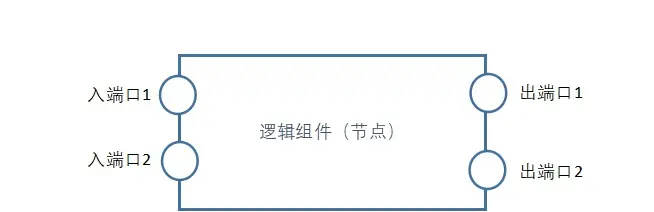
The specific implementation method is to treat each logic component as a black box, with data flowing in through the input port and transformed data flowing out through the output port:
If we use a flowchart, the above arrangement would be displayed as follows:
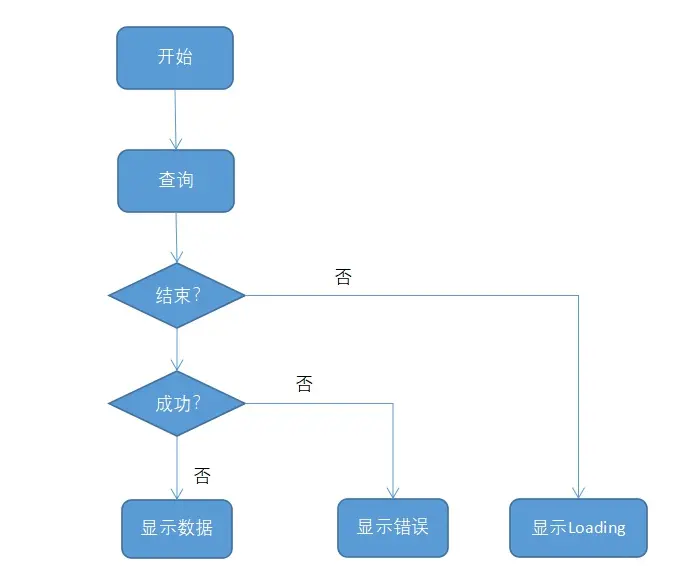
Comparing the two, we find that the flowchart thinking method leads one into conditional details, attempting to describe code with graphics that one is not skilled at. It is purely linear, without callbacks, and thus cannot achieve asynchronous behavior similar to JS promises.
On the other hand, data flow-driven logic arrangement liberates one from the details, allowing for a modular thinking approach to design business logic, making it easier to break down business logic into reusable units.
From a programmer’s perspective, a flowchart is akin to a piece of script code, which is process-oriented; whereas data flow-driven logic arrangement resembles several classes interacting to complete a function, giving it a more object-oriented feel.
Friends, if you had to choose, which method would you prefer? Feel free to leave comments for discussion.
There is also a similar implementation method to Scratch:
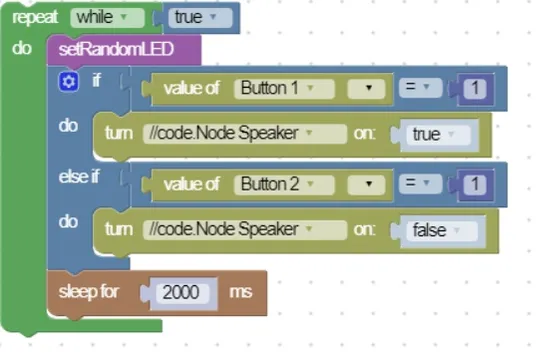
This approach seems purely for visualization’s sake and is only suitable for children to play with. Those who can code are unwilling to use it as it is too inefficient. Those who cannot code need to understand code to use it. The suitable scenario is to introduce what code logic is in an intuitive way, meaning it is only appropriate for relatively low-intelligence programming education, such as in kindergarten or elementary school. For commercial applications, it is best avoided.
2. Low-Code Drag-and-Drop
For low-code drag-and-drop scenarios, there are a few considerations: one is the basic drag-and-drop functionality, and the other is the mutual drag-and-drop and nested drag-and-drop of components within the container. Based on this scenario analysis, I personally recommend using dnd-kit/core as the implementation choice for the drag-and-drop engine. In addition to basic drag-and-drop functionality, dnd-kit also provides many customizable components and hooks to meet different drag-and-drop needs, with corresponding implementations available under popular development frameworks and libraries such as React, Vue, Angular, and Svelte, and it has excellent cross-platform support.
Moreover, dnd-kit’s performance is also quite reliable, especially when there are many DOM elements, effectively reducing operation lag and layout jitter.
3. Low-Code Analysis
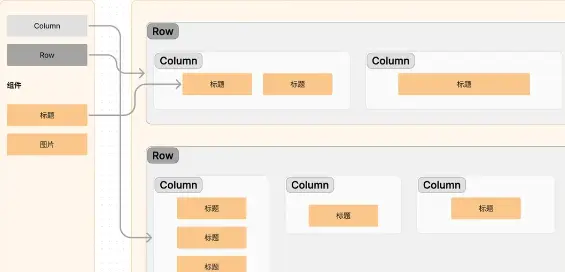
The layout of the editor canvas is divided into container layout and component sides. This layout method divides tasks into two main parts, with the container layout responsible for arranging rows and columns, while components are responsible for displaying content, achieving a division of labor effect.
In the editor canvas, the container layout is responsible for defining and managing the structure of rows and columns. It can provide a flexible grid system, allowing users to freely define and adjust the layout of the page. Users can add, delete, or adjust the size and position of rows and columns within the container layout, thus controlling the overall layout of the page. The container layout can utilize drag-and-drop functionality, making it convenient for users to place components in designated positions.
Components are responsible for presenting specific content. They can be various types of UI elements, such as text boxes, buttons, images, etc. Users can create page content by selecting different types of components from the component library and dragging them to designated positions within the container layout. Components can have custom styles and properties, which users can modify and customize to meet specific design requirements.
By separating the management of container layout and components, the editor canvas achieves greater flexibility and scalability. Users can modify the container layout at any time, adjusting the structure of the page without affecting the content of the components. At the same time, users can perform independent operations on components, modifying their styles or properties without needing to focus on the details of the overall layout. This separation design makes the editor canvas more user-friendly and convenient, suitable for different types and scales of projects.
4. Related Open Source Projects
4.1 flow-eda
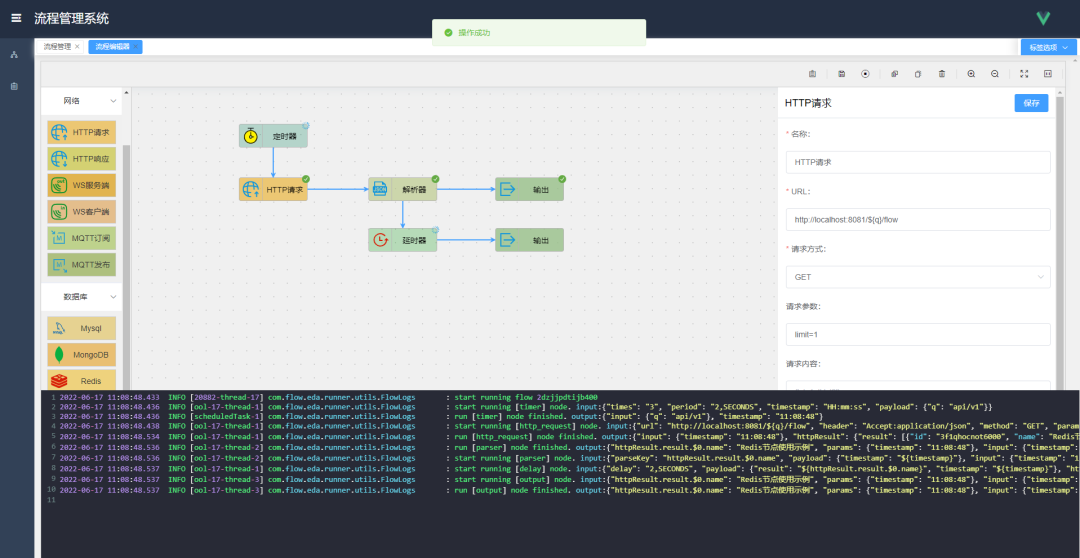
The flow-eda project is an event-driven, stream-based low-code programming application. Its main function is to use visual programming to complete process drawing by dragging and connecting nodes, achieving low-code development and business programming.
Application Scenarios
Automated process business handling, for example, if certain data needs to be processed, nodes can be defined by dragging to define these processes for repeated use.
Supports multi-threaded concurrent processing, arbitrary combinations and arrangements, complex logical processes such as combinations of AND, OR, and NOT, and supports blocking, waiting, periodic execution, etc.
Web crawlers, for example, if specific information needs to be crawled from the web and processed, it supports output display, storage in databases, or sending emails.
Scheduled tasks can be executed periodically, with specified counts or unlimited, supporting cron expressions, etc.
Basic CRUD business models can support custom HTTP interfaces, support protocols such as WebSocket, MQTT, and common database operations.
Business execution process visualization allows real-time viewing of execution status and executable information, including input and output parameters, on the web page during process execution.
4.2 vue-form-design
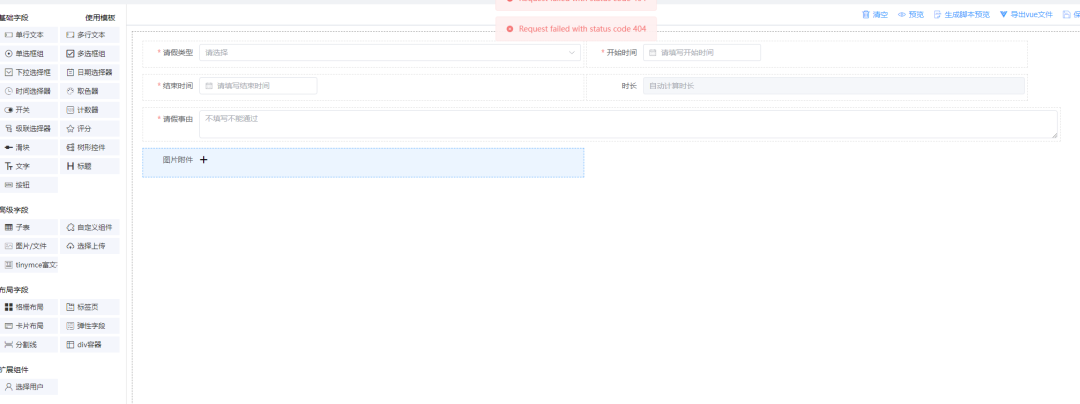
AK-Design is a pure front-end drag-and-drop, visual, low-code data visualization designer development platform, mainly including form design, list page design, process design, data visualization large screen design, and data statistics design.
It uses the desktop component library Element-Plus based on Vue 3.x, which is widely used and easy to extend.
Through visual operations, users can easily and quickly complete the creation of pages such as form design, list page design, process management design, data visualization screen design, and data statistics design.
It provides a variety of powerful components suitable for various complex scenarios.
4.3 rxdrag
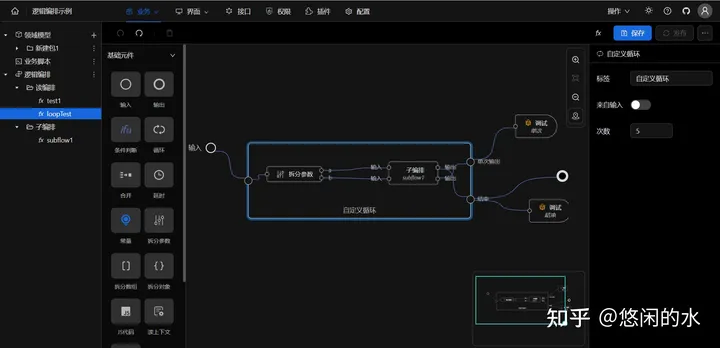
For detailed content, please refer to the article: Challenge Zero Code: Visual Logic Arrangement(https://zhuanlan.zhihu.com/p/644873396)
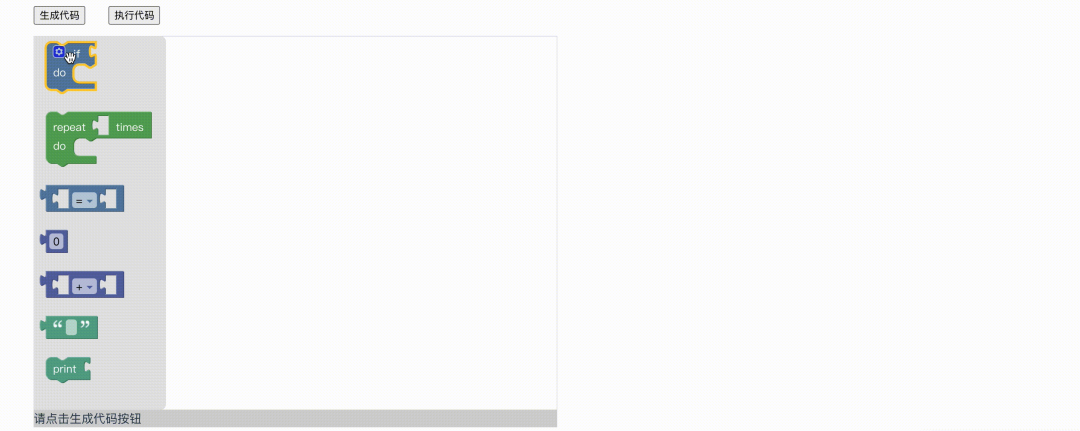
4.4 Child-Programming-Web
This is similar to Scratch’s programming approach. For detailed content, please refer to Vue Implementation of Visual Block-Based Programming (Part 9)(https://blog.csdn.net/weixin_41895625/article/details/120686408?spm=1001.2014.3001.5502)
4.5 yuchang
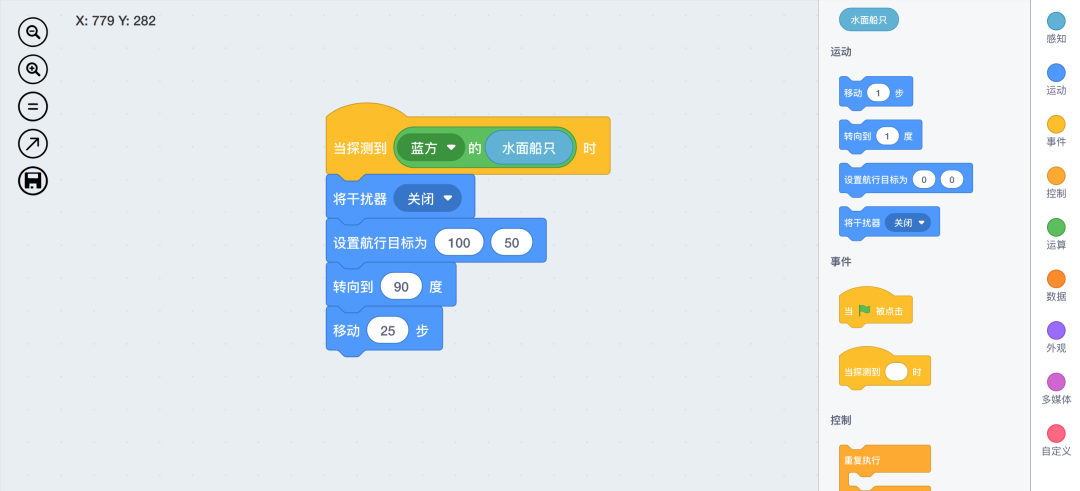
Yuchang is a Vue-based visual script editing tool that mimics Scratch, supporting custom syntax and exporting to JSON format and JS code. Its main features include:
(1) Completely defines script blocks through JSON, allowing for free expansion, even creating a whole new set of blocks, enabling various visual script applications, not just for programming.
(2) Supports export plugins, allowing users to implement exporting visual models to desired file formats, such as JSON, JS code, Word, HTML, etc.
4.6 ursa
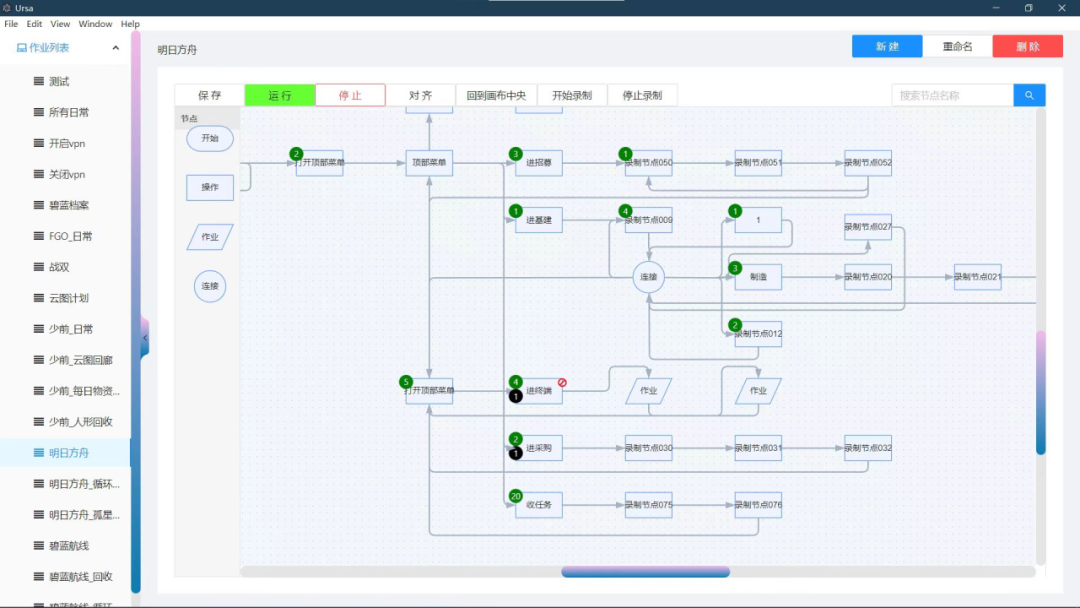
Ursa is a visual orchestration automation script program that automates a series of mouse click operations based on image recognition or specified locations.
Reference Links
https://luzhimin.blog.csdn.net/article/details/122976335
https://zhuanlan.zhihu.com/p/644873396
https://www.zhihu.com/question/593724862