“Assembly Language”, 3rd Edition by Wang Shuang
Chapter 8: Two Fundamental Issues in Data Processing (Page 172)
Experiment 7: Application of Addressing Modes in Structured Data Access
The basic situation of Power Idea Company from its establishment in 1975 to 1995 is as follows:
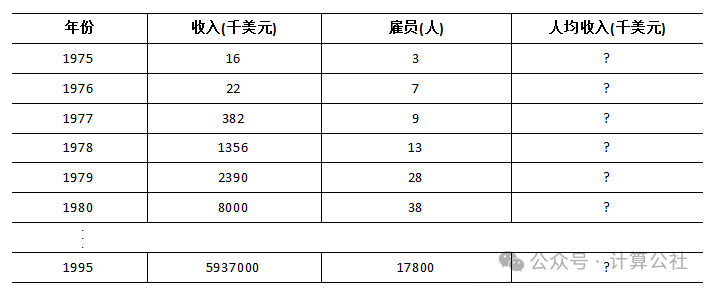
In the following program, these data have been defined:
assume cs:codedata segment   db '1975','1976','1977','1978','1979','1980','1981','1982','1983'  db '1984','1985','1986','1987','1988','1989','1990','1991','1992'  db '1993','1994','1995'  ; 21 strings representing 21 years
  dd 16, 22, 382, 1356, 2390, 8000, 16000, 24486, 50065, 97479  dd 140417, 197514, 345980, 590827, 803530, 1183000, 1843000  dd 2759000, 3753000, 4649000, 5937000  ; 21 dword data representing total revenue over 21 years
  dw 3, 7, 9, 13, 28, 38, 130, 220, 476, 778, 1001, 1442, 2258  dw 2793, 4037, 5635, 8226, 11542, 14430, 15257, 17800  ; 21 word data representing number of employees over 21 years
data endstable segment    db 21 dup('year summ ne ?? ')table ends
Programming: Write the data from the data segment into the table segment in the following format, and calculate the average income over 21 years (rounded), with the results also stored in the table segment in the format below.
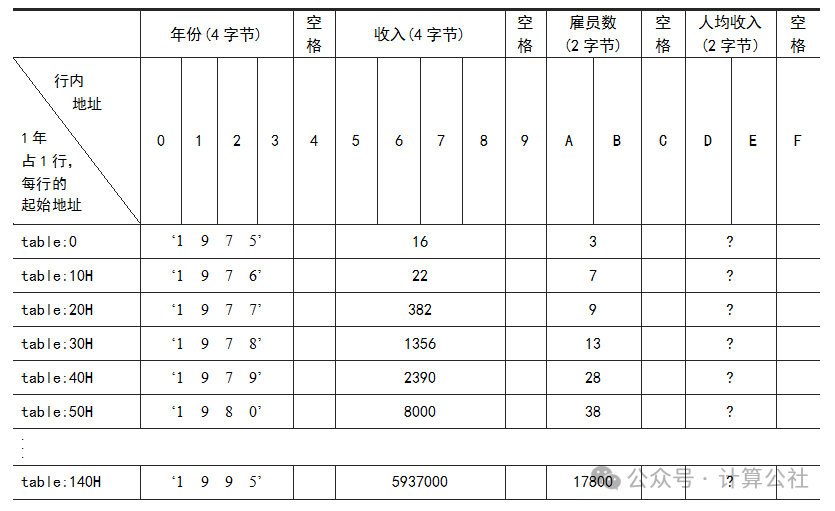
Hint: The data in the data segment can be viewed as multiple arrays, while the data in the table can be viewed as an array of structured data, where each structured data contains multiple data types. You can use bx to locate each structured data, use idata to locate the data type, and use si to locate each element in the array item. For accessing data in the table, you can use the addressing modes [bx].idata and [bx].idata[si].
Note: This program is the most complex one so far, as it utilizes almost all the knowledge and programming skills we have learned. Therefore, this program serves as the best practical summary of our previous studies. Please complete it carefully.
=======================
Method 1: Implement according to the hints provided in the question.
First, let’s understand the meaning of the hints.
Firstly, “the data in the data segment can be viewed as multiple arrays” means that there are three types of data: years, total revenue, and number of employees, which correspond to three arrays. Normally, three address registers would be needed to point to these three arrays to loop through each array’s data. However, since the length of each element in the year and total revenue arrays is 4 bytes, we can use one address register for both. Thus, we can use bp to point to the years and total revenue, and di to point to the number of employees.
Secondly, “the data in the table can be viewed as an array of structured data” means that the entire table is treated as an array, where each element is a structured data. “Using bx to locate each structured data” means that bx points to the table array, allowing us to index each structured data through bx. “Each structured data contains multiple data types” means that there are actually four data types: year, total revenue, number of employees, and average income. “Using idata to locate the data type” means that since each data type has a fixed length, we can use a constant idata to locate it. “Using si to locate each element in the data type” means that here, the “data type” refers to the internal structure, and si is used to locate within it.
Having understood the meaning of the hints, we now know how to use the registers to read from data and write to the table. The reference code is as follows:
;"Assembly Language", 3rd Edition by Wang Shuang; Chapter 8: Two Fundamental Issues in Data Processing (Page 172); Experiment 7: Application of Addressing Modes in Structured Data Access; Programming: Write the data from the data segment into the table segment in the following format, and calculate the average income over 21 years (rounded), with the results also stored in the table segment in the format below; Method 1: Implementation Idea: Write code according to the hints; Since the implementation process uses the stack, it is best to add a stack segment, but I have omitted it here.
assume cs:codesgdata segment   db '1975','1976','1977','1978','1979','1980','1981','1982','1983'  db '1984','1985','1986','1987','1988','1989','1990','1991','1992'  db '1993','1994','1995'  ; 21 strings representing 21 years
  dd 16, 22, 382, 1356, 2390, 8000, 16000, 24486, 50065, 97479  dd 140417, 197514, 345980, 590827, 803530, 1183000, 1843000  dd 2759000, 3753000, 4649000, 5937000  ; 21 dword data representing total revenue over 21 years
  dw 3, 7, 9, 13, 28, 38, 130, 220, 476, 778, 1001, 1442, 2258  dw 2793, 4037, 5635, 8226, 11542, 14430, 15257, 17800  ; 21 word data representing number of employees over 21 years
data endstable segment    db 21 dup('year summ ne ?? ')table endscodesg segment    start: mov ax, data           mov es, ax           mov ax, table              mov ds, ax      ; The hint says to use bx to point to the table, so using ds as the segment address will be more convenient
           mov bp, 0       ; Point to years and total revenue           mov di, 21*4*2  ; Point to number of employees           mov bx, 0       ; Point to table           mov cx, 21      s0:  push cx        ; Save cx's value, as there is an inner loop           mov si, 0      ; Point to year data type           mov cx, 4                 s1: mov al, es:[bp+si]               mov [bx+0+si], al  ; Use [bx+idata+si] addressing               inc si               loop s1    ; Loop to read and write years           mov ax, es:[bp+21*4]   ; Read the two low bytes of total revenue, using [bp+idata] to locate           mov [bx+5], ax         ; [bx+idata] to locate data in the table (total revenue)           mov dx, es:[bp+21*4+2] ; Read the two high bytes of total revenue, store in dx for division           mov [bx+7], dx           div word ptr es:[di]   ; Calculate average income           mov dx, es:[di]        ; After division, dx is no longer used, store number of employees           mov [bx+0aH], dx       ; Write number of employees, use [bx+idata] addressing           mov [bx+0dH], ax       ; Write average income           add bp, 4      ; Point to the next element of years and total revenue           add di, 2      ; Point to the next element of number of employees           add bx, 16     ; Point to the next row in the table           pop cx           loop s0        ; Loop to process the next year's data
           mov ax, 4c00H           int 21Hcodesg endsend start
Debug tracing process is as follows:
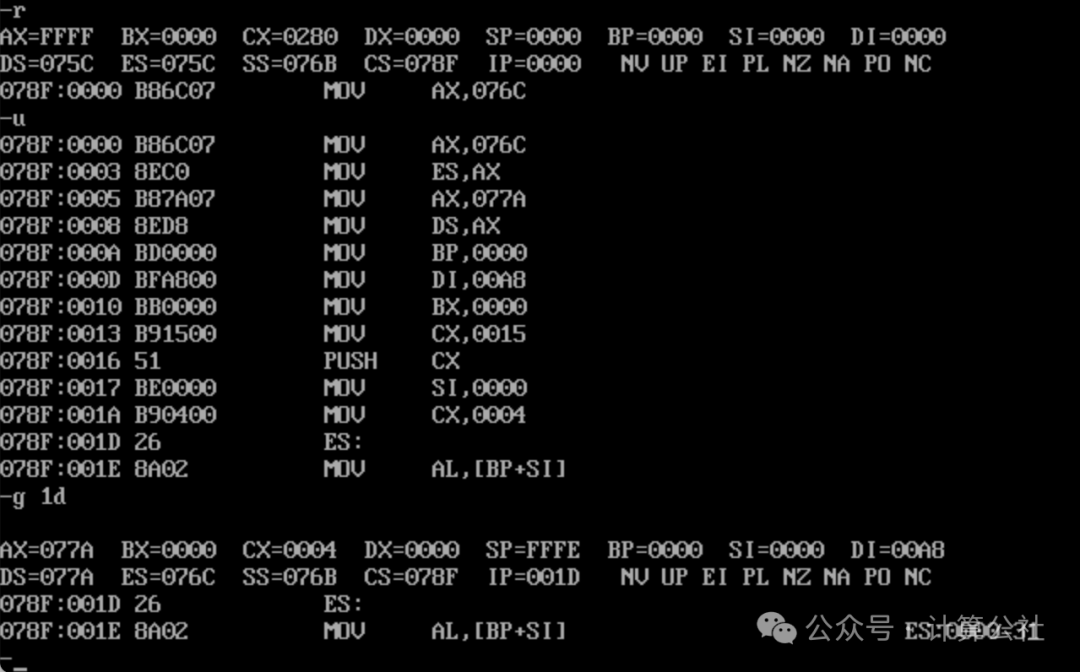
1. First, check the registers and the loaded instructions. The default value of SS is 076B, SP=0000, which means the stack space is allocated from the memory occupied by PSP. In the code, we used the stack but did not define a stack segment, so the data pushed onto the stack will be placed here. The segment address of the data segment is 076C, which is the starting position of our program, and the segment address of the table segment is 077A. Why is it 077A? Ceil[(21*4+21*4+21*2)/16]*16=E0H, 076C0+E0=077A0.
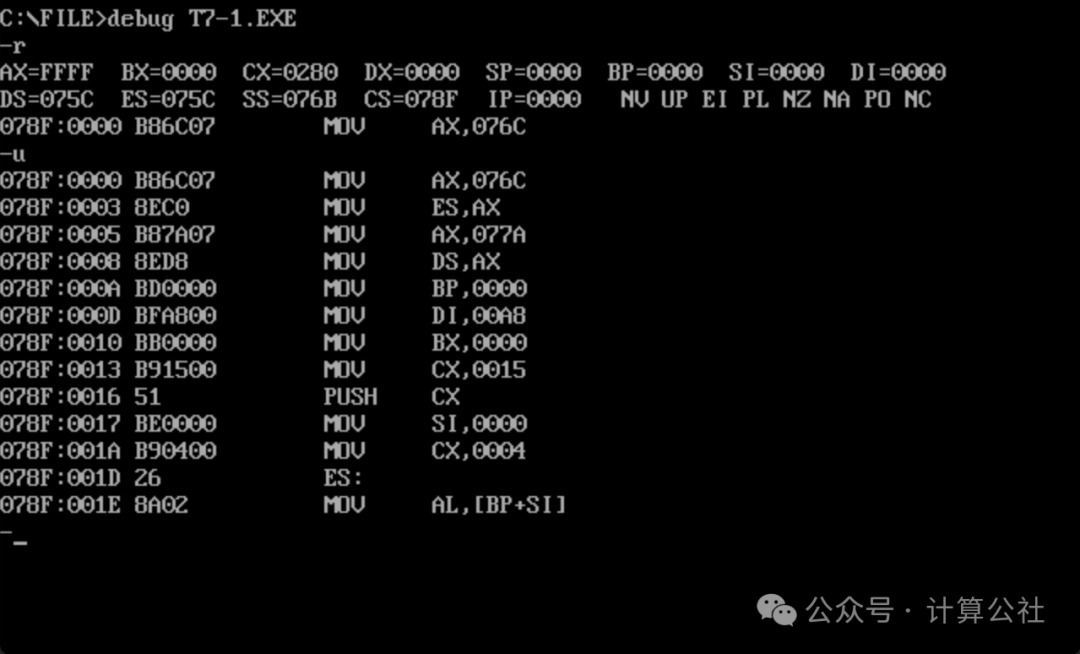
2. Use the t command to step through, carefully checking for errors in the code. The complete process will not be screenshot, but I will highlight some key points to note.
3. Note that instructions 078F:001D and 078F:001E correspond to the code line mov al, es:[bp+si]. If you use the g command to jump to execution, you can only jump to 1D here. If you directly jump to 1E, then bp will use the default SS as the segment address, causing the program to fail. From the screenshots, you can also see that when executing g 1d, both 1D and 1E appear simultaneously, indicating that they are to be executed together.
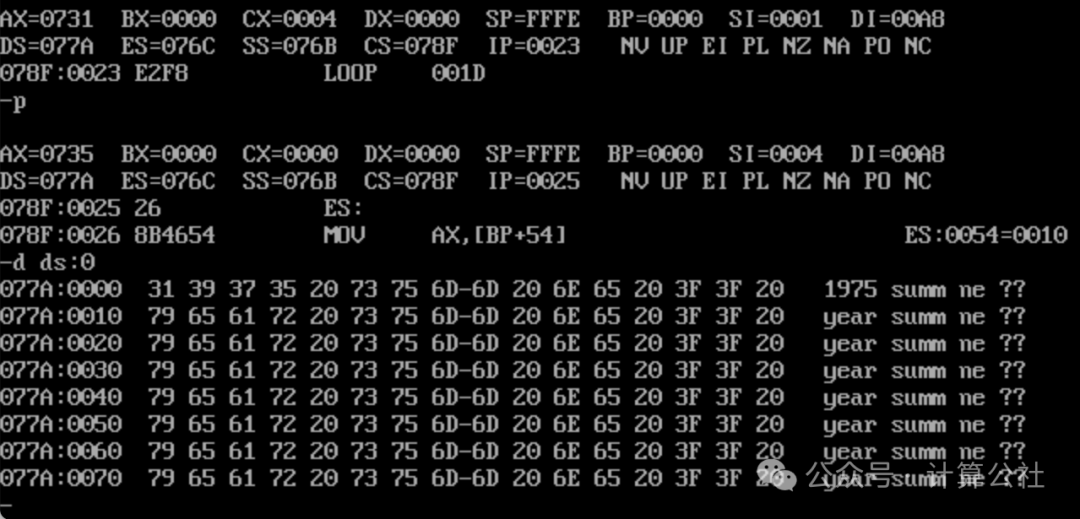
4. Use the p command to let s1 loop execute completely, check the data writing situation, and you can see that 1975 has been correctly written.
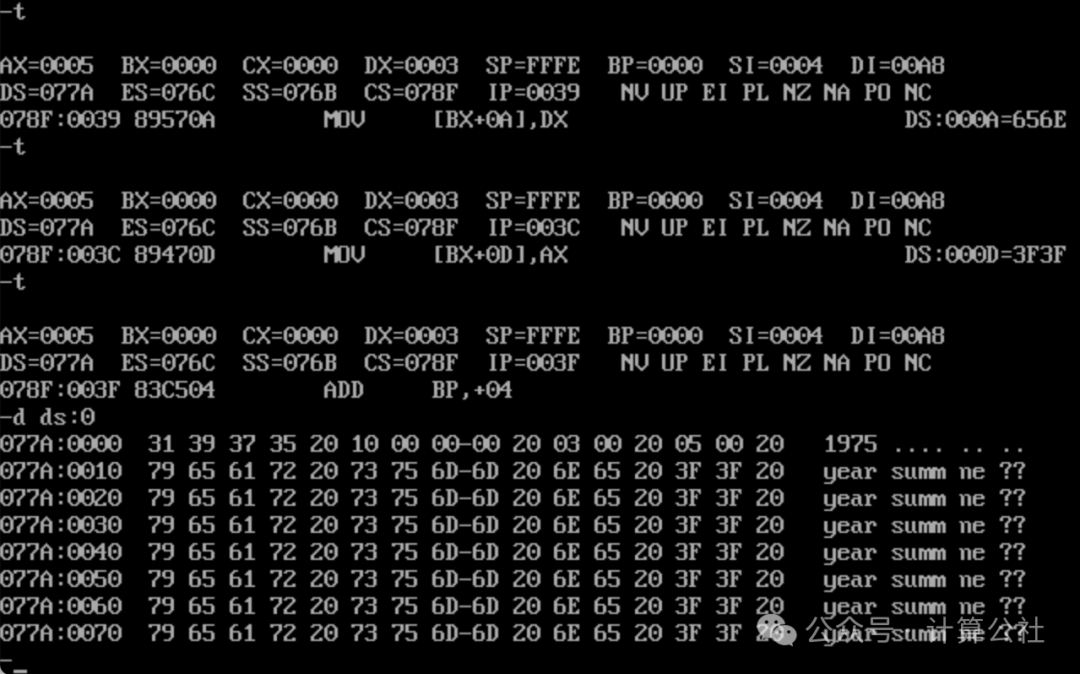
5. Continue stepping through, after total revenue, number of employees, and average income calculations are completed and written, check the data situation again. You can see that the year 1975, total revenue 00000010H, number of employees 0003H, and average income 0005H have all been correctly written to the first row of the table.
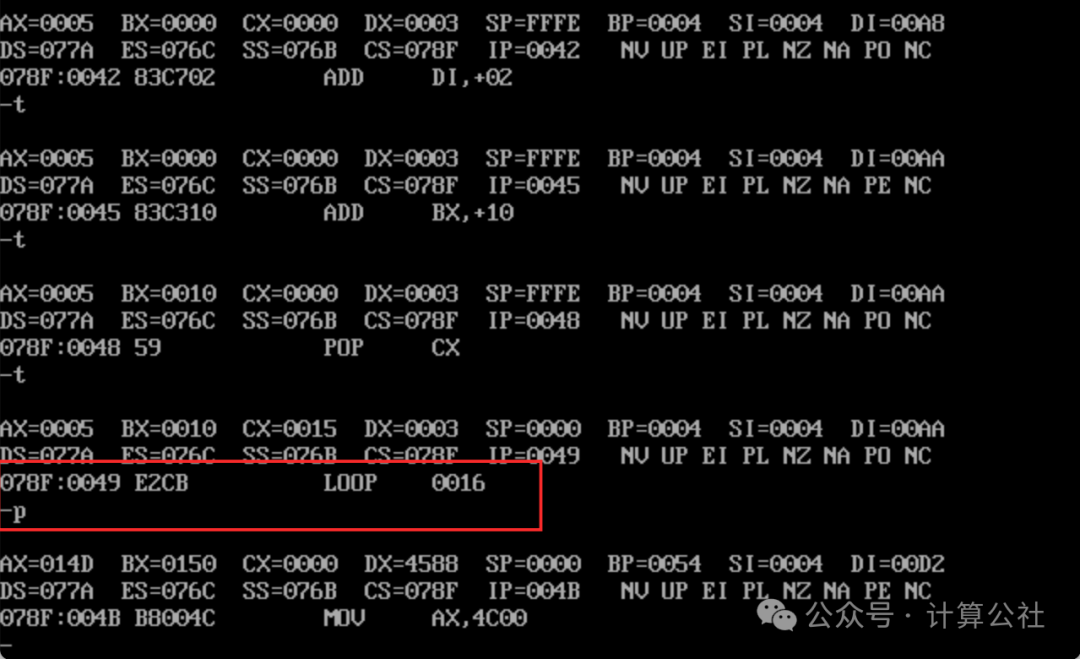
6. Continue executing, use the p command to complete the s0 loop.
7. Check the data again, from 1975 to 1995, all year data has been correctly written. Use the p command to let the program execute normally and exit. The code debugging is successful.
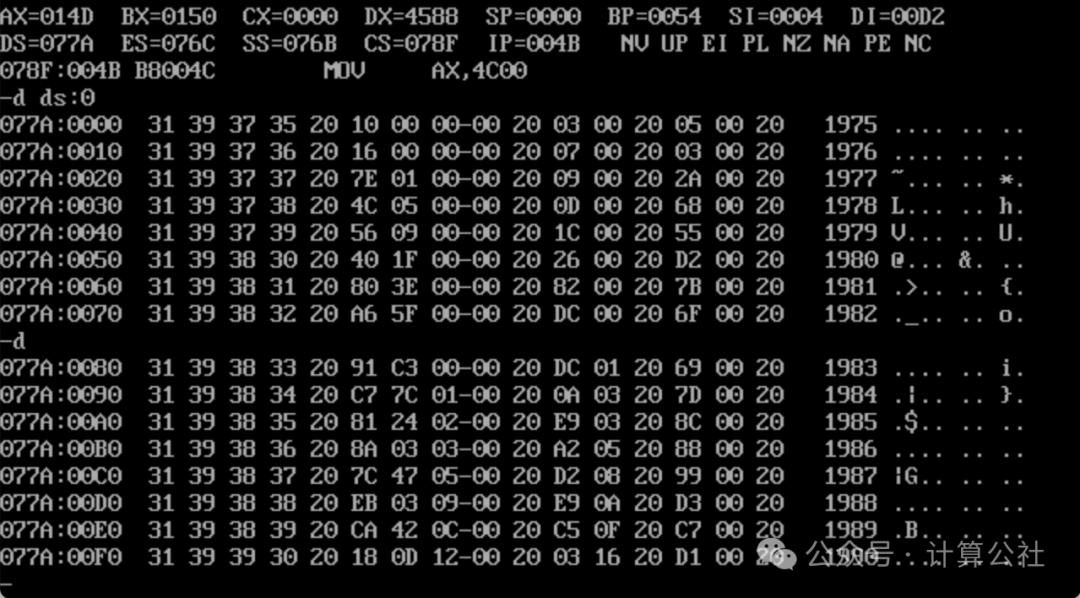
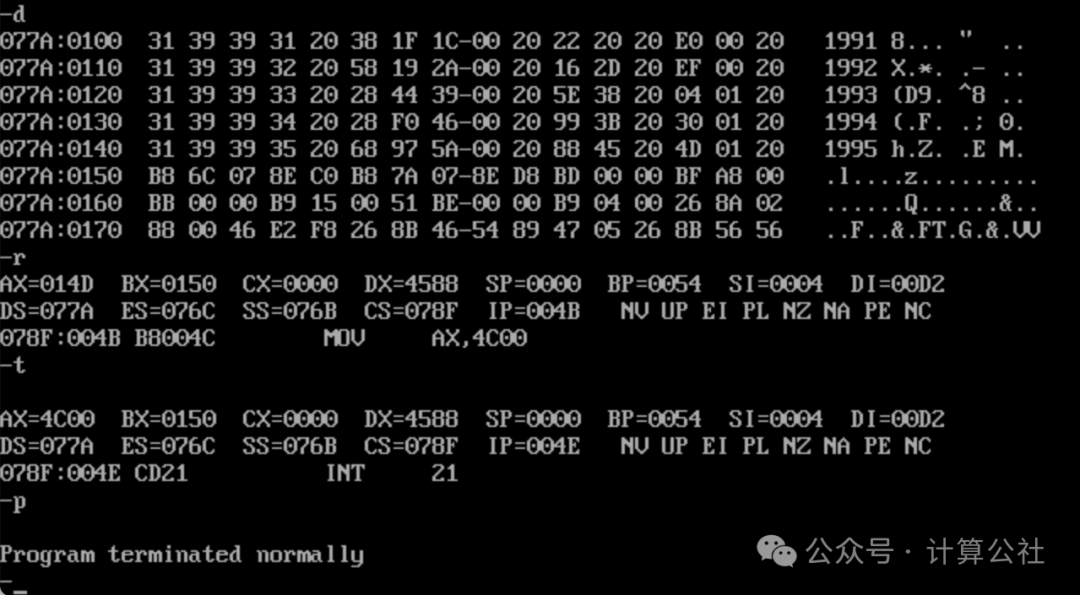
Method 2: Process line by line, completing the calculation and writing of each data item in the table. Method 2 is actually a simplification of Method 1, because in this case, the data type in the table is at most 4 bytes long, so it is easy to read and write without using si for addressing.
Reference code is as follows:
;"Assembly Language", 3rd Edition by Wang Shuang; Chapter 8: Two Fundamental Issues in Data Processing (Page 172); Experiment 7: Application of Addressing Modes in Structured Data Access; Programming: Write the data from the data segment into the table segment in the following format, and calculate the average income over 21 years (rounded), with the results also stored in the table segment in the format below.; Method 2: Implementation Idea: Process line by line;      Year writing no longer uses [bx+idata+si] addressing, but also uses [bx+idata]assume cs:codesgdata segment   db '1975','1976','1977','1978','1979','1980','1981','1982','1983'  db '1984','1985','1986','1987','1988','1989','1990','1991','1992'  db '1993','1994','1995'  ; 21 strings representing 21 years
  dd 16, 22, 382, 1356, 2390, 8000, 16000, 24486, 50065, 97479  dd 140417, 197514, 345980, 590827, 803530, 1183000, 1843000  dd 2759000, 3753000, 4649000, 5937000  ; 21 dword data representing total revenue over 21 years
  dw 3, 7, 9, 13, 28, 38, 130, 220, 476, 778, 1001, 1442, 2258  dw 2793, 4037, 5635, 8226, 11542, 14430, 15257, 17800  ; 21 word data representing number of employees over 21 years
data endstable segment    db 21 dup('year summ ne ?? ')table endscodesg segment    start: mov ax, data           mov ds, ax           mov ax, table           mov es, ax           mov bx, 0           ; Point to year and revenue           mov di, 21*4*2      ; Point to number of employees           mov bp, 0           ; Point to table           mov cx, 21       s:  mov ax, [bx]           mov es:[bp], ax     ; Write the first two bytes of year             mov ax, [bx+2]           mov es:[bp+2], ax   ; Write the last two bytes of year           mov ax, [bx+21*4]           mov es:[bp+5], ax   ; Write the low two bytes of revenue           mov dx, [bx+21*4+2]           mov es:[bp+7], dx   ; Write the high two bytes of revenue           div word ptr [di]   ; Calculate average             mov dx, [di]        ; dx is no longer used, store number of employees           mov es:[bp+0aH], dx ; Write number of employees            mov es:[bp+0dH], ax ; Write average income           add bx, 4           ; Move to the next year           add di, 2           ; Move to the next number of employees           add bp, 16          ; Move to the next row in the table           loop s                      mov ax, 4c00H           int 21H           codesg endsend start
Debug tracing process is as follows:
No step tracing is done, only the final execution results are given. It can be seen that the execution results are exactly the same as those of Method 1.
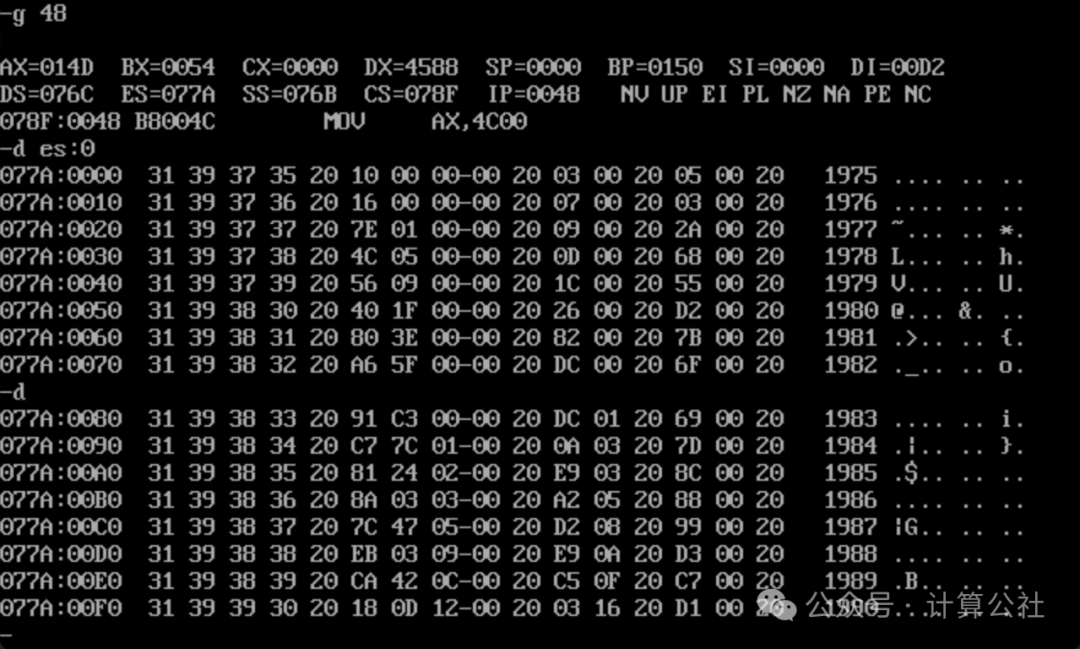
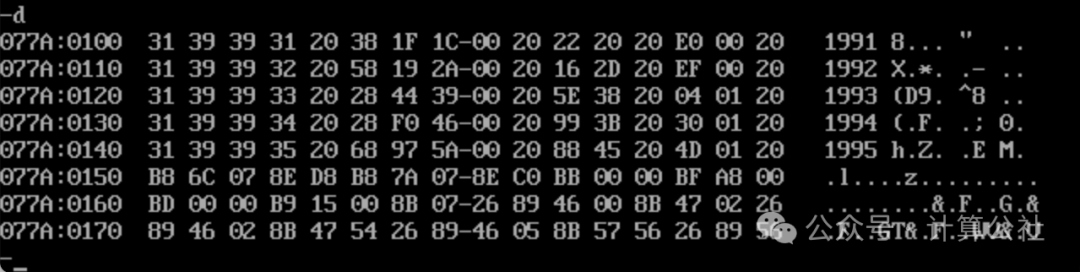
Method 3: Process by columns, first writing the year and total revenue columns, then calculating the average and writing the number of employees and average income.
Reference code is as follows:
;"Assembly Language", 3rd Edition by Wang Shuang; Chapter 8: Two Fundamental Issues in Data Processing (Page 172); Experiment 7: Application of Addressing Modes in Structured Data Access; Programming: Write the data from the data segment into the table segment in the following format, and calculate the average income over 21 years (rounded), with the results also stored in the table segment in the format below.; Implementation Idea: Process by columns:;      Use two loops, first write the year and total revenue columns, then process the number of employees and average income columnsassume cs:codesgdata segment   db '1975','1976','1977','1978','1979','1980','1981','1982','1983'  db '1984','1985','1986','1987','1988','1989','1990','1991','1992'  db '1993','1994','1995'  ; 21 strings representing 21 years
  dd 16, 22, 382, 1356, 2390, 8000, 16000, 24486, 50065, 97479  dd 140417, 197514, 345980, 590827, 803530, 1183000, 1843000  dd 2759000, 3753000, 4649000, 5937000  ; 21 dword data representing total revenue over 21 years
  dw 3, 7, 9, 13, 28, 38, 130, 220, 476, 778, 1001, 1442, 2258  dw 2793, 4037, 5635, 8226, 11542, 14430, 15257, 17800  ; 21 word data representing number of employees over 21 years
data endstable segment    db 21 dup('year summ ne ?? ')table endscodesg segment    start: mov ax, data           mov ds, ax           mov ax, table           mov es, ax           mov bx, 0           mov bp, 0           mov cx, 21       s1: mov ax, [bx]            mov es:[bp], ax                mov ax, [bx+2]           mov es:[bp+2], ax   ; Complete year writing           mov ax, [bx+21*4]           mov es:[bp+5], ax           mov ax, [bx+21*4+2]           mov es:[bp+7], ax   ; Complete revenue writing           add bx, 4            ; Move to the next year           add bp, 16          ; Move to the next row           loop s1           mov si, 21*4*2           mov di, 0           mov cx, 21       s2: mov ax, es:[di+5]           mov dx, es:[di+7]           div word ptr [si]           mov dx, [si]        ;           mov es:[di+10], dx           mov es:[di+13], ax           add si, 2    ; Move to the next year number of employees           add di, 16   ; Move to the next row in the table           loop s2           mov ax, 4c00H           int 21Hcodesg endsend start
Debug tracing process is as follows:
First, check the registers and data, as shown in the figure below. The program loads normally.
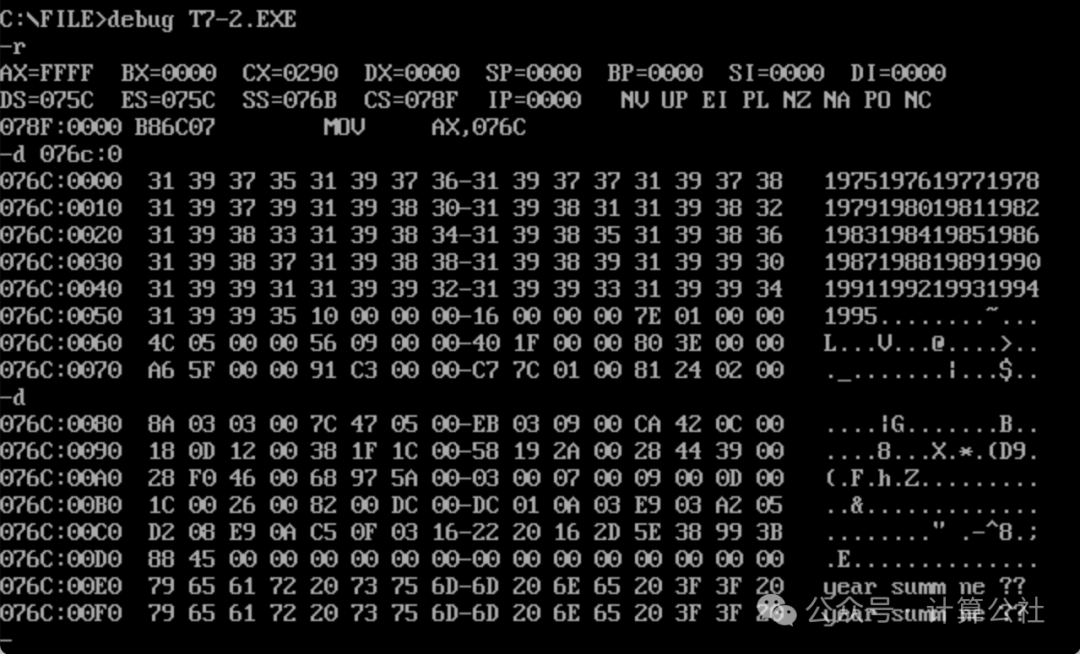
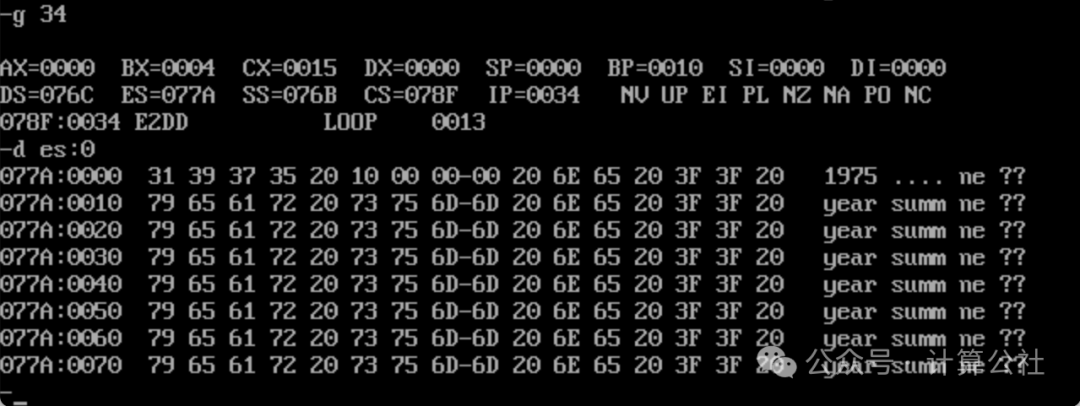
Then use the u command to check the offset addresses of the two loop instructions, one is 34H, the other is 59H. During debugging, you can directly jump to check the results.
First, use the g 34 command to jump to execution and check the results of the first loop. You can see that the year and total revenue have been correctly written, as shown in the figure below.
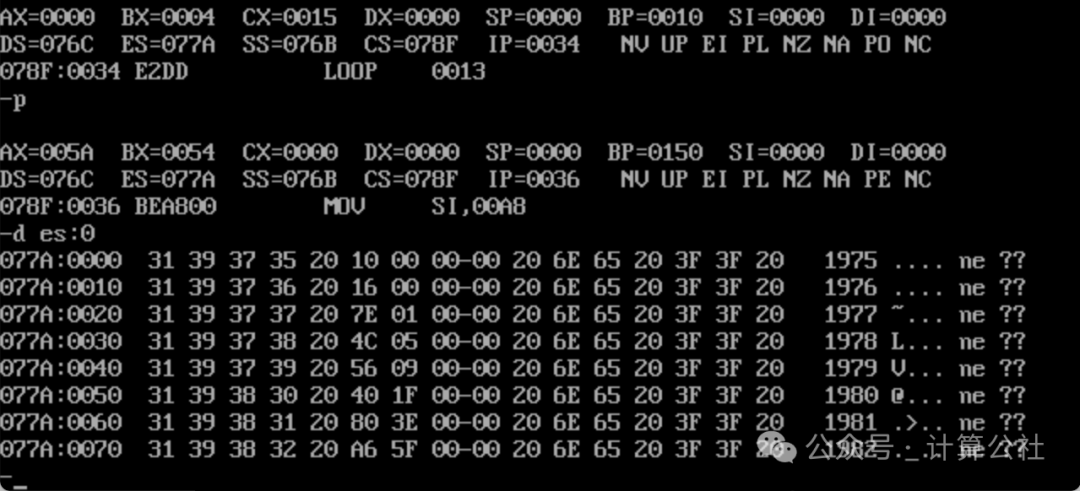
Use the p command to exit the loop, and check the results. You can see that each year and total revenue have been correctly written to the table, as shown in the figure below.
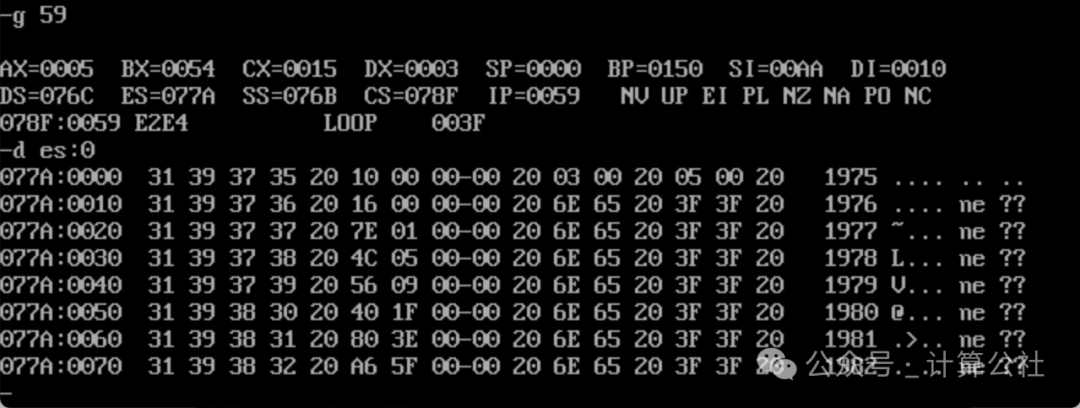
Use the g 59 command to jump to execution and check the results of the number of employees and average income calculations and writing. Number of employees 03, average income 05, results are correct, as shown in the figure below.
Use the p command to end the loop and check all results, as shown below:
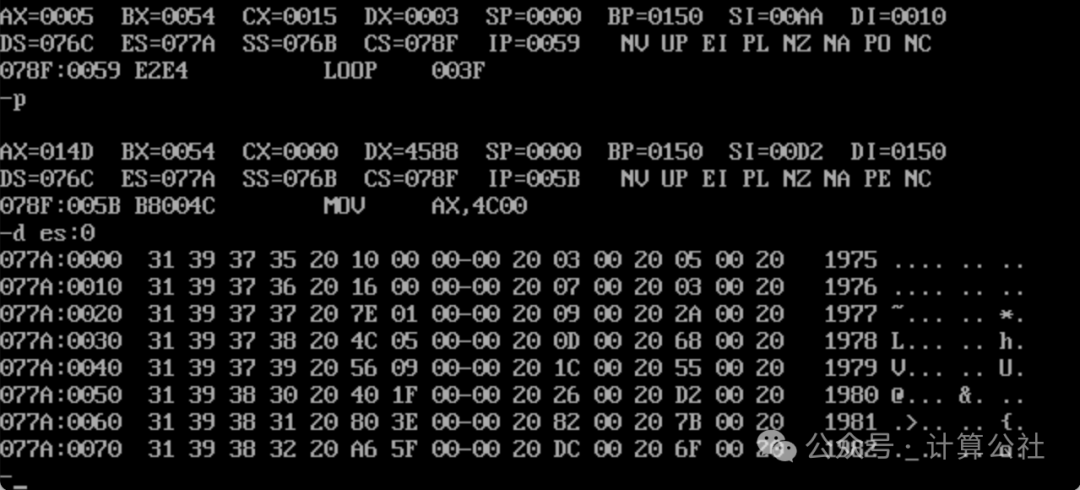
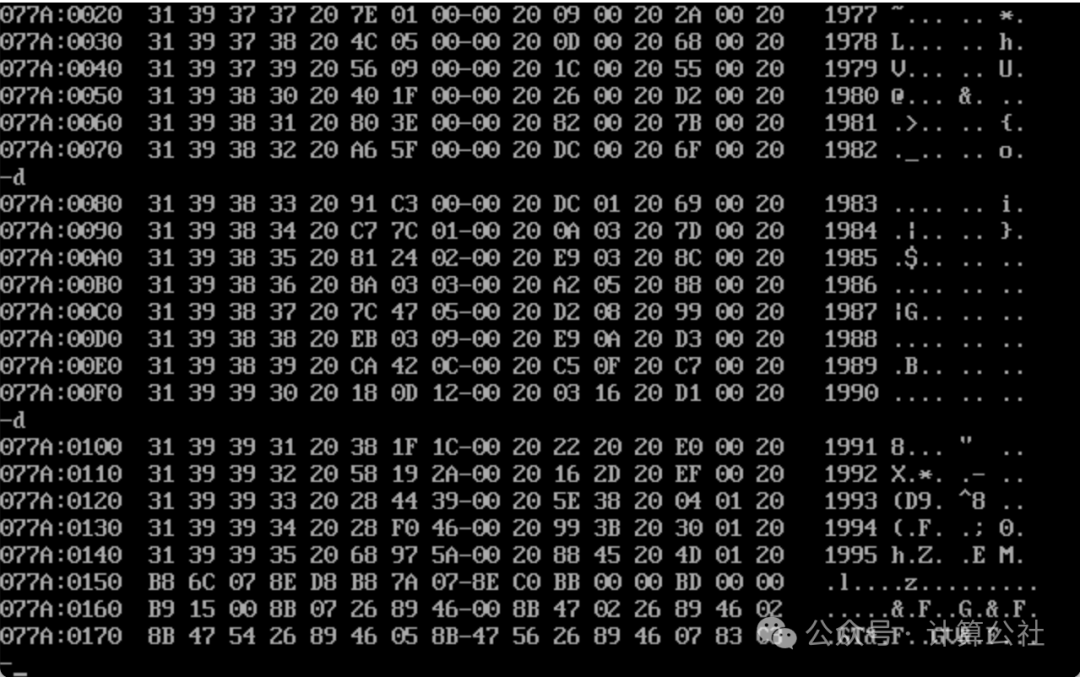
Use the p command to end the program, and the q command to exit Debug. The program exits normally, and the test passes. As shown in the figure below.
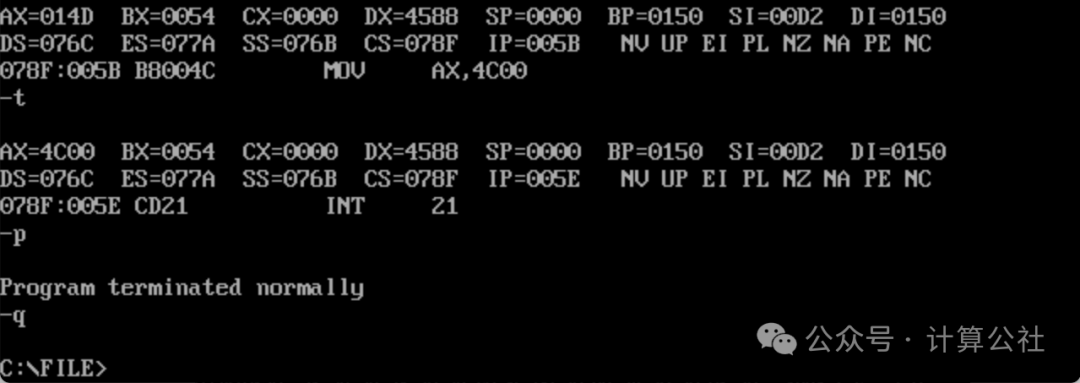
=======================
Appendix: A Strange Issue
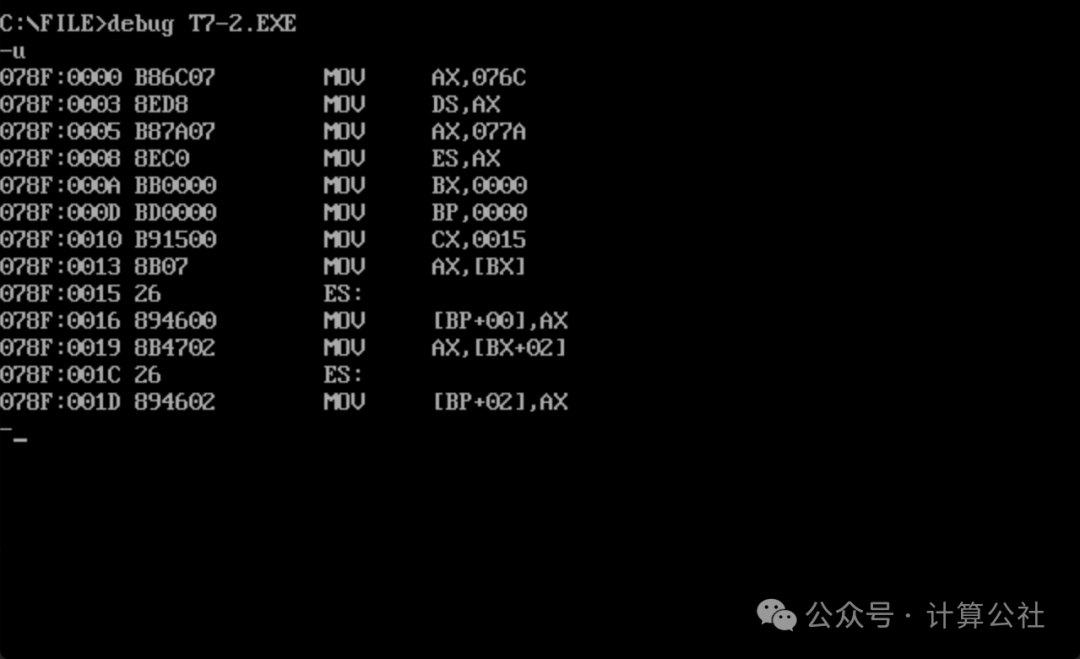
While debugging and tracing on my computer, I encountered a strange issue. When using the g command to jump, if it hits instructions like 078F:0015 and 078F:0016 (the corresponding assembly code is mov es:[bp], ax), you cannot directly g 16 to jump to 078F:0016 to execute, because bp will be set to the default SS instead of ES (it seems that instruction 15 has not been executed), which can lead to potential errors. This issue was mentioned in the Debug of Method 1, and you can refer to it.