Introduction
When a user enters a URL in the browser, the server returns resource files such as HTML, JS, CSS, and images. The process from initiating the request to rendering the page involves CPU computation, page rendering, and network requests. Among these, CPU computation and page rendering can usually be completed quickly, while the speed of network requests and the size of resources are often the key performance bottlenecks. If every visit requires loading the complete resources, it not only wastes bandwidth but also leads to slow page loading, severely affecting user experience. By using HTTP caching, the volume and number of network requests can be reduced, significantly improving page loading speed and user experience.
Cache-Control Caching Strategy
<span>Cache-Control</span> is the core directive in the HTTP response header that controls caching strategies. It informs the browser how to cache resources and for how long through different parameters.
Response Header Cache-Control Related Parameters:
| Parameter | Description |
|---|---|
| max-age=xxx | max-age is usually followed by a number, indicating the number of seconds for which the resource is cached. |
| no-cache | no-cache does not use the cache directly; instead, it must check with the server before using the resource to see if it can still be used. If it can, it continues to use it; if not, it requests it again. |
| no-store | This requires a request to the server for the resource every time. If all resources are treated this way, it can put a significant load on the server, so this operation is only done for highly sensitive data. |
| public | public means that the resource can be cached anywhere. |
| private | private means that only the client is allowed to cache the resource; proxy servers cannot cache it. |
Forced Caching
The server sets the response header for the returned resource to <span>Cache-Control: max-age=3153600;</span>, where max-age is followed by a number indicating the number of seconds for which the resource is cached.
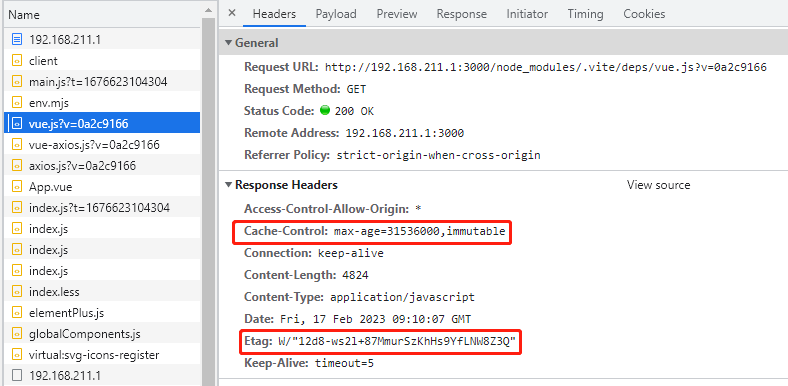
When the browser first requests the server resource, the response header contains <span>Cache-Control: max-age=3153600;</span>. The browser will receive and cache it locally.
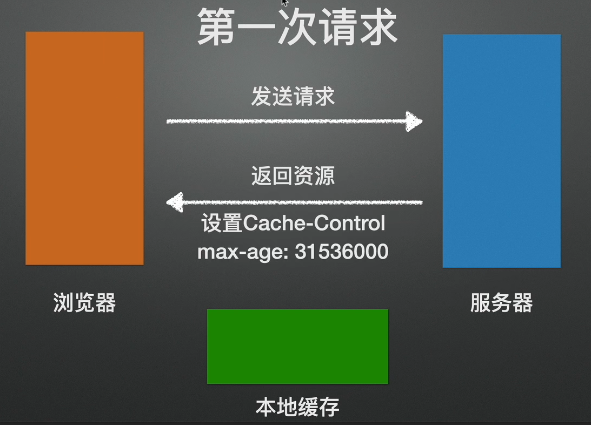
When the browser requests the resource a second time, it checks whether <span>max-age</span> has expired. If <span>max-age</span> has not expired, the browser will not send a request to the server and will directly retrieve the resource from the cache (from disk cache, from memory cache). Conversely, if <span>max-age</span> has expired, the browser will request the resource from the server again.
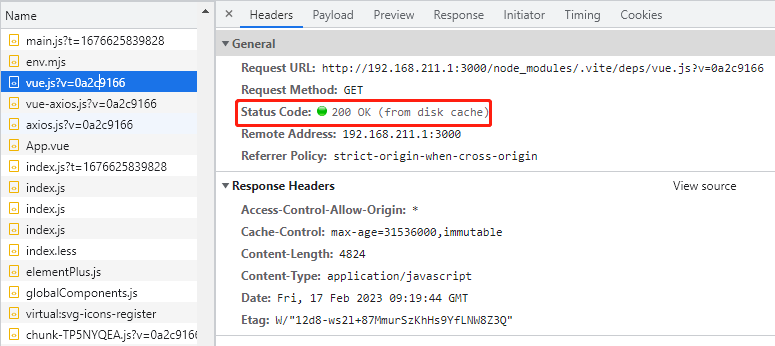
Cache Storage Locations:
<span>from disk cache</span>(Disk Cache): Resources are stored on the hard drive, with relatively slow read speeds but large capacity and persistent storage, suitable for large files or infrequently used files.<span>from memory cache</span>(Memory Cache): Resources are stored in memory (RAM), with extremely fast read speeds but limited capacity, usually invalidated when the browser tab or process is closed, suitable for frequently accessed small files.
Negotiated Caching
<span>Cache-Control: no-cache</span> does not use the cache directly; instead, it must check with the server before using the resource to see if it can still be used. If it can, it continues to use it; if not, it requests it again.
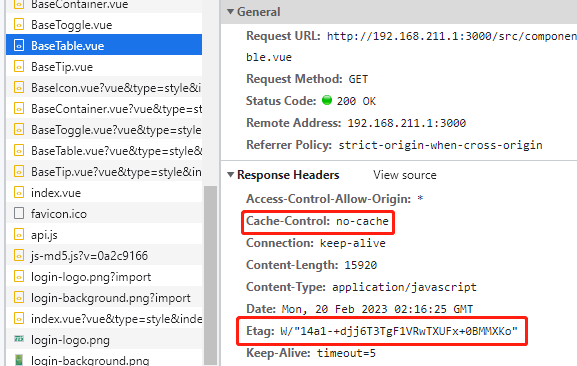
When the browser first requests the server resource, it will receive and cache it locally. Negotiated caching requires the use of the Etag field and the if-none-match field. Etag is a field in the HTTP response header. The value of Etag is a hash string generated based on the resource content (resource identifier); different content will generate different Etag.
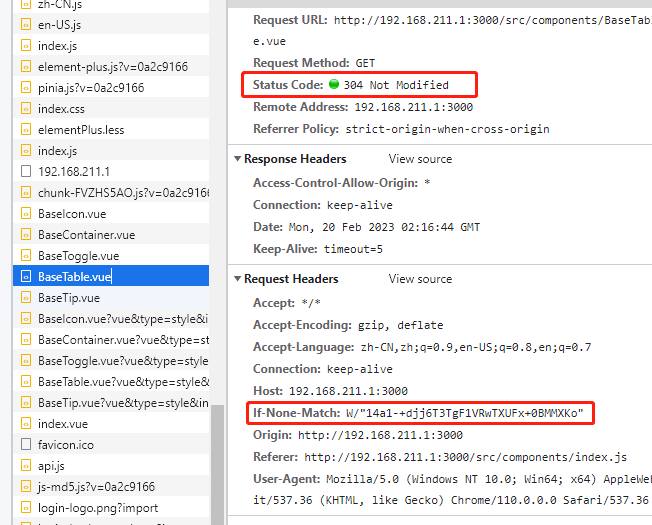
When making a request again, the HTTP request header will carry the if-none-match field, with the value being the Etag from the previous response. The server will compare the requested resource identifier Etag with the sent value if-none-match. If the negotiation matches, the status code will be 304 Not Modified, indicating that the browser loads the resource from local cache. If the negotiation fails, the status code will be 200 Ok, indicating that the browser requests new resources from the server, and the response header’s resource identifier Etag is updated to the new resource identifier Etag.
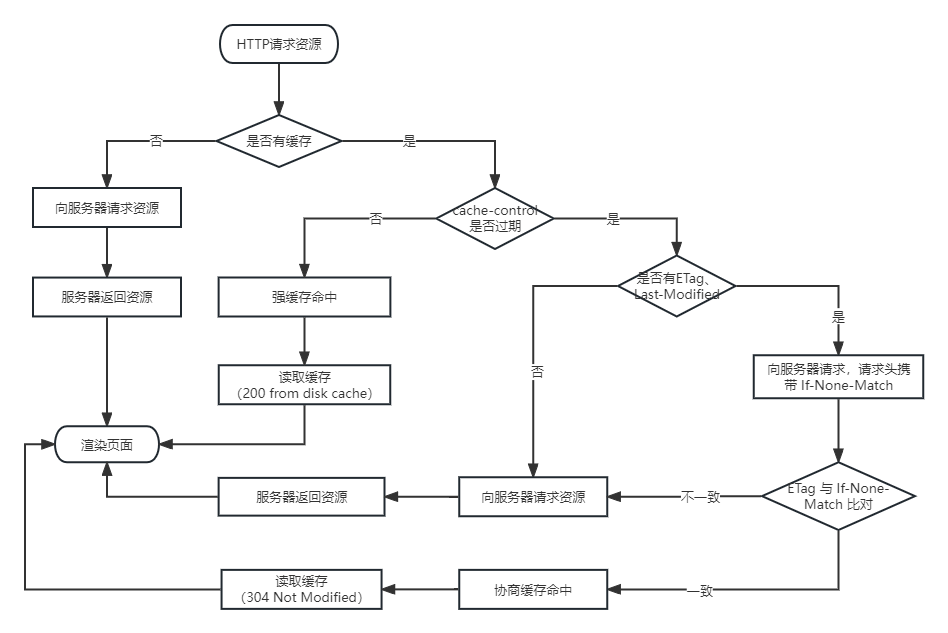
Flowchart: HTTP Caching Decision Tree
Based on a series of caching strategy operations, it determines whether the cache is hit. A cache hit means that the resource can be loaded directly from the browser’s local cache. If the cache is not hit, the browser must send a request to the server for the relevant resource. A cache hit can be divided into strong cache hits and negotiated cache hits. If the response request header contains <span>cache-control: max-age=xxx</span> and max-age is not expired, it is a strong cache hit, and the browser loads the resource from the local disk or memory. If the response header has an Etag field (resource identifier), when the browser requests the resource a second time, it carries If-None-Match in the request header, comparing it with the Etag from the previous file. If they do not match, the resource is fetched from the server; if they match, the resource is loaded from the browser’s local cache.
Project Practice
Solving the “White Screen” Problem
-
Problem: If the HTML file is set with a long
<span>max-age</span>, users may load an old cached HTML, causing referenced JS/CSS to also be old versions, resulting in a white screen or style distortion. -
Solution:
location ~* \.html$ {
    # Each request needs to validate cache validity
    add_header Cache-Control "no-cache, max-age=0";
}
location ~* .([a-f0-9]{8})\.(js|css)$ { # Resources with hash (long-term cache) add_header Cache-Control "public, max-age=31536000, immutable"; } - JS/CSS Resources with Hash: Set
<span>Cache-Control: max-age=31536000, immutable</span>. Use filename hashing to ensure that when the content changes, the filename must change, and the browser will request it as a new resource.<span>immutable</span>tells the browser to skip validation during the validity period. - HTML File: Set
<span>Cache-Control: no-cache</span>. Ensure that every time the HTML is loaded, it verifies with the server to timely obtain the HTML that references the latest version of JS/CSS. -
Effect: Users always get the latest HTML entry, while static resources can enjoy long-term strong caching, greatly improving the speed of repeated visits.
Optimizing Loading of Large Animation/Media Resources
-
Problem: Video, large GIF/APNG animations, complex SVGs, etc., have large file sizes and slow initial loading.
-
Solution:
location ~* \.(mp4|webm|gif|apng|svg)$ { # Medium cache cycle + validation mechanism add_header Cache-Control "public, max-age=86400, must-revalidate"; } - Set a reasonable
<span>max-age</span>: For example,<span>Cache-Control: max-age=86400</span>(1 day). This allows users to revisit within a day without needing to re-download. - Use
<span>ETag</span>/<span>Last-Modified</span>: Even if<span>max-age</span>is set, the browser can still avoid re-downloading unchanged large files through validation requests (304) after expiration. -
Effect: Significantly reduces the time and bandwidth consumption of reloading large files, enhancing user experience.
Conclusion
The HTTP caching mechanism improves resource loading efficiency through forced caching and negotiated caching:
-
Forced Caching: When the response header contains Cache-Control: max-age=xxx and it is not expired, the browser uses the cached resource directly without requesting the server.
-
Negotiated Caching: When forced caching expires or is set to no-cache, the browser carries If-None-Match to confirm with the server whether the resource has been updated. The server returns 304 to indicate that the resource has not changed, and the browser continues to use the cache.
Properly configuring caching strategies can effectively reduce network requests, improve page loading speed, and enhance user experience, making it an important means of frontend performance optimization.
<span>end</span>: I am still learning, and if there are any unclear explanations, please correct me so we can improve together.