Recently, in the microcontroller and electronics enthusiast community, a remarkable tool has been highly recommended: EMBO (EMBedded Oscilloscope), a low-cost, all-in-one open source ‘desktop-level’ tester. Today, I will explain what it is, what it can do, how to set it up, and its pros and cons clearly for you~
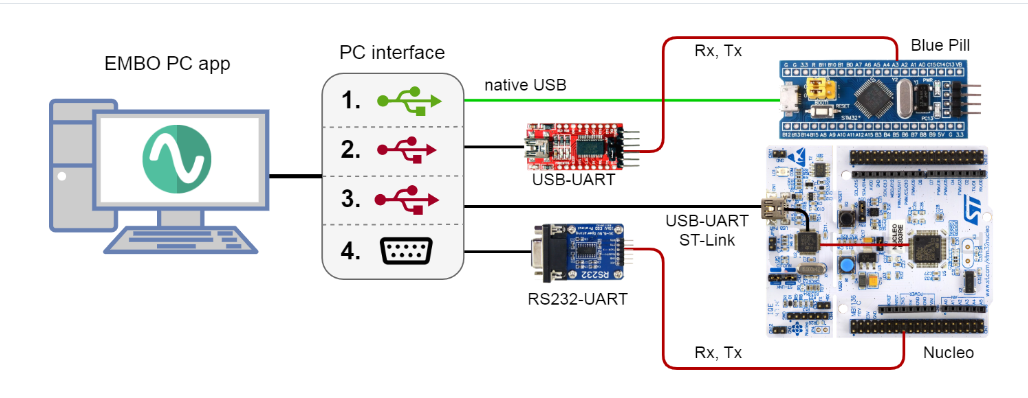
What is EMBO? EMBO, as the name suggests, integrates laboratory equipment such as ‘oscilloscope’ (Oscilloscope), logic analyzer (Logic Analyzer), and digital multimeter (Voltmeter), which usually cost tens of thousands, onto a single STM32 development board (Blue Pill, Nucleo, etc.). With a cross-platform PC application (Windows/Linux/macOS), you can easily connect to your computer via USB and accomplish:
- • Real-time oscillography
- • Digital signal capture
- • DC/low-frequency voltage measurement
- • Counter, PWM output, arbitrary waveform generation…
All firmware is open source under MIT license, stable for STM32F1/F3/L4 series; L0/G0 series is also in experimental support. The total cost starts from $6.
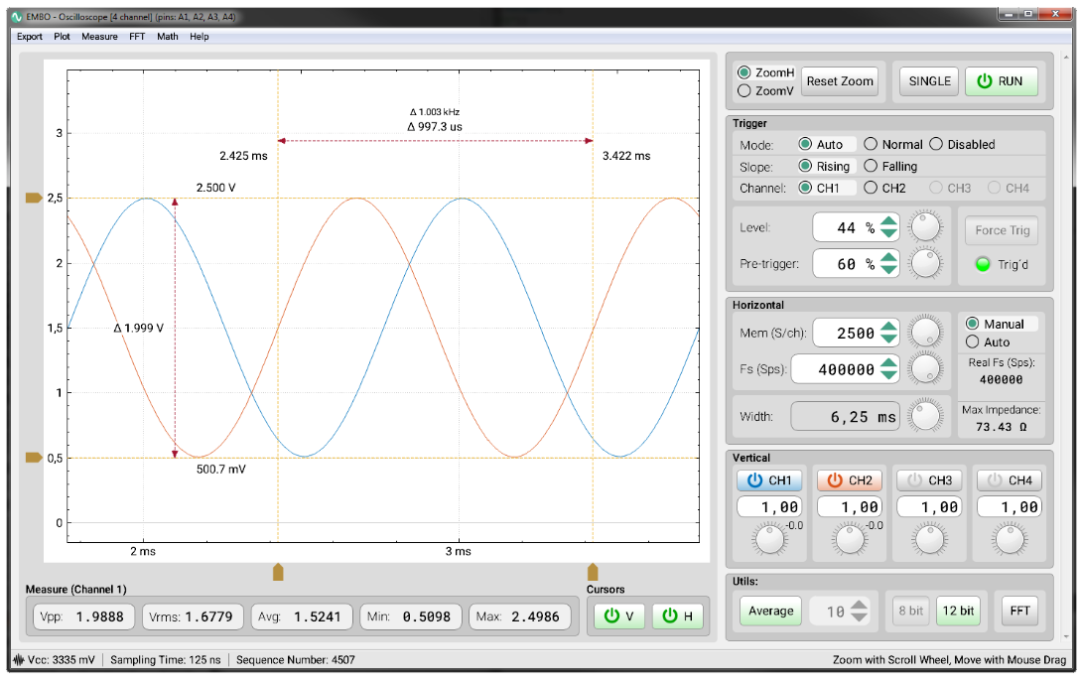
What Pain Points Does It Solve?
- 1. High Price: Is it hard to get an oscilloscope that costs thousands? EMBO allows you to solve it with just a few boards.
- 2. Too Many Tools: Oscilloscope, logic analyzer, multimeter, signal generator – a bunch of instruments take up space and have different vendor interfaces. EMBO consolidates everything with a single USB cable.
- 3. High Playability: Open source app + firmware, you can freely view the source code, modify the firmware, add new features, and test new things.
Device List & Core Parameters
| Device | Fs (Sampling Rate) | Mem (Depth) | Bits (Resolution) | Remarks |
| Oscilloscope (SCOPE) | Up to 1 MS/s | Up to 65536 | 12-bit | Interactive zoom, FFT, cursors |
| Logic Analyzer (LA) | Up to 4 MS/s | Up to 65536 | — | Edge trigger, digital waveform view |
| Multimeter (VM) | Fixed 100 S/s | — | 12-bit | NPLC adjustable, suppress 50Hz noise |
| Counter (CNTR) | 1 MHz/>1 MHz | — | — | Fast/slow mode selectable, 2 seconds timeout |
| PWM Generator | 1/2 channel synchronous output | — | — | Frequency, duty cycle, phase shift adjustable |
| Signal Generator (SGEN) | 12-bit DAC | — | — | Sine/square/triangle/noise, etc. |
Installation & Getting Started
- 1. Flash firmware: Download the corresponding STM32 model’s
<span>.hex</span>from Releases and flash it using ST-LINK or serial Bootloader. - 2. Install PC App: Pull the source code from GitHub to compile it yourself, or directly download the packaged Qt 5 executable file.
- 3. Connect: Use a microUSB cable to connect the board, open the app, select COM/tty on the left, click connect, and the device list on the right will light up.
- 4. Select Device: Click ‘Oscilloscope’/’Logic Analyzer’/’Multimeter’, etc., and within 3 seconds, you will enter the working interface, adjust parameters to use.
Usage Tips
- • Oscilloscope: Auto trigger mode is great; you can see waveforms even with chaotic signals.
- • Logic Analysis: Edge Both trigger, capturing pulse trains, I2C/SPI is also effortless.
- • Multimeter: When NPLC=10, DC jitter drops to within 1 mV.
- • PWM/Signal Source: Easily test against your servos/encoders.
Pros and Cons Summary
| Pros | Cons |
| Low cost (a few boards + USB cable) | Bandwidth/sampling rate cannot compare with high-end oscilloscopes |
| All-in-one, only one USB cable needed on the desktop | Interface is a bit rudimentary, learning curve required |
| Open source for secondary development | Limited STM32 resources, complex logic + high-frequency measurements may lose frames |
| Cross-platform (Win/Linux/macOS) | Board layout has requirements, wiring must be clean |
Conclusion If I hadn’t personally tinkered with EMBO, I wouldn’t have imagined that a few boards could do so much. It won’t replace high-end oscilloscopes, but for students, electronics enthusiasts, and makers, it offers incredible value for money! If you want to give it a try, flash the firmware, install the app, and within minutes you can measure waves, capture data, and send signals without having to run to the lab or worry about it being taken. What’s even better is that it’s fully open source: you can add new features or modify the interface as you wish. If you’re interested in STM32 and electronic measurement tools, I highly recommend you give it a hands-on try.
Project Address: https://github.com/parezj/EMBO