Follow our official account to keep receiving embedded knowledge!
1. Abstract Factory Pattern
The Abstract Factory Pattern is a creational design pattern that provides an interface for creating a family of related or dependent objects without specifying their concrete classes.
In embedded systems that require high compatibility, the Abstract Factory Pattern can significantly reduce the cost of multi-platform adaptation and ensure compatibility between hardware components, making it a core pattern for building portable embedded frameworks.
In the previous article, we shared: Embedded Programming Model | Simple Factory Pattern
The Abstract Factory Pattern has many similarities with the Simple Factory Pattern. Let’s compare them:
| Feature | Simple Factory Pattern | Abstract Factory Pattern |
|---|---|---|
| Embedded Application | Single device driver management | Whole hardware platform adaptation |
| Applicable Scenarios | Few product types with infrequent changes | Systems that need to create multiple related products |
| Level of Abstraction | Product-level abstraction | Factory-level abstraction |
| Object Creation | Single product | Product family (multiple related products) |
| Factory Type | Single factory class | Abstract factory + multiple concrete factory implementation classes |
| Extensibility | Adding new products requires modifying the factory class | Adding a new product family only requires adding a new factory class |
The Simple Factory Pattern is suitable for scenarios with few product types and infrequent changes. For example, in embedded systems for managing a single device driver, such as an LCD driver:
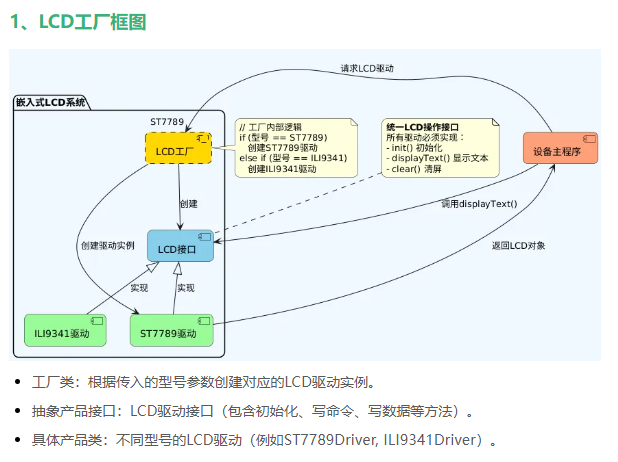
The Abstract Factory Pattern is suitable for systems that need to create multiple related products, such as managing an entire hardware platform in embedded systems.
The core of the Abstract Factory Pattern includes four key components:
- Abstract Factory: Declares methods for creating a series of products.
- Concrete Factory: Implements the methods of the abstract factory to create concrete products.
- Abstract Product: Declares the product interface.
- Concrete Product: Implements the abstract product interface, defining the concrete product.
Among these, points 2 to 4 are the key points of the Simple Factory Pattern. The Simple Factory Pattern combined with point 1, the abstract factory, constitutes the Abstract Factory Pattern.
2. Embedded: Multi-Platform Hardware Abstraction Layer
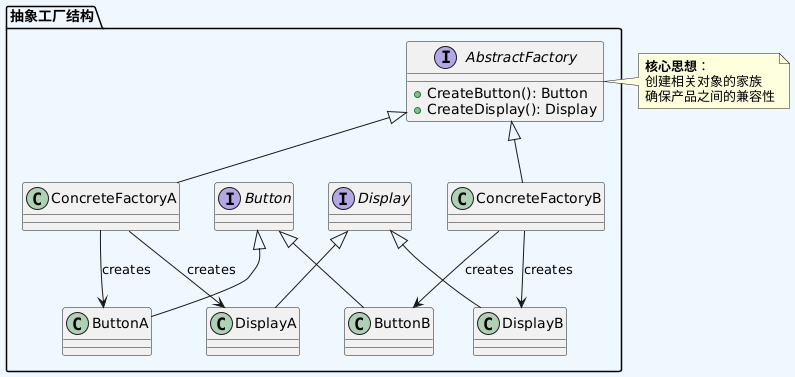
Devices need to support different platforms (STM32/ESP32, etc.), with compatible input and output drivers for each platform.
1. Code
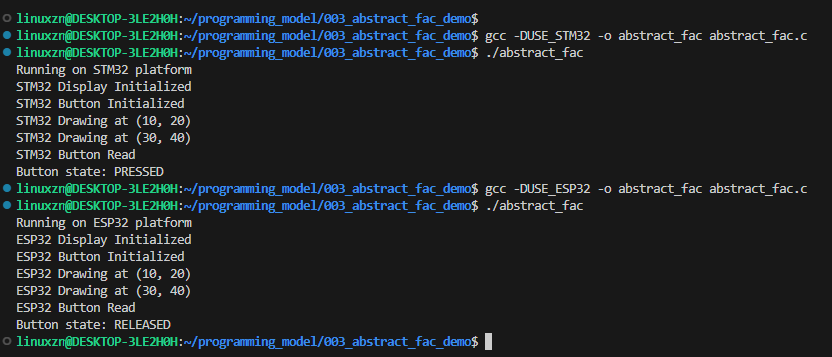
C Language Version:
#include <stdio.h>
#include <stdbool.h>

// Abstract Product
typedef struct {
    void (*Init)(void);
    void (*Draw)(int x, int y);
} DisplayDriver;

typedef struct {
    void (*Init)(void);
    bool (*ReadButton)(void);
} InputDriver;

// Concrete Product Implementation - STM32 Platform
void stm32_disp_init(void) {
    printf("STM32 Display Initialized\n");
}

void stm32_draw(int x, int y) {
    printf("STM32 Drawing at (%d, %d)\n", x, y);
}

void stm32_button_init(void) {
    printf("STM32 Button Initialized\n");
}

bool stm32_read_button(void) {
    printf("STM32 Button Read\n");
    return true; // Simulate button pressed state
}

// Concrete Product Implementation - ESP32 Platform
void esp32_disp_init(void) {
    printf("ESP32 Display Initialized\n");
}

void esp32_draw(int x, int y) {
    printf("ESP32 Drawing at (%d, %d)\n", x, y);
}

void esp32_button_init(void) {
    printf("ESP32 Button Initialized\n");
}

bool esp32_read_button(void) {
    printf("ESP32 Button Read\n");
    return false; // Simulate button not pressed state
}

// Abstract Factory
typedef struct {
    DisplayDriver display;
    InputDriver input;
} HWPlatform;

// Concrete Factory - STM32 Platform
const HWPlatform stm32_platform = {
    {stm32_disp_init, stm32_draw},
    {stm32_button_init, stm32_read_button}
};

// Concrete Factory - ESP32 Platform
const HWPlatform esp32_platform = {
    {esp32_disp_init, esp32_draw},
    {esp32_button_init, esp32_read_button}
};

int main() {
    // Select platform - define USE_STM32 macro to choose
    #if defined(USE_STM32)
        const char* platform_name = "STM32";
        const HWPlatform* platform = &stm32_platform;
    #else
        const char* platform_name = "ESP32";
        const HWPlatform* platform = &esp32_platform;
    #endif

    printf("Running on %s platform\n", platform_name);

    // Initialize display
    platform->display.Init();

    // Initialize input
    platform->input.Init();

    // Draw graphics
    platform->display.Draw(10, 20);
    platform->display.Draw(30, 40);

    // Read button state
    bool buttonState = platform->input.ReadButton();
    printf("Button state: %s\n", buttonState ? "PRESSED" : "RELEASED");

    return 0;
}
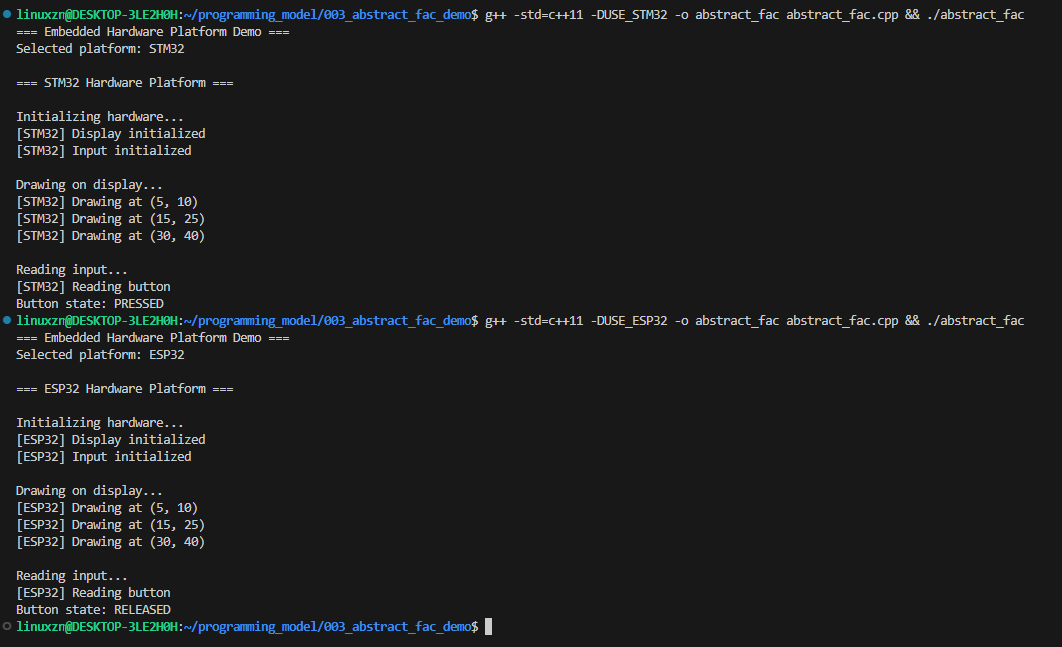
C++ Version:
#include <iostream>
#include <cstdint>

// Abstract Product Interface
struct DisplayDriver {
    void (*Init)(void);
    void (*Draw)(int x, int y);
};

struct InputDriver {
    void (*Init)(void);
    bool (*ReadButton)(void);
};

// Concrete Product Implementation - STM32 Platform
namespace STM32 {
    void DisplayInit() {
        std::cout << "[STM32] Display initialized\n";
    }

    void DisplayDraw(int x, int y) {
        std::cout << "[STM32] Drawing at (" << x << ", " << y << ")\n";
    }

    void InputInit() {
        std::cout << "[STM32] Input initialized\n";
    }

    bool InputReadButton() {
        std::cout << "[STM32] Reading button\n";
        return true; // Simulate button pressed
    }
}

// Concrete Product Implementation - ESP32 Platform
namespace ESP32 {
    void DisplayInit() {
        std::cout << "[ESP32] Display initialized\n";
    }

    void DisplayDraw(int x, int y) {
        std::cout << "[ESP32] Drawing at (" << x << ", " << y << ")\n";
    }

    void InputInit() {
        std::cout << "[ESP32] Input initialized\n";
    }

    bool InputReadButton() {
        std::cout << "[ESP32] Reading button\n";
        return false; // Simulate button not pressed
    }
}

// Abstract Factory
class HWPlatform {
public:
    const DisplayDriver& GetDisplayDriver() const { return display; }
    const InputDriver& GetInputDriver() const { return input; }

    virtual void PrintPlatformInfo() const {
        std::cout << "Generic Hardware Platform\n";
    }

protected:
    DisplayDriver display;
    InputDriver input;
};

// Concrete Factory - STM32 Platform
class STM32Platform : public HWPlatform {
public:
    STM32Platform() {
        display.Init = STM32::DisplayInit;
        display.Draw = STM32::DisplayDraw;
        input.Init = STM32::InputInit;
        input.ReadButton = STM32::InputReadButton;
    }

    void PrintPlatformInfo() const override {
        std::cout << "\n=== STM32 Hardware Platform ===\n";
    }
};

// Concrete Factory - ESP32 Platform
class ESP32Platform : public HWPlatform {
public:
    ESP32Platform() {
        display.Init = ESP32::DisplayInit;
        display.Draw = ESP32::DisplayDraw;
        input.Init = ESP32::InputInit;
        input.ReadButton = ESP32::InputReadButton;
    }

    void PrintPlatformInfo() const override {
        std::cout << "\n=== ESP32 Hardware Platform ===\n";
    }
};

// Usage Example
int main() {
    std::cout << "=== Embedded Hardware Platform Demo ===\n";

    // Platform selection
    #if defined(USE_STM32)
        STM32Platform platform;
        std::cout << "Selected platform: STM32\n";
    #else
        ESP32Platform platform;
        std::cout << "Selected platform: ESP32\n";
    #endif

    // Print platform information
    platform.PrintPlatformInfo();

    // Initialize hardware
    std::cout << "\nInitializing hardware...\n";
    platform.GetDisplayDriver().Init();
    platform.GetInputDriver().Init();

    // Use display driver
    std::cout << "\nDrawing on display...\n";
    platform.GetDisplayDriver().Draw(5, 10);
    platform.GetDisplayDriver().Draw(15, 25);
    platform.GetDisplayDriver().Draw(30, 40);

    // Read input state
    std::cout << "\nReading input...\n";
    bool buttonState = platform.GetInputDriver().ReadButton();
    std::cout << "Button state: " << (buttonState ? "PRESSED" : "RELEASED") << "\n";

    return 0;
}
2. Advantages and Disadvantages Analysis
(1) Advantages
① Complies with the Open/Closed Principle
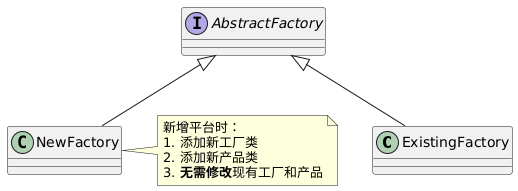
Open/Closed Principle (OCP): Objects (classes, modules, functions, etc.) in software should be open for extension but closed for modification.
- Initial support: STM32 and ESP32
- New platform: Add support for Nordic nRF52
- Add
<span>NRF52Platform</span>factory class - Add nRF52 display/input drivers
- No need to modify existing STM32/ESP32 code
② Unified Interface
// Unified hardware operation interface
platform->display.Init();
platform->input.Init();
platform->display.Draw(10, 20);
platform->display.Draw(30, 40);
bool buttonState = platform->input.ReadButton();
③ Platform-Independent Design
- Decouples business logic from hardware
- High code reuse rate, reducing platform porting workload (new platforms only need to implement concrete factories and products)
(2) Disadvantages
① Difficult to Extend New Products
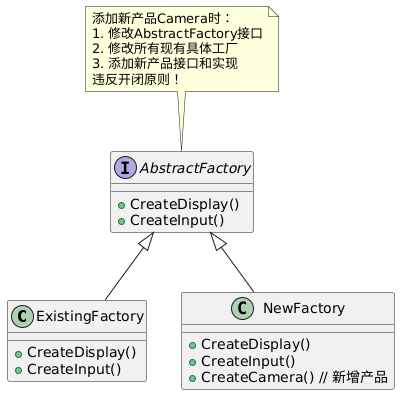
For example:
- Initial design: Display + Input
- New requirement: Camera module
- Modification cost:
- Modify all 3 platform factory classes
- Add 3 camera driver implementations
- Update all test cases
3. Conclusion: When to Choose Abstract Factory
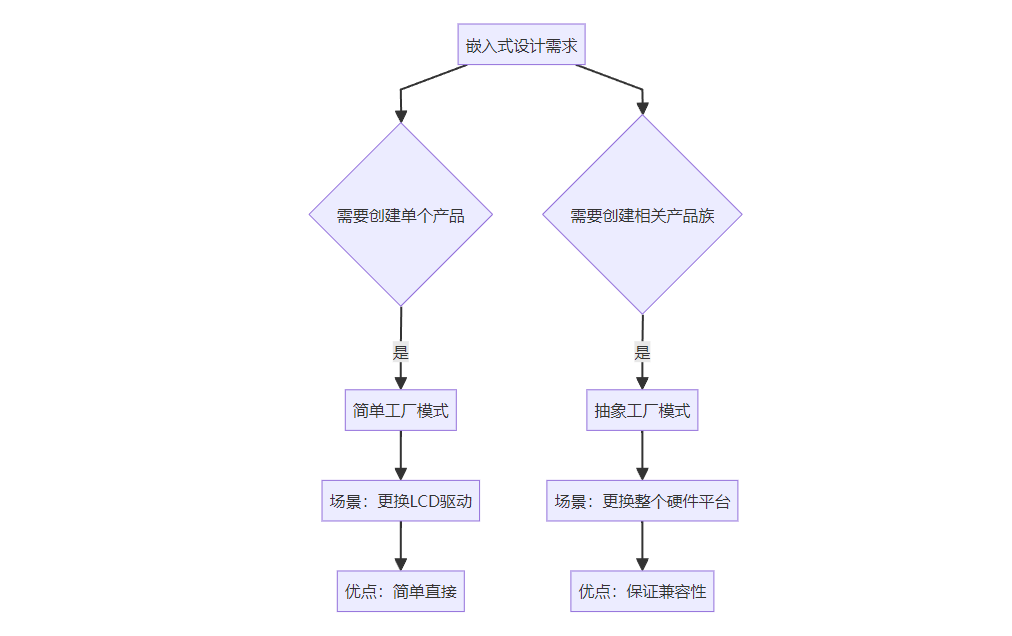
- When managing asingle product type (e.g., LCD driver) → Simple Factory
- When managingrelated product families (e.g., a complete set of hardware drivers) → Abstract Factory
You might also like:
Embedded Programming Model | Simple Factory Pattern
Embedded Software: Functional vs Non-Functional Programming
Embedded Field: The Ultimate Showdown between Linux and RTOS!
Embedded Device Networking: From Basics to Practice!
Embedded Performance Metrics Hide These Secrets, How Many Do You Know?
Embedded Software Advanced Guide, Let’s Level Up Together!
Embedded Programming Model | MVC Model
Embedded Programming Model | Observer Pattern
Step-by-step guide to building an embedded containerized development environment!
An elegant multi-functional embedded debugger!
A very lightweight embedded logging library!
A very lightweight embedded thread pool library!
Popular C language projects on GitHub!
Practical | Teach you to light up a lamp through a webpage in 10 minutes
Essential Skills for Embedded Development | Git Submodules