Today, I will explain how to use the sharing links on Douyin.
Many people usually browse information on WeChat and see the Douyin command shared by friends, which clearly states it is a video, product, or live stream entry, but after clicking for a long time, there is no response, leaving them confused:
Either it doesn’t open, or nothing happens when clicked, and some don’t even know what this command is for!
Don’t worry, today I will guide you step by step on how to correctly open Douyin commands in the simplest way.No matter if you want to watch videos, buy things, or watch live streams, after reading this article, you will be able to handle it easily!1. What is a Douyin Command?
A Douyin command is a special link generated by Douyin, mainly divided into two types:
1. Purchase command: It will contain the words “Douyin Express Version Command”
2. Video command: It will contain the words “Douyin Command”
These commands may be a string of letters and numbers or a URL. The key is to copy everything completely, without missing or adding any characters.
2. Three Simple Methods to Open
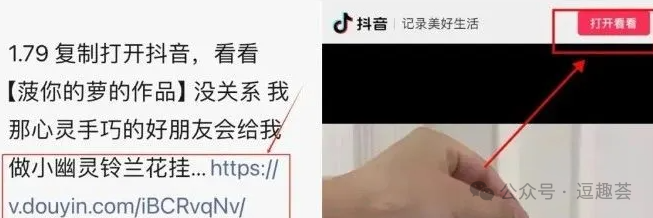
Method 1: Direct Click (The Easiest)
If the link you see is blue, you can click directly:
- 1
Find the blue URL part in the message
- 2.
Click this blue URL directly
- 3.
Your phone will automatically redirect to Douyin to open the content
Note: iPhone users may need to click “Allow” to redirect
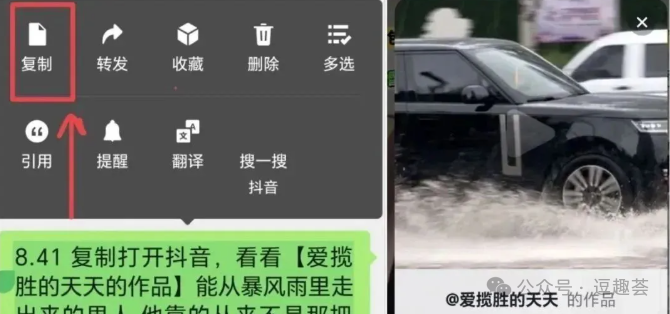
Method 2: Copy and Paste (Most Common)
If it doesn’t open, do this:
- 1.
Long press the entire message and select “Copy”
- 2.
Open Douyin or Douyin Express Version
- 3.
Two situations may occur:
- •
Automatically redirects to content (indicating success)
- •
If there is no response, click the search box, paste, and search
Tip:
- •
Make sure to copy completely
- •
Ensure Douyin is updated to the latest version
- •
Do not copy extra spaces when copying
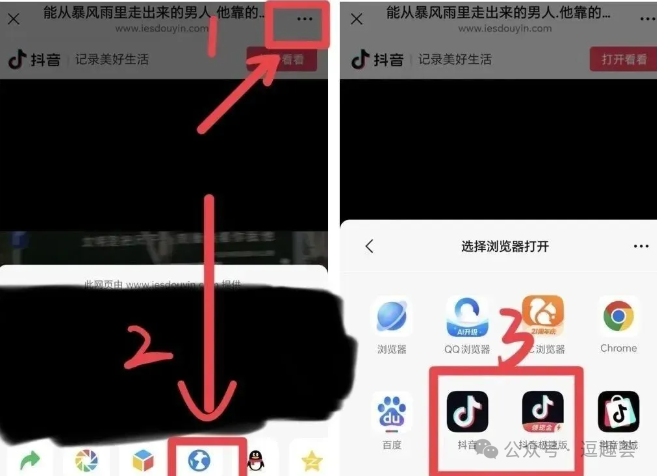
Method 3: Open with Browser (Safest)
If the first two methods do not work:
- 1.
Completely copy the entire message
- 2.
Open the built-in browser on your phone
- 3.
Paste the content into the browser’s address bar
- 4.
Follow the prompts to redirect to Douyin
Different phones note:
- •
iPhone users need to allow redirection in settings
- •
Android users may need to select “Open in APP”
-
[Usage Tips]
If you encounter a link that won’t open, first check if your network connection is normal, clear Douyin’s cache data, or temporarily disable your phone’s security software and try again. If it prompts “Command Invalid”, the content may have been deleted; you can ask your friend to resend it or wait 24 hours before trying again. For iPhone users, remember to enable Douyin’s redirection permissions in settings, ensure the system version is not too old, and restart your phone if necessary to resolve issues.
When using Douyin commands, you can save frequently used ones in your notes for easy access. Android users can also create desktop shortcuts. However, be cautious with enticing commands like “Claim Red Packet” and do not input personal information casually.
Finally, to emphasize: In the future, when you see Douyin video, product recommendations, or live stream entries sent by others on WeChat, you no longer have to foolishly give up when it doesn’t open!
By learning these few tricks, you can not only save a lot of trouble but also grab red packets, take advantage of discounts, and participate in lotteries, which is really great!
I suggest you bookmark this article and share it with family, parents, and friends, especially the elders at home, so they can easily get started too!