When browsing through social media or chatting, have you often seen friends sending a string of strange characters, such as “http://v.douyin.com/if”, claiming that copying it will allow you to access fun content on Douyin? This is actually a Douyin command! So what exactly are Douyin commands and Douyin Lite commands, and how should they be used? You can learn it in just 2 minutes!

1. First, understand: What are Douyin commands and Douyin Lite commands?
In simple terms, a Douyin command is a quick sharing code generated by the Douyin platform, similar to an “electronic doorplate number.” When copied and opened in the corresponding app, it can directly jump to specified content, such as videos, live streams, product pages, etc.
From the platform perspective, there are mainly two types:
Douyin Command: Applicable to the official Douyin app.
Douyin Lite Command: Applicable to the Douyin Lite app. In some cases, both can be used interchangeably, but it is recommended to open them in the corresponding app for better stability.
2. Three methods of use, follow along step by step
Method 1: Most commonly used – Copy the command and open the app directly
This is the most convenient method, whether it’s a command sent by someone else or one you see yourself:
Long press the command text and select “Copy” (for example, copy “₤abc123₤”);
Open the Douyin or Douyin Lite app on your phone (no need to click the search box, just open it directly);
Wait for 1-2 seconds, the app will automatically recognize the command and pop up a prompt asking “Do you want to go?” Click “Let’s take a look” to jump.
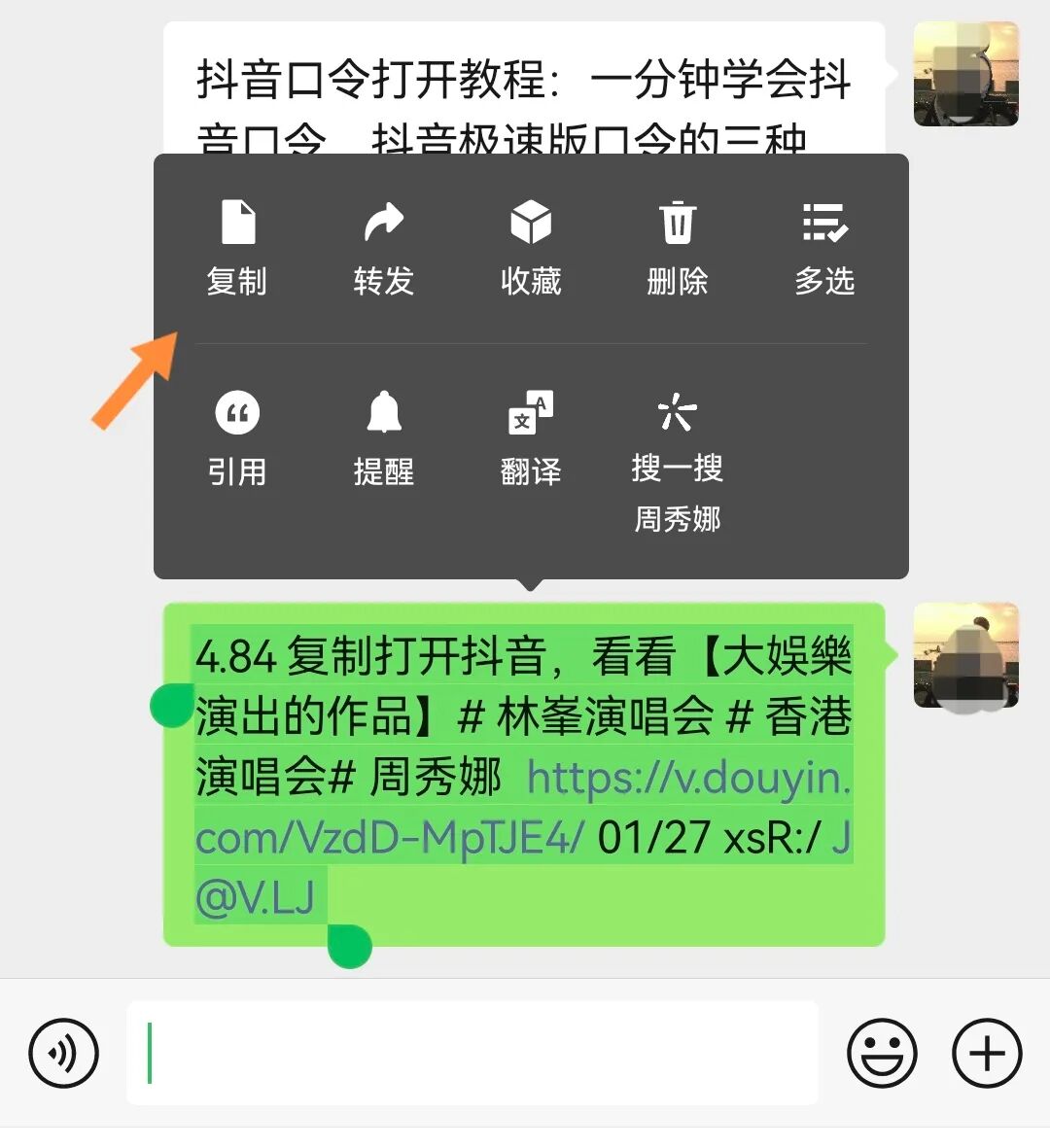
Method 2: Manually paste into the search box (use when automatic recognition does not respond)
If automatic recognition does not work, try manual operation:
First, copy the command;
Open the corresponding app and click on the “search box” at the top;
Long press the search box, select “Paste,” and paste the command;
Click “Search” on the keyboard, and you will jump to the corresponding content.
Method 3: Jump directly from other apps (using WeChat as an example)
When you receive a command in WeChat, you can also operate like this:
After copying the command, click the “+” icon in the upper right corner of WeChat;
Select “Open in WeChat” (some phones support this; if not, use Method 1);
A prompt will pop up with the option “Open with other apps,” select Douyin or Douyin Lite;
The subsequent steps are the same as Method 1, waiting for automatic redirection.
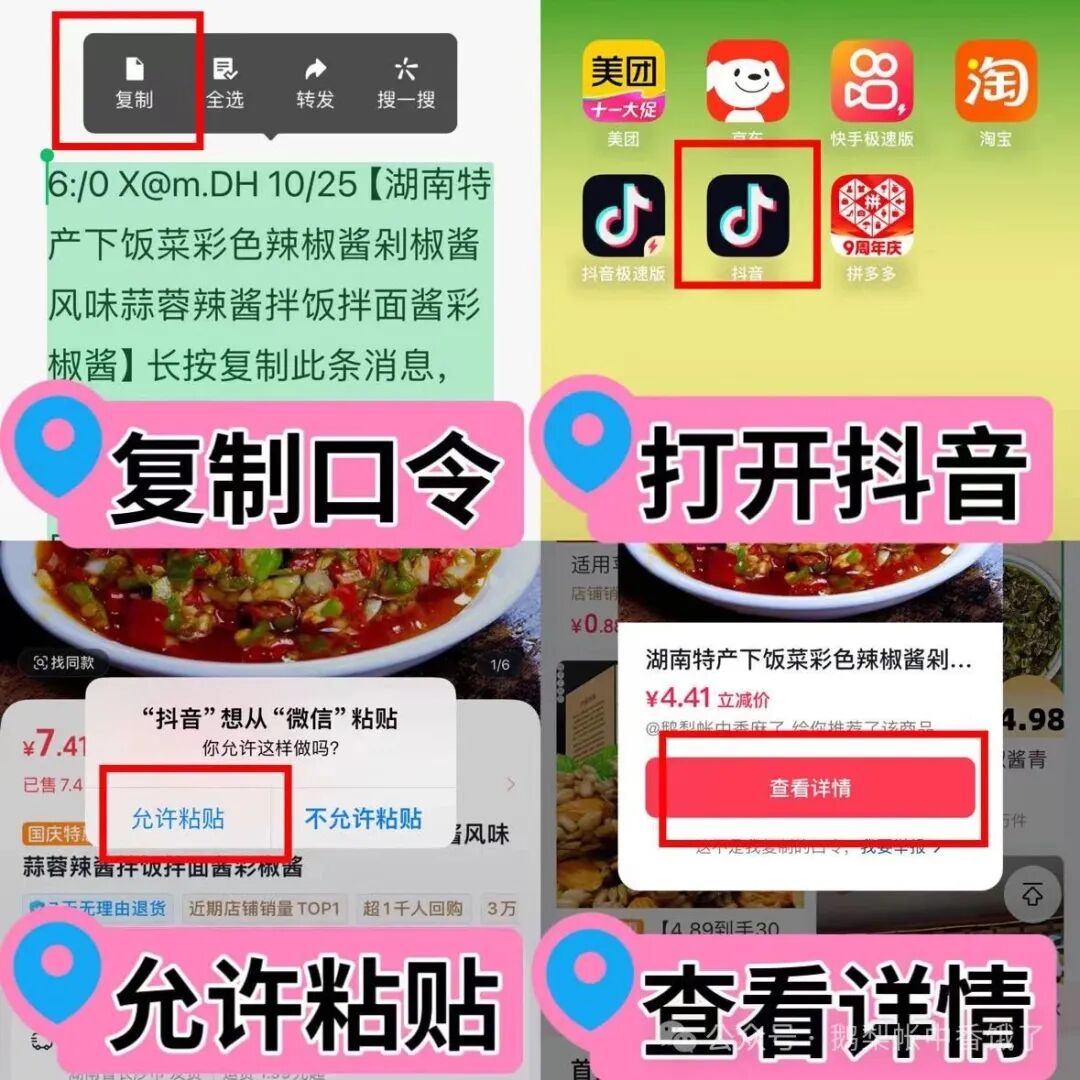
3. Remember these rules and precautions
1. Small differences between different devices
The operation on iOS devices (iPhones) is basically the same as on Android devices, but iPhones may require an additional “allow” authorization when redirecting; just click “Allow.”
The desktop version of Douyin currently does not support automatic command recognition; you can only manually copy the command into the search box to search.
2. Common problem solutions
Problem: No response after opening the app?
Solution: First, check if the command was copied completely and if any characters were missed; if it still doesn’t work, exit the app and reopen it, which usually resolves the issue.
Problem: “Content does not exist” after redirection?
Solution: The content may have been deleted, or the command has expired; in this case, you can ask the person who shared the command.
3. Pay attention to safety tips
Do not copy commands from unknown sources, especially those that ask you to enter your phone number or bank card information, as they may be phishing links.
After copying the command, if the content involves payment or transfer, be sure to be cautious and confirm that it is legitimate content before proceeding.
4. In summary
In fact, using Douyin commands and Douyin Lite commands is super simple; just remember the three steps: “Copy – Open App – Automatic Jump.”
That’s all for today’s tips; isn’t it simple? If you have any questions, feel free to leave a comment, and I will do my best to answer! Thank you all for your support, and see you next time!