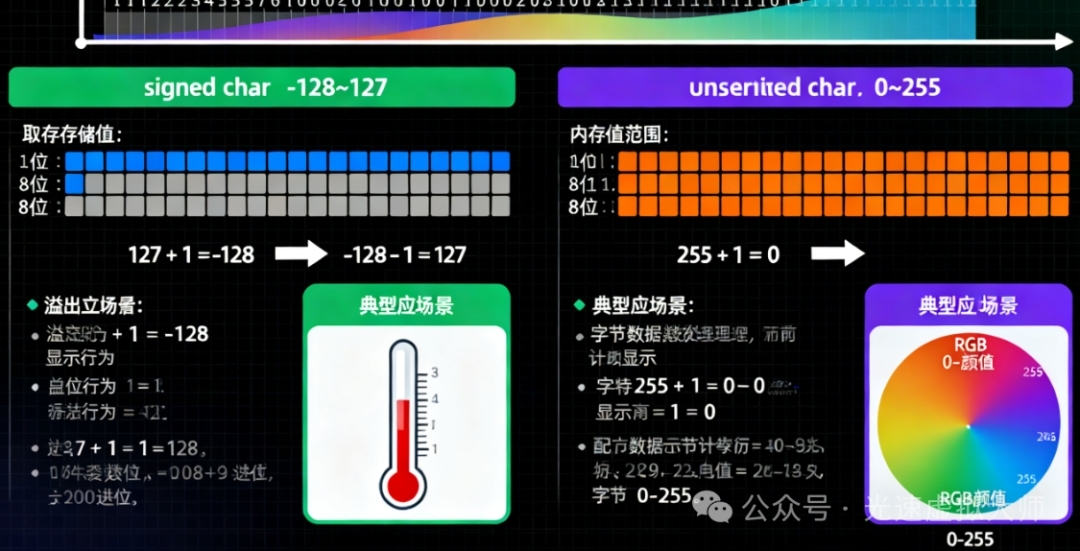
Significance of char Type
In C++, the sign of the <span>char</span> type is defined by the implementation:
- It can be
<span>signed char</span>(signed character) - It can be
<span>unsigned char</span>(unsigned character) - It depends on the compiler and target platform
Differences Among the Three char Types
char foo;              // can be signed or unsigned, defined by implementation
unsigned char bar;     // explicitly unsigned
signed char snark;     // explicitly signed
Differences in Value Range and Behavior
Value Range Comparison
#include <iostream>
#include <limits>
#include <climits>

using namespace std;

void rangeComparison() {
    cout << "=== Numeric Ranges ===" << endl;

    cout << "signed char range: "
         << (int)numeric_limits<signed char>::min() << " to "
         << (int)numeric_limits<signed char>::max() << endl;

    cout << "unsigned char range: "
         << (int)numeric_limits<unsigned char>::min() << " to "
         << (int)numeric_limits<unsigned char>::max() << endl;

    cout << "char range: "
         << (int)numeric_limits<char>::min() << " to "
         << (int)numeric_limits<char>::max() << endl;

    // Using macros from climits
    cout << "\nUsing climits macros:" << endl;
    cout << "SCHAR_MIN: " << SCHAR_MIN << endl;
    cout << "SCHAR_MAX: " << SCHAR_MAX << endl;
    cout << "UCHAR_MAX: " << UCHAR_MAX << endl;
    cout << "CHAR_MIN: " << CHAR_MIN << endl;
    cout << "CHAR_MAX: " << CHAR_MAX << endl;
}
Code Examples
Example 1: Basic Numeric Operations
void basicNumericOperations() {
    cout << "\n=== Basic Numeric Operations ===" << endl;

    // signed char example
    signed char sc1 = 100;
    signed char sc2 = 50;
    signed char sc_result = sc1 + sc2;

    cout << "signed char 100 + 50 = " << (int)sc_result << endl;

    // unsigned char example
    unsigned char uc1 = 200;
    unsigned char uc2 = 100;
    unsigned char uc_result = uc1 + uc2;

    cout << "unsigned char 200 + 100 = " << (int)uc_result << endl;

    // Overflow behavior demonstration
    signed char sc_overflow = 127 + 1;
    cout << "signed char 127 + 1 = " << (int)sc_overflow << " (overflow!)" << endl;

    unsigned char uc_overflow = 255 + 1;
    cout << "unsigned char 255 + 1 = " << (int)uc_overflow << " (overflow!)" << endl;
}
Example 2: Storing Large Values
void storingLargeValues() {
    cout << "\n=== Storing Large Values ===" << endl;

    // Attempting to store a value greater than 127
    int large_value = 200;

    // Using unsigned char can safely store
    unsigned char uc_large = large_value;
    cout << "unsigned char storing 200: " << (int)uc_large << endl;

    // Using signed char will have issues (implementation-defined behavior)
    signed char sc_large = large_value;
    cout << "signed char storing 200: " << (int)sc_large << " (unexpected!)" << endl;

    // The behavior of plain char depends on the implementation
    char c_large = large_value;
    cout << "char storing 200: " << (int)c_large << " (implementation defined)" << endl;
}
Example 3: ASCII Character Handling
void asciiCharacterHandling() {
    cout << "\n=== ASCII Character Handling ===" << endl;

    // For standard ASCII characters (0-127), all char types are applicable
    char regular_char = 'A';
    signed char signed_char = 'B';
    unsigned char unsigned_char = 'C';

    cout << "char 'A': " << regular_char << " (value: " << (int)regular_char << ")" << endl;
    cout << "signed char 'B': " << signed_char << " (value: " << (int)signed_char << ")" << endl;
    cout << "unsigned char 'C': " << unsigned_char << " (value: " << (int)unsigned_char << ")" << endl;

    // Handling extended ASCII characters (128-255)
    unsigned char extended_ascii = 200;
    cout << "Extended ASCII 200 as unsigned char: '" << extended_ascii
         << "' (value: " << (int)extended_ascii << ")" << endl;

    // Using signed char to handle extended ASCII will have issues
    signed char extended_signed = 200;
    cout << "Extended ASCII 200 as signed char: '" << extended_signed
         << "' (value: " << (int)extended_signed << ")" << endl;
}
Example 4: Binary Data Handling
#include <bitset>

void binaryDataHandling() {
    cout << "\n=== Binary Data Handling ===" << endl;

    // For raw binary data, unsigned char is typically used
    unsigned char binary_data[] = {0x48, 0x65, 0x6C, 0x6C, 0x6F}; // "Hello" in hex

    cout << "Binary data as hex: ";
    for (int i = 0; i < 5; i++) {
        cout << hex << uppercase << (int)binary_data[i] << " ";
    }
    cout << dec << endl;

    cout << "Binary data as characters: ";
    for (int i = 0; i < 5; i++) {
        cout << binary_data[i];
    }
    cout << endl;

    // Bit manipulation demonstration
    unsigned char flags = 0b10101010; // 170 decimal
    cout << "Flags: " << bitset<8>(flags) << " (decimal: " << (int)flags << ")" << endl;

    // Setting bits
    flags |= 0b00000001; // Set the least significant bit
    cout << "After setting bit 0: " << bitset<8>(flags) << " (decimal: " << (int)flags << ")" << endl;

    // Clearing bits
    flags &= ~0b10000000; // Clear the most significant bit
    cout << "After clearing bit 7: " << bitset<8>(flags) << " (decimal: " << (int)flags << ")" << endl;
}
Example 5: Type Conversion and Comparison
void typeConversionAndComparison() {
    cout << "\n=== Type Conversion and Comparison ===" << endl;

    signed char sc = -50;
    unsigned char uc = 200;
    char c = 'X';

    // Implicit conversion
    int sc_to_int = sc;
    int uc_to_int = uc;

    cout << "signed char -50 to int: " << sc_to_int << endl;
    cout << "unsigned char 200 to int: " << uc_to_int << endl;

    // Comparison operations
    cout << "Comparison examples:" << endl;
    cout << "signed char -50 < unsigned char 200: " << (sc < uc) << endl;
    cout << "But be careful: (int)sc = " << (int)sc << ", (int)uc = " << (int)uc << endl;

    // Explicit conversion
    unsigned char explicit_convert = static_cast<unsigned char>(sc);
    cout << "signed char -50 to unsigned char: " << (int)explicit_convert << endl;
}
Example 6: Practical Use Cases
// Scenario 1: Image pixel processing (typically using unsigned char)
class ImageProcessor {
private:
    unsigned char* pixel_data;
    int width, height;

public:
    ImageProcessor(int w, int h) : width(w), height(h) {
        pixel_data = new unsigned char[width * height * 3]; // RGB
    }

    ~ImageProcessor() {
        delete[] pixel_data;
    }

    void setPixel(int x, int y, unsigned char r, unsigned char g, unsigned char b) {
        int index = (y * width + x) * 3;
        pixel_data[index] = r;
        pixel_data[index + 1] = g;
        pixel_data[index + 2] = b;
    }

    void brighten(int amount) {
        for (int i = 0; i < width * height * 3; i++) {
            // Prevent overflow
            int new_value = pixel_data[i] + amount;
            if (new_value > 255) new_value = 255;
            if (new_value < 0) new_value = 0;
            pixel_data[i] = static_cast<unsigned char>(new_value);
        }
    }
};

// Scenario 2: Network packet processing
class PacketHandler {
public:
    static void processPacket(const unsigned char* data, int length) {
        cout << "Processing packet of length " << length << ":" << endl;

        for (int i = 0; i < length && i < 16; i++) { // Only display the first 16 bytes
            cout << hex << uppercase << (int)data[i] << " ";
        }
        cout << dec << endl;

        // Check packet type (first byte)
        unsigned char packet_type = data[0];
        cout << "Packet type: 0x" << hex << (int)packet_type << dec << endl;
    }
};

void practicalUseCases() {
    cout << "\n=== Practical Use Cases ===" << endl;

    // Image processing example
    ImageProcessor img(2, 2);
    img.setPixel(0, 0, 255, 0, 0);     // Red
    img.setPixel(1, 0, 0, 255, 0);     // Green
    img.setPixel(0, 1, 0, 0, 255);     // Blue
    img.setPixel(1, 1, 255, 255, 255); // White

    cout << "Image processor created with unsigned char pixel data" << endl;

    // Network packet example
    unsigned char packet[] = {0x01, 0x02, 0x03, 0x04, 0x05, 0xAB, 0xCD, 0xEF};
    PacketHandler::processPacket(packet, sizeof(packet));
}
Example 7: Detecting Current System’s char Sign
void detectCharSign() {
    cout << "\n=== Detecting char Sign on This System ===" << endl;

    char test_char = -1;

    if (static_cast<unsigned char>(test_char) == 255) {
        cout << "char is UNSIGNED on this system" << endl;
    } else if (static_cast<signed char>(test_char) == -1) {
        cout << "char is SIGNED on this system" << endl;
    } else {
        cout << "char sign is UNDETERMINED" << endl;
    }

    // Another detection method
    cout << "CHAR_MIN = " << CHAR_MIN << endl;
    if (CHAR_MIN < 0) {
        cout << "char is SIGNED (CHAR_MIN < 0)" << endl;
    } else {
        cout << "char is UNSIGNED (CHAR_MIN == 0)" << endl;
    }
}
Complete Demonstration Program
#include <iostream>
#include <limits>
#include <climits>
#include <bitset>

using namespace std;

int main() {
    cout << "=== C++ signed char vs unsigned char Demonstration ===" << endl;

    rangeComparison();
    basicNumericOperations();
    storingLargeValues();
    asciiCharacterHandling();
    binaryDataHandling();
    typeConversionAndComparison();
    practicalUseCases();
    detectCharSign();

    cout << "\n=== Best Practices Summary ===" << endl;
    cout << "1. Use plain char for ASCII text" << endl;
    cout << "2. Use unsigned char for:" << endl;
    cout << "   - Binary data processing" << endl;
    cout << "   - Values above 127" << endl;
    cout << "   - Bit manipulation" << endl;
    cout << "3. Use signed char only when explicitly needed for negative values" << endl;
    cout << "4. Be explicit about signedness for portability" << endl;

    return 0;
}
Compilation and Execution
g++ -o char_demo char_demo.cpp
./char_demo
Key Points Summary
- Sign of char: The sign of
<span>char</span>is defined by the implementation and is not portable - Value Range:
<span>signed char</span>: -128 to 127<span>unsigned char</span>: 0 to 255
- ASCII characters: use
<span>char</span> - Large values (>127): use
<span>unsigned char</span> - Binary data: use
<span>unsigned char</span> - Need negative values: use
<span>signed char</span>
This comprehensive example demonstrates the differences, usage scenarios, and best practices of <span>signed char</span> and <span>unsigned char</span>, helping you make the right type choice in various situations.