1. Basic Concepts
The HTTP protocol is the abbreviation for Hyper Text Transfer Protocol, which is used for transferring hypertext from the World Wide Web (WWW) server to the local browser.
HTTP is a protocol based on the TCP/IP communication protocol for data transmission (HTML files, image files, query results, etc.).
HTTP is an object-oriented protocol belonging to the application layer. Due to its simplicity and speed, it is suitable for distributed hypermedia information systems.
The HTTP protocol operates on a client-server architecture. The browser acts as the HTTP client, sending requests to the HTTP server, which is the web server, via a URL. The web server then sends response information back to the client based on the received request.

2. Main Features
-
Simple and Fast: When the client requests services from the server, it only needs to transmit the request method and path. Common request methods include GET, HEAD, and POST. Each method specifies a different type of communication between the client and the server. The simplicity of the HTTP protocol means that the program size of the HTTP server is small, resulting in fast communication speeds.
-
Flexible: HTTP allows the transmission of any type of data object, which is marked by the Content-Type.
-
Connectionless: Connectionless means that each connection only handles one request. After the server processes the client’s request and receives the client’s response, the connection is terminated. This approach saves transmission time.
-
Stateless: The HTTP protocol is stateless. Stateless means that the protocol has no memory capacity for transaction processing. The lack of state means that if subsequent processing requires prior information, it must be retransmitted, which can increase the amount of data transmitted with each connection. On the other hand, when the server does not need prior information, its response is faster.
-
Supports B/S and C/S models.
3. HTTP Request Message
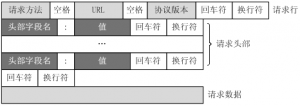
The HTTP request message sent by the client to the server consists of the following format:
It is composed of four parts: request line, header, empty line, and request data.
 ·
·
The request line starts with a method symbol, separated by a space, followed by the requested URI and the protocol version.Example of a GET request, captured using Charles:
GET /562f25980001b1b106000338.jpg HTTP/1.1Host img.mukewang.comUser-Agent Mozilla/5.0 (Windows NT 10.0; WOW64) AppleWebKit/537.36 (KHTML, like Gecko) Chrome/51.0.2704.106 Safari/537.36Accept image/webp,image/*,*/*;q=0.8Referer http://www.imooc.com/Accept-Encoding gzip, deflate, sdchAccept-Language zh-CN,zh;q=0.8
4. HTTP Response Message
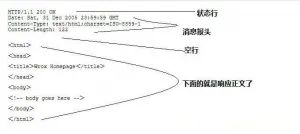
Generally, after the server receives and processes the request sent by the client, it will return an HTTP response message.
The HTTP response also consists of four parts: status line, header, empty line, and response body.
 5. HTTP Status Codes
Status codes consist of three digits, with the first digit defining the category of the response, which is divided into five categories:
1xx: Informational — indicates that the request has been received and is being processed 2xx: Success — indicates that the request has been successfully received, understood, and accepted 3xx: Redirection — further action is needed to complete the request 4xx: Client Error — there is a syntax error in the request or the request cannot be fulfilled 5xx: Server Error — the server failed to fulfill a valid request
Common Status Codes:200 OK // Client request succeeded 400 Bad Request // Client request has a syntax error and cannot be understood by the server 401 Unauthorized // The request is unauthorized; this status code must be used with the WWW-Authenticate header 403 Forbidden // The server received the request but refuses to provide the service 404 Not Found // Requested resource does not exist, e.g., an incorrect URL was entered 500 Internal Server Error // The server encountered an unexpected error 503 Server Unavailable // The server cannot currently handle the client’s request; it may recover after some time
6. HTTP Request Methods According to HTTP Standards
HTTP requests can use multiple request methods.
HTTP/1.0 defines three request methods: GET, POST, and HEAD. HTTP/1.1 introduced five more request methods: OPTIONS, PUT, DELETE, TRACE, and CONNECT.
GET requests the specified page information and returns the entity body.
HEAD Similar to GET requests, but the response does not contain specific content, used for retrieving headers.
POST Submits data to the specified resource for processing (e.g., submitting a form or uploading a file). The data is included in the request body. POST requests may result in the creation of new resources and/or modification of existing resources.
PUT Transmits data from the client to the server to replace the content of the specified document.
DELETERequests the server to delete the specified page.
CONNECT Reserved in the HTTP/1.1 protocol for proxy servers that can change the connection to a pipeline mode.
OPTIONS Allows the client to view the server’s capabilities.
TRACE Echoes the request received by the server, primarily for testing or diagnosis.
8. Does the browser send a request to the web server, and once a response is received, the connection will be terminated?
Answer:Yes, the characteristic of the HTTP protocol is connectionless, meaning that the browser and web server do not maintain a long-term connection state; once the client request is responded to, the connection will be terminated.
9. What is the difference between Fiddler packet capture and tcpdump command?
Answer:Fiddler can only capture data packets forhttp andhttps protocols.Tcpdump is a packet capture command that comes with Linux systems and can capture all data flowing through the network card, resulting in a larger amount of captured content.
Add Teacher Tang’s WeChat to receive for free [A Python Introductory Video]