This article mainly introduces TCP/IP,helping you become familiar with the TCP/IP protocol, making it easier to get started!Detailed Analysis of TCP/IP Protocol Suite1. Introduction to TCP/IPThe Internet Protocol Suite (Internet Protocol Suite, abbreviated IPS) is a network communication model and a whole family of network transmission protocols,serving as the foundational communication architecture for the Internet. It is commonly referred to asthe TCP/IP protocol suite (TCP/IP Protocol Suite, or TCP/IPProtocols),abbreviated asTCP/IP.TCP/IP provides a point-to-point linking mechanism, standardizing how data should be encapsulated, addressed, transmitted, routed, and received at the destination. It typically abstracts the software communication process into four layers, implementing different communication protocols in a protocol stack manner.Various protocols under the protocol suite are categorized into these four layers based on their functions, often considered a simplified seven-layerOSI model.2. Comparison of TCP/IP and ISO/OSI Layering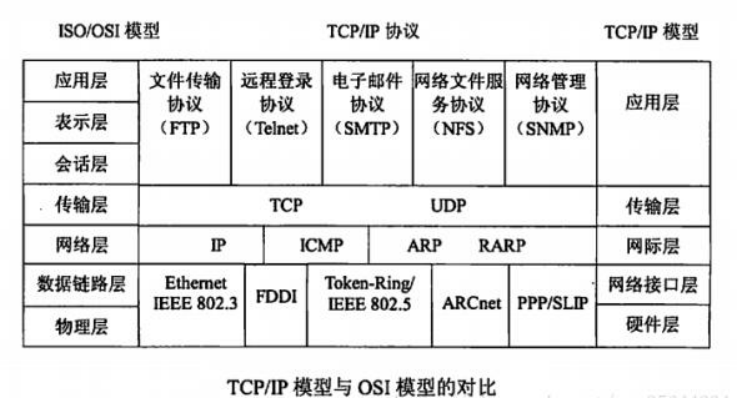 Note: The ISO/OSI model, or Open System Interconnection Reference Model, is a standard framework proposed by the International Organization for Standardization (ISO) that aims to interconnect various computers worldwide into a network, abbreviated as OSI.3. Detailed Explanation of TCP/IP Layering
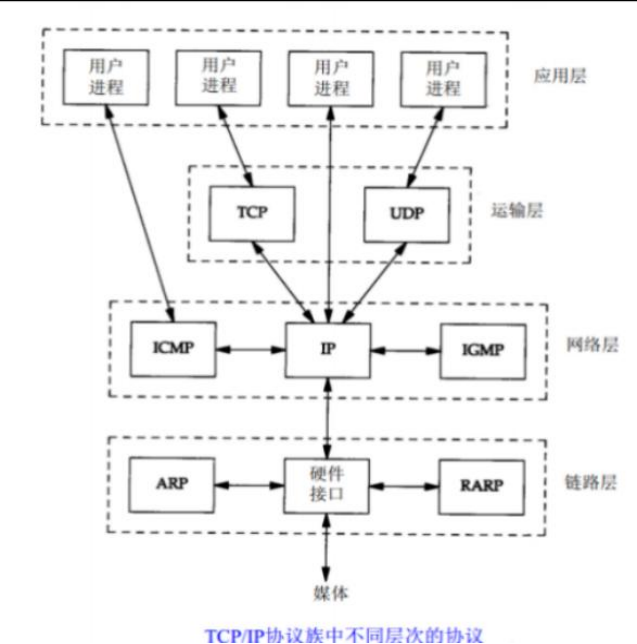 Typically, we divide the TCP/IP protocol suite into four layers, but if considering five layers, an additional physical layer is added beneath the link layer. Below is a detailed introduction to each layer.
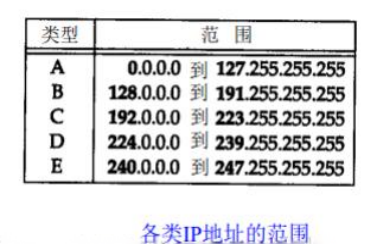
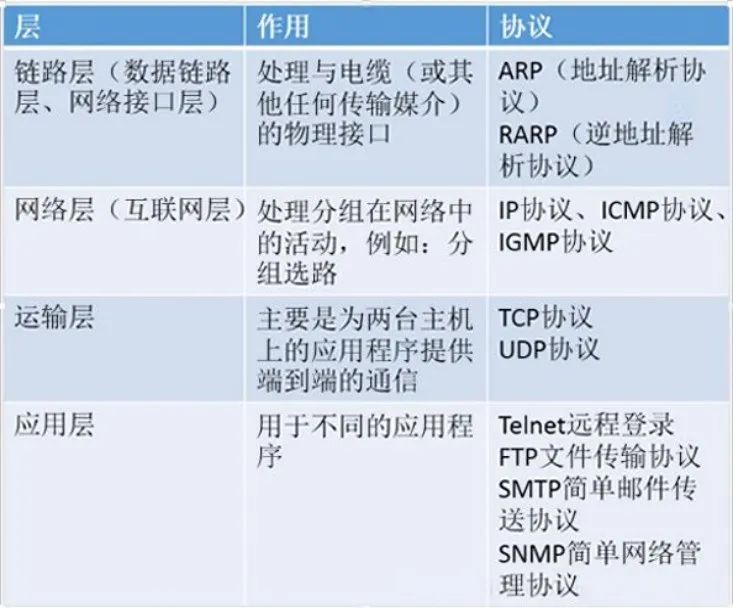 IP is a network layer protocol that provides an unreliable service; it merely attempts to deliver packets from the source node to the destination node as quickly as possible without any reliability guarantees. It is used by both TCP and UDP. Each data packet from TCP and UDP is transmitted over the Internet through the IP layer in endpoint systems and each intermediate router.ICMP is an ancillary protocol to the IP protocol. The IP layer uses it to exchange error messages and other important information with other hosts or routers.IGMP is the Internet Group Management Protocol. It is used to multicast a UDP datagram to multiple hosts.TCP is a Transmission Control Protocol that provides reliable data communication between two hosts. Its tasks include appropriately segmenting the data from the application layer into packets for the lower network layer, confirming the receipt of packets, and setting a timeout for sending the last acknowledgment packet.UDP is the User Datagram Protocol that provides a simple service to the application layer; it merely sends packets called datagrams from one host to another without guaranteeing that the datagram will reach the other end.4. Introduction to IP AddressesEvery interface on the Internet must have a unique Internet address (also known as an IP address). An IP address is 32 bits long.The Internet address does not use a flat address space like1, 2, 3, etc. IP addresses have a certain structure, and there are five different formats of Internet addresses as follows:
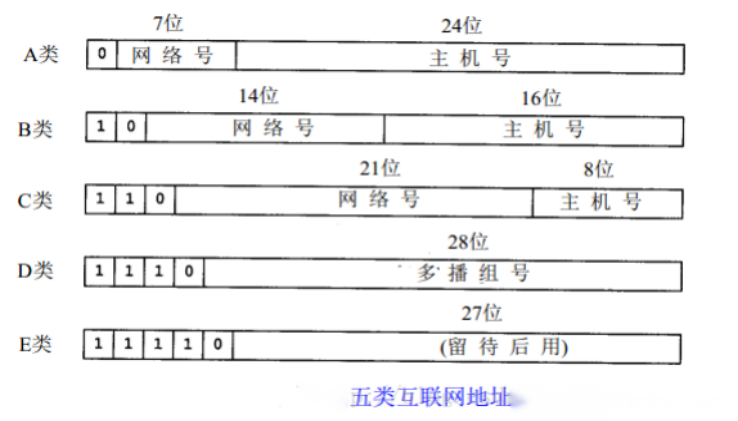 From the above image, we can see thatthere are five classes of IP addresses, each with its address range:
 We can find that through the network number and host number of an IP address, we can identify the network interface and access the host. However, people still prefer using hostnames, so we need to provide a Domain Name System (DNS) that offers the mapping information between hostnames and IP addresses.5. Encapsulation and DemultiplexingEncapsulation
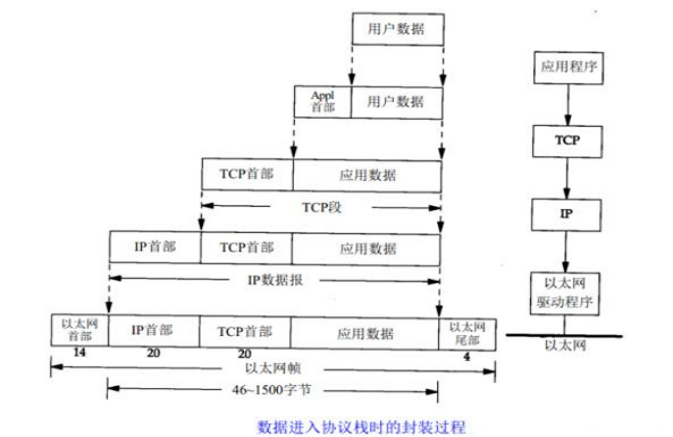 As shown in the image, when an application program uses TCP to transmit data, the data is sent into the protocol stack and then through each layer until it is transmitted as a stream of bits over the network. Each layer receiving the data adds some header information (some may also require footer information).The data unit passed from TCP to IP is called a TCP segment (the data unit passed from UDP to IP is called a UDP segment), and the data unit passed from IP to the network interface layer is called an IP datagram. The bit stream transmitted over Ethernet is called a frame.Note: When the destination host receives an Ethernet data frame, the data must be removed from the protocol stack from bottom to top while removing the message headers from each layer of the protocol, as shown in the following image:
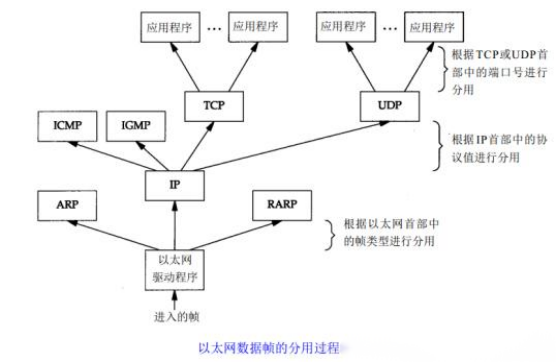 Supplement: Introduction to Port NumbersServers are generally identified by well-known port numbers. For example, for eachTCP/IP implementation, the TCP port number for the FTP server is 21, eachTelnet server’s TCP port number is 23, and each TFTP (Trivial File Transfer Protocol) server’s UDP port number is 69.Any service provided by a TCP/IP implementation uses well-known port numbers between1 and 1023. These well-known port numbers are managed by the Internet Assigned Numbers Authority (IANA).Well-known port numbers range from1to255;port numbers between256and1023are usually occupied byUnixsystems to provide specificUnix services; port numbers from 1024 to 5000 are used for client-assigned temporary port numbers; and port numbers greater than 5000are reserved for other services.