Day 57: Compatibility of Carriage Return and Line Feed in C Language
The previous lecture detailed asynchronous traps in signal handling, emphasizing that signal handling functions should only perform minimal tasks (such as setting flags), and it is strictly prohibited to call non-asynchronous safe functions. It also pointed out the complexity of signal dispatch in a multithreaded environment. Today we enter Day 57: Compatibility of Carriage Return and Line Feed in C Language, a common yet often overlooked issue in file operations, string processing, and cross-platform development. Different operating systems define and handle carriage return (Carriage Return, <span>\r</span>) and line feed (Line Feed, <span>\n</span>) characters differently, which can easily lead to errors in data parsing, display, and file operations.
1. Step-by-step Explanation of the Principles and Details
1.1 Definitions of Carriage Return and Line Feed
- •
<span>\n</span>(Line Feed, LF): Represents a line feed. ASCII code 10. - •
<span>\r</span>(Carriage Return, CR): Represents a carriage return. ASCII code 13. - • On a display terminal,
<span>CR</span>moves the cursor to the beginning of the line, while<span>LF</span>moves the cursor to the next line.
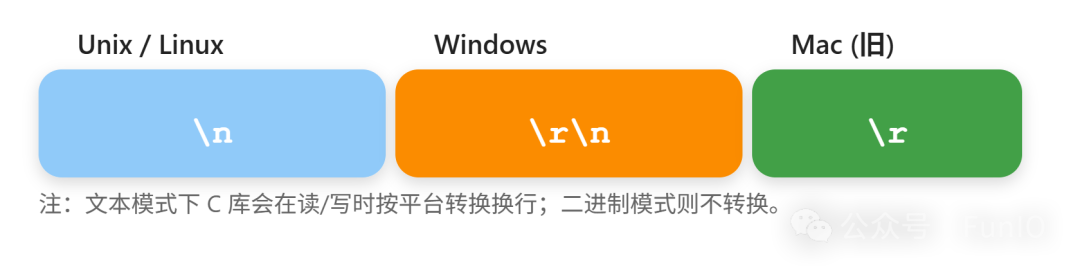
1.2 Line Feed Conventions Across Platforms
- • Unix/Linux/macOS (new): Uses only
<span>\n</span>to represent a line feed. - • Windows/DOS: Uses the combination
<span>\r\n</span>(CRLF) to represent a line feed. - • Old Mac OS: Uses
<span>\r</span>alone to represent a line feed.
1.3 C Language File Operations and Automatic Conversion of Line Feed Characters
- • When opening a file in text mode with
<span>fopen</span>(e.g.,<span>"r"</span>,<span>"w"</span>), the C standard library automatically converts line feed characters during read/write operations: - • When writing, it converts
<span>\n</span>to the corresponding line feed sequence of the operating system (e.g., converting to<span>\r\n</span>on Windows). - • When reading, it may convert
<span>\r\n</span>to<span>\n</span>, or vice versa. - • When opened in binary mode (e.g.,
<span>"rb"</span>,<span>"wb"</span>), no conversion is performed.
2. Typical Traps/Defects and Cause Analysis
2.1 Incompatibility of Line Feed Characters Across Different Platforms
- • Writing files in text mode causes the line feed characters to be automatically converted by the C library, resulting in different content for the same source file on different platforms.
- • Processing text files in binary mode reads the raw bytes, leading to mixed
<span>\r</span>and<span>\n</span>, causing string processing errors.
2.2 String Processing Assumes All Are <span>\n</span>
- • The program only checks
<span>\n</span>as the line end, failing to correctly recognize<span>\r\n</span>on Windows, leading to extra blank lines or an additional<span>\r</span>character at the beginning of the line.
2.3 Parsing Text Files Misses or Reads Extra Characters
- • Using
<span>fgets</span>to read Windows format files, the line ending may be<span>\r\n</span>, resulting in an actual string ending with<span>\r</span>, affecting parsing.
2.4 Ignoring <span>\r</span> When Directly Comparing or Processing Strings
- • For example, when processing logs, CSV, and other text data,
<span>\r</span>is not removed, leading to errors in data fields.
2.5 Using <span>strcmp</span>/<span>strncmp</span> to Compare Line Ends, Inconsistent Results
- • If the line end includes
<span>\r</span>, direct string comparison will yield inconsistent results with expectations.
3. Avoidance Methods and Best Design Practices
3.1 Clear File Mode Selection – Text or Binary
- • For handling plain text data, use text mode and leverage the automatic conversion of the C library.
- • If precise control over byte content is required, use binary mode and handle line feed characters manually.
3.2 Unifying Line Feed Format for Text Files
- • In cross-platform projects, specify a unified line feed character (e.g., Git setting
<span>core.autocrlf</span>), or manually convert during read/write operations.
3.3 Explicitly Remove <span>\r</span> Characters When Reading Text
char *strip_crlf(char *line) {
    size_t len = strlen(line);
    if (len > 0 && line[len-1] == '\n') line[--len] = '\0';
    if (len > 0 && line[len-1] == '\r') line[--len] = '\0';
    return line;
}- • After reading each line, remove trailing
<span>\r</span>and<span>\n</span>.
3.4 Handle Strings to Be Compatible with All Line Feed Methods
- • When determining line endings, check for
<span>\r\n</span>,<span>\n</span>, and<span>\r</span>simultaneously.
3.5 Use Specialized Libraries (e.g., libunistring) for Cross-Platform Development to Avoid Handwritten Compatibility Code
4. Comparison of Typical Error Code and Optimized Correct Code
Error Example 1: Directly Using <span>fgets</span> to Handle Windows Format Files
fgets(buf, sizeof(buf), fp);
// buf content may be "abc\r\n\0"
if (strcmp(buf, "abc\n") == 0) { ... } // Not true
Optimized Version:
fgets(buf, sizeof(buf), fp);
strip_crlf(buf); // Remove trailing \r and \n
if (strcmp(buf, "abc") == 0) { ... }
Error Example 2: Not Specifying Mode When Writing Files
FILE *fp = fopen("data.txt", "w"); // Automatically writes \r\n on Windows, only \n on LinuxOptimized Version:
- • Clearly define platform requirements, or use binary mode and manually control line endings:
FILE *fp = fopen("data.txt", "wb");
fprintf(fp, "line1\nline2\n"); // Manually ensure each line's ending format
Error Example 3: Handling CSV with Trailing <span>\r</span>
// Directly using strtok to split after reading a line, fields contain \rOptimized Version:
strip_crlf(line); // First remove trailing
// Then split fields
5. Necessary Supplement on Underlying Principles
- • The line feed character conversion in C library text mode depends on the operating system, while binary mode does not perform any conversion.
- • Different platforms interpret line feed characters in text files differently; it is essential to unify formats when moving files across platforms.
- • Old Mac uses
<span>\r</span>, while modern systems mostly use<span>\n</span>or<span>\r\n</span>.
6. Illustration: Line Feed Characters Across Different Platforms
7. Summary and Practical Recommendations
- • Compatibility of carriage return and line feed is a core detail in cross-platform text processing that must be clearly addressed.
- • Text and binary file modes determine line feed conversion strategies, which should be chosen based on actual needs.
- • When reading text, it is essential to remove all possible line ending markers, and when writing files, be aware of platform differences.
- • Unifying file line feed formats reduces platform migration and parsing errors.
- • High-quality C code should always be compatible with line feed rules across all major platforms, avoiding reliance on a single line feed method.
Conclusion: Although carriage return and line feed may seem trivial, they are critical links in data parsing, user experience, and cross-platform development. Every text read/write operation should be vigilant about line feed differences to achieve “flawless compatibility.”