 Do you find it inconvenient to use Keil or IAR for online debugging on-site?What if the device is already running and you want to check some runtime logs?Take a look at this command line terminal effect below; it can be fully accomplished with just a .c and .h file, whether for bare metal or RTOS, it can handle it all!Let’s create a custom command line terminal for the MCU!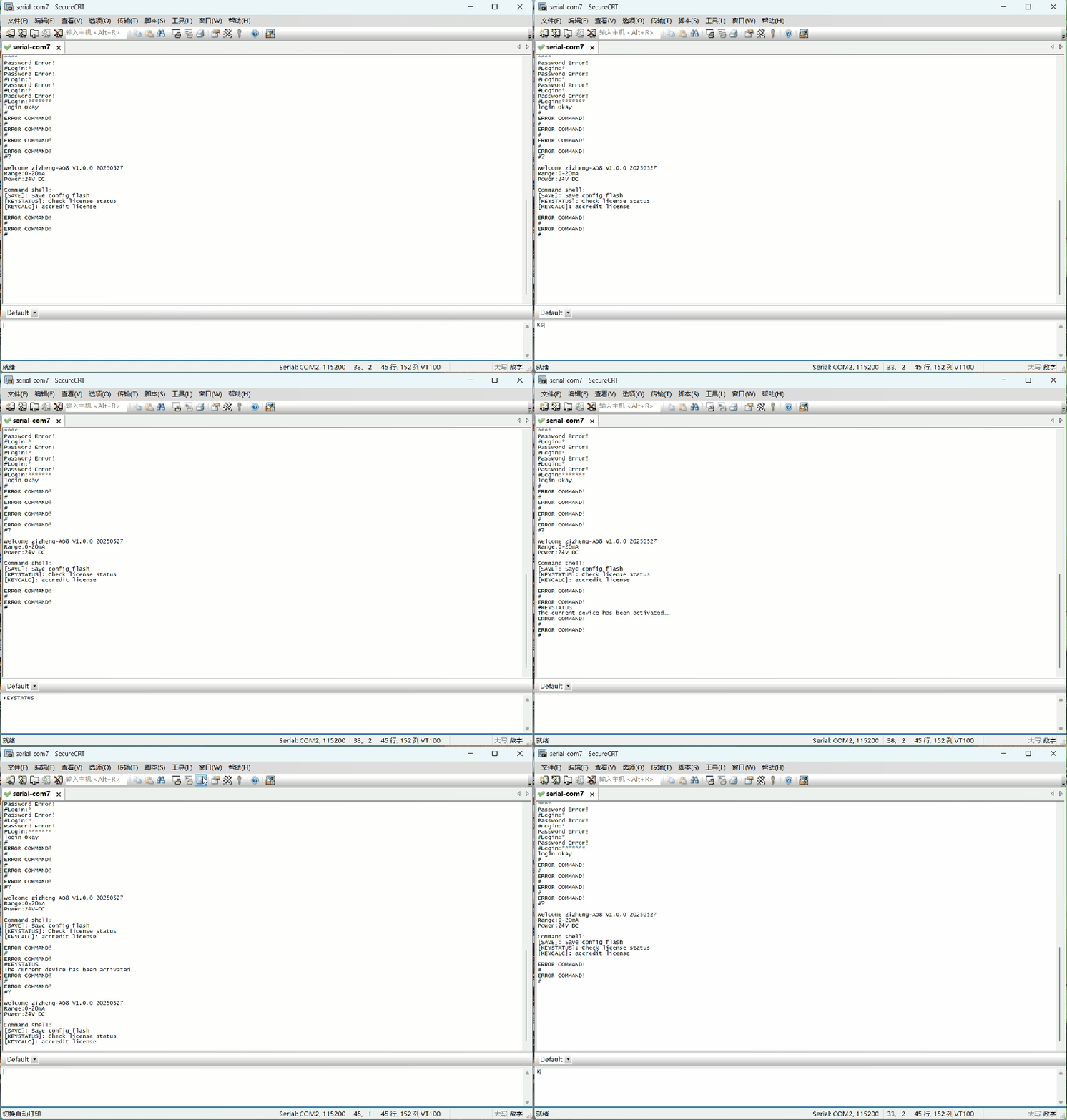
 The operational logic processes data using newline characters. Windows adds a carriage return and line feed (
) at the end when a line is broken with
at the end of the line;· Linux system: Using newline characters adds
at the end of the line;· MAC system: Using newline characters adds at the end of the line;In the command line terminal program, the carriage return and line feed serve two purposes: first, to trigger the command reception completion flag, and second, to use the newline character as a frame break flag during buffer scrolling processing;
// Data structure required for the command line terminalstruct command_line_data{ uint8_t uartcmd; // Character processing completion flag 0/character not processed 1/character processed uint8_t login_flag; // Login flag uint8_t auto_tx_flag; // none uint32_t acptFlag; // Print flag, determines what information to print uint32_t ptFlag; // none char cmdline[64]; // Current command to be processed uint16_t length_word; // Last processed command byte end position uint16_t length_data; // Total number of received data bytes uint16_t length_head; // Next command byte start position uint8_t rx_test[512]; // Circular data buffer};The above structure contains the data required for terminal operation;
/* Data reception program segment, can be encapsulated in the main loop or placed directly in the interrupt handler */uint8_t cache = 0;cache = (unsigned char)usart_data_receive(USART1);if(cache == 0x0a) // If the read data is 0x0A, which is the newline character, then end reading{ /* Set the reception completion flag here */ continue;}else // Other data is normal{ st_command_line.rx_test[st_command_line.length_data] = cache; st_command_line.length_data = (st_command_line.length_data+1)&0x1ff; // Data length +1}The above program segment reads data from the serial port data register; depending on the implementation method, if using serial port interrupt mode, it should be placed in the interrupt handler; if polling in the main loop, it can be encapsulated and placed in the main loop to poll the data register.
// Frame break processing functionvoid processTerminal(void){ /* You can add a check for the frame reception completion flag here; if not completed, do not process */ if(st_command_line.length_data != st_command_line.length_head) { for(; st_command_line.length_data != st_command_line.length_head; st_command_line.length_head=(st_command_line.length_head+1)&0x1ff) { if(st_command_line.rx_test[st_command_line.length_head] != '\n') // If the current character is not the newline key "\n", then process { if(st_command_line.login_flag == 0) { printf("*"); } else { tx_char(st_command_line.rx_test[st_command_line.length_head]); // Return the currently processed character } } if(st_command_line.rx_test[st_command_line.length_head] == '\r') // If the current character is the carriage return key "\r", enter processing { st_command_line.cmdline[(st_command_line.length_head-st_command_line.length_word)&0x3f] = 0; st_command_line.length_head = (st_command_line.length_head+1)&0x1ff; st_command_line.length_word = st_command_line.length_head; printf("\n"); st_command_line.uartcmd = 1; // Character processing completion flag goto bkc; } else { st_command_line.cmdline[(st_command_line.length_head-st_command_line.length_word)&0x3f] = st_command_line.rx_test[st_command_line.length_head]; } } }bkc: if(st_command_line.uartcmd == 1) { st_command_line.uartcmd = 0; // Command line interaction processing function console(); }}The above function scrolls through the command frames in the buffer; storing and processing data is done in a circular manner, which helps avoid frame loss. This program records the current processing position and extracts the completed data frames for command line processing.
// Command line interaction processing functionvoid console(void){ char *ptr; char buf[80]; st_command_line.auto_tx_flag = 0; st_command_line.acptFlag = 0; if(st_command_line.login_flag == 0) { /* This is the set key; the key must be correct to enable the command line terminal */ if(strcmp(st_command_line.cmdline,"123456")==0) { st_command_line.login_flag = 1; printf("login Okay\r\n#"); } else { printf("Password Error!\n\r#Login:"); } return; } if(strcmp(st_command_line.cmdline,"?")==0) { /* Simulate command line, provide keyword hints */ printf("\r\nwelcome zizheng-AO8 V1.0.0 20250527\r\n"); printf("\r\nCommand shell:\r\n"); printf("[SAVE]: Save config flash\r\n"); return; } if(strcmp(st_command_line.cmdline,"KEYSTATUS")==0) { /* Place the corresponding processing function for this command here */ printf("The current device has been activated……\r\n"); } if(strcmp(st_command_line.cmdline,"KEYCALC")==0) { /* Place the corresponding processing function for this command here */ printf("Calc secret key success okay……\r\n"); } ptr=strchr(st_command_line.cmdline,'='); if(ptr) { /* C library function int strncmp(const char *str1, const char *str2, size_t n) compares str1 and str2, up to n characters */ /* C library function size_t strlen(const char *str) calculates the length of the string str, until the null terminator, but not including the null terminator. */ /* C library function int strcmp(const char *str1, const char *str2) compares the string pointed to by str1 and str2. */ /* C library function int atoi(const char *str) converts the string pointed to by str to an integer (of type int) */ memcpy(buf,st_command_line.cmdline,ptr-st_command_line.cmdline); buf[ptr-st_command_line.cmdline] = 0; if(strcmp(buf,"AO1chn")==0) { recdata = atoi(ptr+1); // Extract the data after = and assign it to the variable /* If you want to assign a value to a variable, you can do it here */ printf("AO1chn Value = %d!\r\n", recdata); } printf("#"); return; } tx_string("ERROR COMMAND!\n\r#");}The above function is the processing function for the command line terminal; theoretically, the commands in the command line can be infinitely expanded. This command line terminal only requires a .c and .h file to implement;When using it, depending on the application scenario, the data reception program segment can be encapsulated in the main loop or placed in an interrupt; note that the interrupt needs to use the non-empty interrupt of the serial port data register;The frame break processing function can be placed in the main loop or in the polling task of RTOS; if combined with the RTOS message queue, there is no need to poll for flag checks, resulting in lower system overhead;Finally, it needs to be used with a PC terminal emulator, setting the mode to new line mode. Tests have shown that many serial port tools only use the newline character (
) at the end of the line when issuing commands;So if using other serial port tools, only minor adjustments to the logic are needed;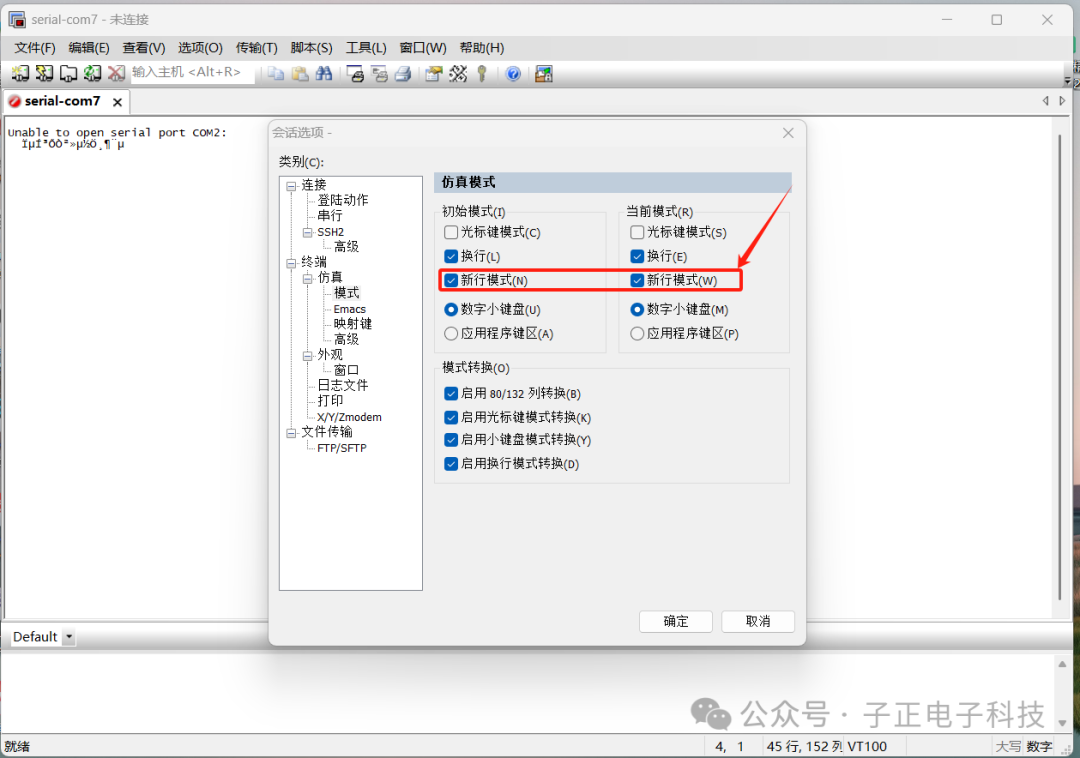 If needed, you can privately message <command line terminal> in the background, and I can provide the terminal software and complete source code project for reference.
 This command line terminal is very simple and practical;It does not require complex configurations, does not require complicated porting, is not picky about processors, is implemented in pure C, and can even be used for PC-side serial port software;In my personal projects, I have retained this functionality in almost all of them, aiming to facilitate viewing log information when the device malfunctions.